
Prompt Mage
Prompt Mage turns words and photos into image prompts: Archmage with style presets and optional thinking, local vision captions, appearance overrides, DART expansion, and native MOSS JSON layouts.
Prompt Mage for ComfyUI
Turn a rough idea or reference image into a usable image prompt. Archmage combines scene writing, image descriptions, character appearance settings, 31 visual styles and native MOSS JSON layouts. Use local Qwen or the OpenAI API, with one shared canvas size for your prompt and image workflow.
Quickstart · Workflows · Model downloads · Archmage guide · Registry · Node screenshots · Community · Support · Credits
Start with Archmage
- Write an idea, or leave Concepts blank for a seeded scene.
- Connect an image to make it the primary reference. Add instructions for requested changes.
- Connect DART tags to
source_tagsfor random scene inspiration. Character replacements and the selected style take priority; known conflicting traits are filtered before composition. DART scene ideas → - Choose Prose or MOSS JSON layout, with canvas/aspect-ratio context in either mode.
- Pick from 31 style templates: amateur Instagram, phone snapshots, studio photography, sci-fi anime, manga, watercolor and more. Random and Custom are available too.
- Connect Appearance Overrides for a character trigger and selected traits. This edits the description, not the source image.
- Optionally enable Thinking mode with a compatible model. It can take longer; it does not guarantee better results.
Archmage is beta. Reports distinguish valid output, appearance warnings, unsupported/unconfirmed thinking and blocked layouts. Inspect important results before using them downstream.
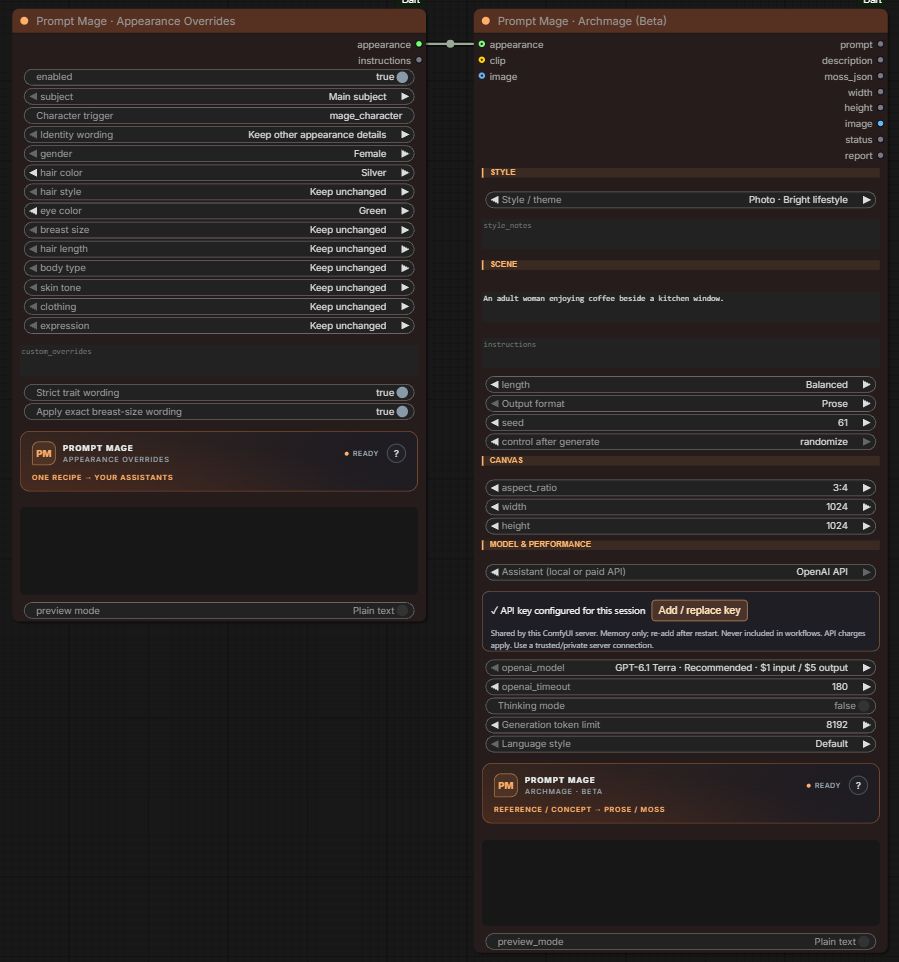
Current Archmage layout with a reusable appearance recipe and the collapsed OpenAI key panel. Neutral demo settings; see individual node screenshots.
Install
Use one installation of this pack. It replaces the original ComfyUI-Dart and retains legacy node IDs; do not install both together.
cd ComfyUI/custom_nodes
git clone https://github.com/Renz1998/ComfyUI-Prompt-Mage.git prompt-mage
# Use the Python environment that runs ComfyUI:
python -m pip install -r prompt-mage/requirements.txt
Restart ComfyUI, refresh the browser, then search Prompt Mage or Archmage.
Comfy Registry: the new package ID and display name are prompt-mage / Prompt Mage. After Registry approval, the install command is comfy node install prompt-mage. This replaces the legacy prompt-atelier distribution; do not install both because they register the same node IDs. Existing users should follow the migration guide. A successful upload is not the same as Registry review approval or Manager discovery; see current publishing status.
Pick the right tool
| Node | Use it for | | --- | --- | | Archmage (Beta) | Text/reference → prose or native MOSS layout JSON; the recommended starting point | | Resolution | Select aspect ratio and total megapixels once; send matching width/height to Archmage and your latent | | Upload Images | Local file picker, folder picker and drag-and-drop, including when ComfyUI runs on RunPod | | Appearance Overrides | Reusable gender, character trigger, appearance dropdowns and custom replacements | | Tag Composer (Experimental) | Separate vocabulary-backed Danbooru conversion; review coverage and semantic warnings | | DART v3 tools | DART v3 tag expansion, shared generation/config/decode utilities and creative ideas for Archmage | | Server Folder (Advanced) | Read image folders on the computer running ComfyUI |
Deprecated: Scene Composer, Text Assistant and Image to Text remain executable for older workflows. Use Archmage for new scene/prose/MOSS workflows. External chat servers, DART/Anima formatting and general Structured JSON captions remain documented in legacy controls. Deprecated does not mean removed, and there is no automatic graph conversion.
Start with the main Archmage workflow
Download the main workflow JSON · Model downloads and folders
The supplied Moss_Image_Zine_2 - DART Ideas workflow, with only the Zine character LoRA removed. Its accelerator LoRA, custom sampling, SLG, 3.7 MP resolution, appearance recipe and Archmage settings are retained. The saved assistant uses OpenAI API: add your own key in the masked panel, or select Local Qwen. Install the required nodes/models and select your installed filenames. Workflow requirements.
| Goal | Open | | --- | --- | | Write a character scene | 01 · Write a scene | | Describe uploaded photos | 02 · Describe uploaded images | | Main: DART ideas → Archmage → MOSS | 03 · Main Archmage workflow |
Simple setup and prose/JSON comparison → · Older / specialized workflows
Already using DART? Try DART Generate → Appearance Overrides → Archmage to turn random tags into a coherent scene for your character.
DART v3 is the only new-workflow entry point. The multi-version loader, v1/v2 composers and v2 aspect helper are deprecated; saved workflows retain their original behavior. Shared DART generation and tag tools stay available. Models and compatibility →
Upload from your computer, even on RunPod
Click the drop area, drop files onto the node, or choose a local folder. Files upload to the ComfyUI server. Connect image → Archmage.image and filename → source_name; the drag-create shortcut wires both. Wait for uploads, then click Run all images from first on Upload Images.
Batch mode off: five images queue five complete workflow runs, starting from the first. Batch mode on: one workflow receives all five through native list handling. Manual indices and limits do not affect this button. The global Run button retains its manual behavior. Batch runner guide →
<img src="assets/screenshots/upload-images.jpg" alt="Prompt Mage Upload Images node with local file and folder buttons" width="510">Workflow files store server-relative image paths. Upload again when moving to another server. Removing a file from the list does not delete it from the server.
Models and practical limits
OpenAI API: switch Archmage's Assistant dropdown, paste a key into the masked panel and click Add key. The field clears and hides after adding; the key stays in server memory for this session, outside saved workflows. GPT-6.1 Terra and GPT-6.1 Sol are recommended options, Luna is the budget choice, and Astra carries a HIGH COST label. The dropdown shows per-million-token pricing. API setup, billing and privacy →
- Install a full generation-capable Qwen encoder in
models/text_encoders, or connect a compatible CLIP loader. Image inputs require vision weights. Archmage Automatic reuses a compatible downstream encoder when unambiguous, otherwise chooses a small installed Qwen. With none installed, it downloads a pinned official Qwen3.5 2B fallback once; other nodes do not auto-download. - Local checks used Qwen3-VL 4B and Qwen3.5 9B. Native thinking was detected with Qwen3.5 9B; the tested Qwen3-VL 4B did not return a separate thinking segment. Try 8192 tokens for thinking, up to 16384 for complex requests.
- Templates are text instructions, not LoRAs. Use Reference style → Apply selected style to restyle a reference caption; the default preserves its style.
- MOSS JSON is validated and converted to native centered-pixel coordinates. Connect width/height to your latent to match the actual image size. Valid boxes do not guarantee precise diffusion placement.
- These nodes produce text and conditioning inputs, not finished images. Appearance instructions do not edit pixels or load character LoRAs. Vocabulary membership does not prove a tag accurately describes the scene.
Model choices · Archmage controls · DART and legacy setup
Hover controls and sockets for help. Ember adds animated flames while running; Studio offers a quieter theme. Both respect reduced-motion settings. Right-click for theme/design options.
Help build Prompt Mage
Got a workflow that works well? Found a confusing control? Share it with the community. Testers, workflow creators, developers and documentation improvements are welcome. Include models and settings so others can reproduce your results. Ways to contribute.
If the pack is useful, consider starring the repo or supporting development:
☕ Ko-fi · PayPal · Support details
USDT · TRON / TRC20 — use the code block's copy button:
TUggk9S4aDDyT7HxrEjqCDxFPXgEr4okW8
Support is optional and goes to the Prompt Mage maintainer. Check the TRON network before sending.
Built on the original creators’ work
Original node foundation: nkchocoai and contributors. DART models: p1atdev. Language/vision models: Qwen team and checkpoint authors. MOSS format/model: OpenMOSS. Runtime/frontend: ComfyUI contributors.
Full credits and model links · GPL-3.0 license · Contributing · Changelog