
ComfyUI-BatchPromptLoader
ComfyUI custom node that loads and encodes prompts from TXT files with fixed/increment/decrement/random modes for batch image generation.
ComfyUI-BatchPromptLoader
A ComfyUI custom node that batch-loads and encodes TXT prompt files from a folder — with fixed / increment / decrement / random indexing, recursive scan, wildcard filter, skip-already-done, and external progress logs.
从文件夹批量加载并编码 TXT 提示词的 ComfyUI 自定义节点,支持固定/递增/递减/随机四种索引、递归扫描、通配符过滤、跳过已处理与外置日志。






📦 仓库当前暂无正式 Release / tag;发布流程见下方"文档与治理"。
中文
项目简介
ComfyUI-BatchPromptLoader 是一个面向"多提示词 × 多张图"批量生成场景的 ComfyUI 自定义节点(real custom node,含 __init__.py 与 requirements.txt)。它把一个文件夹下的多个 .txt 提示词文件按索引逐个读出、用已连接的 CLIP 编码为 CONDITIONING,再接到下游 KSampler。配合节点 Current Index 的 control_after_generate = increment,每点一次 Queue 就自动切到下一个提示词,无需额外的种子/计数器节点。
核心特性
- 📁 递归扫描:自动扫描文件夹及所有子目录中的
.txt文件。 - 🔍 通配符过滤:
file_pattern支持*.txt、character_*.txt、*_v2.txt等文件名模式。 - 🎲 四种索引模式:
fixed/increment/decrement/random,由Current Index控件的"生成后控制"菜单直接切换(ComfyUI 原生菜单把该项显示为randomize,对应节点值random)。 - ♻️ 内置自动递增:每次 Queue 后自动推进索引,并在重启 ComfyUI 后从上次位置继续。
- ⏭️ 跳过已存在:
skip_exists+output_folder可按输出目录同名图片跳过,避免重复渲染。 - 📋 外置日志记录:
enable_logging把已处理文件写到user/default/batch_prompt_logs/下的 JSON,中断后重跑自动跳过;可整目录清空或按单文件删除。 - ✂️ 正负提示词自动分段:TXT 内可用
positive:/negative:段;无段头时整段作为正向提示词。 - 🛡️ 路径收窄:
folder_path限定在ComfyUI/input/、log_folder在ComfyUI/user/、output_folder在ComfyUI/output/,拒绝越界与..逃逸。 - 📤 元数据输出:额外吐出
filename/index/total_count,可连到 Save Image 的filename_prefix或 Display Int。
展示
1. 已配置节点与连线(Load CLIP → Batch Prompt Loader)
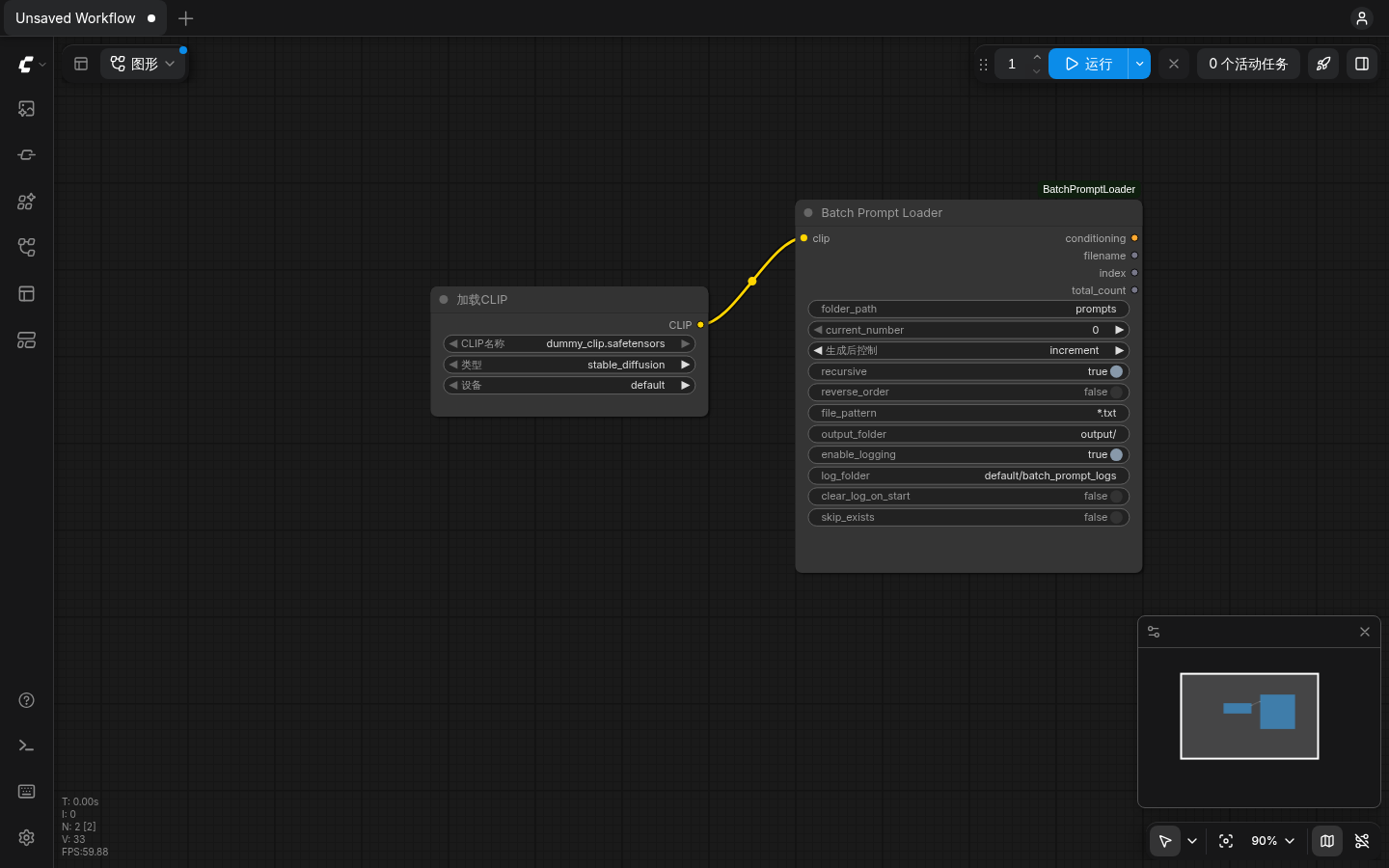
folder_path 指向 prompts/(含 4 个 TXT),current_number 的"生成后控制"设为 increment,enable_logging 开启;Load CLIP 的 CLIP 输出已连到本节点的 clip 输入。
2. 入队与自动递增(每次 Queue 索引 +1)
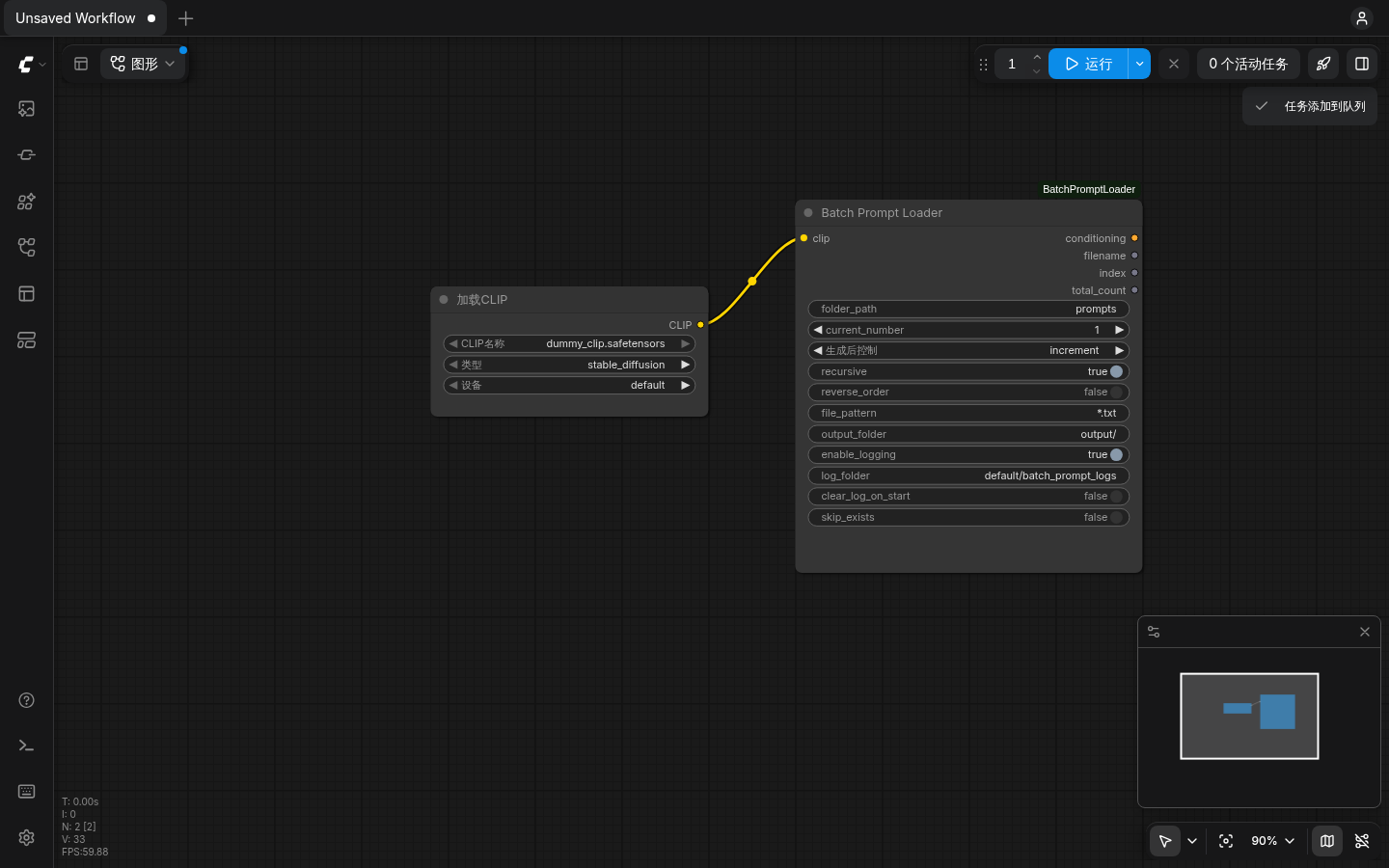
点击"运行"后右上角提示"任务添加到队列";current_number 已从 0 自动推进到 1,无需额外种子/计数器节点。
3. 执行历史与节点输出(真实 Queue 记录)
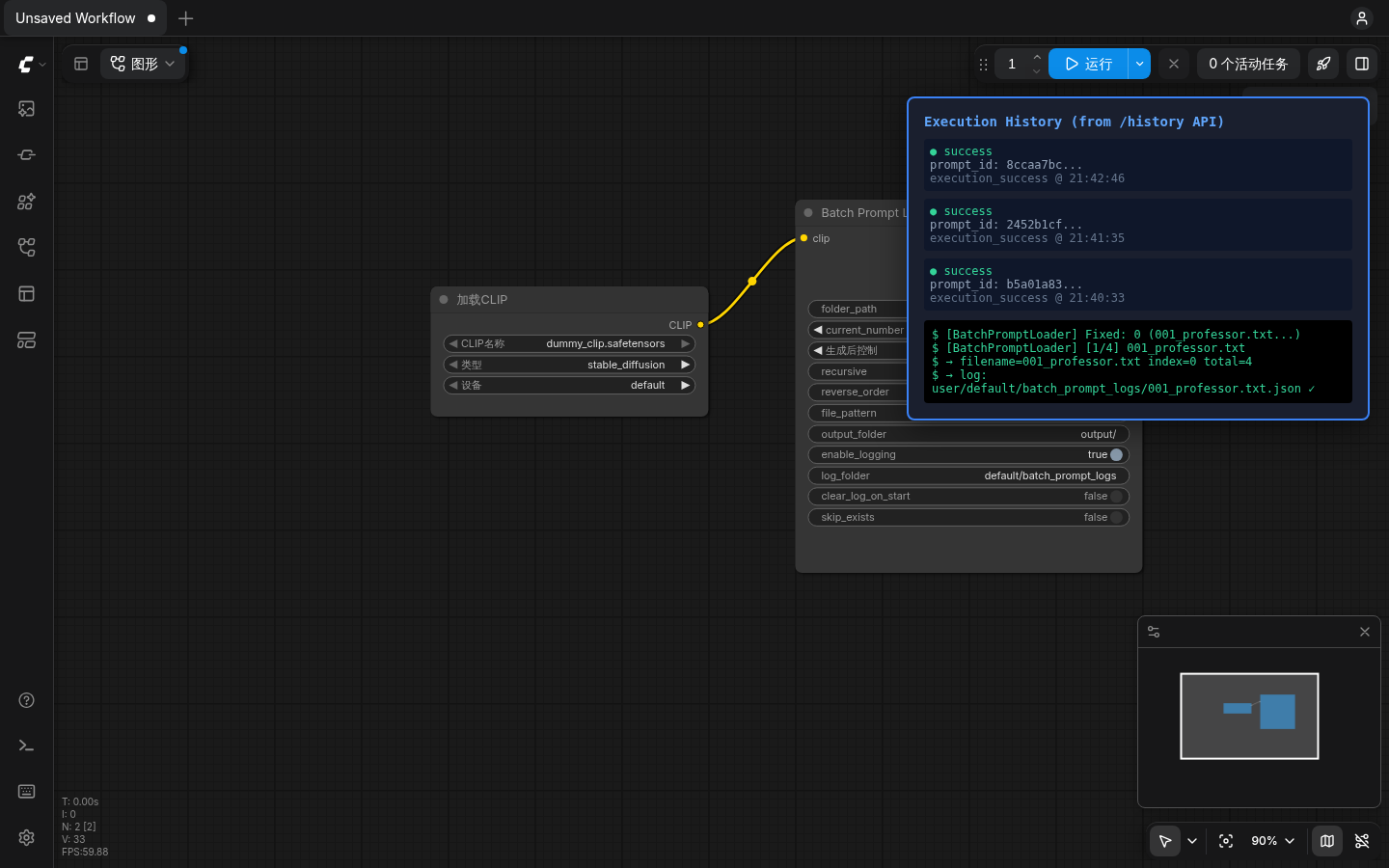
队列历史显示 success;节点控制台输出 [1/4] 001_professor.txt,返回 filename=001_professor.txt、index=0、total_count=4,并在外置日志目录写入对应 JSON。
4. 数据流架构
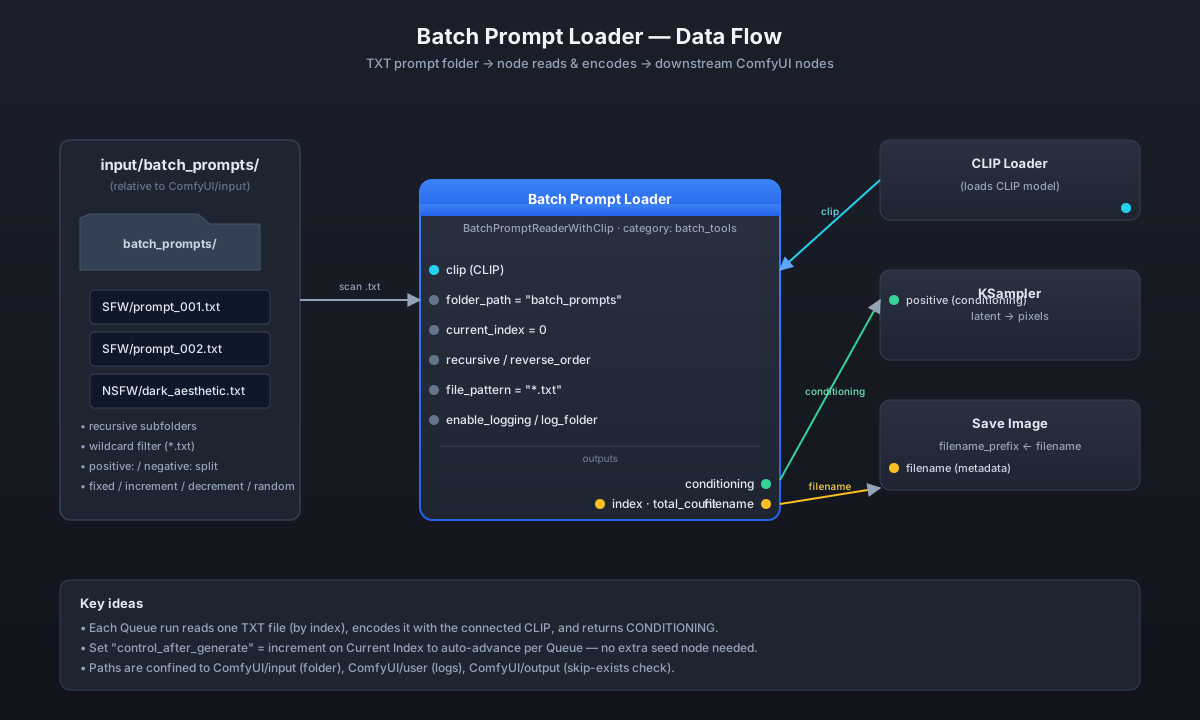
提示词文件夹 → 本节点(读 TXT + CLIP 编码)→ conditioning 接 KSampler;filename 元数据可接 Save Image 的 filename_prefix。
快速开始
前置:已安装并能正常启动 ComfyUI(任意分发,包括便携包 / 源码安装)。本节点不是 pip 包,必须以 ComfyUI custom node 形式安装。
# 1. 进入 ComfyUI 的 custom_nodes 目录
cd ComfyUI/custom_nodes

# 2. 克隆本仓
git clone https://github.com/ReSerendipity/ComfyUI-BatchPromptLoader.git

# 3. 安装依赖(本节点无第三方依赖,仅使用 ComfyUI 自带的 PyTorch 环境;
#    该命令兼容未来可能新增的依赖)
pip install -r ComfyUI-BatchPromptLoader/requirements.txt

# 4. 重启 ComfyUI
重启后在画布空白处右键 → 添加节点 → batch_tools → Batch Prompt Loader。
最小验证:
- 在
ComfyUI/input/下建一个batch_prompts/目录,丢几个.txt文件进去。 - 拖入一个标准
Load CLIP节点与本节点,把Load CLIP的CLIP输出连到本节点的clip输入。 - 把本节点的
conditioning输出连到CLIP Text Encode (Positive)或 KSampler 的positive输入。 - 把
Current Index的"生成后控制"切到increment,点 Queue 观察控制台输出[n/total] filename。
本节点不下载模型、不触发推理;只在 Queue 被点击时读取并编码当前 TXT。
系统要求与兼容性
- ComfyUI 任意近期版本(custom node API 稳定)。
- Python ≥ 3.10(跟随 ComfyUI 主线)。
- 无第三方运行时依赖(
requirements.txt为空注释文件);只使用 ComfyUI 自带的torch。 - 路径约束自 v2.1.1 起收窄:
folder_path相对ComfyUI/input/、log_folder相对ComfyUI/user/、output_folder相对ComfyUI/output/;旧工作流中以input/...、user/...、output/...开头的值会自动剥离前缀继续可用。 - 仅在 CPU / CUDA / MPS 任意 ComfyUI 支持的设备上运行,节点本身不区分设备。
使用示例
基础连线:
[Load CLIP] ──CLIP──▶ [Batch Prompt Loader] ──conditioning──▶ [KSampler positive]
                                                  └─filename──▶ [Save Image.filename_prefix]
TXT 文件格式:
positive: a wise professor standing on a lecture podium, soft daylight
negative: blurry, low quality, deformed
无 positive: 段头时,整份文件内容作为正向提示词。
文件排序:
- 文件按路径字典序(不区分大小写)排列;子目录中的文件排在其父目录文件之后。
reverse_order = true对整个列表倒序。file_pattern = "character_*.txt"可只挑出特定前缀的文件。
中断续跑(外置日志):
- 打开
enable_logging。 - 正常 Queue;每成功编码一个文件,就在
log_folder写一个 JSON。 - 中断后重跑,节点自动跳过已处理文件,全部完成时
filename输出ALL_DONE。 - 想重跑某个文件,删掉对应的那个 JSON 即可;想整体重来,清空
log_folder或打开clear_log_on_start。
常见问题(FAQ)
Q1:为什么节点列表里找不到?
A:确认仓库已放到 ComfyUI/custom_nodes/ComfyUI-BatchPromptLoader/ 且 __init__.py 位于该目录下;重启 ComfyUI 后看启动日志里 Import times for custom nodes 是否列出本目录。仍找不到时检查 ComfyUI 控制台是否有 Python 导入错误。
Q2:filename / index / total_count 怎么用?
A:filename 可连到 Save Image 的 filename_prefix,实现按提示词文件名落盘;index 与 total_count 可连 Display Int 做进度显示,或用在 Switch / 条件分支里。
Q3:开启 skip_exists 跳过后图片会黑吗?
A:跳过时节点返回空 CONDITIONING,下游 KSampler 可能出黑图或随机噪声。建议配合 Switch 节点只在需要生成时走采样分支,或依赖后续 Save Image 不被触发。
Q4:日志目录里的 JSON 能直接删吗?
A:可以。每个已处理文件对应一个 JSON(文件名由提示词相对路径转义而来);删单个 JSON 即重跑该提示词,清空整个 log_folder 即从头开始。
Q5:路径填了绝对路径为什么报错?
A:出于路径遍历防护,folder_path / log_folder / output_folder 分别被限制在 ComfyUI/input / ComfyUI/user / ComfyUI/output 内;请填相对于对应基准目录的路径,如 batch_prompts。
文档与治理
- CHANGELOG.md — 版本变更记录。
- docs/agent-contract.md — 自动化 agent 接入契约。
- docs/release-governance.md — 发布与回滚规范(tag 格式、draft release、SHA256SUMS 等)。
- AGENTS.md — 公开精简版 agent 契约。
贡献、安全与支持
- Issue / PR 欢迎:请先阅读
docs/release-governance.md了解发布口径。 - 安全问题请通过 Issue 或仓库所有者披露,不要在公开 Issue 中泄露可利用细节。
- 支持渠道:GitHub Issues;不提供商业支持 SLA。
- 发布由维护者推送
vMAJOR.MINOR.PATCHtag 触发 release.yml,自动生成 draft release 与源码归档,人工审核后发布。
许可证
English
Introduction
ComfyUI-BatchPromptLoader is a real ComfyUI custom node (with __init__.py and requirements.txt) built for the "many prompts × many images" batch-generation workflow. It reads one .txt prompt file per Queue run from a folder, encodes it with the connected CLIP into CONDITIONING, and feeds it downstream to KSampler. Set Current Index control_after_generate = increment and each Queue automatically advances to the next prompt — no extra seed/counter node required.
Features
- 📁 Recursive scan: walks the folder and every subdirectory for
.txtfiles. - 🔍 Wildcard filter:
file_patternsupports*.txt,character_*.txt,*_v2.txt, etc. - 🎲 Four index modes:
fixed/increment/decrement/random, switched directly from theCurrent Indexcontrol's "control after generate" menu (ComfyUI's native menu labels this itemrandomize, which maps to the node valuerandom). - ♻️ Built-in auto-advance: the index advances per Queue and resumes where it left off after a ComfyUI restart.
- ⏭️ Skip existing:
skip_exists+output_folderskips files whose output image already exists. - 📋 External progress log:
enable_loggingwrites one JSON per processed file underuser/default/batch_prompt_logs/; re-runs after an interruption auto-skip completed files. - ✂️ Positive/negative split: TXT files may use
positive:/negative:sections; without a header the whole body is treated as positive. - 🛡️ Path confinement:
folder_pathis confined toComfyUI/input/,log_foldertoComfyUI/user/,output_foldertoComfyUI/output/; escapes via..or absolute paths outside the base are rejected. - 📤 Metadata outputs:
filename/index/total_countcan be wired to Save Imagefilename_prefixor Display Int.
Screenshots
1. Configured node with wiring (Load CLIP → Batch Prompt Loader)
folder_path points to prompts/ (4 TXT files), current_number "control after generate" is set to increment, enable_logging is on; Load CLIP.CLIP is wired into this node's clip input.
2. Queue enqueued and auto-increment (index advances per Queue)
After clicking Run, a toast confirms "task added to queue"; current_number has advanced from 0 to 1 automatically — no extra seed/counter node needed.
3. Execution history and node output (real Queue record)
Queue history shows success; the node console prints [1/4] 001_professor.txt, returns filename=001_professor.txt, index=0, total_count=4, and writes a corresponding JSON into the external log folder.
4. Data-flow architecture
Prompt folder → this node (read TXT + CLIP encode) → conditioning to KSampler; filename metadata can feed Save Image filename_prefix.
Quick start
Prerequisite: a working ComfyUI installation (portable package or from source). This node is not a pip package — it must be installed as a ComfyUI custom node.
# 1. Enter ComfyUI's custom_nodes directory
cd ComfyUI/custom_nodes

# 2. Clone this repository
git clone https://github.com/ReSerendipity/ComfyUI-BatchPromptLoader.git

# 3. Install dependencies (the node has no third-party deps and only uses
#    ComfyUI's bundled PyTorch; this line stays valid if deps are added later)
pip install -r ComfyUI-BatchPromptLoader/requirements.txt

# 4. Restart ComfyUI
After restart, right-click the canvas → Add Node → batch_tools → Batch Prompt Loader.
Minimal verification:
- Create
ComfyUI/input/batch_prompts/and drop a few.txtfiles into it. - Add a stock
Load CLIPnode and this node; wireLoad CLIP.CLIP→Batch Prompt Loader.clip. - Wire
Batch Prompt Loader.conditioning→ KSamplerpositive. - Set
Current Index"control after generate" toincrement, click Queue, and watch the console print[n/total] filename.
The node does not download models and does not trigger inference; it only reads and encodes the current TXT when Queue is clicked.
Requirements & compatibility
- Any recent ComfyUI release (custom node API is stable).
- Python ≥ 3.10 (tracks ComfyUI mainline).
- No third-party runtime deps (
requirements.txtis an empty comment file); only ComfyUI's bundledtorchis used. - Since v2.1.1, paths are confined:
folder_pathis relative toComfyUI/input/,log_foldertoComfyUI/user/,output_foldertoComfyUI/output/. Legacy values starting withinput/...,user/..., oroutput/...keep working by automatic prefix stripping. - Runs on any device ComfyUI supports (CPU / CUDA / MPS); the node itself is device-agnostic.
Usage examples
Basic wiring:
[Load CLIP] ──CLIP──▶ [Batch Prompt Loader] ──conditioning──▶ [KSampler positive]
                                                  └─filename──▶ [Save Image.filename_prefix]
TXT format:
positive: a wise professor standing on a lecture podium, soft daylight
negative: blurry, low quality, deformed
Without a positive: header, the whole file body is treated as positive.
File ordering:
- Files are sorted lexicographically (case-insensitive); files in subdirectories come after their parent directory's files.
reverse_order = truereverses the entire list.file_pattern = "character_*.txt"selects only files with a specific prefix.
Resume after interruption (external log):
- Enable
enable_logging. - Queue normally; one JSON per successfully encoded file is written to
log_folder. - Re-run after an interruption — already-processed files are auto-skipped; when everything is done,
filenameoutputsALL_DONE. - To re-run one prompt, delete its single JSON; to start over, empty
log_folderor enableclear_log_on_start.
FAQ
Q1: Why can't I find the node in the menu?
A: Make sure the repo sits at ComfyUI/custom_nodes/ComfyUI-BatchPromptLoader/ with __init__.py directly inside; restart ComfyUI and check the Import times for custom nodes section of the startup log. If it still does not appear, look for a Python import error in the ComfyUI console.
Q2: How do I use filename / index / total_count?
A: Wire filename to Save Image filename_prefix to name outputs after the prompt file; wire index and total_count to Display Int for progress, or into a Switch/condition branch.
Q3: Will skipped files produce black images?
A: A skipped file returns an empty CONDITIONING, so KSampler may produce a black or noisy image. Prefer a Switch node that only routes to sampling when generation is actually needed, or rely on downstream Save Image not being triggered.
Q4: Can I delete the JSON files in the log folder directly?
A: Yes. Each processed prompt file has one JSON (the filename is the sanitized relative prompt path). Deleting one JSON re-runs that prompt; emptying the whole log_folder restarts from scratch.
Q5: Why does an absolute path fail?
A: To prevent path traversal, folder_path / log_folder / output_folder are confined to ComfyUI/input / ComfyUI/user / ComfyUI/output respectively. Provide a path relative to the corresponding base directory, e.g. batch_prompts.
Docs & governance
- CHANGELOG.md — release history.
- docs/agent-contract.md — automation agent contract.
- docs/release-governance.md — release & rollback policy (tag format, draft release, SHA256SUMS).
- AGENTS.md — public condensed agent contract.
Contributing, security & support
- Issues and PRs are welcome; read
docs/release-governance.mdfor the release policy before opening one. - Report security issues via a private channel to the maintainer; do not disclose exploitable details in a public Issue.
- Support is via GitHub Issues; no commercial SLA.
- Releases are cut by the maintainer pushing a
vMAJOR.MINOR.PATCHtag, which triggers release.yml to produce a draft release with a source archive and SHA256SUMS, then published after manual review.