
ComfyUI-PixlStash
Custom ComfyUI nodes for loading and saving images to a PixlStash vault.
Nodes (18)
The PixlStash Adapter Loader
The character dropdown that feeds your face-likeness gate and your saver
The PixlStash checkpoint loader that refuses to download anything
One CLIP loader to replace both of ComfyUI's
Pick your ControlNet by its picture, not by a filename you half remember
The node that kills bad character renders before you upscale them
Give it a reference image (or four), get back the vault's closest lookalikes
Eight LoRA rows in one node, if you run PixlStash
Keep only frames that match a reference set
Pull vault images into ComfyUI as tensors — browse them, or just let the filters decide
Save generations straight back into your vault — with the workflow baked into the PNG
One dropdown that scopes your whole PixlStash workflow
'red dress at golden hour' just works
The Set Loader does the scoping for you
The upscaler grid that tells you which file you meant
The PixlStash VAE loader, and why TAESD never shows up in its grid
Your clips stop being loose files in temp
The PixlStash Workflow Set Loader, and the one thing it won't do
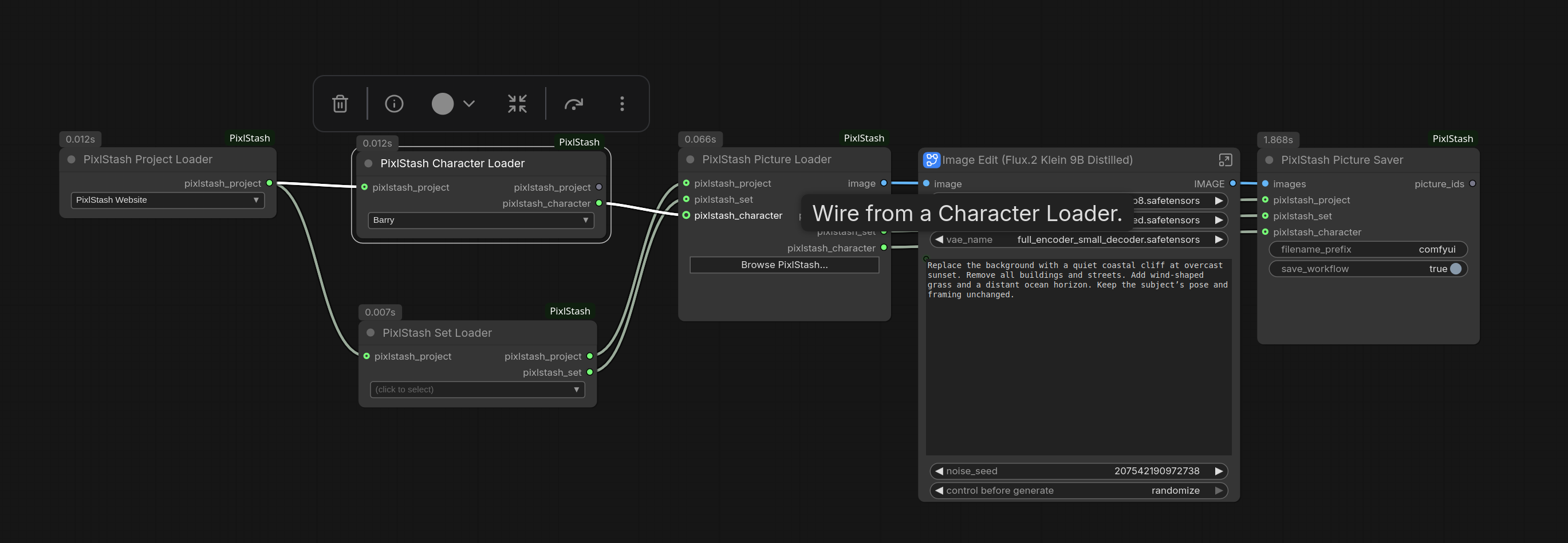
<div align="center"> <a href="examples/PixlStash-SearchImageEdit.json"><img src="screenshots/ScreenshotSearchEdit.jpg" alt="Semantic search feeding a ComfyUI image-edit pipeline" width="100%"></a> <p><sub>Semantic search to image edit, end to end. <a href="examples/PixlStash-SearchImageEdit.json">Open this workflow</a>.</sub></p> </div>
Overview
These nodes connect ComfyUI to a PixlStash vault. Load images by project, set or character, run them through any pipeline, and save the results back with metadata. Models can be loaded from the PixlStash model shelf too.
Set the URL and API token once in ComfyUI Settings > PixlStash. The nodes read them at runtime, so they never end up in saved workflow JSON.
Nodes
| Node | What it does | Added in | Needs PixlStash |
|---|---|---|---|
| Project Loader | Picks a project. Outputs a wire to scope other nodes. | 1.0 | 1.0 |
| Set Loader | Picks a set inside a project. | 1.0 | 1.0 |
| Character Loader | Picks a character. | 1.0 | 1.2.1 |
| Picture Loader | Loads images as IMAGE and MASK. Pick them in a thumbnail browser, or leave the selection empty to fetch everything matching the wired filters. Stills only: videos are left out, as Load Image leaves them out. | 1.0 | 1.0 |
| Picture Saver | Uploads images, optionally filed under a project, set or character. Can embed the workflow in PNGs. | 1.0 | 1.0 |
| Video Saver | ComfyUI's Save Video, saving to PixlStash: the same format, codec and encoding options, with the video optionally filed under a project, set or character. Can embed the workflow in the file. | 1.7 | 1.2 |
| Likeness Search | Finds pictures by facial or image similarity to reference images. | 1.1 | 1.4 |
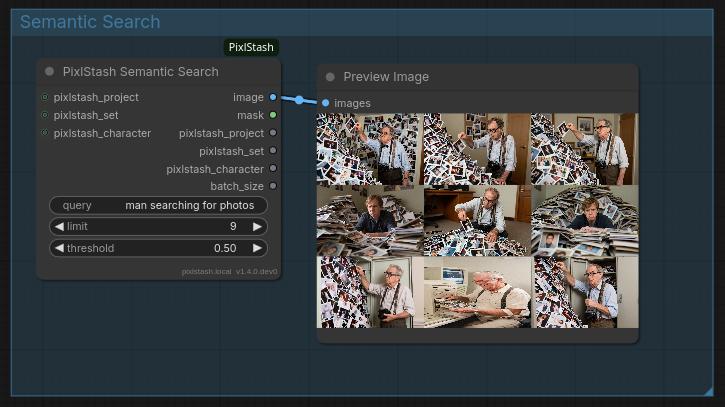
| Semantic Search | Finds pictures by text. | 1.1 | 1.4 |
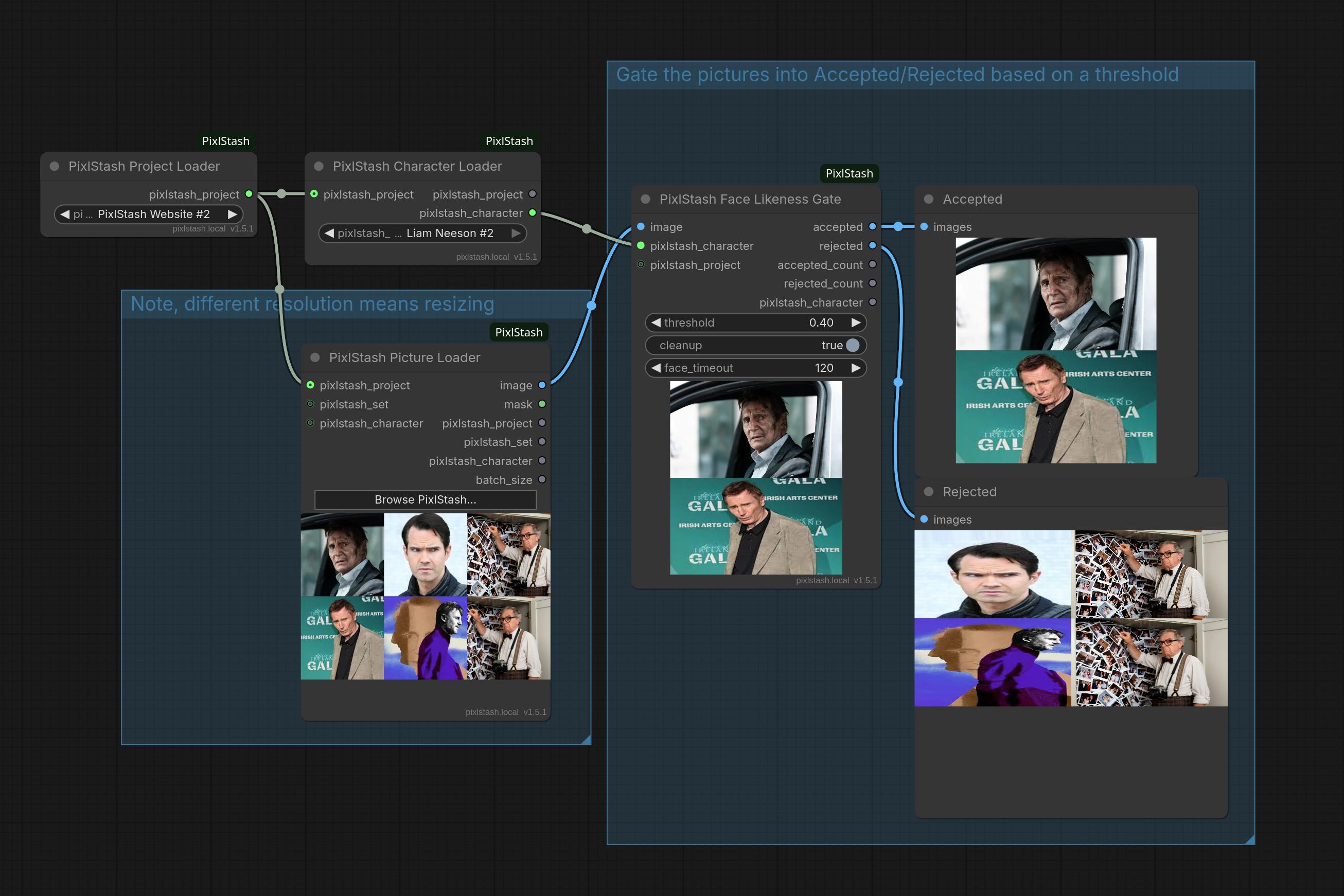
| Face Likeness Gate | Splits a batch into accepted and rejected by how well each face matches a character. | 1.2 | 1.6 |
| Picture Likeness Gate | Same, judged on whole-image likeness to a reference picture set. | 1.3.1 | 1.4 |
| Adapter (LoRA) Loader | Applies a LoRA from the model shelf. | 1.5 | 1.10 |
| Multi Adapter (LoRA) Loader | Applies several LoRAs from the model shelf, one row each, in one node. Can list people instead of files. | 1.7 | 1.12 |
| Checkpoint Loader | Loads a checkpoint from the model shelf. Its picker shows nine of the selected checkpoint's pictures, and from PixlStash 1.12 how many each checkpoint made. | 1.5 | 1.10 |
| VAE Loader | Loads a VAE from the model shelf. | 1.5 | 1.10 |
| CLIP Loader | Loads one or two text encoders from the model shelf. | 1.5 | 1.10 |
| ControlNet Loader | Loads a ControlNet from the model shelf. | 1.7 | 1.12 |
| Upscale Model Loader | Loads an upscale model (.pth or .safetensors) from the model shelf. | 1.7 | 1.12 |
| Workflow Set Loader | Loads a workflow set's checkpoint, text encoders and VAE in one node, and narrows an Adapter Loader to the set's LoRAs. | 1.6 | 1.12 |
"Added in" is the ComfyUI-PixlStash version. The Face Likeness Gate also needs a running face-extraction worker. A node checks the server's version before its first request and refuses an older PixlStash with a message naming both versions, rather than failing on a route the server does not have yet.
The search and gate nodes take optional project, set and character inputs as filters. The loaders pass their context through, so a saver downstream needs no extra wiring.
Search
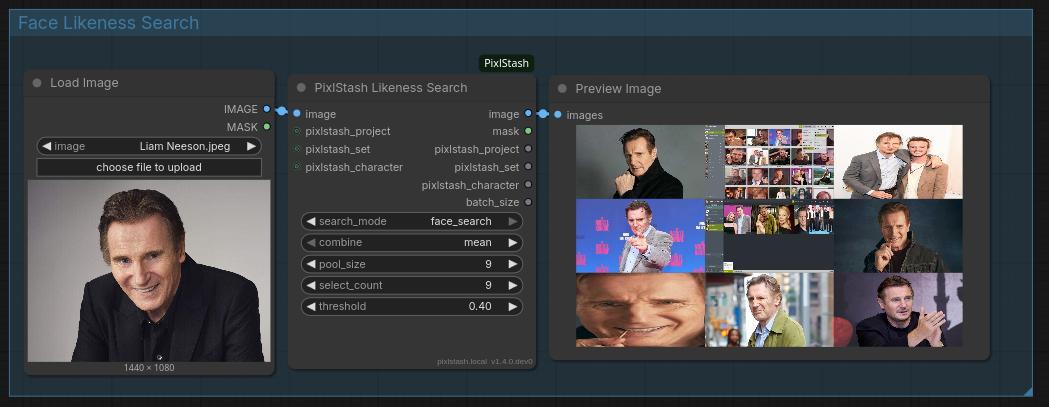
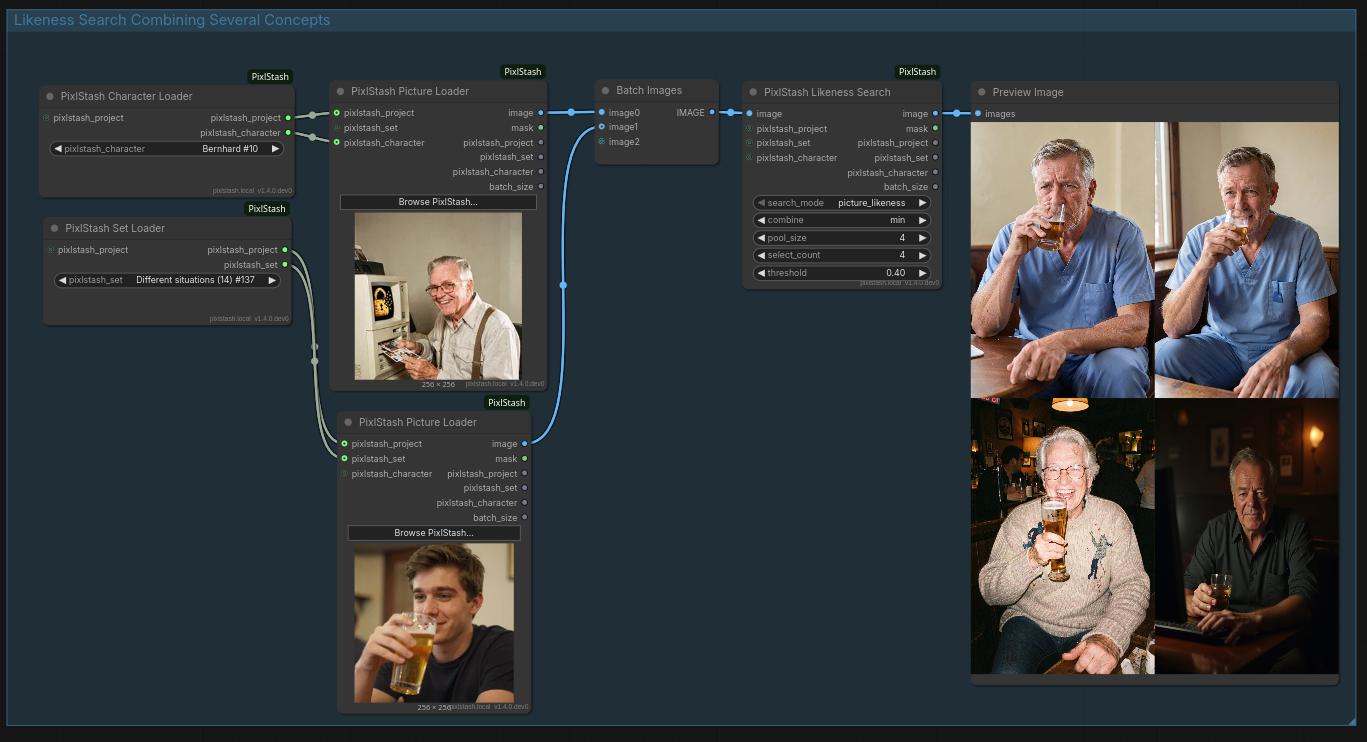
Image search takes several images at once, so you can combine concepts. "An old man and a young man drinking beer" returns four older men drinking beer:
Gates
Wire in a batch of generations plus a Character Loader (face) or Set Loader
(picture), set a threshold, and route accepted to an upscale or save branch
so you never waste compute on a bad match. Both also output
accepted_count / rejected_count and pass the reference through.
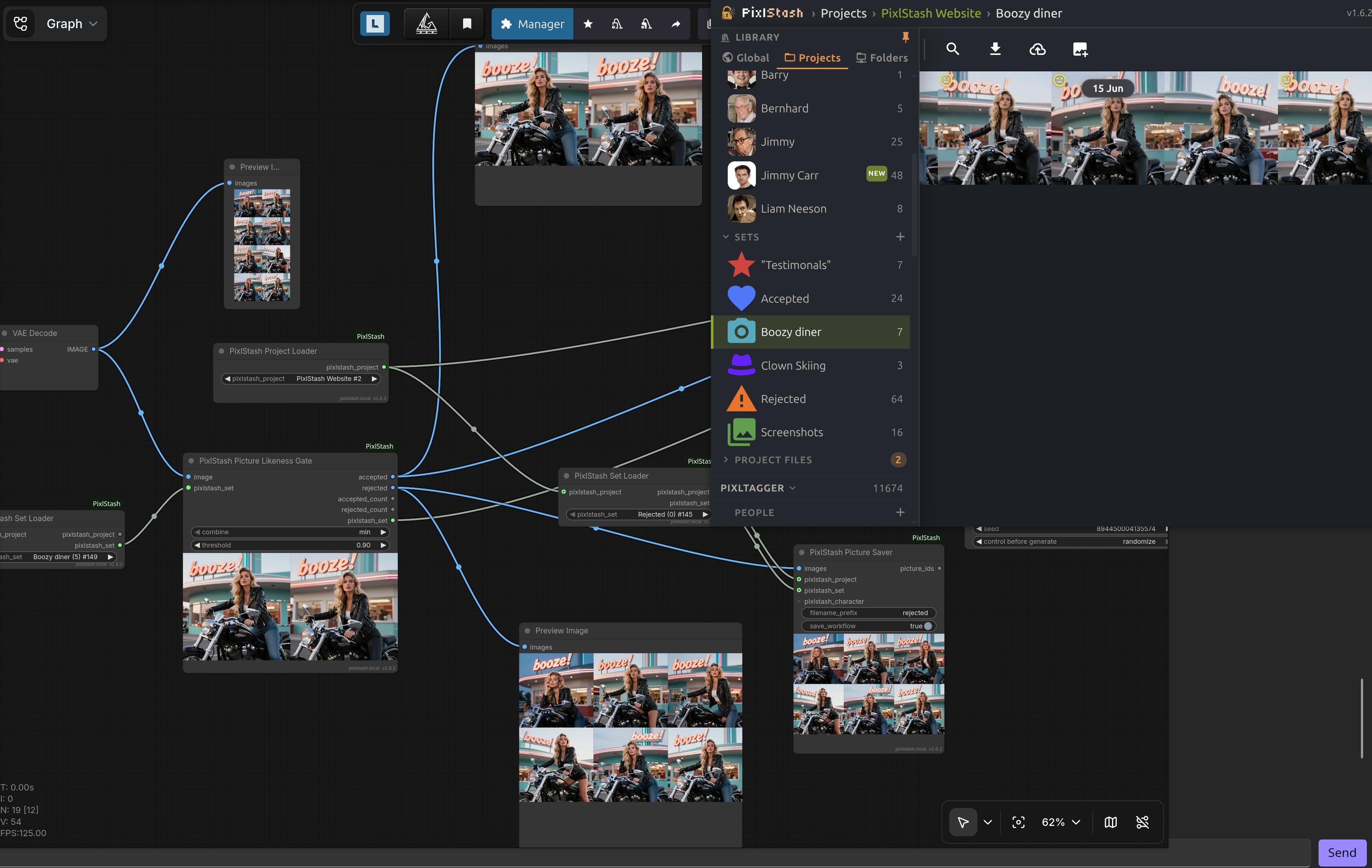
The Picture Likeness Gate's combine mode decides how per-member scores become
one verdict: min (default) means match every member of the set, max means
match any.
Both score server-side and write nothing to the vault. A read-scope token is enough.
Model shelf loaders
Pick models from a thumbnail grid instead of a dropdown of hundreds of
filenames. Each loader has the same inputs and outputs as its ComfyUI built-in,
so it drops straight into an existing graph. The Adapter Loader adds a
trigger_words output.
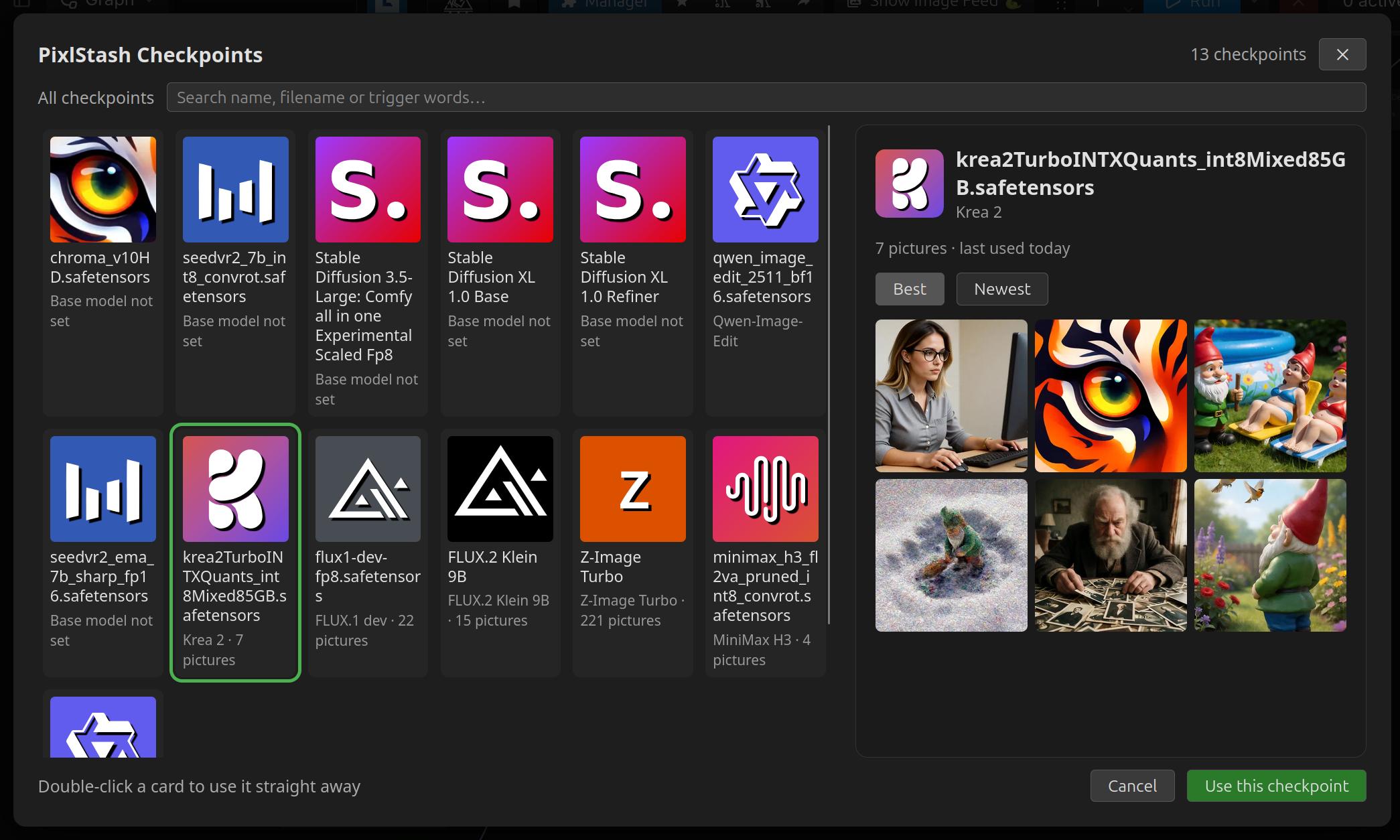
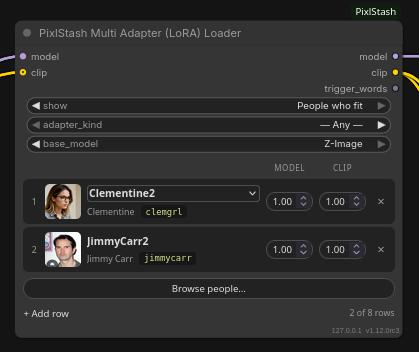
Once picked, the node shows the model's name and its face: a resizable thumbnail on the Adapter (LoRA) Loader, where seeing the face is the point, a row per adapter on the Multi Adapter (LoRA) Loader, and a small favicon on the others — so a graph with four loaders stays readable without any of them ballooning in size.
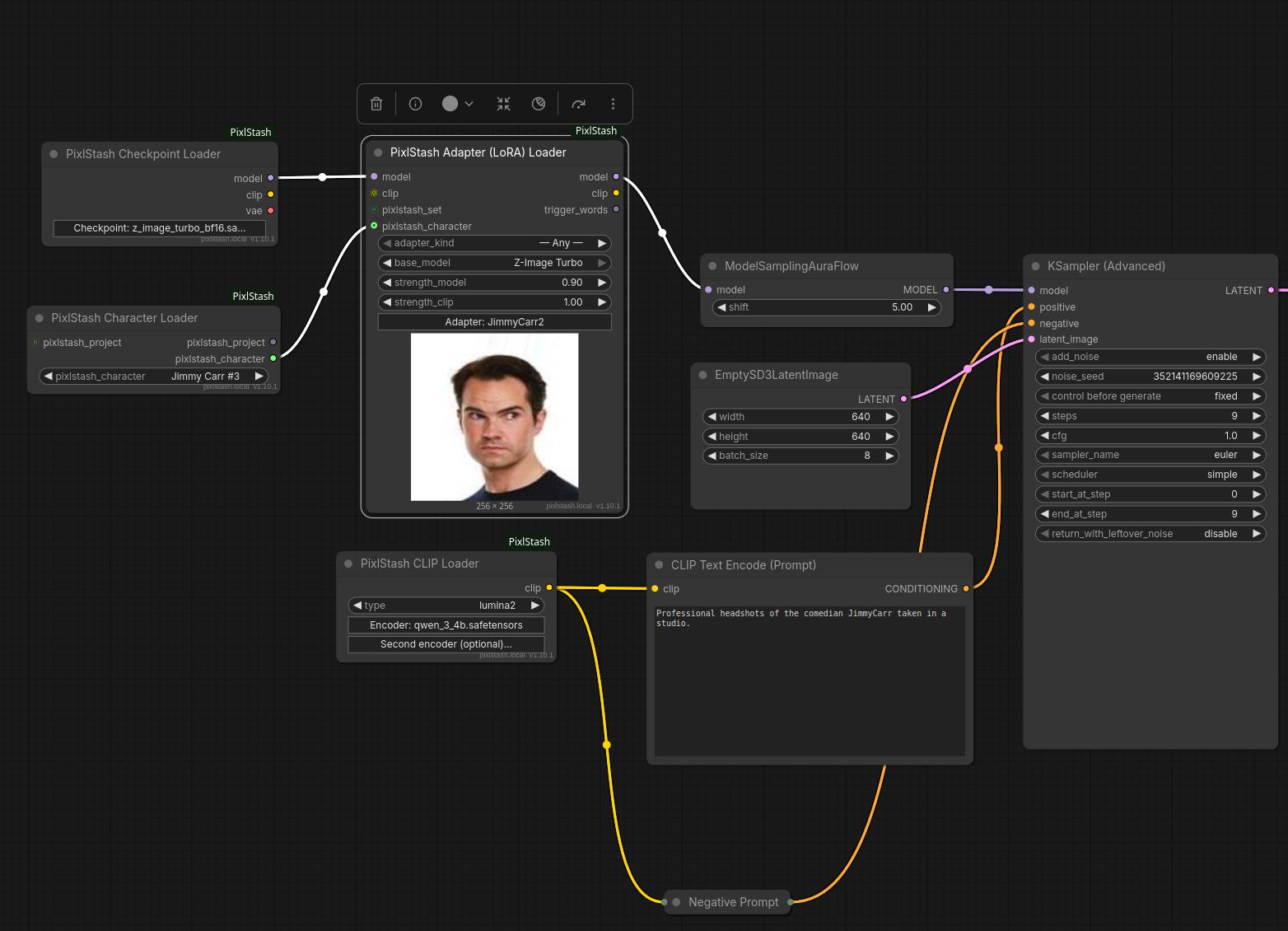
Wire a Set or Character Loader into the Adapter Loader to see only that character's or set's adapters.
base_model narrows the grid to one base-model family: Krea 2 shows the
Krea 2, Raw and Turbo adapters alike. On a workflow opened from PixlStash it
starts on the family of that workflow's checkpoint.
The Multi Adapter (LoRA) Loader is the same loader for several adapters at
once, with the same model, clip and trigger_words wires; it does not take a
Set, Character or Workflow Set Loader. Each picked adapter is a row with its
picture, the person it is attached to, its trigger word (click it to copy) and
its own two strengths. The rows are applied top to bottom, exactly as that many chained
Adapter Loaders would be, and trigger_words carries every row's words in row
order. Browse opens the same grid with several cards tickable; the number
on a card is the row it will fill. Set show to People who fit and the grid
lists people instead of files: everyone with an adapter for the chosen
base_model, with a choice between their adapters when more than one fits. A
node with no rows passes the model and clip through untouched. It holds up to
eight rows, stored in the workflow as adapter_sha256, strength_model,
strength_clip, then adapter_sha256_2 and so on.
The Workflow Set Loader loads one of the workflow sets you made on the shelf:
its checkpoint, with the set's text encoders and VAE in place of the
checkpoint's own. It does not apply the set's LoRAs, since a set records no
order or strengths. Wire its pixlstash_workflow_set output into an Adapter
Loader instead, and that loader's Browse grid shows only the set's LoRAs.
The CLIP, Checkpoint and Workflow Set loaders also read .gguf files, through
a bundled copy of ComfyUI-GGUF, so
you do not need that pack installed. A GGUF text encoder can be paired with a
safetensors one. A GGUF checkpoint is a diffusion model only: its CLIP and VAE
outputs are empty, so wire those from their own loaders. The VAE, ControlNet
and Adapter loaders take .safetensors only; the Upscale Model Loader takes
.pth as well.
Files are used in place when ComfyUI and PixlStash share a filesystem. Adapters,
VAEs, text encoders, ControlNets and upscalers are otherwise fetched once and cached under
pixlstash/<sha256>.safetensors (or .gguf, .pth) in the matching models directory, verified
against the digest. Checkpoints cannot be fetched and must be readable
locally.
Note: the shelf needs an owner token. Resource-scoped share tokens get a 403.
What a run reports
A workflow says what to look for; a run resolves that to what was actually used. A Picture Loader with an empty selection picks its batch off a live query, a search node picks its off a score, and a shelf hash becomes one particular file. None of that is in the saved workflow, and re-running it tomorrow can legitimately resolve to something else.
So the Picture Loader, the two search nodes and the five shelf loaders attach
their resolution lock to their own output: the picture IDs that loaded, and
the models they were locked to. ComfyUI carries it in the executed websocket
message and keeps it in GET /history/{prompt_id}, so PixlStash can record
what went into a render without the nodes having to call anything.
Your graphs do not change: the sockets, their types and their order are the
same, and an existing workflow loads and runs exactly as before. (Under the
hood those eight nodes now return ComfyUI's {"ui": …, "result": …} form
instead of a bare tuple, which matters only if you call them from Python.)
The lock lands under a pixlstash_lock key on the node, as a list of entries:
[{"pictures": [12, 15],
  "models": [{"kind": "adapter", "sha256": "…", "id": null,
              "filename": "…", "display_name": null}]}]
kind is adapter, checkpoint, vae, clip, controlnet or upscaler. Both identifiers are always
present and either may be null: hash-addressed files have no row id, and a
checkpoint's sha256 stays null until the shelf has hashed it. filename and
display_name are the shelf's names for the file, either null — for showing,
and for finding the model again once its shelf row is gone, never for loading.
The model's name in the saved workflow
The shelf loaders address their file by id or digest, which names nothing once
the shelf row is merged, forgotten or deleted. So when a loader picks a file,
and again when it shows the file's name on load, it records the file in the
node's properties (the editor workflow, which a picture saved from ComfyUI
embeds):
"properties": {"pixlstash_models": [
  {"input": "checkpoint_id", "kind": "checkpoint", "id": 7, "sha256": "…",
   "filename": "…", "display_name": "…"}]}
input is the widget the entry describes — the CLIP Loader writes one per
slot, and the Workflow Set Loader one per file it loads (the set's first
checkpoint, its encoders and its first VAE). properties never reach the API
prompt, so this changes neither what runs nor PixlStash's structural hash of
it. They are part of the editor document, so a workflow saved before this
shows as modified the first time it opens; save it once. A run submitted as a
bare prompt has no editor graph; its lock carries the same names.
Fold every entry, don't take the first. One entry per execution of the
node, which is normally one — but a node fed from something with
OUTPUT_IS_LIST runs once per element and ComfyUI concatenates the payloads,
so the list can hold several and indexing [0] would record one resolution out
of N.
Whose an id is
The Picture Loader and the Checkpoint Loader address what they load by a row
id, and an id means nothing outside the library or the shelf it was picked
from: ids start at 1 in every one. So each keeps, in a hidden widget beside
the id, whose it is. The Picture Loader's library is the uuid of the library
its picture_ids are from; the Checkpoint Loader's shelf is the id of the
shelf its checkpoint_id is a row of (GET /checkpoints answers it as
shelf). The Browse buttons write them, and so does PixlStash when it opens a
workflow here.
They reach the API prompt, and so every picture the workflow makes. PixlStash
reads the ids back out of such a picture (to run the workflow again, or to
find what the picture was made from) only when they name the library and the
shelf it has open. The nodes themselves load by id alone. A workflow saved
before these widgets has them empty; pick again to fill them. PixlStash
names the library on its picture list for the owner's key and the one it
hands ComfyUI; with a share link's key the pick lands without it.
Opened from PixlStash
PixlStash's Workflow tab has an Open in ComfyUI button. A workflow opened with it is linked to the PixlStash workflow it came from:
- It opens as a saved file, in a
pixlstashfolder of your ComfyUI workflows, so Ctrl+S saves it and never asks for a filename. - The canvas says so. While that file is showing, a small Linked to PixlStash sign sits at the foot of the canvas. It is gone on any other workflow, a copy of this one included.
- Saving it saves a version in PixlStash. No question is asked in either
app, and a toast says what happened:
Saved to PixlStash: Portrait, version 4. The saves of one opening are one version there, so the workflow as it was before you opened it is one step back however often you press Ctrl+S (or ComfyUI's autosave does); a version a picture was made with, or a recipe saved on, is kept. Moving nodes or re-rolling the seed is nothing new to save. If you changed the checkpoint, the save lands as a new workflow and the canvas is linked to that one from then on. If PixlStash cannot be reached, or a node will not convert, the toast says why; the file is saved in ComfyUI, the next save tries again, and until one gets through, opening the workflow from PixlStash again will not write over that file. Nor over one open with changes you have not saved: the workflow opens beside it instead, asPortrait (2), the other is left as it is, and a toast saysPortrait is also open elsewhere.Saving the older copy after the newer one says it replaced a newer version, which PixlStash keeps. - Only that file saves back. ComfyUI writes a workflow's link into every picture it makes and every duplicate of its tab. A picture dragged back in, a duplicated tab, a renamed file or somebody else's file is told that saving it does not save to PixlStash; PixlStash > Save to PixlStash sends it over the workflow it names if that is what you mean, and Save as new workflow in PixlStash sends it as a new one. On a canvas that names no workflow Save to PixlStash is greyed out.
- Your layout comes back. Positions, groups and notes are kept with the workflow, and the next Open in ComfyUI opens it the way you left it, with the workflow's current values written over it. The layout is used only when it turns out to be the same graph PixlStash has; a workflow never saved from ComfyUI, or rewired in PixlStash since, opens auto-arranged. A node PixlStash has since put one of its own in place of (below) is replaced where it stands, so the layout is kept across that.
- It opens with PixlStash nodes in it. Save Image and Save Video open as the PixlStash Picture Saver and Video Saver, so what you queue here comes back to PixlStash, and a LoRA loader whose file is on PixlStash's shelf opens as the Adapter Loader. A Load Image with a picture pinned to it in PixlStash, or holding one a run uploaded, opens as the Picture Loader on that picture, and, where ComfyUI and PixlStash are on one computer, a Load Checkpoint whose file is on the shelf opens as the Checkpoint Loader. Nothing else about the graph changes, and saving it untouched saves nothing new. Open original in ComfyUI, in the Workflow tab's More menu, opens the workflow with its own nodes instead. Needs PixlStash 1.12.
- A loader for people is put beside the model: a Multi Adapter Loader set
to People who fit, offering the people PixlStash's Run popup offers for
the workflow, wired where a run from PixlStash would put a person's LoRA.
A workflow that loads several models (the same one several times, or a
base model and its refiner) gets one beside each; pick the person in each
one that should have them. Where the models differ, PixlStash cannot say
where a run would put the LoRA, so each loader takes its model and that
model's own CLIP; a CLIP loaded apart (a UNET workflow's) is left as it is.
Pick one or several and queue. Nobody is picked when it opens, and what you
pick is never saved into the workflow:
Nothing new to save. The people picked here stay in ComfyUI.A person's LoRA in an ordinary loader is left out of the workflow too, and the toast names it. - A draft opens as its template. A workflow PixlStash made from a ComfyUI template but could not convert has no graph yet. It opens as the template it came from, linked like any other, and its first save gives the workflow its graph.
- Save As makes a copy that is not linked. Use Save as new workflow in PixlStash to send a copy, or any other workflow, to PixlStash as a new workflow.
- A run opens as a new workflow in the making. PixlStash's Run popup has
an Open in ComfyUI button too. It opens the workflow with what the
popup holds in it (prompt, seed, models, LoRAs, stages, pictures), as a file
of its own beside the workflow's. Saving that one saves a new workflow
to PixlStash and leaves the one it came from as it was:
Saved to PixlStash as a new workflow, Portrait (from a run). The canvas is linked to the new workflow from then on, so the saves after it are versions of that one. Needs PixlStash 1.12.
The save is sent when ComfyUI's own save finishes, by watching the workflow
store's saveWorkflow action. That is ComfyUI's internal interface (checked
against frontend 1.53), so on a ComfyUI where it is missing a toast says so
once, and PixlStash > Save to PixlStash in the menu sends the canvas by
hand. Autosave makes the same call as Ctrl+S, so it is sent like any save.
Needs a PixlStash new enough to keep versions of a workflow, and an owner token in Settings > PixlStash.
Save as new workflow in PixlStash
A workflow in ComfyUI is an editor document, and only ComfyUI can turn it into a graph PixlStash can run. Open the workflow, then pick PixlStash > Save as new workflow in PixlStash from the menu: ComfyUI converts it and sends both to PixlStash, which can then run it and offer its parameters.
Nothing has to be saved first. What is sent is the workflow as it stands on the canvas, unsaved changes included, and ComfyUI's own file is left alone. PixlStash recognises a workflow it already holds and makes that one runnable; anything else arrives there as a new workflow. It is never a version of another workflow, also on a canvas opened from PixlStash, where it is how to get a new workflow on purpose. One that uses a node pack this ComfyUI lacks can't be converted, so it can't be sent. A LoRA attached to a person is not part of a workflow: the toast names any the canvas holds in an ordinary loader, and PixlStash runs and opens the workflow without it.
Needs PixlStash 1.12 or newer and an owner token in Settings > PixlStash.
Endpoints for PixlStash
Two routes ship dormant — nothing in this package or its UI calls them, and they are here so a future PixlStash can drive a ComfyUI it does not live on:
| Route | What it does |
|---|---|
| GET /pixlstash/inventory | This package's version, the oldest PixlStash its nodes accept, and the checkpoint / LoRA / VAE / text-encoder filenames ComfyUI can see. |
| POST /pixlstash/assets | Takes one image into ComfyUI's input directory under pixlstash/, as the first multipart field, named file — and answers with the {name, subfolder, type} a workflow needs to reference it. |
Both need Authorization: Bearer <token> carrying the API token from
Settings > PixlStash. Every /pixlstash/* route asks for that header, but
the proxy routes only forward it and let PixlStash decide; these two are
checked here, because they run locally and one of them writes a file while
ComfyUI's own server usually has nothing in front of it.
An asset's filename must be 1–128 characters of A–Z a–z 0–9, space, dot, dash
or underscore, and must end in an image extension ComfyUI can load (.png,
.jpg, .jpeg, .webp, .gif, .bmp, .tif, .tiff). The extension rule
is containment, not tidiness: ComfyUI's own /view serves anything under the
input directory back over ComfyUI's origin, so an .html or .svg there would
run as a page with read access to the settings file holding this very token.
A name that is already taken gets a 409 rather than being replaced — a prompt
sitting in ComfyUI's queue must not start loading bytes it was not submitted
against. Nothing before the file field is read, so the 64 MB ceiling cannot
be reached around by a large field in front of it.
Workflow examples
Ready-to-load JSON lives in examples/. Click a screenshot to open
its workflow.
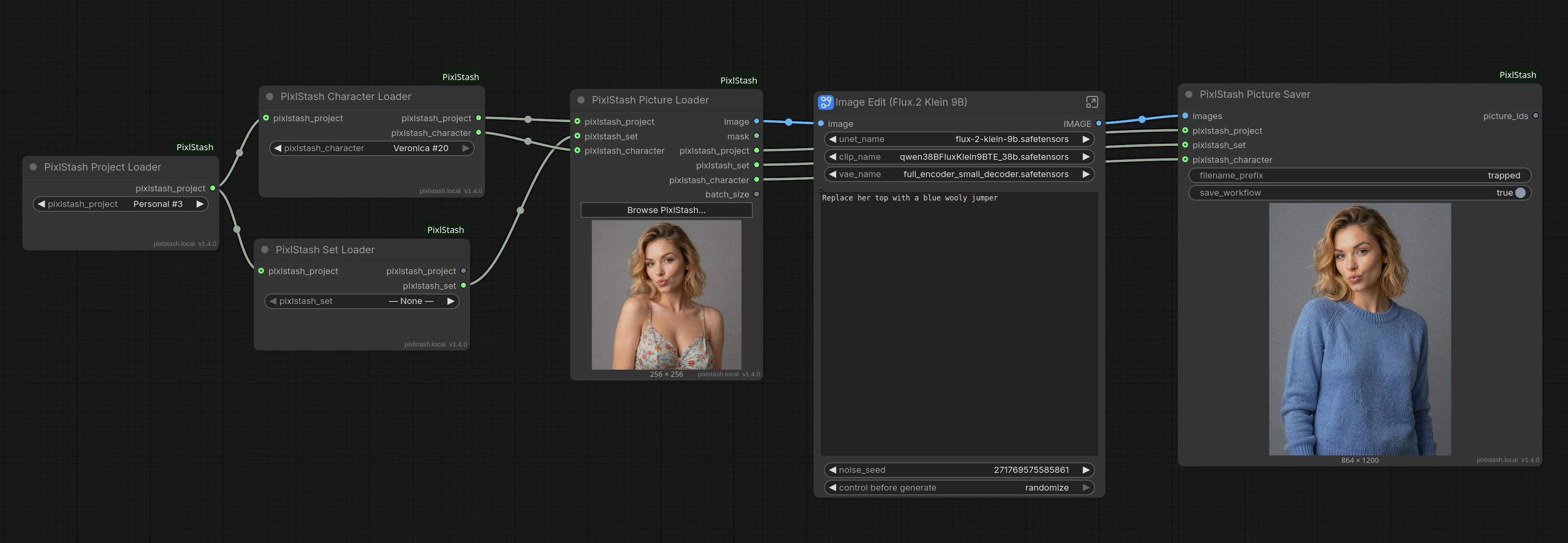
Search to image edit. Pull images out of the vault by meaning, then edit them.
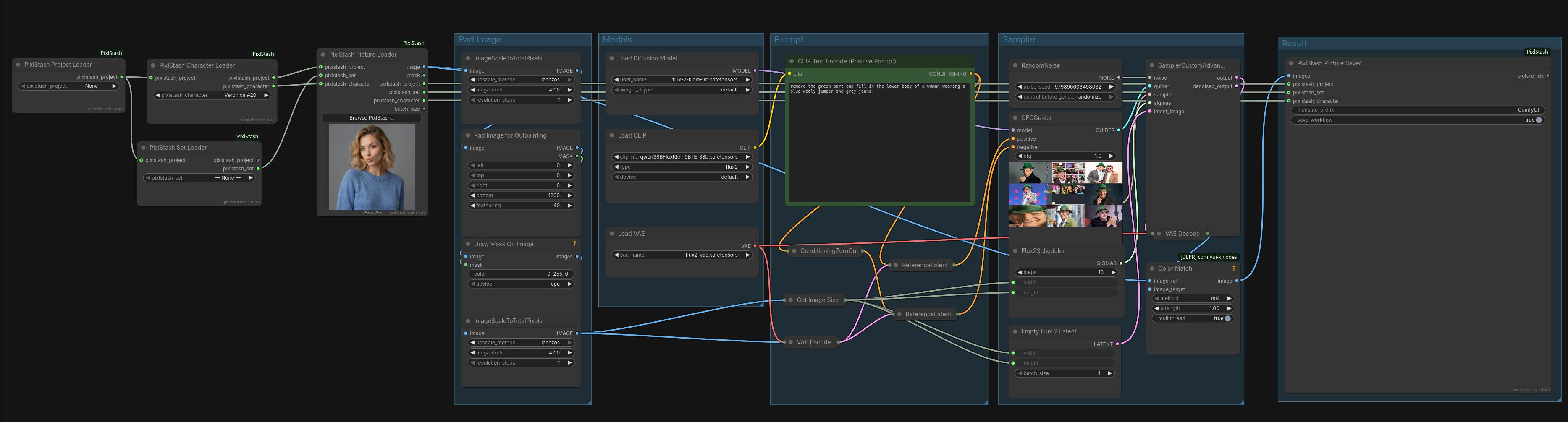
Outpaint. Extend a vault image beyond its frame.
Face Likeness Gate. Keep only the frames matching a character.
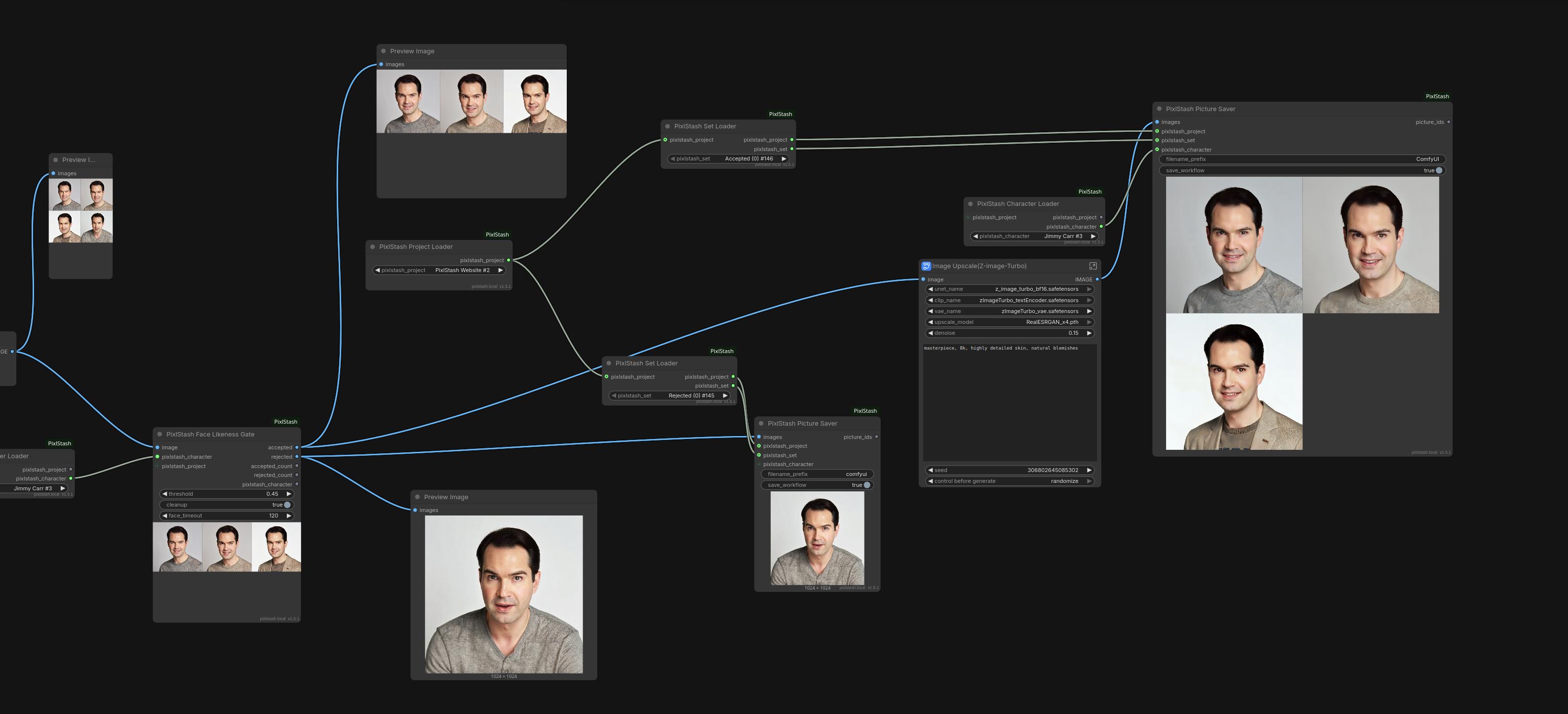
Or end to end: generate with a character LoRA, gate, upscale the matches, save both streams to separate sets.
The same pipeline with every model off the shelf:
Picture Likeness Gate. Keep only the frames matching a reference set: bare, or with upscale and save:
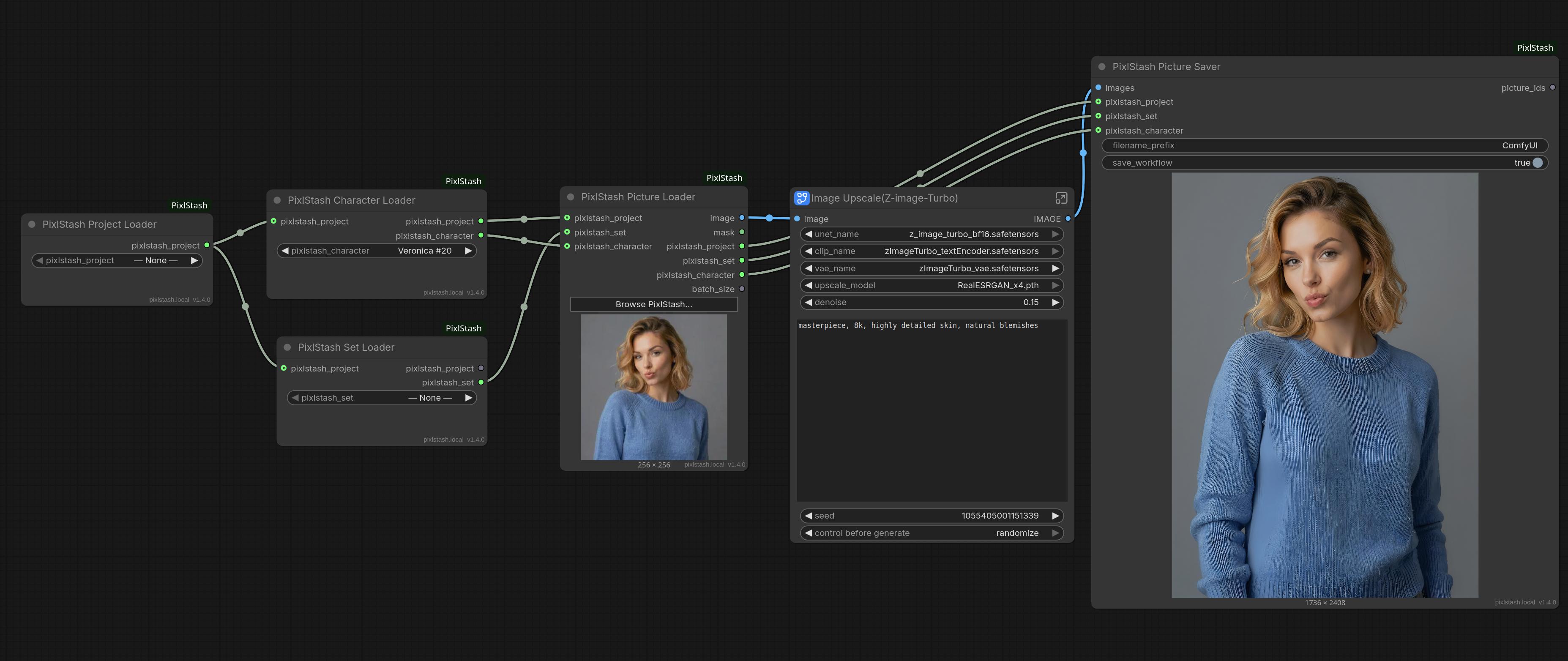
Upscale. Upscale a vault image and save it back with metadata intact.
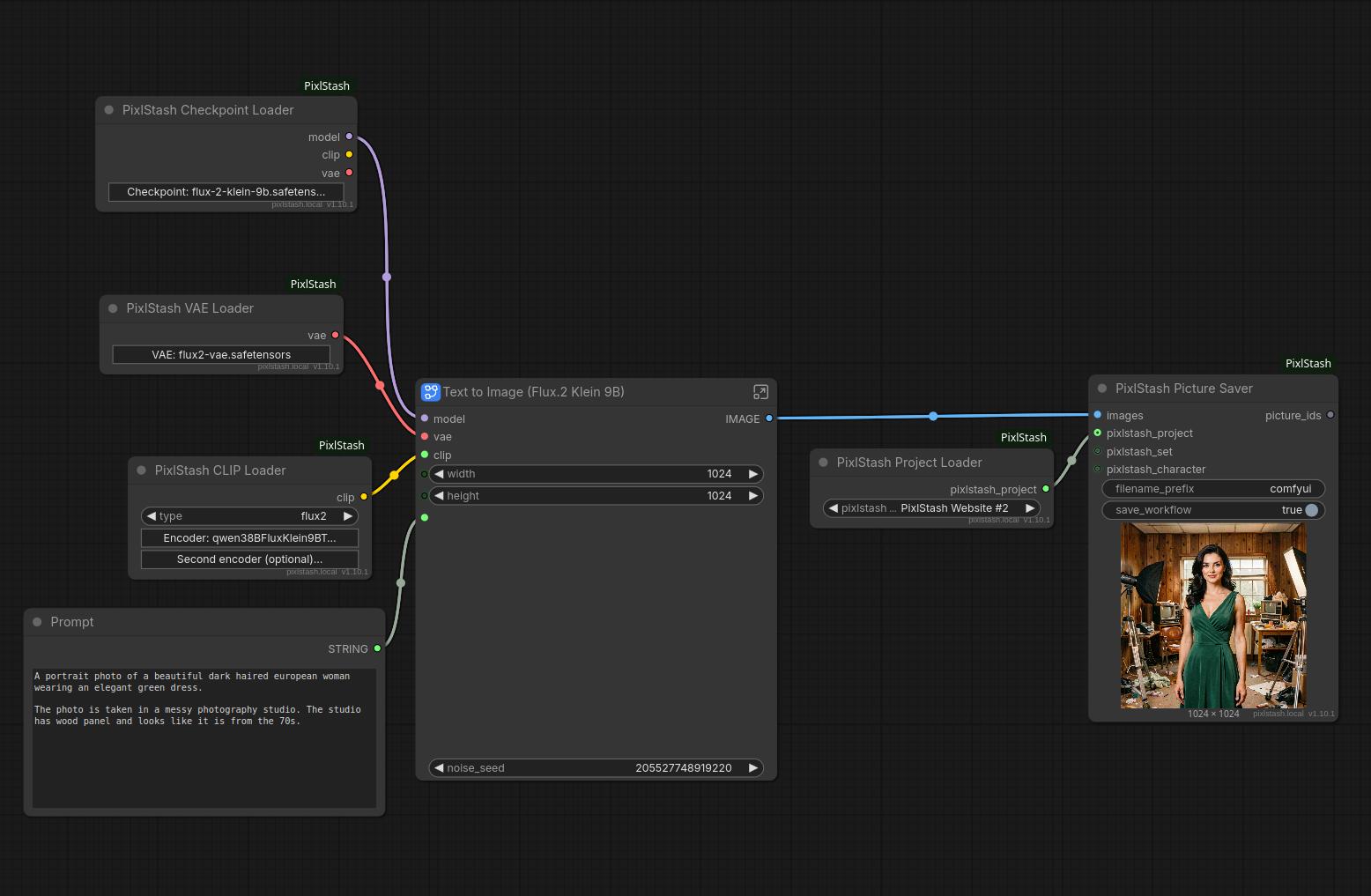
Generate from the model shelf. Checkpoint, VAE and text encoder all picked from a Browse grid, render saved straight into a project.
Inpaint. Repaint the masked part of a picture with Flux.2 Klein 9B, MOSS Image or Qwen Image Edit 2511. These are in ComfyUI's API format and need ComfyUI-Inpaint-CropAndStitch.
Some of these use subgraphs, so they need a recent ComfyUI. Bare diffusion
models like Flux.2 Klein 9B and Z-Image Turbo are filed as checkpoints, so only
the Checkpoint Loader's model output is wired and clip and vae come from
their own loaders.
Installation
The easiest way is through PixlStash 1.12.0 or later: link it with ComfyUI under Settings > ComfyUI and the nodes install automatically.
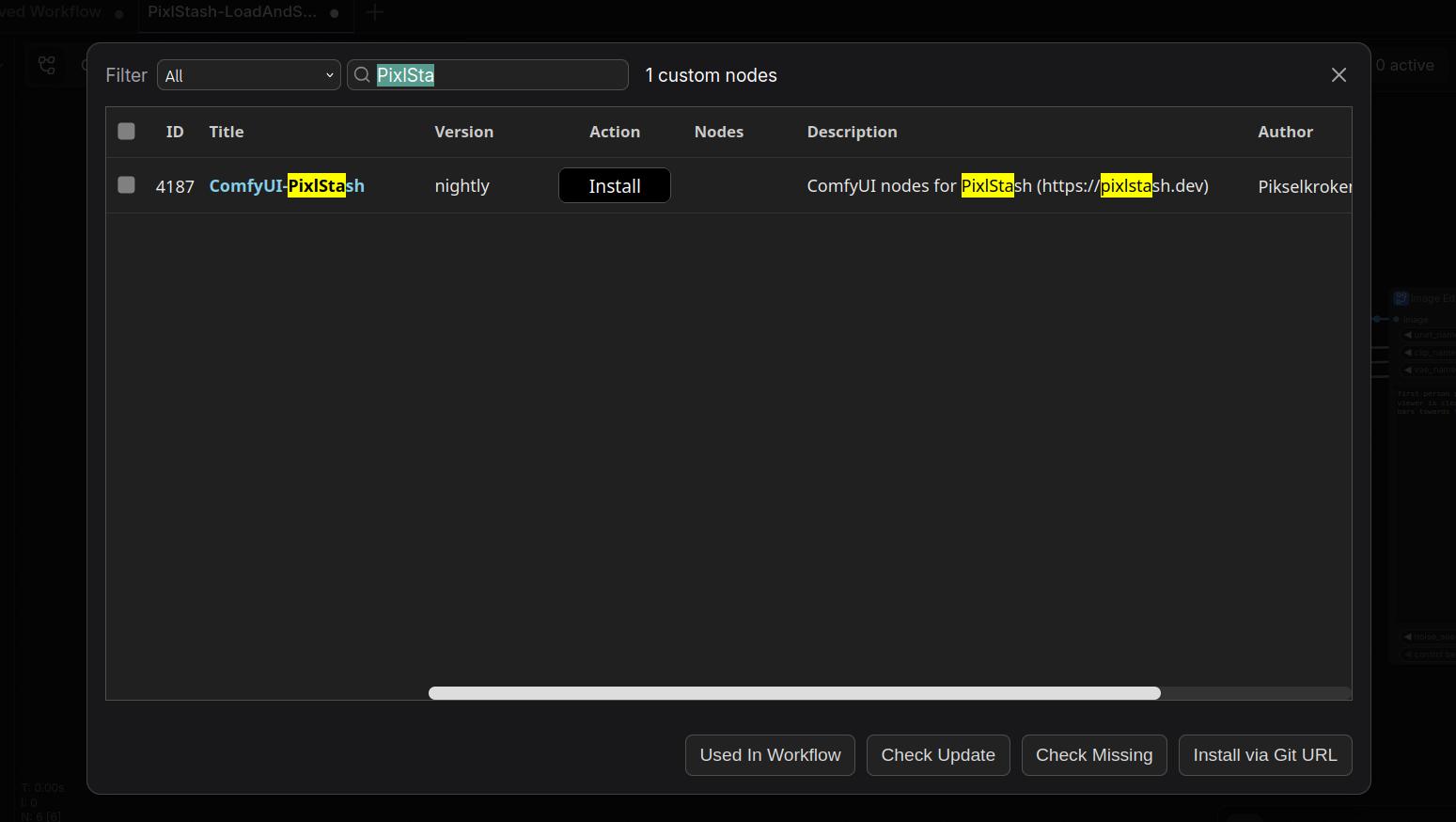
Or search for ComfyUI-PixlStash in the ComfyUI Manager and click Install.
Or manually:
cd custom_nodes
git clone https://github.com/Pikselkroken/ComfyUI-PixlStash.git
Loading .gguf models needs the gguf Python package, which is not installed
with this pack. Run pip install -U "gguf>=0.13.0" in ComfyUI's environment if
you use GGUF models; the loader says so if it is missing or too old. A few GGUF text encoders (a Wan
UMT5, Gemma 3) also need sentencepiece and protobuf to rebuild their
tokenizer, and the error names them too.
Restart ComfyUI, then set your URL and API token under Settings > PixlStash.
Configuration
| Setting | Description | |---|---| | URL | Base URL of your PixlStash instance | | API Token | Token with the required read or write scope | | Verify SSL | Whether to validate the server certificate |
Multi-user is not supported. ComfyUI doesn't tell a node which user submitted the running prompt, so the nodes refuse to run rather than risk using someone else's token. Run one single-user ComfyUI per PixlStash user.
Development
python -m unittest discover -s tests   # stdlib unittest, no ComfyUI needed
ruff check . && ruff format .
The tests stub ComfyUI's runtime modules, so only requests needs installing
(pip install -r requirements.txt). They cover the security-sensitive paths:
the multi-user guard, the proxy SSRF and auth checks, the token check and
filename containment on the two served endpoints, loader id extraction, and
path containment and digest verification in the savers and loaders.
Pull requests are reviewed by an AI reviewer (.github/workflows/ai-review.yml)
when the maintainer opens or pushes to one, or comments /review, /improve
or /ask ... on it. The rules it checks are in .github/review-context.md.
License
MIT. See LICENSE.
No ComfyUI source is copied into this repository. ComfyUI is GPL-3.0 and
this package is MIT, so everything here is written against ComfyUI's public
APIs: comfy.utils / comfy.sd for the model loaders, folder_paths,
server.PromptServer for the /pixlstash/* proxy, and app.registerExtension
plus LiteGraph for the frontend. The loaders mirror the shape of the built-ins
(inputs, outputs, widget names) so they drop into existing graphs, but none of
their code is reproduced here.
Runtime dependencies come from PyPI:
requests (Apache-2.0),
Pillow (MIT-CMU), and optionally
gguf (MIT) for GGUF models. ComfyUI supplies
torch and numpy.
Third-party code: vendor/comfyui_gguf/ is
ComfyUI-GGUF by city96, Apache-2.0,
unmodified. See vendor/comfyui_gguf/LICENSE.
The model makers' glyphs in web/js/img/lobehub/ are from
LobeHub Icons, MIT; see
web/js/img/lobehub/LICENSE. The marks remain
their owners'.