
ComfyUI-HunyuanImage3
Run Tencent's HunyuanImage-3.0 (80B MoE) natively in ComfyUI on a 24 GB GPU: base, Instruct and Instruct-Distil, prompt rewriting, image editing, Spectrum speed-up.
ComfyUI-HunyuanImage3
Run Tencent's HunyuanImage-3.0, an 80-billion-parameter image model, natively in ComfyUI on a single 24 GB GPU. Use the normal KSampler, the normal VAE Decode and ComfyUI's own memory management, with no Python wrapper around someone else's pipeline.
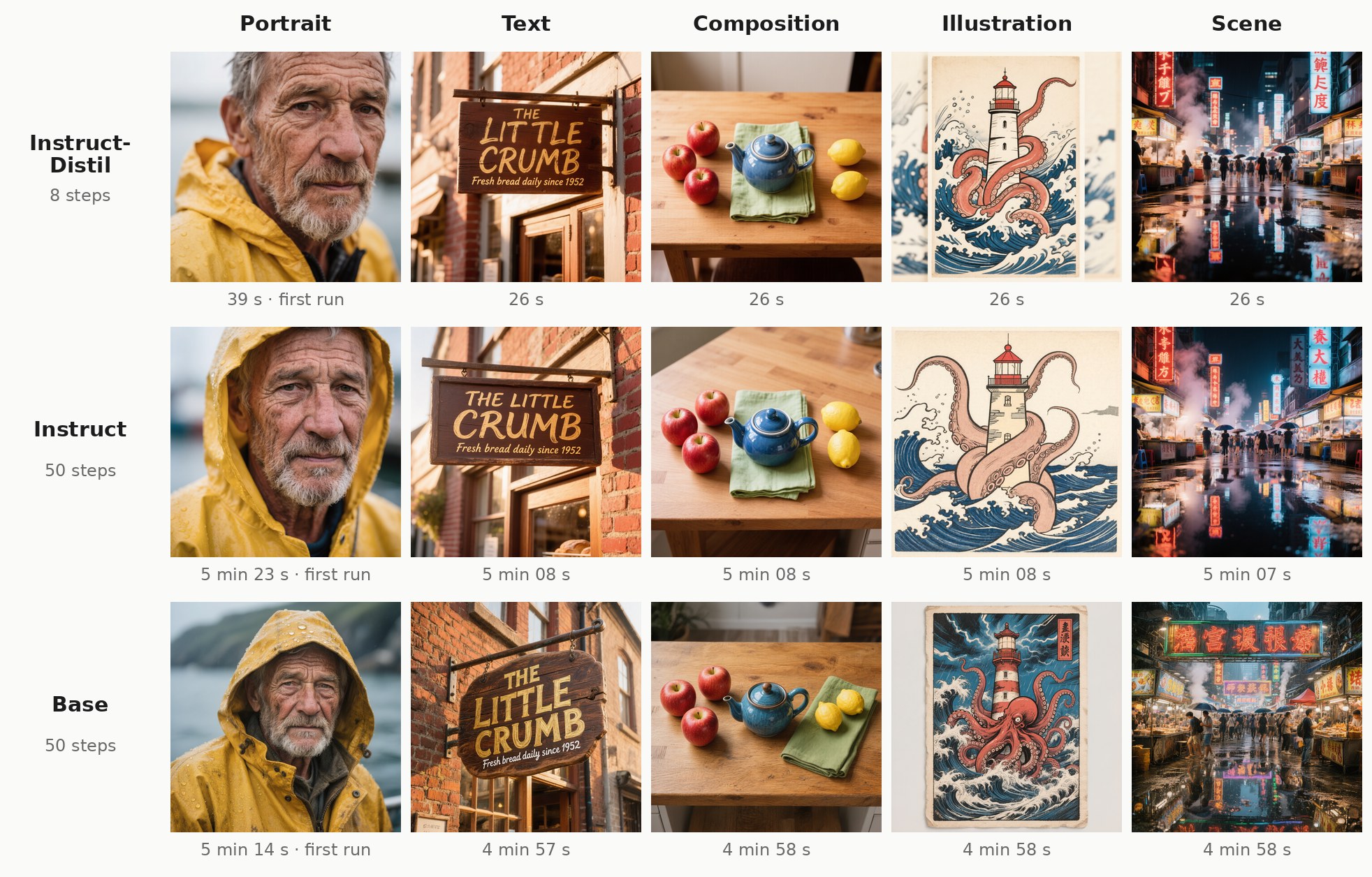
<sub>Instruct-Distil, Instruct and Base with W4A8 weights, 1024×1024 on one RTX 4090, same seed per prompt. The time under each image is the whole generation; each row's first image also includes loading the model.</sub>
Compare every image side by side → all three models, all three weight formats, Spectrum off and on.
What you get
- All three HunyuanImage-3.0 models: the fast 8-step Instruct-Distil, the full Instruct, and the pretrained Base.
- Text-to-image, image editing ("turn this photo into a watercolor") and multi-image fusion (combine up to three images).
- Prompt rewriting: the model can expand a short prompt into a detailed one before drawing.
- Spectrum: an optional speed-up that makes the 50-step models about 3.4× faster, at the cost of some drift from the full render.
- Ready-made weights in three sizes (W4A8, int8, bf16) on HuggingFace, plus the scripts that made them.
What you need
| | |
|---|---|
| GPU | an NVIDIA card with 12 GB or more (tested: RTX 4090, RTX 3090, and 16 GB / 12 GB limits, see smaller GPUs) |
| System RAM | a lot. The model streams its weights from RAM every step. With the W4A8 file loaded, ComfyUI held about 50 GB (tested on a 188 GB machine) |
| Disk | 45 GB for the recommended W4A8 file, on a fast SSD |
| ComfyUI | a current version (from late September 2026: the quantized expert banks load through its own bank layout). Tested with its dynamic VRAM streaming (comfy-aimdo), which is what makes a single consumer card practical |
HunyuanImage-3.0 is a mixture-of-experts model: 80B parameters in total, 13B used per step. Only a slice fits on the GPU at any time, so the rest streams from system RAM over PCIe on every step. That's why RAM and bus speed matter more here than for most models, and why a smaller GPU costs surprisingly little.
Install
Search for HunyuanImage 3.0 (native) in ComfyUI-Manager, or install it from the Comfy Registry with comfy node install hunyuanimage3-native. Or clone it:
cd ComfyUI/custom_nodes
git clone https://github.com/PedroMarinhoDev/ComfyUI-HunyuanImage3
Restart ComfyUI. There's nothing to pip install: the nodes only use what ComfyUI already has.
Download the weights
Start with the Instruct-Distil in W4A8. It's the default in this pack and the lightest way to run the model: 8 steps with one pass each, so about 26 s per image where the other two take about 5 minutes, and at 44 GB it's the smallest download and the easiest on your system RAM. It does everything the Instruct does (editing, multi-image fusion, prompt rewriting). Reach for the others when you want something specific:
| Model | HuggingFace | Best for | |---|---|---| | Instruct-Distil (default) | PedroMarinhoDev/HunyuanImage-3.0-Instruct-Distil-ComfyUI | everyday use: 8 steps, ~26 s per image, editing and prompt rewriting | | Instruct | PedroMarinhoDev/HunyuanImage-3.0-Instruct-ComfyUI | the full 50-step model, with classic CFG and a step count you choose | | Base | PedroMarinhoDev/HunyuanImage-3.0-Base-ComfyUI | plain text-to-image from the pretrained model, strong photographic detail |
All three need the same GPU and the same memory for a given format: the weight format, not the model, is what sets the RAM you need. From the repo you picked, download:
| File | Put it in |
|---|---|
| hunyuan_image_3_<model>_w4a8.safetensors (~44 GB, recommended) | ComfyUI/models/diffusion_models/ |
| vae/hunyuan_image_3_vae_fp16.safetensors | ComfyUI/models/vae/ |
| clip_vision/hunyuan_image_3_<model>_siglip2_so400m_naflex.safetensors | ComfyUI/models/clip_vision/ (only for image editing) |
| hunyuan_image_3_<model>_cot_head.safetensors (1 GB) | ComfyUI/models/diffusion_models/ (only for prompt rewriting) |
Every workflow has a Read me note listing exactly these files, with links. The model's config.json and
tokenizer.json ship with the nodes, so there's nothing else to download.
Which format?
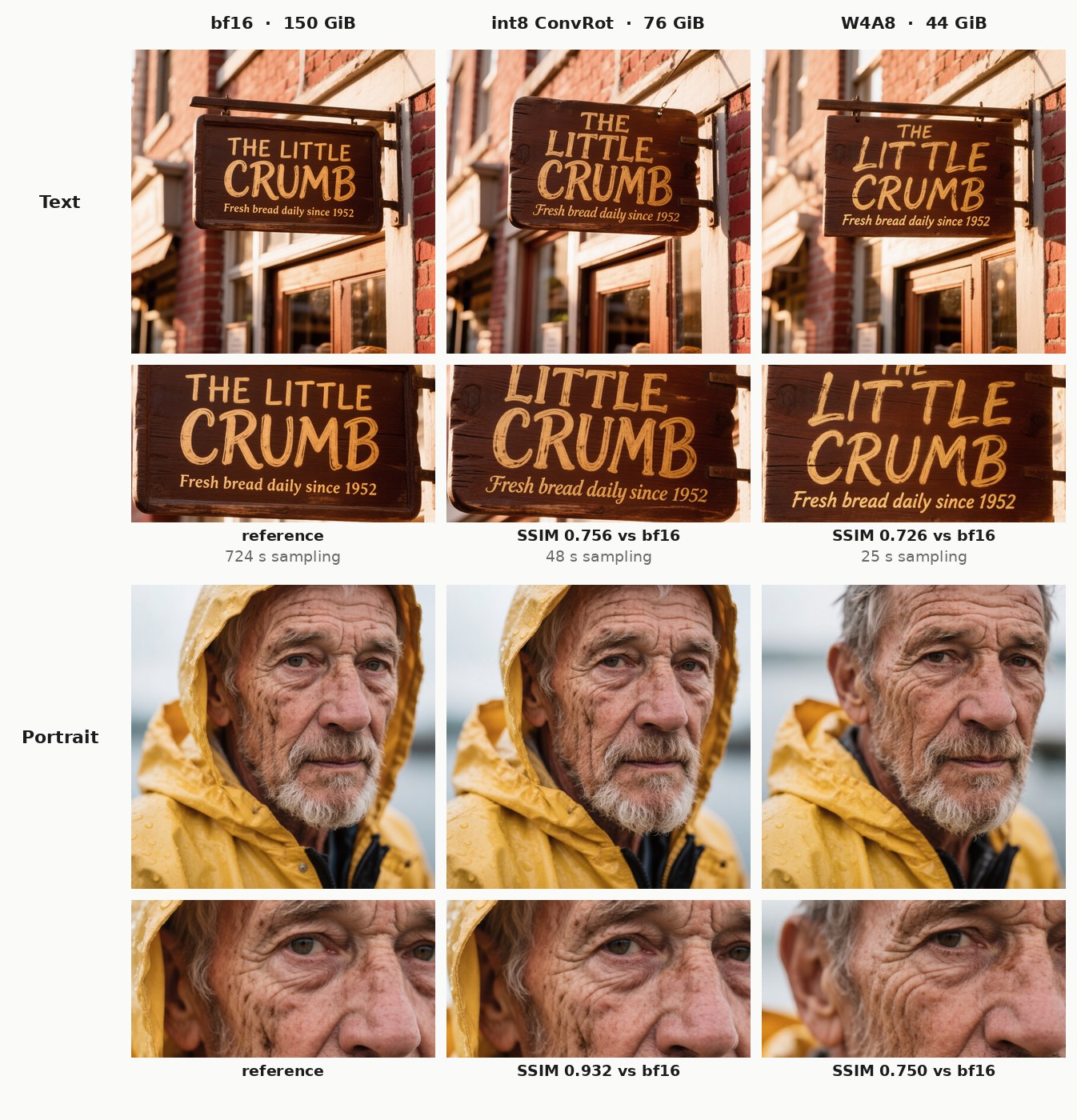
<sub>Instruct-Distil, same prompt and seed in each row, only the weight format changes. The strip under each image is a zoom on the finest detail.</sub>
| Format | Size | Speed | When to use it | |---|---|---|---| | W4A8 | 44 GB | fastest | the default: 4-bit weights, 8-bit activations | | int8 ConvRot | 76 GB | ~1.9× slower per step | 8-bit weights, closest to the original that still fits the streaming budget | | bf16 | 150 GB | slowest | the unquantized reference (bit-identical to Tencent's weights), mainly for comparisons |
How far the quantized weights are from the originals, and how far the images move:
<!-- bench:quant:start -->| Format | File size | Weight error vs bf16 | Cosine similarity | Image SSIM vs bf16 | |---|---|---|---|---| | bf16 | 150 GiB | — (reference) | 1 | 1 | | int8 ConvRot | 76 GiB | 1.0 % | 0.99995 | 0.844 | | W4A8 | 44 GiB | 7.3 % | 0.99732 | 0.738 |
<!-- bench:quant:end -->Weight error is the relative difference between the quantized weights and Tencent's bf16 weights, and cosine how closely they point the same way (1 = identical), over 5 layers spread through the model and 8 experts in each. Everything that isn't quantized (embeddings, norms, the router) is byte-identical to bf16. Image SSIM compares the rendered images with the bf16 one (1 = identical pixels). At the same seed even small weight differences can shift the composition a little, as in the portrait, so SSIM measures "same picture", not "same quality".
The text "head" that prompt rewriting uses lives in its own cot_head file, so the model files don't carry
1 GB that most images never use.
Your first image
-
Drag a workflow from
workflows/into ComfyUI:| Workflow | Model | Task | |---|---|---| |
hunyuan_image_3_instruct_distil_txt2img.json| Instruct-Distil | text to image (start here) | |hunyuan_image_3_instruct_distil_img2img.json| Instruct-Distil | editing, 1 to 3 input images | |hunyuan_image_3_instruct_txt2img.json| Instruct | text to image | |hunyuan_image_3_instruct_img2img.json| Instruct | editing, 1 to 3 input images | |hunyuan_image_3_base_txt2img.json| Base | text to image | -
In Load HunyuanImage 3.0 Model, pick your file. The node recognizes which of the three models it is from the weights themselves, so there's nothing else to set.
-
Write a prompt and queue it. The workflows already carry each model's settings:
| Model | Steps | cfg | Notes | |---|---|---|---| | Instruct-Distil | 8 | 1.0 | keep the Guidance node at 2.5 | | Instruct | 50 | 2.5 | | | Base | 50 | 5.0 | |
Always use the
eulersampler with thesimplescheduler. The encoders make the negative prompt themselves (the model's own "empty" prompt), so there's no second text box to fill.
Image size. The model was trained at about 1 megapixel, in 37 shapes from 2048×512 to 512×2048 (pick one in HunyuanImage 3.0 Resolutions). Custom sizes work up to 4× that area, 2048×2048: the RoPE base is rescaled by how much larger the image is than 1024×1024. Larger images widen the scene rather than enlarging it, and past 4× (2304×2304 and up) the output is noise. For big images, generate at a native size and upscale. The experimental nodes in Large images and looped diffusion help with both routes.
Speed
Measured on one RTX 4090 (PCIe 4.0 ×8, 188 GB RAM), 1024×1024, with the settings in the workflows:
<!-- bench:speed:start -->| Model | Format | First image (cold) | Next images (warm) | Per step | Warm, Spectrum on | |---|---|---|---|---|---| | Instruct-Distil (8 steps) | W4A8 | 39 s | 26 s | 3.1 s | 20 s | | Instruct-Distil (8 steps) | int8 ConvRot | 1 min 10 s | 49 s | 5.9 s | 37 s | | Instruct-Distil (8 steps) | bf16 | 12 min 36 s | 12 min 06 s | 90.3 s | — | | Instruct (50 steps) | W4A8 | 5 min 23 s | 5 min 08 s | 6.1 s | 1 min 30 s | | Instruct (50 steps) | int8 ConvRot | 9 min 48 s | 9 min 50 s | 11.8 s | 2 min 48 s | | Base (50 steps) | W4A8 | 5 min 14 s | 4 min 58 s | 5.9 s | 1 min 27 s | | Base (50 steps) | int8 ConvRot | 10 min 13 s | 9 min 50 s | 11.8 s | 2 min 48 s |
<!-- bench:speed:end -->- Cold is the first image after you queue a workflow with a model that isn't loaded yet: it includes loading the weights and moving them onto the GPU. Warm is every image after that, with the model already in memory. (The loader node itself only maps the file, which takes under a second; the loading shows up in the first sampling step.) Right after a reboot, when the file isn't in your system's file cache, the first image takes longer still, because the weights come off the disk.
- Text encoding costs nothing without prompt rewriting: it only turns the prompt into tokens. VAE decode takes about 1.2 s.
- Instruct and Base run two passes per step (your prompt and the model's negative), which is why their steps take about twice as long as the Instruct-Distil's.
- bf16 was only rendered for the Instruct-Distil, as the reference for the quantized formats. Its 154 GB didn't fit in the RAM left over on this 188 GB machine, so it streamed from an NVMe drive at about 1 GB/s, which is what its ~90 s per step shows. In an earlier run with more RAM free it took about 15 s per step. Either way, bf16 is for comparisons, not for everyday use.
- The attention backend doesn't change the speed. The table was measured with
--use-ck-attention(Comfy Kitchen int8 attention). Re-measured on the same 4090 with PyTorch SDPA, xformers, Comfy Kitchen, Flash and Sage, the Instruct-Distil W4A8 ran at 2.5–2.6 s per step under every one of them, because the expert weights take the time, not attention. (That's also faster than the table's 3.1 s: ComfyUI and comfy-kitchen got quicker since it was measured.) Flash and Sage can't take this model's attention mask and fall back to SDPA. Switching backends changes fine details in an image, not its quality.
Smaller GPUs
The Instruct-Distil W4A8 also runs on 16 GB and 12 GB of VRAM. Measured on the same RTX 4090 with the rest of its memory held by another process, so ComfyUI could only use 16 GB or 12 GB; 1024×1024, 8 steps:
| VRAM | First image (cold) | Next images (warm) | Per step | ComfyUI's peak VRAM | |---|---|---|---|---| | 24 GB | 39 s | 26 s | 3.1 s | — | | 16 GB | 47 s | 30 s | 3.5 s | 15.9 GB | | 12 GB | 47 s | 32 s | 3.7 s | 11.6 GB |
The images are identical to the 24 GB ones. The weights stream from system RAM, not from disk: the disk is read once, when the first image loads the model, and never after. So a smaller card still needs the same ~50 GB of free RAM, and a slower card than this 4090 (less compute, a narrower PCIe link) will be slower than the table.
<details> <summary>Every stage, cold and warm</summary> <!-- bench:stages:start -->| Model | Format | Run | Load model | Text encode | Sampling | VAE decode | Total | |---|---|---|---|---|---|---|---| | Instruct-Distil | W4A8 | cold | 0.6 s | 0.00 s | 37 s | 1.4 s | 39 s | | Instruct-Distil | W4A8 | warm | 0.0 s | 0.00 s | 25 s | 1.2 s | 26 s | | Instruct-Distil | int8 ConvRot | cold | 0.3 s | 0.00 s | 1 min 08 s | 1.2 s | 1 min 10 s | | Instruct-Distil | int8 ConvRot | warm | 0.0 s | 0.00 s | 47 s | 1.1 s | 49 s | | Instruct-Distil | bf16 | cold | 0.2 s | 0.00 s | 12 min 34 s | 1.5 s | 12 min 36 s | | Instruct-Distil | bf16 | warm | 0.0 s | 0.00 s | 12 min 04 s | 1.4 s | 12 min 06 s | | Instruct | W4A8 | cold | 0.7 s | 0.00 s | 5 min 21 s | 1.5 s | 5 min 23 s | | Instruct | W4A8 | warm | 0.0 s | 0.00 s | 5 min 06 s | 1.2 s | 5 min 08 s | | Instruct | int8 ConvRot | cold | 0.3 s | 0.00 s | 9 min 46 s | 1.2 s | 9 min 48 s | | Instruct | int8 ConvRot | warm | 0.0 s | 0.00 s | 9 min 49 s | 1.1 s | 9 min 50 s | | Base | W4A8 | cold | 1.3 s | 0.00 s | 5 min 10 s | 1.2 s | 5 min 14 s | | Base | W4A8 | warm | 0.0 s | 0.00 s | 4 min 56 s | 1.2 s | 4 min 58 s | | Base | int8 ConvRot | cold | 0.4 s | 0.00 s | 10 min 11 s | 1.1 s | 10 min 13 s | | Base | int8 ConvRot | warm | 0.0 s | 0.00 s | 9 min 48 s | 1.1 s | 9 min 50 s |
<!-- bench:stages:end --> </details>Prompt rewriting
Connect a HunyuanImage 3.0 Prompt Rewriting node to the prompt_rewriting input of a Text Encode or Image
Encode node, and the model first rewrites your prompt into a detailed description, then draws that. The
rewritten text comes out of the encoder's rewritten_prompt output. The workflows include the node, switched
off: set enabled to true to use it.
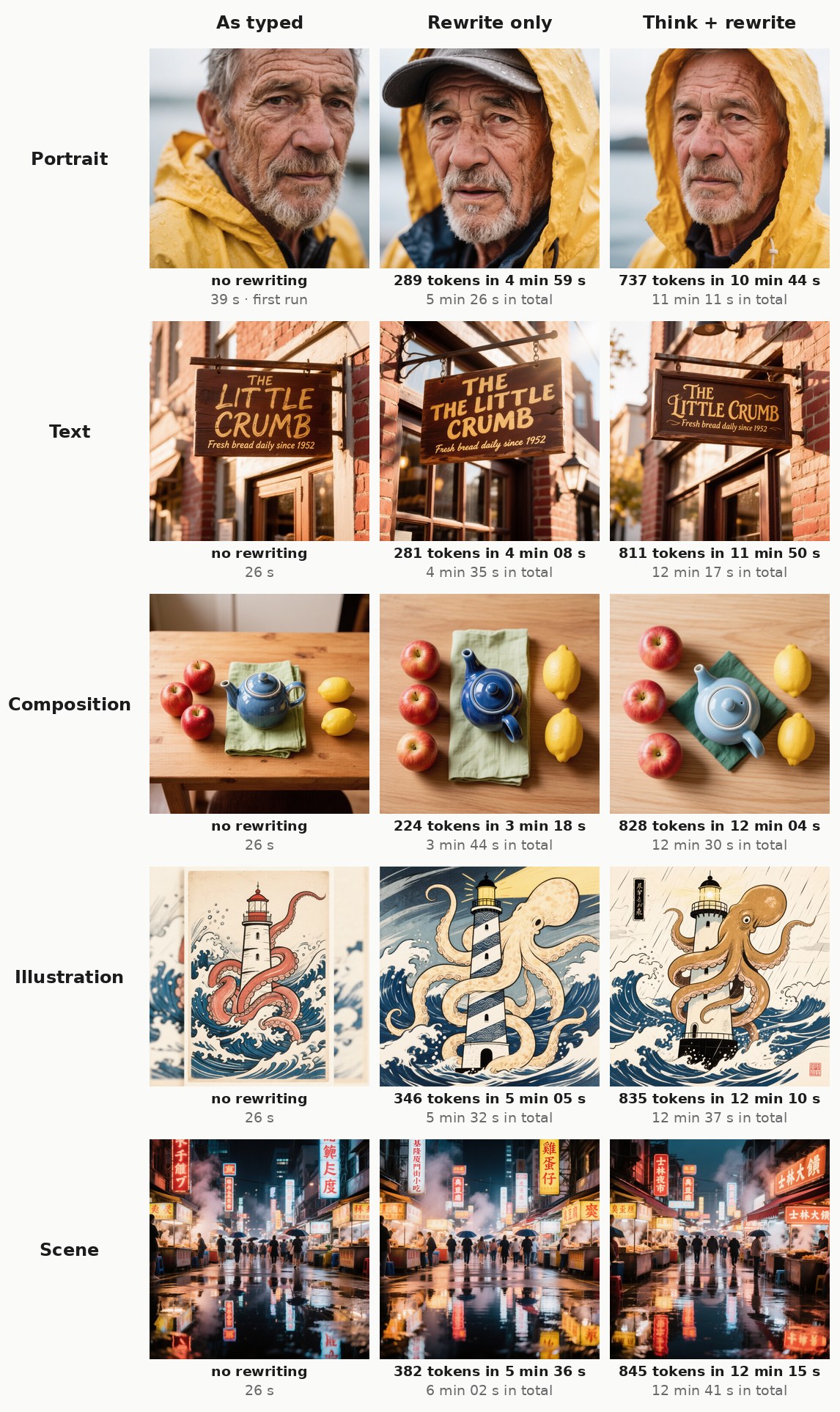
<sub>Instruct-Distil, W4A8, same image seed in each row. The first line under each image is the rewriting stage (tokens it wrote and how long that took), the second the whole generation. The rewritten prompts and the model's reasoning are on the comparison page.</sub>
mode: rewrite only (default, a few hundred tokens) or think + rewrite (writes its reasoning first, often 1000+ tokens).- It's slow: about 1 second per token (0.8–0.9 s measured), so a typical rewrite of ~300 tokens takes 4–5 minutes. The text model has to stream its experts for every single token.
- When editing, the rewrite is written looking at your images, as in Tencent's own pipeline.
- It needs the model's
cot_headfile inmodels/diffusion_models.cot_head: autofinds the right one. - It works with Instruct and Instruct-Distil. The Base model wasn't trained for it.
- The rewrite has its own
seed, fixed by default, so changing the image seed doesn't redo it.
Image editing and multi-image fusion
Use HunyuanImage 3.0 Image Encode (or the _img2img workflows): connect your image, the VAE and the
model's clip_vision file, and describe the change.
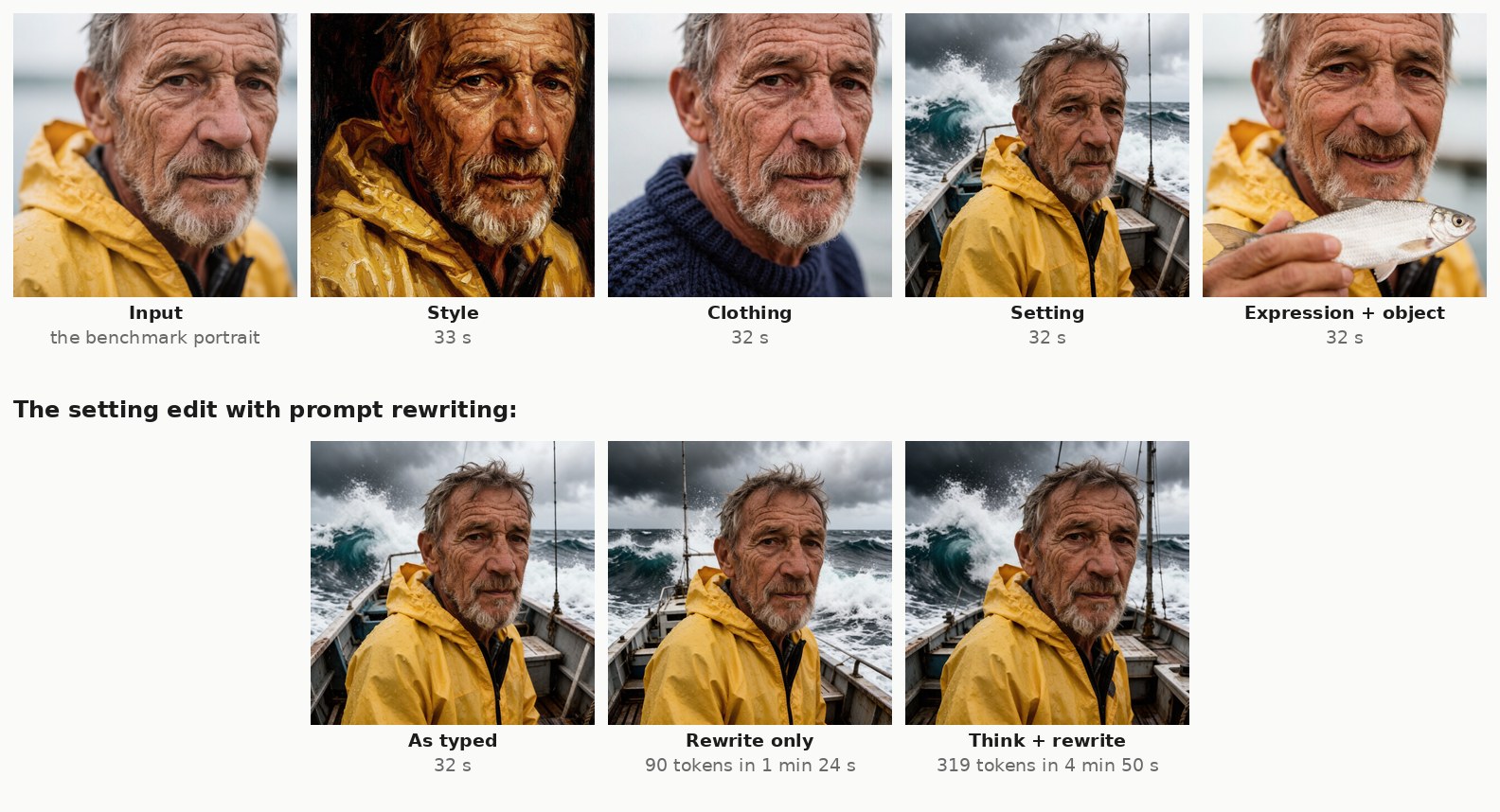
<sub>Instruct-Distil, W4A8, 8 steps. The instructions are on the comparison page. The bottom row repeats the setting edit with prompt rewriting, which reads the input image before rewriting the instruction.</sub>
- Up to three images. A new
imagesocket appears each time you connect one. Refer to them in the prompt as "the first image", "the second image" and so on ("put the cat from the first image on the sofa in the second image"). - Each input image is resized to about 1 megapixel, as Tencent's pipeline does.
- The output size is whatever you wire into
width/height. The workflows use the first image's shape at about 1 megapixel (Scale Image to Total Pixels → Get Image Size); a Resolutions node gives a fixed size. vit_strengthandlatent_strength(both 1.0 by default) tune how strongly the input images steer the result.reference_vit_padding(on by default) pads each image's tower run to the checkpoint's 1024 tower slots, matching the reference processor. Workflows saved before this input existed get the default (on); switch it off for this pack's original compact tower runs.- Image-block RoPE positions are whole numbers, as in the reference (
build_2d_rope's.long()). Earlier versions used half-steps for grids with an oddw·h−worw·h−h, e.g. a 39×26 tower grid; such images and output sizes render slightly differently now, whatever the toggle. - Each extra image makes every step slower, since the model reads all of them at every step.
Spectrum: up to 3.4× faster sampling
Put HunyuanImage-3.0 Spectrum between the model loader and the KSampler, and set enabled to true (the
workflows already include it, switched off). On some steps it skips the model's heavy core and predicts its
output from the steps that did run (Spectrum, CVPR 2026).
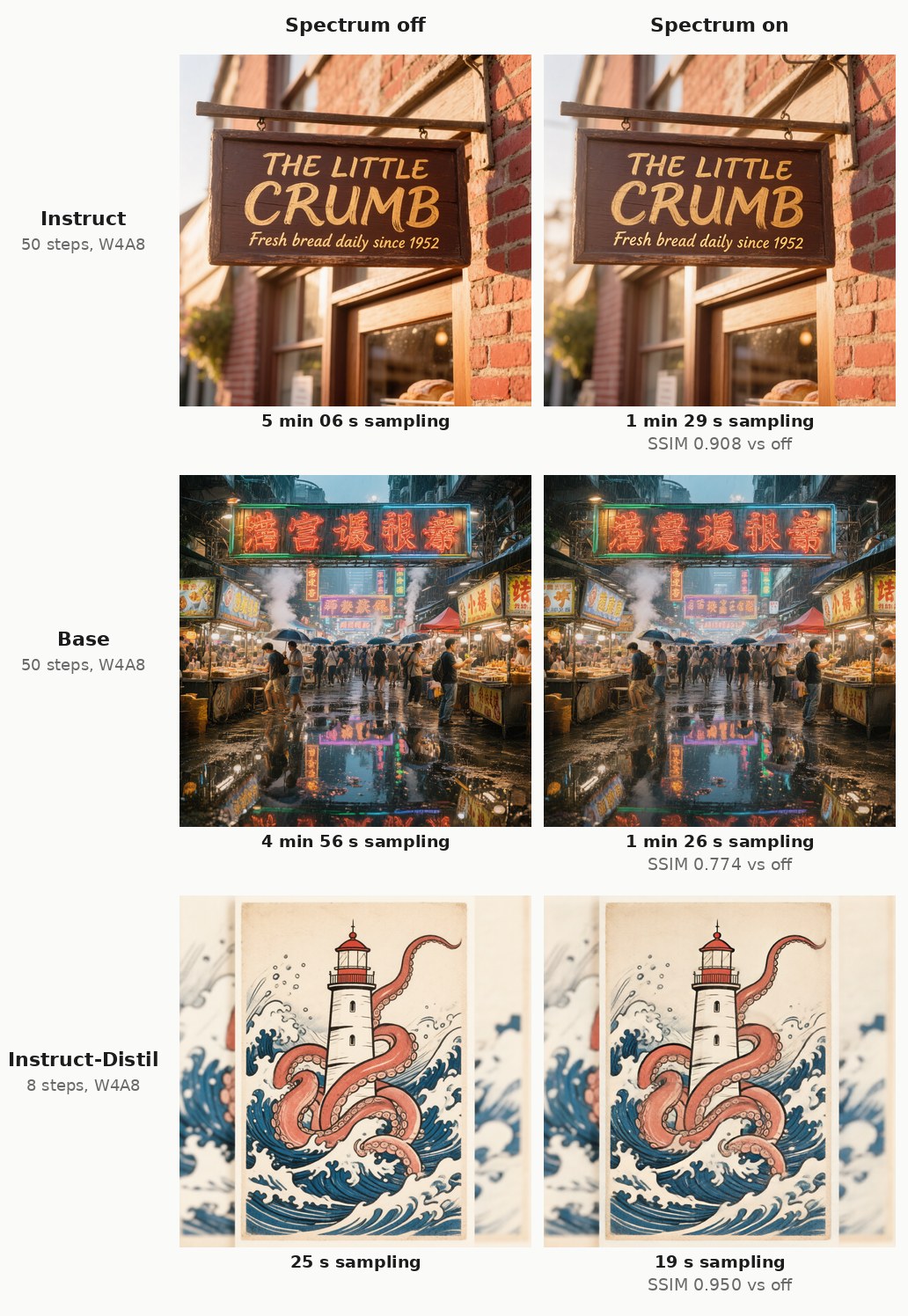
| Model | Warm image, Spectrum off | Spectrum on | Faster by | Similarity to Spectrum off (SSIM, 5 prompts) | |---|---|---|---|---| | Instruct-Distil (8 steps) | 26 s | 20 s | 1.3× | 0.959 (lowest 0.945) | | Instruct (50 steps) | 5 min 08 s | 1 min 30 s | 3.4× | 0.878 (lowest 0.752) | | Base (50 steps) | 4 min 58 s | 1 min 27 s | 3.4× | 0.830 (lowest 0.739) |
<!-- bench:spectrum:end -->It pays off on the 50-step models: about 3.4× faster, at the cost of details and sometimes layout drifting from
the full render (the SSIM column: 1 would be identical). On the 8-step Instruct-Distil there are too few steps to skip,
so it saves only a few seconds, and the image stays very close. The defaults follow the paper; flex_window
trades speed for fidelity.
Experimental: large images and looped diffusion
These nodes are experimental and still under development. Their inputs, defaults and behaviour may change between updates, the workflows don't use them yet, and some combinations break the image (see below).
Each one goes between the model loader and the KSampler, like Spectrum, and they can be chained.
| Node | What it does | Cost |
|---|---|---|
| HunyuanImage-3.0 SEGA | above 1024×1024: a slightly weaker RoPE rescale plus a per-frequency attention temperature taken from the image's own spectrum | no extra time |
| HunyuanImage-3.0 SPA | above 1024×1024: for the first steps (default 3) the positions are folded back into the trained grid, which keeps a 1024-style composition with larger subjects | about +30% |
| HunyuanImage-3.0 DyPE | above 1024×1024: the RoPE rescale relaxes over the steps; text usually comes out better without it | no extra time |
| HunyuanImage-3.0 HAP | above 1024×1024: after the first step each attention head only looks at nearby image tokens. A speed-up; the image barely changes | about 12% faster per step at 2× |
| HunyuanImage-3.0 Looped Diffusion | runs a span of layers twice per step: early x2 (layers 4–9) for sharper detail and denser text, mid x2 and mid x2 half (layers 11–20) for counting, at the risk of dropping subjects | +15–27% per step |
| HunyuanImage-3.0 Tiled Refine | for a refinement pass on an upscaled image too large for one go: every step runs on overlapping tiles and blends them | grows with the number of tiles |
What two test sweeps found (Instruct-Distil, 8 steps, from a 768×1280 and an 896×1152 render, scaled by whole multiples):
- From scratch at 2× per side (4× the area), whether a plain render holds up depends on the prompt and the
shape: in one test a chessboard floor multiplied into the sky. SEGA, SPA or Looped Diffusion
early x2each fixed it on its own. DyPE, HAP, Spectrum and a ModelSamplingSD3 shift of 6 did not, and themidloop presets made it worse. - Pairs that fight: SPA + Looped
early x2scattered coloured specks over the image in every test, and so did SEGA + SPA at 2× (at 1.5× per side it was the one combination that worked). Try one fixer at a time. - Upscaling: a stock hires pass (upscale the image, VAE encode, sample at denoise 0.3–0.5) is safe up to 2×; at denoise 0.7 faces start to change, and at 3× a faint grid texture prints into flat areas. Past 2× use Tiled Refine: tiles at a native size such as 896×1152, overlap 256, the prompt encoded at the tile size (a short general description of the image works), denoise 0.3. It took a 2× image to 3072×5120 cleanly in about 11 minutes on the 4090.
- Keep Spectrum and Looped Diffusion off tiled passes: Spectrum's prediction blends the tiles into a mottled texture, and the loop speckles flat areas.
- At native sizes, Looped
early x2gave crisper edges and more small detail for about +20% time.
Nodes
| Node | What it does | |---|---| | Load HunyuanImage 3.0 Model | loads a checkpoint and detects which model it is | | HunyuanImage 3.0 Text Encode | prompt → positive and negative conditioning, for text to image | | HunyuanImage 3.0 Image Encode | prompt + 1 to 3 images → positive and negative conditioning, for editing | | HunyuanImage 3.0 Prompt Rewriting | lets the model rewrite the prompt first; plugs into either encoder | | HunyuanImage 3.0 Guidance | the Instruct-Distil's built-in guidance strength (it samples at cfg 1.0) | | HunyuanImage 3.0 Resolutions | the model's 37 native sizes | | HunyuanImage 3.0 Empty Latent | an empty latent of the right shape | | Load HunyuanImage-3.0 VAE | the model's VAE (the stock VAE loader misdetects it) | | HunyuanImage-3.0 Spectrum | optional speed-up, see above | | HunyuanImage-3.0 SEGA, SPA, DyPE, HAP | experimental, for images larger than 1024×1024, see Experimental | | HunyuanImage-3.0 Looped Diffusion | experimental, extra detail for extra time, see Experimental | | HunyuanImage-3.0 Tiled Refine | experimental, for refining images beyond 2×, see Experimental |
Both encoders use each model's built-in system prompt. To use your own, connect any text to their optional
custom_system_prompt input.
Everything else is stock ComfyUI: KSampler, VAE Decode, Save Image, Select Model Device for multi-GPU.
How it runs on 24 GB
- Streaming, ComfyUI-native. Weights stay in system RAM and move to the GPU as each layer needs them, through ComfyUI's dynamic VRAM system.
- Layer lookahead. While one layer computes, the next layer's weights are already being copied, which makes each step about 30% faster.
- Per-expert fetching for text. When rewriting a prompt, only the 8 experts each token uses are copied, not all 64 (21× faster than the naive way).
- Quantization. W4A8 stores the expert weights in 4 bits with rotation (ConvRot) and per-expert codebooks, so each step moves ~45 GB instead of ~150 GB.
Make the weights yourself
tools/convert_all.py builds every file from Tencent's original release:
python tools/convert_all.py --model distil --weights /path/to/HunyuanImage-3.0-Instruct-Distil \
    --out-dir ComfyUI/models/diffusion_models --clip-vision-dir ComfyUI/models/clip_vision \
    --formats w4a8,int8,bf16,head,vision --device cuda:0
Run it with ComfyUI's Python and PYTHONPATH pointing at your ComfyUI folder. Quantizing needs a CUDA GPU
and ~45 GB of free RAM. Existing outputs are skipped, so an interrupted run can simply be restarted.
Troubleshooting
- Wrong-looking or noisy images: use
euler+simplewith the step/cfg values above. - A workflow from the first release shows red nodes: the nodes were redesigned (separate Image Encode and
Prompt Rewriting nodes, no
model_type). Start from the new workflows inworkflows/. - "Missing VAE keys … temb_proj" in the log: harmless, printed while the VAE loads.
- The VAE isn't found after updating: it's now
hunyuan_image_3_vae_fp16.safetensors, one file for all three models. - "Flash Attention failed, using default SDPA" over and over in the log: harmless with
--use-flash-attention. This model's attention needs a mask, which Flash can't take; drop the flag to silence it. - Out of memory / very slow: close other GPU apps; W4A8 needs the least RAM and VRAM.
- Prompt rewriting returns nothing: you're on the Base model, or the token budget ran out: raise
max_new_tokensto 512–768. - "prompt rewriting needs the … text head": download that model's
cot_headfile intomodels/diffusion_models. - An edit looks overbaked or oversaturated, or comes out as colour noise: use a different seed than the one that made the input image. Re-using it pushes the result too far, and some seed and size combinations render only noise (a known issue, under investigation).
- A ModelSamplingSD3 shift does nothing with Spectrum: a shift set before the Spectrum node is currently lost (a known issue).
License
- Code: GPL-3.0 (LICENSE). Parts of the model code are adapted from Tencent's reference implementation of HunyuanImage-3.0, which remains under the Tencent Hunyuan Community License. The Spectrum forecaster is adapted from hanjq17/Spectrum (MIT). See NOTICE.
- Weights: the Tencent Hunyuan Community License. It doesn't apply in the European Union, the United Kingdom or South Korea, and it includes an Acceptable Use Policy.
Credits
Tencent Hunyuan for HunyuanImage-3.0 · Spectrum by Han et al. · ComfyUI.