comfyui-lora-tag-hash-metadata
ComfyUI node that converts <lora:name:weight> tags into Civitai-friendly Name:HASH:Weight metadata strings.
ComfyUI LoRA Tag Hash Metadata
ComfyUI custom nodes that credit your generation resources on CivitAI by
embedding Name:AUTOV2[:Weight] hash metadata into saved images.
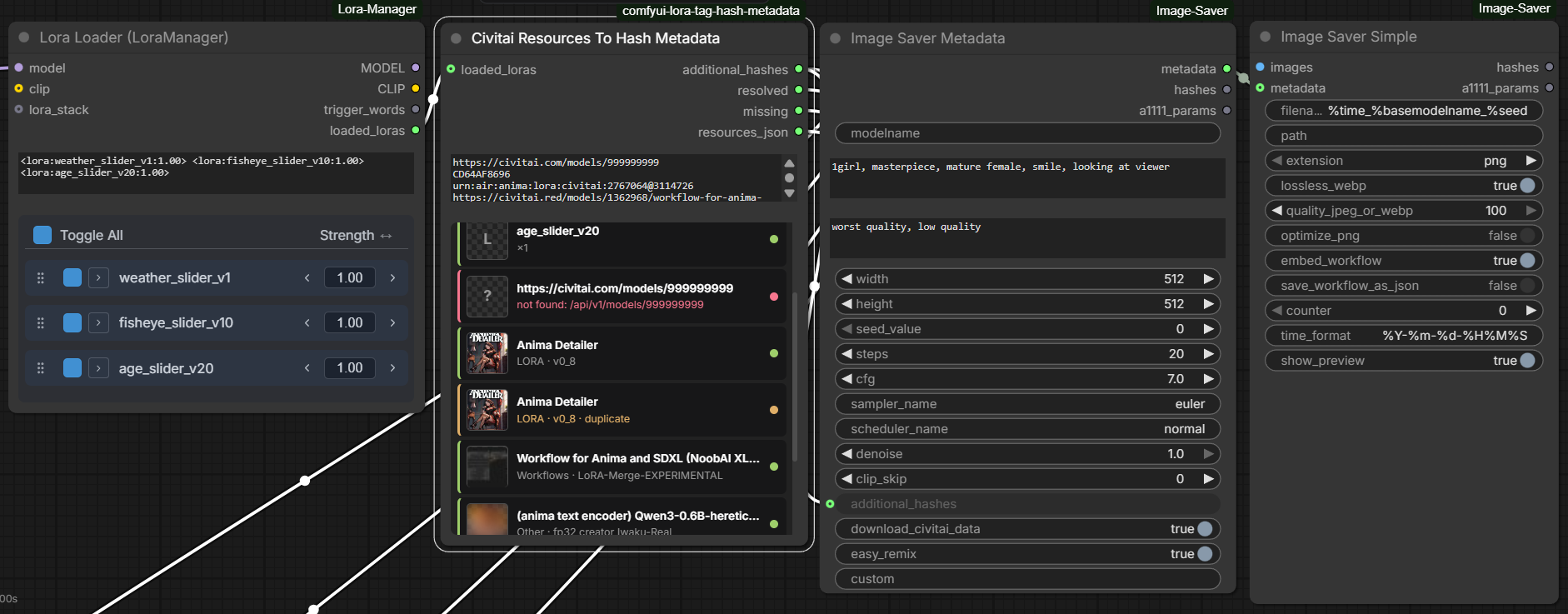
- Civitai Resources To Hash Metadata (v2, primary) — credits local lora tags AND any CivitAI resource (workflows, text encoders, detailers, …) from pasted URLs, hashes, or AIR URNs, with an in-node status list.
- LoRA Tags To Hash Metadata (v1) — converts
<lora:name:weight>text intoName:HASH:Weightstrings. Still supported.
Created with comfyui-custom-node-template
Install
ComfyUI Manager
- Open Manager in ComfyUI
- Click Install Custom Nodes
- Search for
LoRA Tag Hash Metadataorcomfyui-lora-tag-hash-metadata - Click Install
- Restart ComfyUI if Manager prompts you to do so
If you use the ComfyUI CLI instead of the Manager UI:
comfy node install comfyui-lora-tag-hash-metadata
Civitai Resources To Hash Metadata (v2)
- Node id:
CivitaiResourcesToHashMetadata - Display name:
Civitai Resources To Hash Metadata - Category:
utils/metadata
CivitAI auto-links image resources purely by file hash — including resource
types it can't detect from prompts, like whole workflows, text encoders
("Other"), and selectively-applied detailer LoRAs. This node resolves each
resource you list to its AutoV2 hash via the CivitAI API and emits it into
additional_hashes so uploads credit the creators automatically.

Typical wiring:
Lora Loader (LoraManager).loaded_loras
-> Civitai Resources To Hash Metadata.loaded_loras
-> Image Saver Metadata.additional_hashes
Example civitai_resources input:
# workflows, text encoders, detailers — anything on civitai
https://civitai.red/models/1362968/workflow-for-anima-and-sdxl-noobai-xlillustrious-xl
https://civitai.red/models/2598886/anima-text-encoder-qwen3-06b-heretic-abliterated-uncensored
https://civitai.com/models/2767064/anima-detailer?modelVersionId=3114726 0.8
CD64AF8696
urn:air:anima:lora:civitai:2767064@3114726
+ Add Resource picker
The node's + Add Resource button opens a searchable picker so you never have to hand-copy URLs:
- CivitAI search tab: live search (all content types, no filtering), type chips, sort, load-more; picking a result appends a version-pinned URL line to the textbox. Lora-ish results take an optional weight.
- Local · LoRA Manager tab (shown only when LoRA Manager is installed): pick from every model type LoRA Manager indexes — loras, checkpoints, and embeddings, with kind chips to narrow. Matched files insert their civitai link, unmatched files insert their AutoV2 hash. Weight inputs appear for loras and embeddings only; checkpoints take none. Note: LoRA Manager hashes checkpoints lazily — an unmatched checkpoint it hasn't hashed yet shows a disabled "no hash" button until you hash/match it in LoRA Manager.
- Entries already in the textbox show Remove instead of Add, so the picker can also clean up. The textbox stays fully hand-editable either way.
- Result names link to their civitai page; lora-ish results take an optional
weight (the small
wtbox). - When a query returns nothing: civitai's public API hides some models (e.g. flagged ones) — the picker links the same search on the civitai site. Pasting such a model's version-pinned URL into the textbox still credits it.
The in-node status list updates live: picker applies, the per-row ✕
(removes that line from the textbox), and the ⟳ Refresh resources button
(under + Add Resource) all re-parse civitai_resources through the node's
own resolver + cache — no queueing needed. loaded_loras is included live:
the preview reads the linked loader's widget state (LoRA Manager's loras
panel — honoring per-lora enable toggles, exactly like a run — or any node
exposing <lora:…> tag text), falling back to the last run's rows for
producers it can't read. Preview renders carry a "queue a prompt to
see final resource list" note. Loading a saved workflow re-renders the list
the same way. Hover a row (or its status dot) for what the color means —
resolved / unverified hash / duplicate / not credited.
Inputs:
loaded_loras(optional link):<lora:name:weight>text, e.g. from LoRA Manager — handled exactly like v1civitai_resources(multiline textbox), one resource per line:- model URLs on any civitai domain (
.com/.red/.green), optionally pinned with?modelVersionId=…— unpinned URLs resolve to the model's latest version - AutoV2 hashes (10 hex) or full SHA256 hashes (64 hex)
- AIR URNs like
urn:air:anima:lora:civitai:2767064@3114726(+fileIdhonored) - optional trailing weight:
<line> 0.8 #comment lines and blanks are ignored- bare numeric IDs are rejected (ambiguous)
- model URLs on any civitai domain (
Outputs:
additional_hashes: comma-separatedName:AUTOV2[:Weight]entries (weight only when explicit; lora tags keep their weights)resolved/missing: comma-separated names for quick displayresources_json: structured JSON of every entry (status, type, version, hash, links) for downstream tooling
Behavior:
- in-node status list after each run: card rows with a preview thumbnail (civitai preview for URL/hash/AIR entries, local sidecar preview via ComfyUI's stock model-preview route for loras), name linked to civitai, type · version subline, and a status accent (green resolved / amber duplicate / red failed with reason)
- the list is capped at ~320px and scrolls inside the node — it never overflows the node bounds
- executes standalone (output node) — no downstream saver needed to check your list
- persistent on-disk cache under ComfyUI's user directory: version- and hash-pinned lookups cache forever, unpinned model URLs refresh after 24h; cached entries keep working offline
- failures never abort the queue — bad lines land in
missingand the status list - names are sanitized for Image Saver (
,/:stripped, never literallyvae), and all-decimal hashes get an explicit:1.0so the hash can't be misparsed as a weight
Image Saver footgun:
Name:HASH:Weight(3-part) entries are only parsed when Image Saver Metadata'sdownload_civitai_datais True. With it False, 3-part entries are silently dropped — this affects all v1 output (always weighted) and weighted v2 entries. Keepdownload_civitai_data=True(the default).
LoRA Tags To Hash Metadata (v1)
- Node id:
LoraTagsToHashMetadata - Display name:
LoRA Tags To Hash Metadata - Category:
utils/metadata
Inputs:
loaded_loras: multiline string containing one or more<lora:name:weight>tags; LoRA Manager's dual-strength form<lora:name:model:clip>is accepted too (the model strength is the credited weight)
Outputs:
additional_hashes: comma-separatedName:HASH:Weightstringresolved_loras: comma-separated list of successfully resolved LoRA namesmissing_loras: comma-separated list of unresolved or incompatible names
Behavior:
- supports
<lora:name>and defaults weight to1.0 - resolves path-qualified names before basename fallback
- treats dotted version suffixes such as
my_lora_v0.23as part of the LoRA name unless a known model extension is present - computes SHA256 locally and emits the first 10 uppercase hex characters
- deduplicates repeated tags with last occurrence winning
- reports comma-bearing names in
missing_lorasinstead of silently dropping them
Local Development
- Clone/symlink this folder into ComfyUI's
custom_nodes/directory - Run
pnpm install - Run
pnpm devto watch for changes and rebuilddist/
pnpm install # Install dependencies
pnpm dev # Watch mode - rebuilds dist/ on change
pnpm build # Build for production
pnpm test # EVERYTHING: vitest + pytest + full e2e (live civitai API)
Note: Reload ComfyUI frontend (browser refresh) for JS changes. Restart ComfyUI server for Python changes.
Testing
One suite, no tiers: pnpm test runs frontend unit tests, backend Python
tests, and a full end-to-end run against a repo-local pinned ComfyUI (with
LoRA Manager + Image Saver + real fixture loras + the live civitai API) —
every time, locally and in CI. See docs/TESTING.md for the
harness details, manual serve mode (pnpm e2e:serve), and user stories.
uv sync # python deps
pnpm test:unit # fast lanes only
pnpm test:e2e # provision .e2e/ + playwright
Publishing to ComfyUI Registry
- Ensure all fields in
pyproject.tomlare correct - Add
REGISTRY_ACCESS_TOKENsecret to your repo (from ComfyUI registry) - Go to Actions → "Publish to Comfy registry" → Run workflow
- Select version bump type (patch/minor/major)
License
MIT