
comfy-prompt-iterator
www.theoath.studio/projects/comfy-prompt-iterator?utm_source=registry.comfy A ComfyUI node that automatically steps through every line in a text file in a directory each generation run.
Nodes (1)
Comfy Prompt Iterator — ComfyUI Custom Node
A ComfyUI node that automatically steps through prompts in a text file on each generation run, so you can test multiple prompt variations without touching the graph between runs.
https://www.theoath.studio/projects/comfy-prompt-iterator
Install
cp ComfyUI/custom_nodes/
git clone [email protected]:OATH-Studio/comfy-prompt-iterator.git
# restart ComfyUI
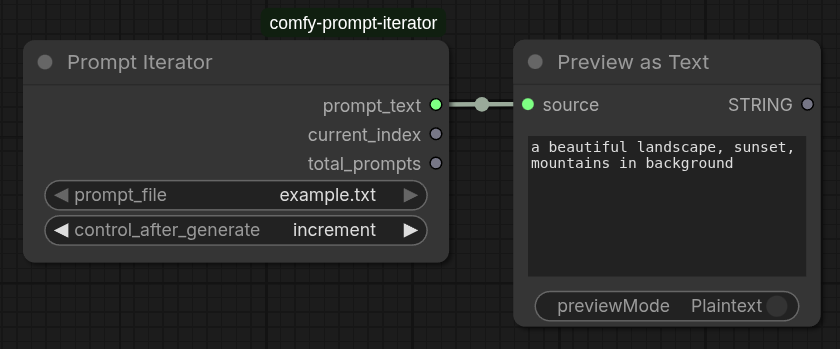
The node appears in the node browser under utils/prompt → Prompt Iterator.
Inputs
| Input | Type | Description |
|-------|------|-------------|
| prompt_file | Dropdown | The text file containing prompts (one per line) from prompt_texts folder |
| control_after_generate | Dropdown | How to advance the prompt selection after each run |
Outputs
| Output | Type | Description |
|--------|------|-------------|
| prompt_text | STRING | The current prompt text (useful for connecting to PromptString nodes) |
| current_index | INT | One-based index of the current prompt in the file |
| total_prompts | INT | Total prompts in the selected file |
control_after_generate
This is the key feature. After each generation completes, the node advances its internal prompt selection according to the chosen mode:
| Mode | Behaviour |
|------|-----------|
| fixed | Always uses the same prompt — nothing changes between runs |
| increment | Moves forward one prompt each run. Wraps back to 0 after the last one |
| decrement | Moves backward one prompt each run. Wraps to the last one after index 0 |
| randomize | Picks a random prompt from the list each run |
Example: You have 10 prompts in your variations.txt file. Set control_after_generate to increment. Queue 10 runs — each generation automatically uses the next prompt with zero manual intervention.
File organisation
Create a prompt_texts folder inside this custom node directory:
ComfyUI/custom_nodes/comfy-prompt-iterator/prompt_texts/
    base_prompts.txt
        a beautiful portrait of a woman, detailed face, cinematic lighting
        a beautiful landscape, sunset, mountains in background
    variations.txt
        add blur effect to the image
        add grainy film texture
        add vibrant colors and high contrast
Adding your own prompt files
- Create a new
.txtfile insideprompt_texts/(e.g.,my_prompts.txt) - Add one prompt per line:
first prompt variation here second prompt variation here third prompt variation here - Empty lines are automatically ignored
- Restart ComfyUI or refresh the node list to see new files in the dropdown
Each .txt file should contain one prompt per line. The node will read all .txt files from prompt_texts/ and display them in a dropdown.
Typical workflow
Prompt Iterator → Prompt (or CLIPTextEncode) → KSampler → SaveImage
      ↑
  set control_after_generate = increment
  queue N runs (one per prompt variation)
Connect the prompt_text output to a Prompt node or directly to a CLIPTextEncode node's text input. This lets you automatically test multiple prompts without manually changing them between generations.
Using with filename prefix
Combine with a Filename Prefix node to organize outputs:
Filename Prefix (text from prompt_text output) → Save Image
This embeds the current prompt variation in your saved filenames for easy tracking of which prompt produced which result.