
comfy-lora-iterator
https://www.theoath.studio/projects/comfy-lora-iterator A ComfyUI node that automatically steps through every LoRA in a directory on each generation run. Increment, decrement, randomize, or hold fixed. No rewiring. No manual switching. Queue and walk away.
LoRA Iterator — ComfyUI Custom Node
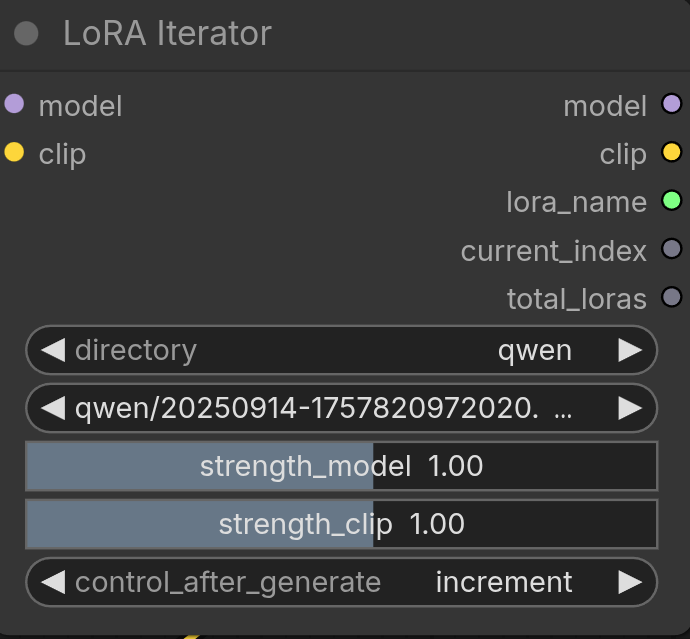
A ComfyUI node that automatically steps through every LoRA in a directory (or subdirectory) on each generation run, so you can test all your LoRAs without touching the graph between runs.
https://www.theoath.studio/projects/comfy-lora-iterator
Install
cp ComfyUI/custom_nodes/
git clone [email protected]:OATH-Studio/comfy-LoRA-iterator.git
# restart ComfyUI
The node appears in the node browser under loaders/lora → LoRA Iterator.
Inputs
| Input | Type | Description |
|-------|------|-------------|
| model | MODEL | Base model passthrough |
| clip | CLIP | Base CLIP passthrough |
| directory | Dropdown | [All] or a specific subdirectory of your loras folder |
| lora_name | Dropdown | The currently selected LoRA (relative path) |
| strength_model | Float slider | LoRA strength applied to the diffusion model |
| strength_clip | Float slider | LoRA strength applied to the CLIP encoder |
| control_after_generate | Dropdown | How to advance the LoRA selection after each run |
Outputs
| Output | Type | Description |
|--------|------|-------------|
| model | MODEL | Patched model with LoRA applied |
| clip | CLIP | Patched CLIP with LoRA applied |
| lora_name | STRING | Name of the LoRA used this run (useful for filename nodes) |
| current_index | INT | Zero-based index of the current LoRA |
| total_loras | INT | Total LoRAs in the selected directory |
control_after_generate
This is the key feature. After each generation completes, the node advances its internal LoRA selection according to the chosen mode:
| Mode | Behaviour |
|------|-----------|
| fixed | Always uses the same LoRA — nothing changes between runs |
| increment | Moves forward one LoRA each run. Wraps back to 0 after the last one |
| decrement | Moves backward one LoRA each run. Wraps to the last one after index 0 |
| randomize | Picks a random LoRA from the list each run |
Example: You have 8 LoRAs in the zimage directory. Set directory to
zimage and control_after_generate to increment. Queue 8 runs — each
generation automatically uses the next LoRA with zero manual intervention.
Directory organisation
The directory dropdown shows [All] plus every immediate subdirectory
inside your ComfyUI loras folder. This lets you group LoRAs by the model
family they were trained on:
ComfyUI/models/loras/
    zimage/               ← appears as "zimage" in dropdown
        AnimeMix.safetensors
        Realism.safetensors
    sdxl/                 ← appears as "sdxl" in dropdown
        portrait.safetensors
    my_lora.safetensors   ← included when "[All]" is selected
Selecting zimage means only LoRAs trained for that model family are shown
and iterated — preventing mismatched LoRA/model combinations.
Multiple instances
Each node instance tracks its own LoRA position independently using
ComfyUI's internal unique_id. Two LoRA Iterator nodes in the same
graph increment through their respective directories separately.
Typical workflow
CheckpointLoader → LoRA Iterator → KSampler → VAEDecode → SaveImage
                        ↑
                  set control_after_generate = increment
                  queue N runs (one per LoRA)
Wire lora_name output into a filename prefix node to embed the LoRA name
in every saved image automatically.