
ComfyUI PRXPixel
Photoroom PRXPixel (prxpixel-t2i) — pixel-space text-to-image (~7B DiT + Qwen3-VL) for ComfyUI.
ComfyUI-PRXPixel
Run Photoroom PRXPixel in ComfyUI — a pixel-space text-to-image model (~7B) that paints images directly, with no VAE, using a Qwen3-VL text encoder.
It installs as a normal model and runs entirely on stock ComfyUI nodes — there are no custom nodes to learn, and no extra Python packages to install.
Install
cd ComfyUI/custom_nodes
git clone https://github.com/Nynxz/ComfyUI-PRXPixel
Restart ComfyUI.
Download the models
Grab the two files from nynxz/Prxpixel-t2i and drop them in:
| File | Folder |
| --- | --- |
| prxpixel_t2i.safetensors | ComfyUI/models/diffusion_models/ |
| prxpixel_qwen3vl.safetensors | ComfyUI/models/text_encoders/ |
Or fetch them straight into place:
pip install -U "huggingface_hub[cli]"
hf download nynxz/Prxpixel-t2i prxpixel_t2i.safetensors     --local-dir ComfyUI/models/diffusion_models
hf download nynxz/Prxpixel-t2i prxpixel_qwen3vl.safetensors --local-dir ComfyUI/models/text_encoders
The text encoder has its tokenizer bundled in, so there's nothing else to set up.
Use it

Drag workflow_example.png onto the ComfyUI canvas to
load the full workflow — that PNG has it embedded (the preview above is a lightweight JPEG copy).
Plain .json is here too.

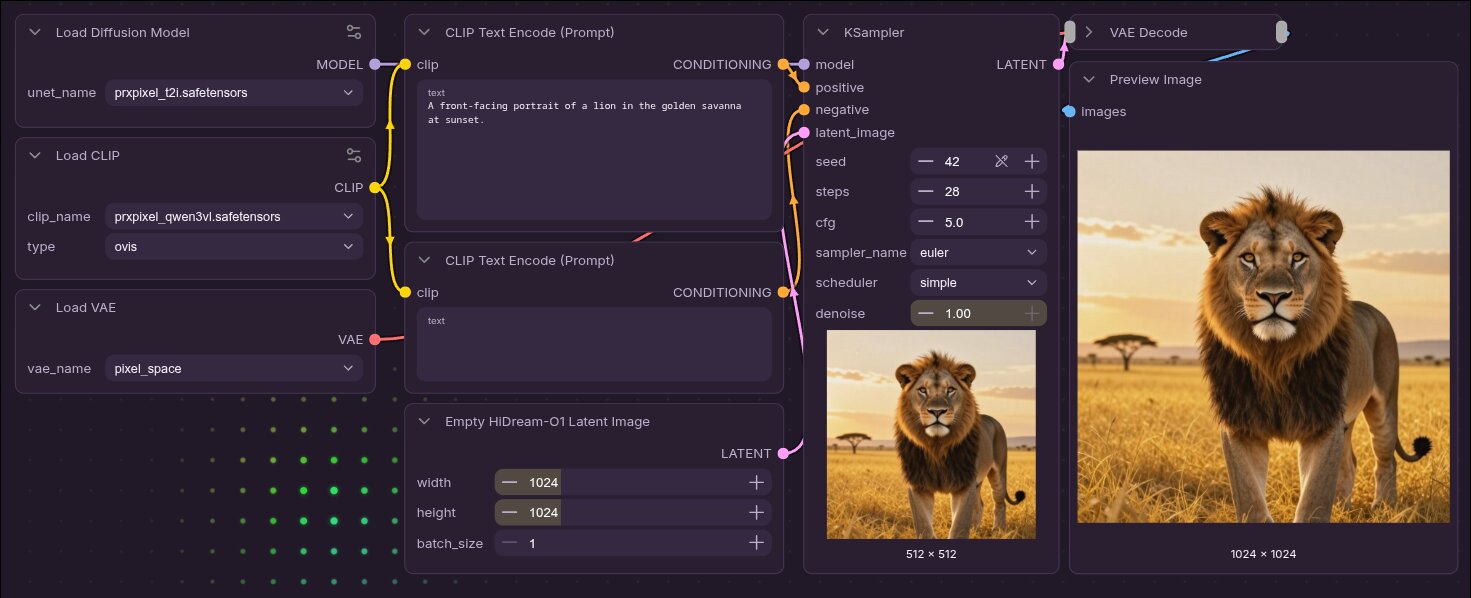
Recommended settings — KSampler: euler + simple, 28 steps, CFG 5, 1024×1024
(PRXPixel is a 1024 px model).
Two stock nodes are easy to miss when building from scratch: the canvas is a pixel-space empty
latent (e.g. Empty HiDream-O1 Latent Image, not the regular Empty Latent Image), and decoding
uses Load VAE → pixel_space with a normal VAE Decode (no real VAE — pixel_space is
ComfyUI's built-in passthrough for pixel models).
Credits
Based on Photoroom's PRXPixel. Apache-2.0.