
Nynxz
A collection of experimental custom nodes for ComfyUI made by Nynxz.
Nodes (18)
Stage-split conditioning
Slice your denoise by percent or sigma
A 'variation seed' that doesn't touch your sampler seed
Fuse generated images straight off the wire, no file detour
Drop your reference images in, weight each one, fuse them
See which reference image won each token of your fusion
See what your grounding node actually selected
Arrange reference images as layers — and use that layout to drive the fusion
Content's subject, style's look
Hunt down which Qwen3-VL layers carry which effect, four bands at a time
Texture vs. semantics
Apply a shared LoRA stack to any model + CLIP pair
Stack your LoRAs on one node instead of chaining six loaders
The multi-LoRA stack loader when you also need to patch CLIP
The headless picker
Turn your Qwen3-VL text encoder into a captioner — no extra runtime
Ask the model where 'the sky' is, and fuse from what it finds
Fuse N reference images into one Qwen image-edit conditioning
Nynx'z Experimental Nodes
Experimental ComfyUI nodes — the stuff that's still moving. Node ids, schemas and behaviour here can change between commits. For the settled ones, see Nynx'z Custom Nodes.
Nodes at a glance
| Group | Nodes |
| --- | --- |
| Fusion — Nynxz/Fusion | Fusion Input · Fusion Images · Text Encode Qwen Image Edit (Fusion) |
| Conditioning — Nynxz/Conditioning | Conditioning Blend (Mixer) · Conditioning Sigma Gate · Conditioning Variation |
| LoRA — Nynxz/LoRA | LoRA Loader · LoRA Loader (CLIP) · LoRA Picker · Apply LoRA |
Nodes
Fusion — Nynxz/Fusion
Spatial visual-token fusion for Qwen3-VL image editing. Each source image is encoded independently, then their visual conditioning tokens are blended on a shared spatial grid — so a single edit can draw on many reference images at once, and you control how much each one gets a say.
The spatial interleave underneath — hard-assigning grid cells to sources in a checkerboard/block pattern — is silveroxides' original idea and implementation. What this pack adds on top: a soft weight field with feathering, content-derived weights, per-source relative strength, style release, seeded variety, and the on-node grid UI.
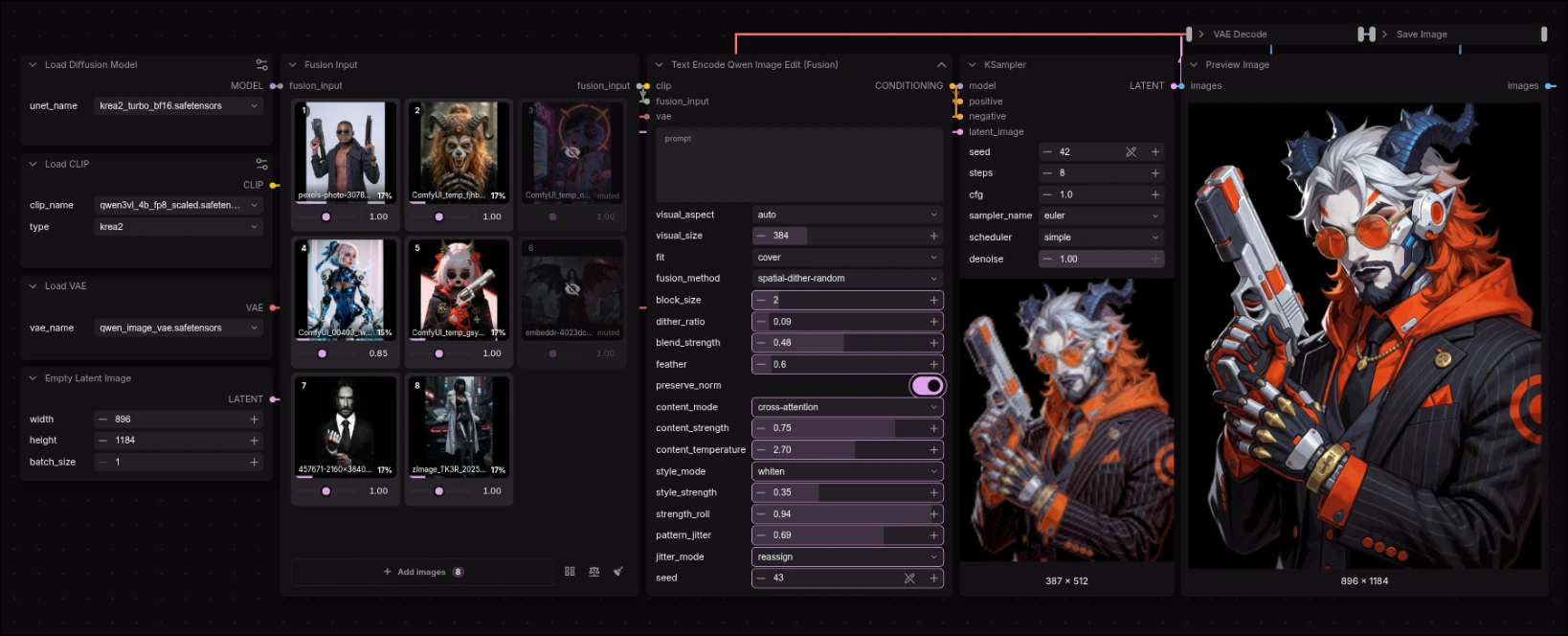
| Node | What it does |
| --- | --- |
| Fusion Input | The image grid, for files on disk. Drop images on it, weight each one, mute, reorder, remove. Outputs fusion_input. |
| Fusion Images | The wire side. Autogrow IMAGE sockets, each with its own strength, fit and mute. Outputs fusion_input. |
| Text Encode Qwen Image Edit (Fusion) | Takes a fusion_input plus your prompt and fuses it all into one conditioning. |
Wire it up as: Fusion Input → Text Encode Qwen Image Edit (Fusion) → KSampler.
Two collectors, split by where your images live — files on disk (the grid) or a wire
(Fusion Images). They emit the same fusion_input and carry the same per-source controls, so
pick whichever matches how the images arrive and chain them freely in either direction.
One image is a valid fusion. The blend is then a passthrough, which is what you want when you're using the node for style release (below) or just as a single-reference encode. Both collectors and the encode node accept a single source.
Fusion Input
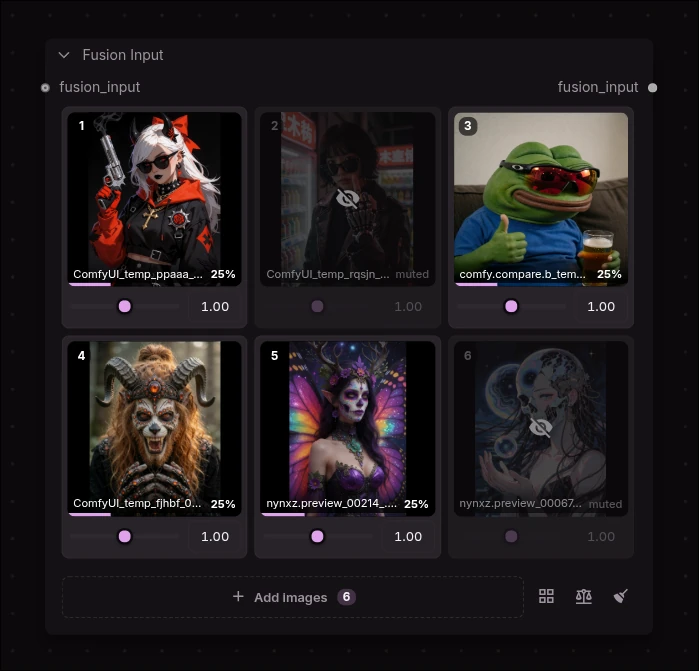
- Drop images anywhere on the node, or Add images / Browse to pick from your
input/,output/ortemp/folders. An image that's already ininput/is referenced, not re-uploaded (matched by name + size), so dropping the same file twice never copies it intoinput/— only genuinely new images are uploaded. - Strength is relative prevalence, not an absolute gain. Doubling everything changes
nothing; halving one image hands its share of each token to whoever else contributes
there. The
%under each card is its real share of the result, live. - Mute (the eye) drops an image from the blend without removing it.
- Order matters. The spatial patterns assign grid cells by source index, so image 1 and image 2 land in different cells. Drag a thumbnail to reorder.
- Fit is per card — the frame icon in each card's corner cycles
contain(whole image, letterboxed — the default),cover(center-crop to fill) andstretch(distort to fill). The thumbnail mirrors the choice, so what you see on the card is exactly what the encoder gets. Force one mode for every source with the encode node'sfitoverride. - Chain Fusion Input → Fusion Input to group sources across several grids.
- Images are files on disk, not sockets — that's what lets every card show a real thumbnail
and carry a visible weight. To fuse something generated upstream, run it through a Preview
or Save node and pick it out of
temp/oroutput/.
Fusion Images
<!-- SCREENSHOT: docs/images/fusion-images.webp — 3 Load Image nodes wired in, rows showing uneven strengths, one muted, mixed fits  -->The wire-side collector. The grid only reaches files on disk; this takes any IMAGE, so
anything generated upstream (a sampler, a mask composite) can be a reference without a round
trip through temp/.
Load Image ─┐
Load Image ─┼─→ Fusion Images ─→ Text Encode ... (Fusion)
Load Image ─┘   (autogrow sockets)
- Autogrow sockets — a new IMAGE input appears as you fill them, up to 16.
- A row per connected socket, each with the same controls a grid card carries: a
strength (the same relative prevalence), a fit (
contain/cover/stretch), a mute, and the live%share of the result that source claims. - Rows map to sockets positionally — the first row drives the first connected input. Wiring a new image in adds a row at full strength; unwiring one drops its row.
- Muting drops the source from the blend entirely, so the spatial patterns reflow across the sources that remain rather than leaving its cells empty.
- Socket order is source order, matching how the grid orders its cards, so it decides which grid cells each image gets.
- A batched IMAGE adds one source per frame, all sharing that socket's strength and fit.
- An optional upstream
fusion_inputis prepended, so a grid can feed this and vice versa.
Per-source strength lives in a widget rather than on the sockets because a ComfyUI autogrow template takes exactly one input per repeat — there's no way to pair each
image_Nwith its own strength field.
Text Encode Qwen Image Edit (Fusion)
Holds the prompt and the tuning:
| Knob | Does |
| --- | --- |
| visual_aspect / visual_size | The shared grid every source is fitted into. auto takes the aspect from the first image; set it explicitly if a portrait first image is letterboxing your landscapes too hard. Bigger visual_size = more visual tokens = finer fusion, more compute. |
| fit | How sources are framed into the grid. per image honours each grid card / Fusion Images row; cover / contain / stretch force one mode for all. cover gives the old center-crop framing the pack used before fit was a choice. |
| strength_roll | More variety from the same images. Seed-driven random re-weighting of the blend — shifts which image dominates each run. The one that actually moves the mix. 0 = off. See below. |
| pattern_jitter | Subtler spatial variety: reassigns a fraction of grid cells to a different image by seed. Rearranges the same tokens rather than re-weighting them, so it moves the result less. 0 = the clean pattern (default). |
| fusion_method | How cells are handed out: spatial-checkerboard, spatial-block-interleave (see block_size), spatial-dither-random (see dither_ratio + seed). |
| blend_strength | 0.0 = hard per-cell mosaic (original behaviour) → 1.0 = fully feathered. |
| feather | Gaussian softening, in grid cells, of each source's territory. |
| preserve_norm | Rescales blended tokens to keep embedding magnitude, so blends don't wash out. |
| content_mode / content_strength / content_temperature | Derive weights from the tokens themselves instead of geometry alone: saliency (foreground wins), energy (strongest signal wins), cross-attention (agreement with the per-cell consensus — smoother). |
| style_mode / style_strength | Experimental. Loosen the reference's grip on style so the prompt/LoRA can set the look. Off by default. See below. |
Order of operations: geometry → content → per-image strength → renormalize per token → blend → style release. Strength is applied last of the weights, so it re-weights whatever geometry and content settled on; style release then acts on the blended tokens, never on who contributed them.
Style release — style_mode / style_strength
For the anime→photoreal case: the style is supposed to come from your prompt and a LoRA (a
2real-style one), but the reference image's visual tokens keep voting for the look it
already has, and they're strong. Turning the whole block down would cost you the structure
too. Style release instead splits the tokens the AdaIN way — per-channel statistics across the
block are the look, each token's normalized residual is what's where — and flattens only
the former. Measured on realistic token statistics, both modes retain the content structure
exactly (correlation +1.0000 against the original structure) while erasing the signature:
| style_mode | Removes | Leaves |
| --- | --- | --- |
| gist | the block's mean token — its overall "look" | per-channel scale (anisotropy). Gentler. |
| whiten | mean and per-channel scale — the full AdaIN signature | per-token structure only. Stronger. |
style_strength0 is an exact no-op and the default, so every existing workflow is bit-for-bit unchanged. Start around 0.3–0.5.- High values push tokens away from what the encoder normally emits, so expect it to fall apart near 1.0 — that's the trade, not a bug.
- It is a hypothesis, tested for its math and its no-op guarantees but not for whether it makes your generations better. That part needs your eyes and an A/B at a fixed seed.
Variety from the same images — strength_roll and pattern_jitter
The fusion is otherwise deterministic — identical images always fuse the same way (only
spatial-dither-random reads the seed). Two seed-driven knobs re-roll it, both off at 0 so
existing workflows are bit-for-bit unchanged, both driven by the same seed widget that
auto-increments after every run. So raise one, queue repeatedly, and each run differs.
There's a real difference in how much they move the result, and it's structural, not a matter of magnitude:
strength_rollrandomly re-weights the blend each run — it shifts which reference dominates the mix. That's a change to the blend proportions, which the renormalize carries all the way through, so it's the one that visibly re-rolls the output. Multiplicative and log-symmetric (a source is as likely to be pushed up as down), bounded to ¼×–4× at1.0; muted images stay muted. Try ~0.5.pattern_jitterrearranges which cell each image owns. It shuffles the same visual tokens spatially rather than re-weighting them, and the model integrates over the whole block, so it moves the result much less — useful for subtle spatial variation, not big swings. Works on anyfusion_method.
Both are verified for their math and their no-op guarantees (0 = exact no-op, seed-tracking,
bounded, muted-stays-muted). Whether the variety feels right — and a good default value —
is yours to judge on real generations; the honest lever for big swings is strength_roll.
Conditioning — Nynxz/Conditioning
Composable primitives that act on any CONDITIONING wire — a CLIP encode, a Fusion encode, anything upstream. They stack: blend two prompts, gate the result to the back half of the denoise, nudge it with a variation seed.
| Node | What it does | | --- | --- | | Conditioning Sigma Gate | Restrict a conditioning to a slice of sampling — in denoise percent or in real sigma. | | Conditioning Variation | A "variation seed" for conditioning: seeded noise nudges the prompt without touching the sampler seed. |
Conditioning Sigma Gate
Drop it on a wire to make that conditioning active only within a slice of the denoise.
denoise percent— a plain 0..1 fraction (0= first step,1= last). No model needed.sigma— a real sigma window. Conditioning can only store a percent range, so sigma is converted using the model's own schedule (exact, wireMODEL) or a wiredSIGMASschedule as a lookup table (approximate — fine for normal schedulers, soft for Karras/exponential, which are non-linear in percent).
The gate intersects any range already on the conditioning rather than overwriting it, so gates stack — and it composes with the Mixer's ramp instead of fighting it.
Conditioning Variation
Explore neighbouring variations of the same prompt without changing the sampler seed. Noise is
scaled to each token's own magnitude, so strength means the same thing regardless of how loud
a given conditioning is. Keep preserve_norm on and the nudge changes direction (content)
without changing activation energy — coherent variety rather than louder or washed-out. Turn it
off for a rawer perturbation.
LoRA — Nynxz/LoRA
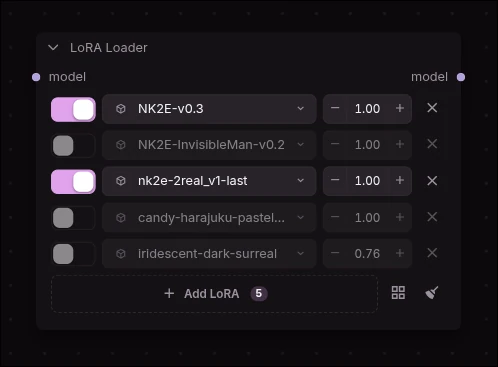
A multi-LoRA stack widget on the node: each row has an on/off toggle, a searchable and bookmarkable picker (with sidecar preview thumbnails), and a strength. Build the stack right on the node instead of chaining single-LoRA loaders.
| Node | What it does | | --- | --- | | LoRA Loader | MODEL in → the stack → MODEL out. No CLIP — the common case. | | LoRA Loader (CLIP) | MODEL + CLIP in → the stack → MODEL + CLIP out, for when you also patch CLIP. | | LoRA Picker | Headless: just the stack, output on a wire. One picker can feed several Apply nodes. | | Apply LoRA | Applies a Picker's stack to MODEL + CLIP. |
Each row's strength applies to both model and CLIP; set a separate CLIP strength per row if you
need it. Bookmarks persist in a favorites.json beside the pack (gitignored, never shipped).
Interactive background
An optional WebGL grid of glowing dots behind the node graph — it reacts to your cursor and follows your theme colors. Off by default; turn it on in ComfyUI Settings → Nynxz Experimental → Canvas → Interactive background. The choice persists via ComfyUI's own settings store, and the render machinery only spins up once you enable it, so leaving it off costs nothing.
Development
The frontend is Vue + TypeScript in src/, built into web/ (served via WEB_DIRECTORY).
npm install
npm run build      # → web/main.js
npm run dev        # watch
npm run typecheck
Building needs ZenKit checked out as a sibling
directory — @zenkit/ui is bundled from its source at build time (../ZenKit/packages/ui/src).
There's no runtime dependency on ZenKit: the components are plain Vue SFCs, and
comfy-bridge.css maps --zen-* onto ComfyUI's own theme vars, so they follow your ComfyUI
theme with zero JS. If ZenKit is installed, middle-clicking Fusion Input's fusion_input
output spawns and wires the encode node.
Layout
Add a node group = a directory under nodes/ with an __init__.py; add a node = a *.py
in it that subclasses NynxzNode. Both are picked up automatically — no registry to edit.
_-prefixed modules (_base.py, _fusion.py) are helpers and are skipped by the scan.
nodes/fusion/
  _fusion.py       the weight/blend/style math — one copy, shared by every fusion node
  _io_types.py     NYNXZ_FUSION_GRID + NYNXZ_FUSION_STRENGTHS (widgets), NYNXZ_FUSION_INPUT (wire)
  fusion_input.py  fusion_images.py    fusion_encode.py   api.py
nodes/conditioning/
  _blend.py        blend modes (average / spherical / concat / combine)
  _consensus.py    meaning-matched token merge     _schedule.py  timestep ramp curves
  _sigma.py        sigma ↔ percent + range gating  _variation.py seeded perturbation
  blend.py         sigma_gate.py    variation.py   io_types.py
src/fusion/
  node.ts          FusionGrid.vue    FusionStrengths.vue    api.ts
src/conditioning/
  CondMixer.vue
The _-prefixed conditioning helpers are pure torch/Python with no ComfyUI imports, so the
blend, schedule, sigma and variation math can all be exercised without a running ComfyUI.
Credits
silveroxides — ComfyUI-UtilsCollection
The Fusion nodes exist because of
silveroxides and
ComfyUI-UtilsCollection. The
spatial visual-token interleave — the insight that you can encode several images through a
Qwen3-VL text encoder and hand out grid cells between their visual tokens — is theirs, and
nodes/fusion/_fusion.py started as their implementation.
Everything this pack layered on top (the soft weight field, feathering, content-derived weights, relative strength, style release, seeded variety, the Vue grid UI) is an extension of that idea, not a replacement for it. Go look at the original — it's MIT, it's clean, and it's worth your star.
Their license is reproduced in full in THIRD_PARTY_LICENSES.md, as MIT requires.