
ComfyUI JoyAI
JoyAI-Image-Edit (16B MMDiT + Qwen3-VL-8B) instruction image editing for ComfyUI.
Nodes (2)
ComfyUI-JoyAI
Run JoyAI-Image-Edit and JoyAI-Image-Edit-Plus in ComfyUI — JD's 16B Multimodal Diffusion Transformer + 8B Qwen3-VL MLLM for instruction image editing from one reference (Edit) or up to five (Edit Plus).
It installs like any other diffusion model — auto-detected and loaded through ComfyUI's normal Load Diffusion Model / Load CLIP / Load VAE / KSampler path. No patching of ComfyUI's source, and no extra Python packages.
Install
cd ComfyUI/custom_nodes
git clone https://github.com/Nynxz/ComfyUI-JoyAI
Restart ComfyUI.
Download the models
JoyAI reuses stock components — the Wan 2.1 VAE and the Qwen3-VL-8B text encoder — so only the transformer differs between Edit and Edit Plus. Everything is pre-packed and ready to load:
| File | Folder | From |
| --- | --- | --- |
| Edit (single ref) transformer | ComfyUI/models/diffusion_models/ | jdopensource/JoyAI-Image-Edit-ComfyUI |
| Edit Plus (1–5) transformer (bf16) | ComfyUI/models/diffusion_models/ | nynxz/JoyAI |
| Qwen3-VL-8B text encoder | ComfyUI/models/text_encoders/ | jdopensource/JoyAI-Image-Edit-ComfyUI |
| Wan 2.1 VAE | ComfyUI/models/vae/ | jdopensource/JoyAI-Image-Edit-ComfyUI |
The Edit Plus file is tagged so the stock Load Diffusion Model node auto-routes
it. Load the encoder with Load CLIP → type joyimage.
Use it
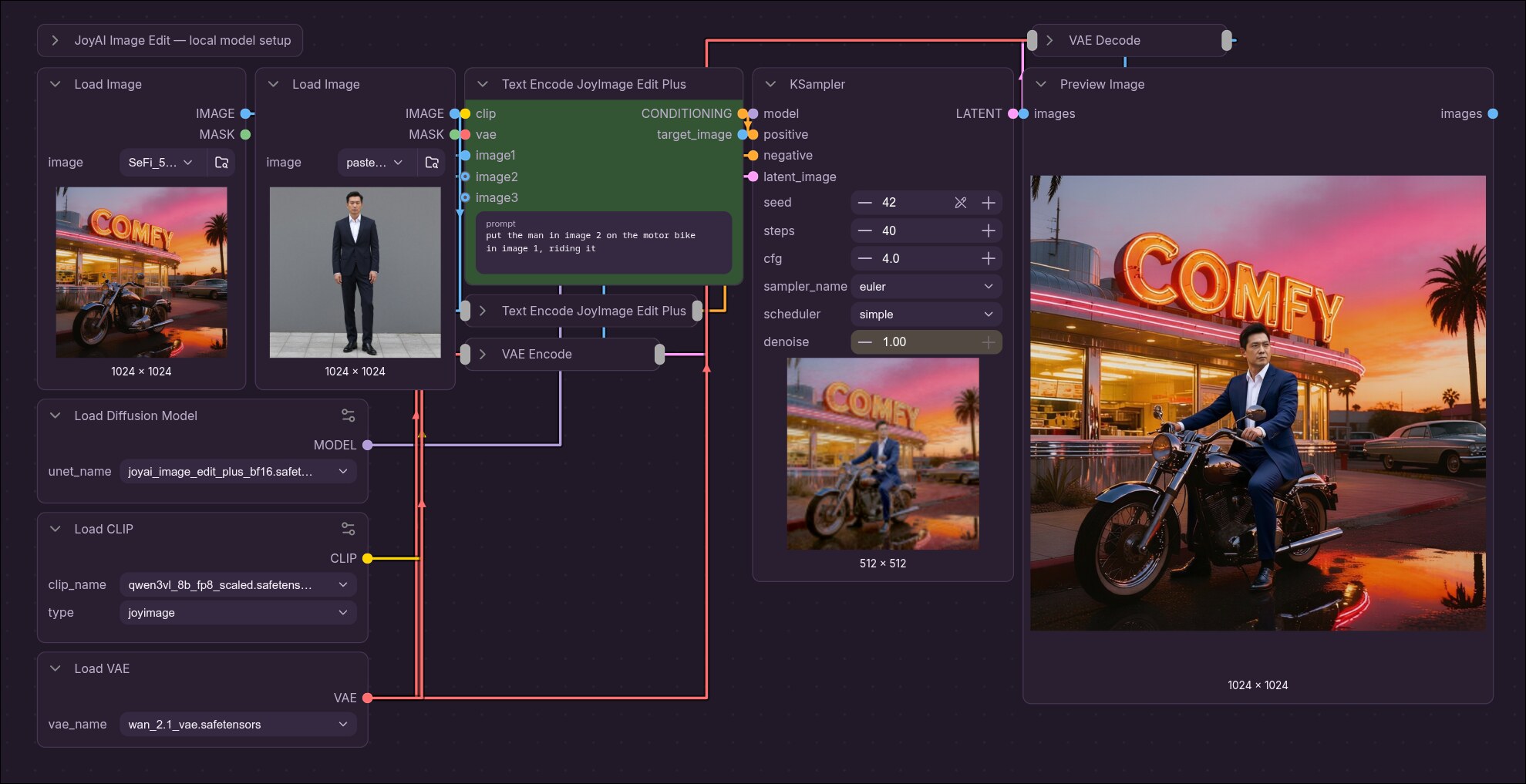
JoyAI is an edit model: every conditioning (positive and negative) must carry the reference image(s). Drag a ready-made graph onto the canvas to start: single-reference · Edit Plus (1–5) (shown above).
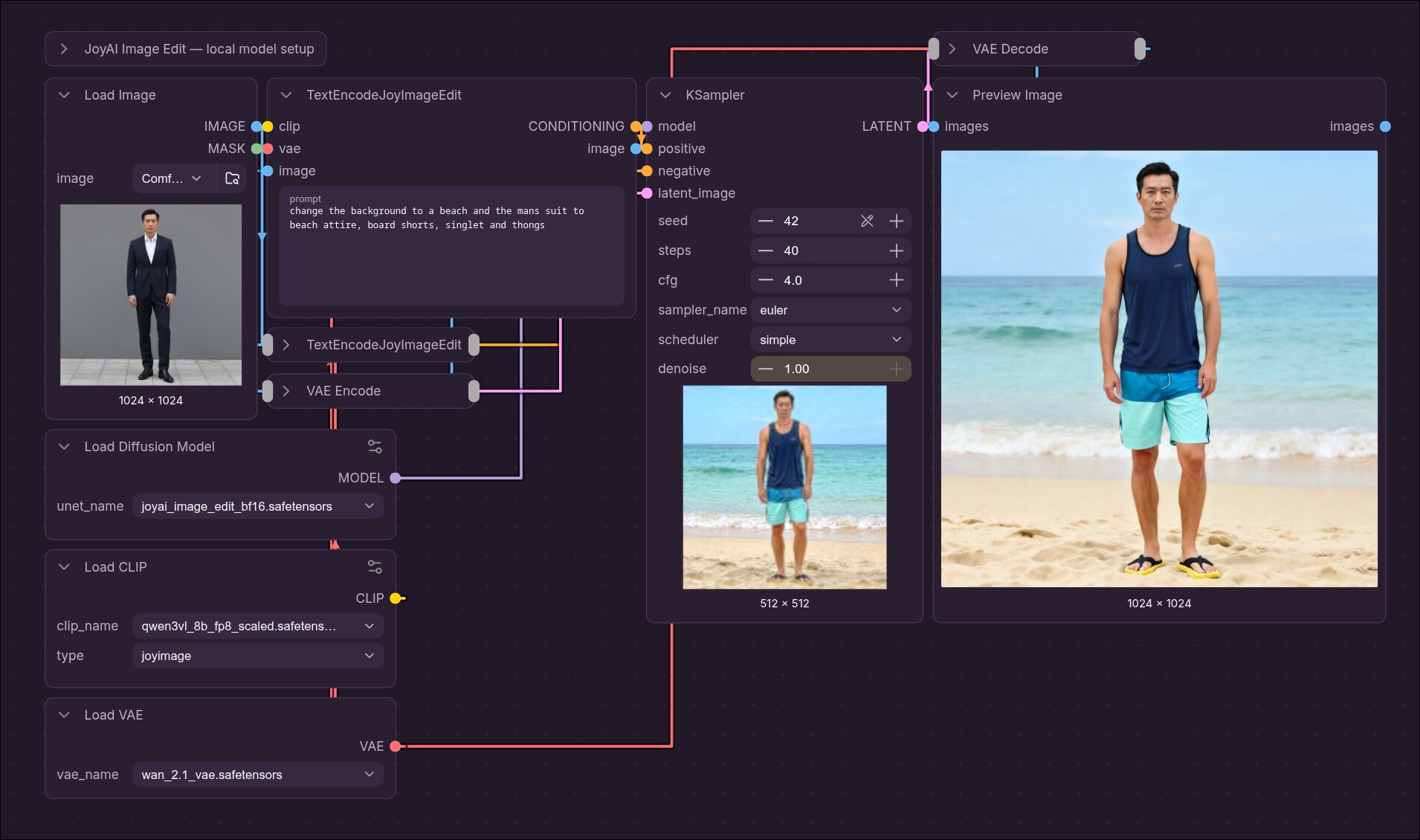
- Load Diffusion Model → the JoyImage transformer (auto-detected; a
plusfile routes to Edit Plus automatically). - Load CLIP → Qwen3-VL-8B, type
joyimage. Load VAE → Wan 2.1. - Text Encode JoyImage Edit ×2 — one positive, one negative; wire the same image + vae into both (an empty negative prompt still needs them).
- Size the sampling latent to the edit: take the positive node's image output
→ VAE Encode → KSampler
latent_imagewithdenoise = 1.0. - KSampler → VAE Decode → Save Image.
The model installs its own required CFG guidance-rescale at sample time — don't add
a CFGNorm/sampler_cfg_function node (it'll be rejected rather than silently
override the model's rescale).
Edit Plus (1–5 references)
Same graph, but use Text Encode JoyImage Edit Plus. It has a single
auto-growing image input — connect image1 and an image2 socket appears, up
to five. The order is semantic (image1…image5 map to the reference sequence), and
each reference is bucketed independently, so they can be different sizes. Wire the
same references into the positive and negative nodes. The node's target_image
output (the last reference, bucketed) → VAE Encode → KSampler latent_image.
Don't connect ControlNet or a custom sampler CFG function to either variant.
Credits
JoyAI-Image-Edit by JD (jd-opensource) (Apache 2.0). The base integration is vendored from Comfy-Org/ComfyUI#14428; Edit Plus is reconstructed against the official Diffusers reference.