
ComfyUI-Signed-Image
SIGNED_IMAGE - a zero-centered counterpart to ComfyUI's IMAGE - plus conversion and preview nodes.
Nodes (4)
The node that finally lets you subtract two images without murdering the negative values
The preview node for data that lives below zero (and why your detail map looks gray)
When an image needs zero to mean 'nothing happened'
The mode dropdown that decides how your signed data becomes an image
ComfyUI-Signed-Image
SIGNED_IMAGE - a zero-centered counterpart to ComfyUI's IMAGE - plus conversion and preview nodes.
ComfyUI's standard IMAGE type is optimized for displayable images (range 0.0 ... 1.0), but many signal-processing operations (wavelet coefficients, image differences, high-pass/Sobel/Laplacian filters, ...) naturally produce signed or out-of-range values. This package introduces a lightweight SIGNED_IMAGE convention so those values can be carried through a workflow without being clipped or remapped until you actually want to look at them.
Features
SIGNED_IMAGE: a plain[B,H,W,C]tensor, nominally in-1.0 ... +1.0, zero-centered - not a wrapper type, so any node pack can produce or consume it just by using the same socket type name- Convert
IMAGE↔SIGNED_IMAGE - Three ways to bring a
SIGNED_IMAGEback to0..1: sign-preserving clamp, magnitude-only (abs), or per-image contrast stretch (minmax) - A one-node preview (
Preview Signed Image) that combines the conversion with ComfyUI's own image-preview mechanism
Included Nodes
Convert
- To Signed Image
- To Unsigned Image
- Image Subtract
- Preview Signed Image
Sample Workflow
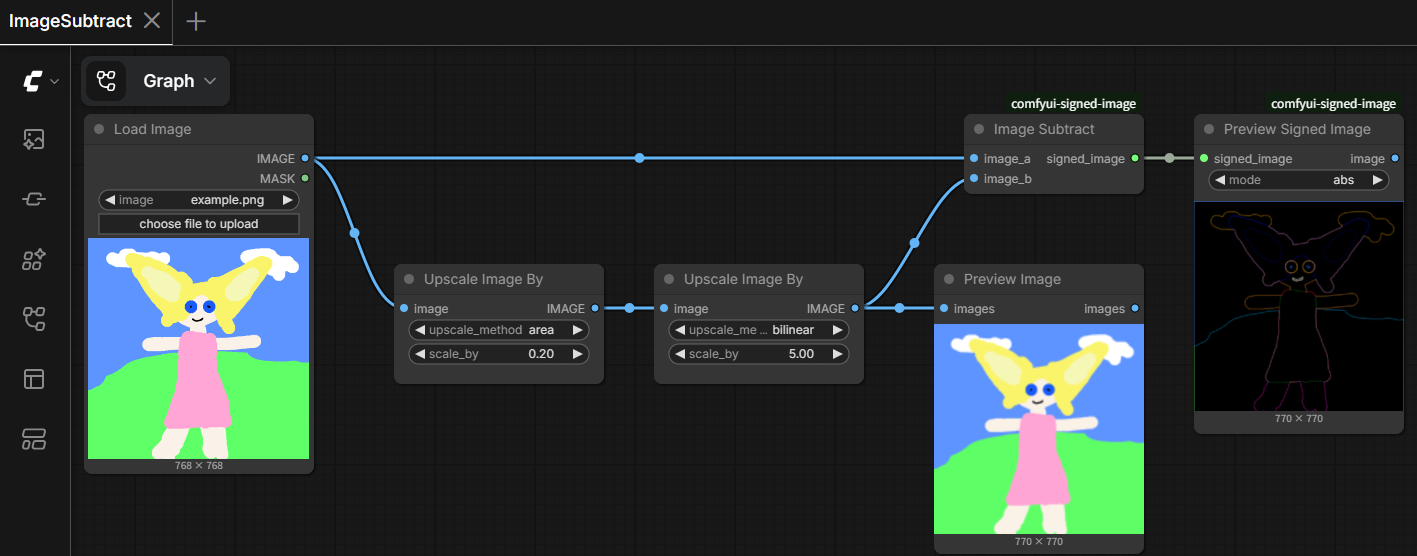
workflows/ImageSubtract.json blurs an image (shrink then enlarge with Upscale Image By) and subtracts the blurred version from the original with Image Subtract, producing a signed high-frequency detail map - the classic unsharp-mask setup. Displaying that difference with Preview Signed Image (abs mode here) shows the edge detail that a plain 0..1 subtraction would have clipped away on one side. Load it in ComfyUI and swap in your own image at the Load Image node.
Installation
Clone this repository into your ComfyUI custom_nodes folder.
ComfyUI/
└── custom_nodes/
    └── comfyui-signed-image/
Restart ComfyUI after installation. No extra Python dependencies are required.
SIGNED_IMAGE Data Type
IMAGE
   ↓ To Signed Image
SIGNED_IMAGE
   ↓ signal processing (this package's nodes, or another pack's - e.g. comfyui-wavelet-2d)
SIGNED_IMAGE
   ↓ To Unsigned Image
IMAGE
To Signed Image maps 0.0 ... 1.0 to -1.0 ... +1.0 linearly (signed = image * 2 - 1). To Unsigned Image maps it back, with a choice of clamp (sign-preserving, 0 stays gray), abs (magnitude only, sign discarded), or minmax (per-image contrast stretch, ignores the -1..1 convention entirely).
SIGNED_IMAGE is intentionally just a socket-type name on an ordinary tensor - other node packs (e.g. comfyui-wavelet-2d) can produce and consume it without depending on this package's code.
License
See the repository license file for details.