
ComfyUI-Latent-Viewer
Visualize every channel of a LATENT as a tiled IMAGE (or an IMAGE batch) in ComfyUI.
Nodes (2)
ComfyUI-Latent-Viewer
Visualize every channel of a LATENT as a tiled IMAGE (or an IMAGE batch) in ComfyUI.
This package turns a LATENT's per-channel feature maps into a standard ComfyUI IMAGE, so they can be inspected with the usual Preview Image / Save Image nodes - useful for teaching VAE / latent-space concepts.
Features
- Visualizes any
[B,C,H,W]LATENT - no channel count assumed, so it works for SD1.5's 4-channel latents and beyond - AUTO or manual grid column count
- Multiple normalization modes (global/per-channel std or min-max, fixed range)
- Nearest-neighbor upscaling to inspect small feature maps
- Two layouts: a single tiled image, or one IMAGE per channel as a batch (for ComfyUI's own auto-grid preview)
Included Nodes
Visualize
- Latent Feature Map Viewer
- Latent Ch to Batch
Sample Workflow
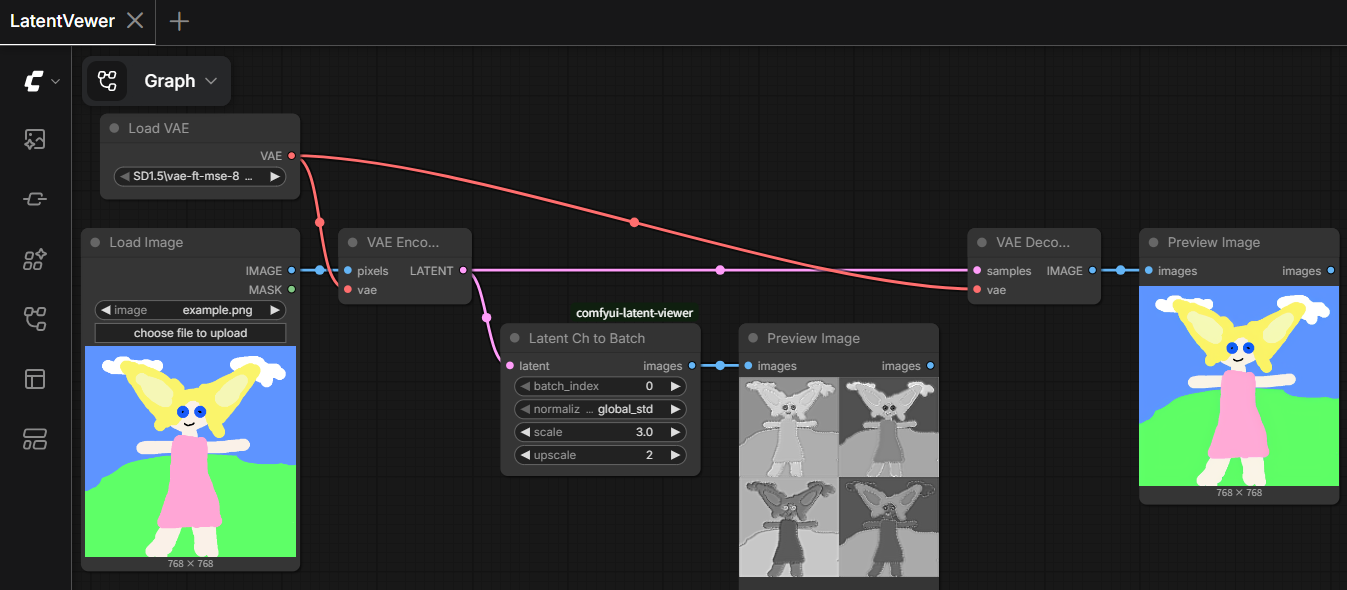
workflows/LatentViewer.json loads an image, VAE-encodes it, and previews both the four latent channels (via Latent Ch to Batch) and the VAE-decoded reconstruction side by side. Load it in ComfyUI and swap in your own image at the Load Image node.
Installation
Clone this repository into your ComfyUI custom_nodes folder.
ComfyUI/
└── custom_nodes/
    └── comfyui-latent-viewer/
Restart ComfyUI after installation. No extra Python dependencies are required.
License
See the repository license file for details.