
AutoFreeMemory
Automatically frees VRAM/RAM after an idle delay - Ollama-style keep_alive for ComfyUI. No node to add to your workflows: configured entirely from Settings, with an optional topbar button.
ComfyUI-AutoFreeMemory

Automatically unloads Models and Execution Cache once ComfyUI's queue
has been idle for a configurable number of seconds — the equivalent of
Ollama's keep_alive=N, built as a native ComfyUI plugin.
No graph node to wire up: it runs silently in the background from the moment ComfyUI starts, and is configured entirely from ComfyUI's own Settings menu (with an optional topbar shortcut).
Features
- Idle-triggered auto-free — frees VRAM/RAM after N seconds of an empty queue, so a workflow you forgot to close doesn't sit there holding memory.
- Same effect as the native "Unload Models and Execution Cache" button — not a partial workaround. It goes through the exact same mechanism, so it also clears cached node outputs (images, latents, etc.), not just the loaded models.
- Zero-friction configuration — everything lives in Settings > AutoFreeMemory: no config file to hand-edit, no restart required for a setting to take effect.
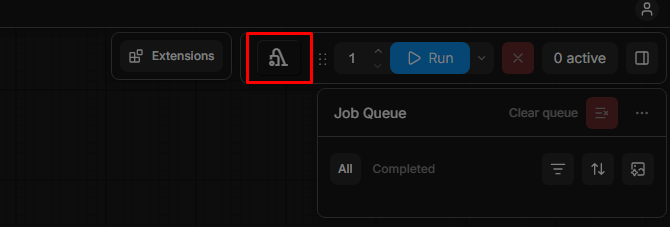
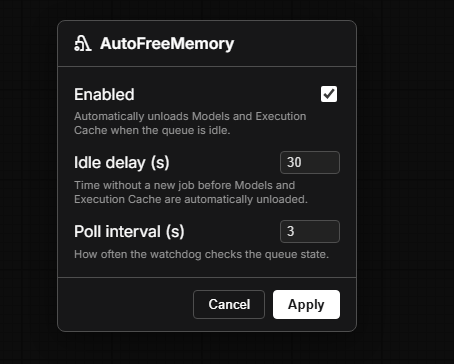
- Optional topbar button — a one-click shortcut that opens a small popup mirroring the same controls, for quick access without digging through the Settings menu. Can be hidden if you prefer a clean topbar.
- Re-enable safety net — turning the plugin back on after it was disabled immediately frees memory if the queue is idle, instead of waiting for a full idle cycle.
- No dependencies — pure Python standard library + ComfyUI's own
APIs. Nothing to
pip install.
Installation
Via ComfyUI-Manager (recommended):
Open the Manager → Custom Nodes Manager → search for AutoFreeMemory → Install, then restart ComfyUI.
Manual:
cd ComfyUI/custom_nodes
git clone https://github.com/Nlepetit/ComfyUI-AutoFreeMemory.git
Then restart ComfyUI. In the console log you should see:
[AutoFreeMemory] watchdog started - settings available in Settings > AutoFreeMemory.
Configuration
Open ComfyUI's Settings menu (gear icon) → AutoFreeMemory:
| Setting | Default | Description |
|---|---|---|
| Enabled | on | Turns the watchdog on/off. |
| Idle delay (seconds) | 30 | How long the queue must stay empty before freeing. |
| Poll interval (seconds) | 3 | How often the watchdog checks the queue state. |
| Show topbar button | on | Shows/hides the topbar quick-access button. |
All changes apply live — no restart needed.
The topbar button (vacuum icon, next to ComfyUI's own settings/view buttons) opens a small popup with the first three controls above, for quick access without opening the full Settings menu.
Environment variable defaults
If you'd rather set a starting value from your launch script (before
main.py runs) instead of the Settings UI, these variables act as
defaults the first time the plugin runs:
| Variable | Default | Description |
|---|---|---|
| COMFYUI_AUTOFREE_ENABLED | 1 | 0 to disable by default |
| COMFYUI_AUTOFREE_IDLE_SECONDS | 30 | idle seconds before freeing |
| COMFYUI_AUTOFREE_POLL_INTERVAL | 3 | check frequency (seconds) |
How it works
A background thread polls PromptServer.instance.prompt_queue (the same
queue the UI and the /queue HTTP API use) every "Poll interval" seconds.
Once it's been empty (no job running or pending) for longer than the
"Idle delay", the plugin sets the same unload_models / free_memory
flags on that queue that ComfyUI's native "Free model and node cache"
button / POST /free endpoint set. ComfyUI's own main loop then unloads
all models and resets the executor's cached node outputs — exactly as
if you'd clicked the button yourself, just automatic and without an HTTP
round trip.
As soon as a new prompt is queued, the timer resets. Re-enabling the plugin after it was off also triggers an immediate free if the queue is idle at that moment, rather than waiting for a full idle cycle.
Settings are read from ComfyUI/user/default/comfy.settings.json, the
standard location ComfyUI uses for a single-user install. If you run
ComfyUI with --multi-user, only the default profile is used.
Requirements
- Any reasonably current ComfyUI install (any frontend from 2025+):
the plugin relies on ComfyUI's
settingsextension API and itsapp.menu.settingsGrouptopbar extension point. - No Python package dependencies beyond ComfyUI itself.