
Prompt Architect
A visual prompt construction system for ComfyUI. Build prompts with draggable color-coded categories, tag pills, age slider, free text blocks, tag groups, live preview with tag and character count, and full state persistence.
Prompt Architect — ComfyUI Custom Node


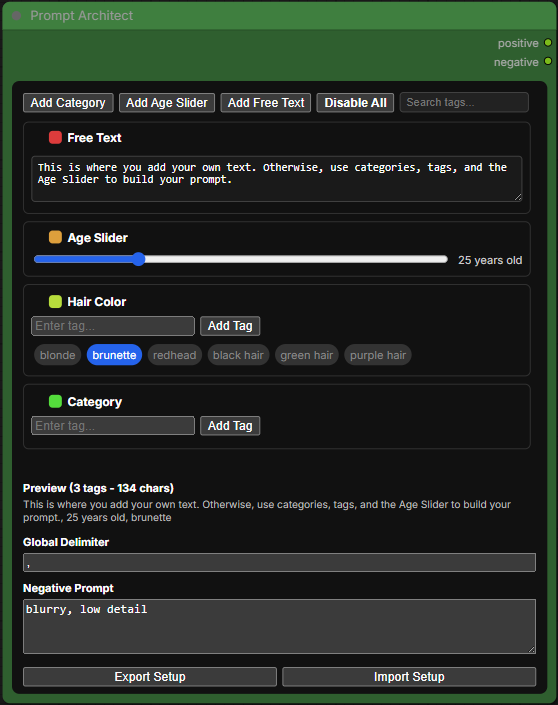
A clean, intuitive, and fully-featured prompt building node for ComfyUI. Instead of typing raw prompt strings, Prompt Architect lets you build, organize, and manage your prompts visually — with color-coded categories, draggable tags, and a live preview of your assembled output.
Why Prompt Architect?
Most prompt nodes are a single text box. Prompt Architect gives you a full prompt management workspace directly inside your ComfyUI graph — no dropdowns, no popups, no hunting through long strings to find a tag. Everything is visible, interactive, and organized the way you want it.
Features
Three Block Types
Add as many blocks as you need, in any order. Drag them up and down to control where their content appears in your final prompt.
- Category — A labeled group of tags. Add, toggle, and rearrange tags freely. Great for organizing by subject (e.g. Hair, Lighting, Style, Clothing).
- Age Slider — A simple slider from 1–99 that injects an age descriptor (e.g.
25 years old) directly into your prompt. - Free Text — A freeform text area for anything that doesn't fit neatly into tags — scene descriptions, camera angles, artistic direction, etc.
Tag Management
- Type a tag and press Enter or click Add Tag to add it — the cursor stays in the input box ready for the next one
- Click a tag to toggle it on or off (blue = active, grey = inactive)
- Drag tags to reorder them within a category
- Right-click a tag to instantly delete it
- Tags are remembered across sessions and offered as autocomplete suggestions next time
Tag Groups
Save a category's entire set of tags as a named group — the group is automatically named after the category it was saved from. Load or delete saved groups any time from the same menu. Useful for reusing common tag sets across different workflows or projects.
Live Preview
See your assembled positive prompt update in real time as you make changes. The preview label also shows a running tag count and character count so you always know how long your prompt is.
Global Delimiter
Set whatever separator you want between prompt elements — default is , but you can change it to anything.
Negative Prompt
A dedicated text area for your negative prompt, wired directly to the node's negative output.
Search / Filter
Type in the search box to filter tags across all categories in real time. Categories with no matching tags dim automatically. Clear the search to restore everything.
Enable All / Disable All
One button to toggle every block on or off. If anything is disabled, it reads Enable All. If everything is active, it reads Disable All.
Export / Import
Back up your entire setup — all blocks, tags, saved groups, the master tag library, delimiter, and negative prompt — to a single JSON file. Import it on any machine or browser to restore everything instantly. Great for sharing setups with other users or keeping backups before major changes.
Auto Save
Your entire node state — every block, tag, slider value, free text, and setting — is saved automatically and restored the next time you open ComfyUI. Nothing is lost between sessions.
How to Use
- Add the Prompt Architect node to your graph
- Connect positive and negative outputs to your sampler or conditioning nodes
- Add categories, tags, and blocks to build your prompt visually
- Use the live preview to confirm the assembled output before generating
Installation
Via ComfyUI Manager (Recommended)
Search for Prompt Architect in the ComfyUI Manager and click Install.
Manual
cd ComfyUI/custom_nodes
git clone https://github.com/NikoDemon80/comfyui-prompt-architect
Then restart ComfyUI.
File Structure
comfyui-prompt-architect/
├── __init__.py
├── prompt_architect_node.py
├── web/
│   ├── prompt_architect.js
│   └── prompt_architect.css
└── README.md
Requirements
No external dependencies. Works with any standard ComfyUI installation.
Tips
- The node's control bar (Add Category, Add Age Slider, Add Free Text, Enable All, Search) will wrap to a second line at narrower widths — widen the node slightly if you prefer everything on one row
- Collapse blocks you aren't using by clicking the block label — keeps the node tidy
- Reorder blocks by dragging the dot-grid handle (⠿) on the left of each block header — it appears on hover
- Saved tag groups are stored in your browser's local storage and persist between sessions — note that if you clear your browser data, saved groups and the master tag library will be reset. Use Export Setup to create a backup or share your setup across machines
- The character count in the preview is useful for models with token limits — Stable Diffusion starts deprioritizing tokens past 75 tags
License
MIT License — free to use, modify, and distribute.