ComfyUI Extension
ComfyUI-Targm
A ComfyUI custom node for high-quality text translation using Tencent's HY-MT1.5-1.8B-FP8 model.
MohammadAboulEla/ComfyUI-Targm
Nodes—
On cloudLocal install
Stars0
Updated7 months ago
Readme
ComfyUI-Targm
A ComfyUI custom node for high-quality text translation using Tencent's HY-MT1.5-1.8B-FP8 model. This node is specifically designed to handle broad translation tasks across 36+ languages, making it ideal for translating prompts or descriptions within your ComfyUI workflows.
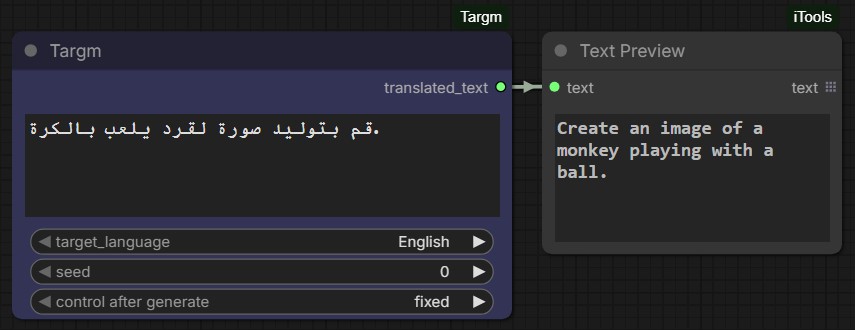
Features
- High Performance: Uses the FP8 quantized version of HY-MT1.5 (1.8B parameters) for fast inference and lower VRAM usage.
- Multilingual Support: Supports 36 languages including Arabic, Chinese, English, Japanese, French, and many more.
- Auto-Download: Automatically downloads the necessary model files from Hugging Face on first use.
- Lazy Loading: The model is loaded into memory only when needed and cached for subsequent runs.
Supported Languages
English, Arabic, Bengali, Burmese, Chinese, Czech, Dutch, French, German, Gujarati, Hebrew, Hindi, Indonesian, Italian, Japanese, Kazakh, Khmer, Korean, Malay, Marathi, Mongolian, Persian, Polish, Portuguese, Russian, Spanish, Tagalog, Tamil, Telugu, Thai, Tibetan, Turkish, Ukrainian, Urdu, Uyghur, Vietnamese.
Installation
- Head to
ComfyUI/custom_nodesdirectory and clone this repositorygit clone https://github.com/MohammadAboulEla/ComfyUI-Targm.git - Head to
ComfyUI-Targmdirectory and Install the required dependencies (python_embeded):../../../python_embeded/python.exe -m pip install -r requirements.txt
Model Credit
Based on tencent/HY-MT1.5-1.8B-FP8.
Usage
- Add the Targm node in ComfyUI (Found under the
Targmcategory). - Inputs:
text: The text you want to translate (supports multiline).target_language: Select the destination language from the dropdown.
- Outputs:
translated_text: The resulting translated string.
Support me on PayPal