
Mojie-API-Party
A node that aggregates many powerful API features,Easier integration into workflows
Nodes (25)
Swap a head onto a product shot without touching a brush
The node that makes multi-turn AI chat work in a ComfyUI graph
Text, multi-image fusion, 4K, zero VRAM
A moving hero shot from one first frame
One reference image in, a Seedance video out — no GPU required
No first frame, just a prompt and a camera move
Feed a PDF or docx into the Gemini LLM node
Multi-image editing with color you can aim
Turn one furniture photo into a full set of catalog angles
Styled furniture photography from one flat product photo
Thinking level, web search, multi-turn context
'make it sunset' and mean it
A full Gemini 3 chat model inside your graph — files, video, web search and all
Great results, and the README is upfront it's not cheap
Reference-image video for product shots, with surprisingly lenient moderation
HappyHorse text-to-video — and optionally image-assisted
Translate the text inside an image without re-rendering it
Cloud upscaling up to 6x — no ESRGAN models to download, no VRAM to budget
Pull one field out of a JSON blob without writing Python
The two-line way to cut a subject out of any image
Turn a flat garment photo into a model wearing it
The one node in this pack that doesn't call any API
Nano Banana Pro in ComfyUI, without a Google Cloud account
Qwen-Image editing in ComfyUI — but it's an API call, not a local model
Alibaba's Qwen-Image, but through the cloud, not your GPU
MojieAI开发的Comfyui自定义节点工具。为了让comfyui更加普及,让本地低配置电脑也同样能顺利的运行comfyui,同时避免在comfyui中调用外部API时密钥和地址难以统一管理,以及许多更优秀模型本地算力难以支撑,本地部署耗时耗力,因此mjapi-party将许多优秀常用的API节点做整合,只需要一个API-key即可以调用全网的API接口能力,也能够通过comfyui节点式操作,保留极大的灵活性,极大的拓展了comfyui的易用性。更多API节点正逐步添加中。
要使用此节点需前往 mojieaigc.com 注册账户 详细说明查看
更多节点更新信息请关注B站'摩诘AI', 传送门
目前已支持的节点
- happyhorse视频生成
- gpt-image-2
- 多图上传节点
- Gemini3-Nano节点
- Gemini3-LLM
- Nano-pro节点
- 图片翻译节点
- 图片高清放大节点
- seedance视频生成
- 服装系列节点
- seedream-4
- Gemini-NanoBanana
- Qwen-image
- Qwen-edit-image
- 自动抠图
节点使用说明
所有的节点说明文档在:
doc目录下node_list.md
所有的节点示例工作流在:
workflow目录下
在comfyui节点列表中找到mjapiparty
2.6.0版本更新,删除了不少旧版节点,也为新版本做准备。mojieAgentflow主站全新改版发布,所有节点支持在线使用,当然旧的Mojie-api-party也会更新。
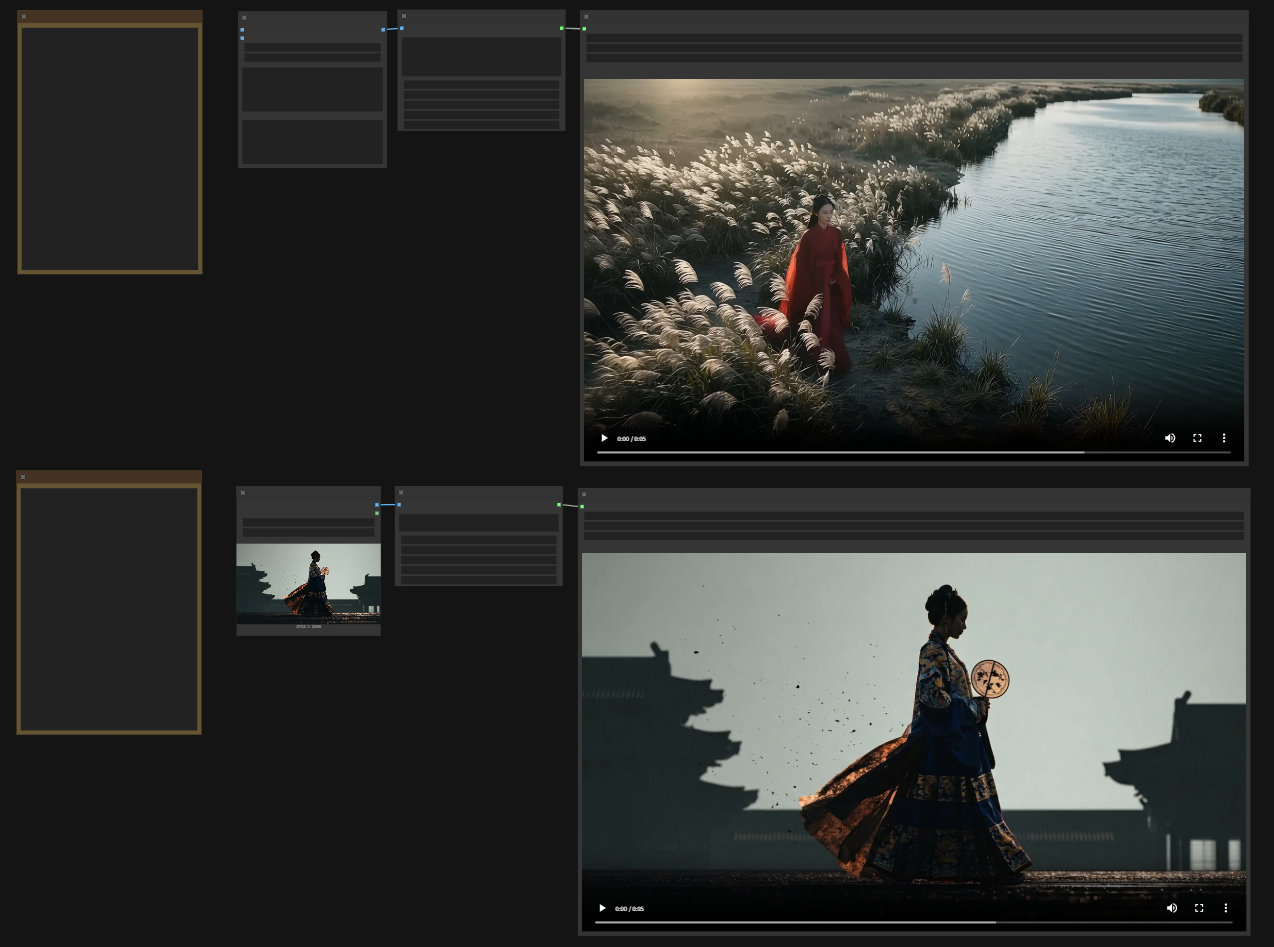
更新happyhorse视频生成节点
happyhorse参考生视频功能和文生图生视频。 happyhorse虽然在动作方面不太行,但是电商的产品稳定性上还不错,至少审核非常宽松。
- 使用[image N]N为你的图片顺序,来引用参考图片。
- 参考生视频最多支持9张图,多了会被抛弃。
- resolution 是视频分辨率
- Size是生成尺寸。
- duration 是生成时长,最多15s
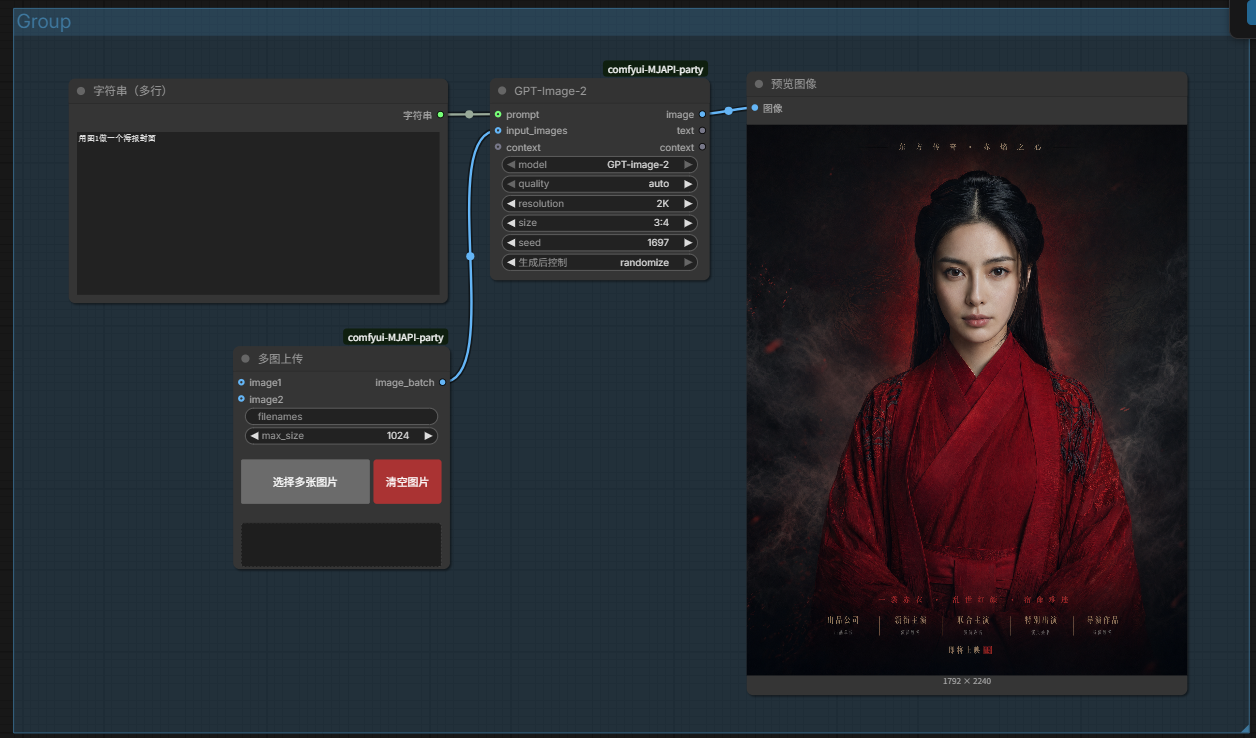
更新chatgpt-image-2 图像生成节点
效果非常不错,但是价格也是真的不便宜,工作流在workflow目录下。
更新新增了多图上传节点,非常好用
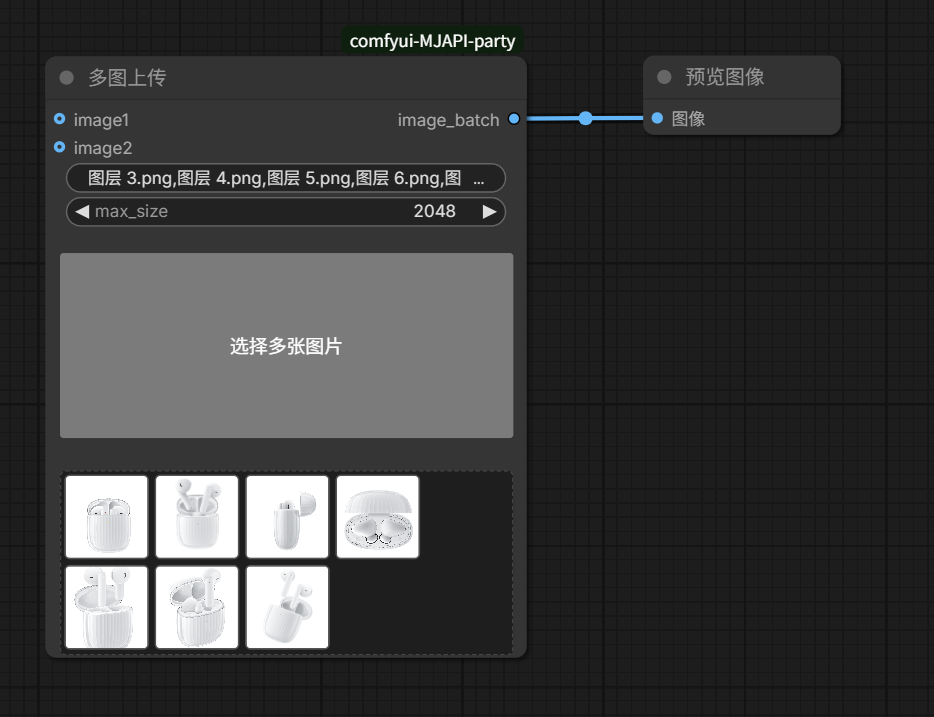 最多可以支持10张图片上传。
工作流同时新增了Gemini3多图详情页工作流和多图详情页seedream版本,消耗更少。更适合国内电商。
最多可以支持10张图片上传。
工作流同时新增了Gemini3多图详情页工作流和多图详情页seedream版本,消耗更少。更适合国内电商。
- 250121 mojie-api-party-2.2版本更新
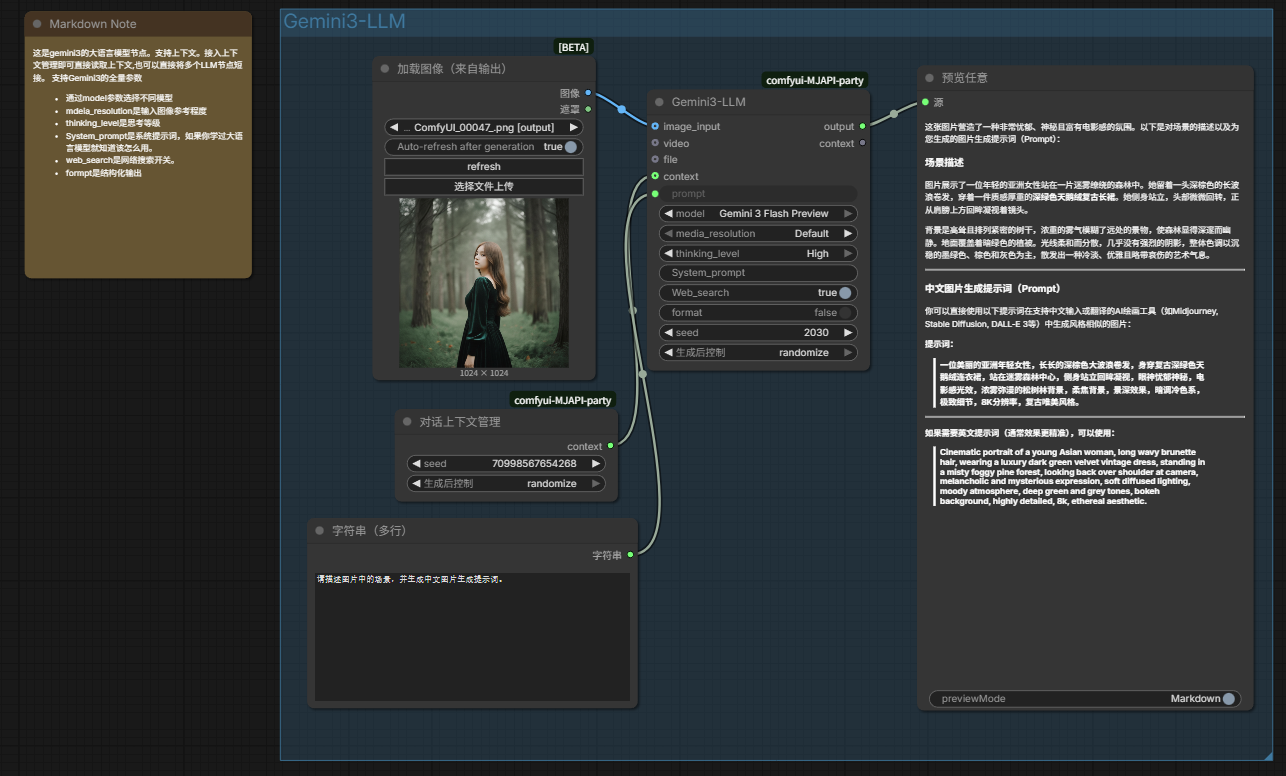
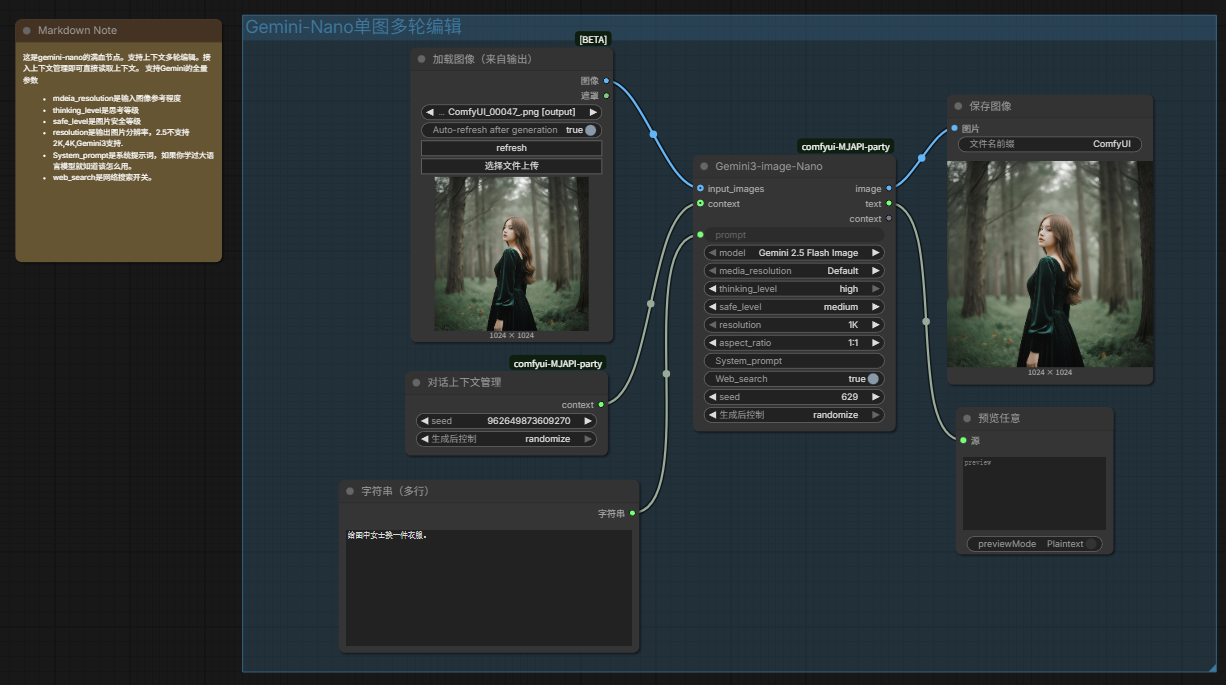
Gemini3-LLM节点和满血版的Gemini3-Nano节点
支持的模型有Gemini 3 Pro Preview,Gemini 3 Flash Preview,Gemini3-image-Nanobanana-pro和gemini-2.5-flash-image,并且支持上下文。极大的扩展了comfyui的可塑性。并且支持全参数可调,支持结构化输出,支持web_search,支持思考等级参数和图像参考参数,支持读取视频和pdf文件。能够最大化发挥Gemini3的性能。
- 251217 mojie-api-party-2.0版本更新
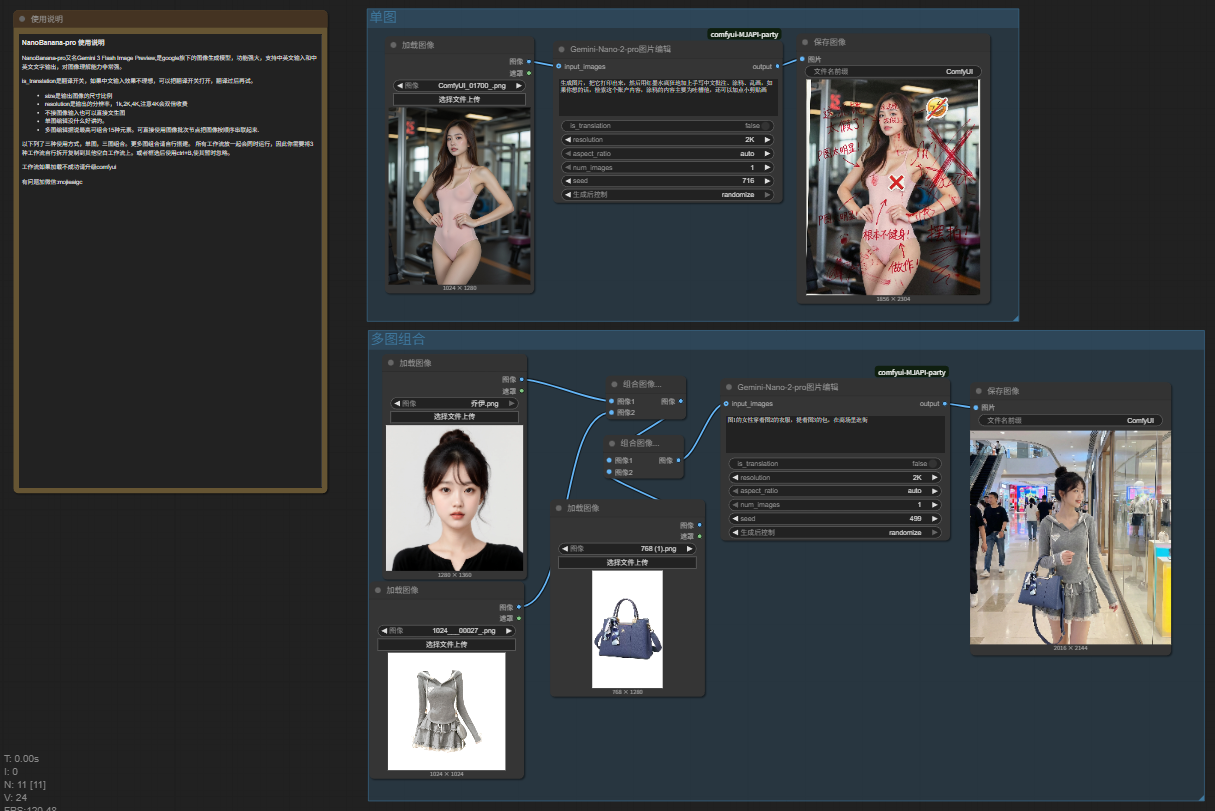
Nano-pro节点
NanoBanana-pro又名Gemini 3 Flash Image Preview,是google旗下的图像生成模型,功能强大,支持中英文输入和中英文文字输出,对图像理解能力非常强。支持1K、2K、4K分辨率
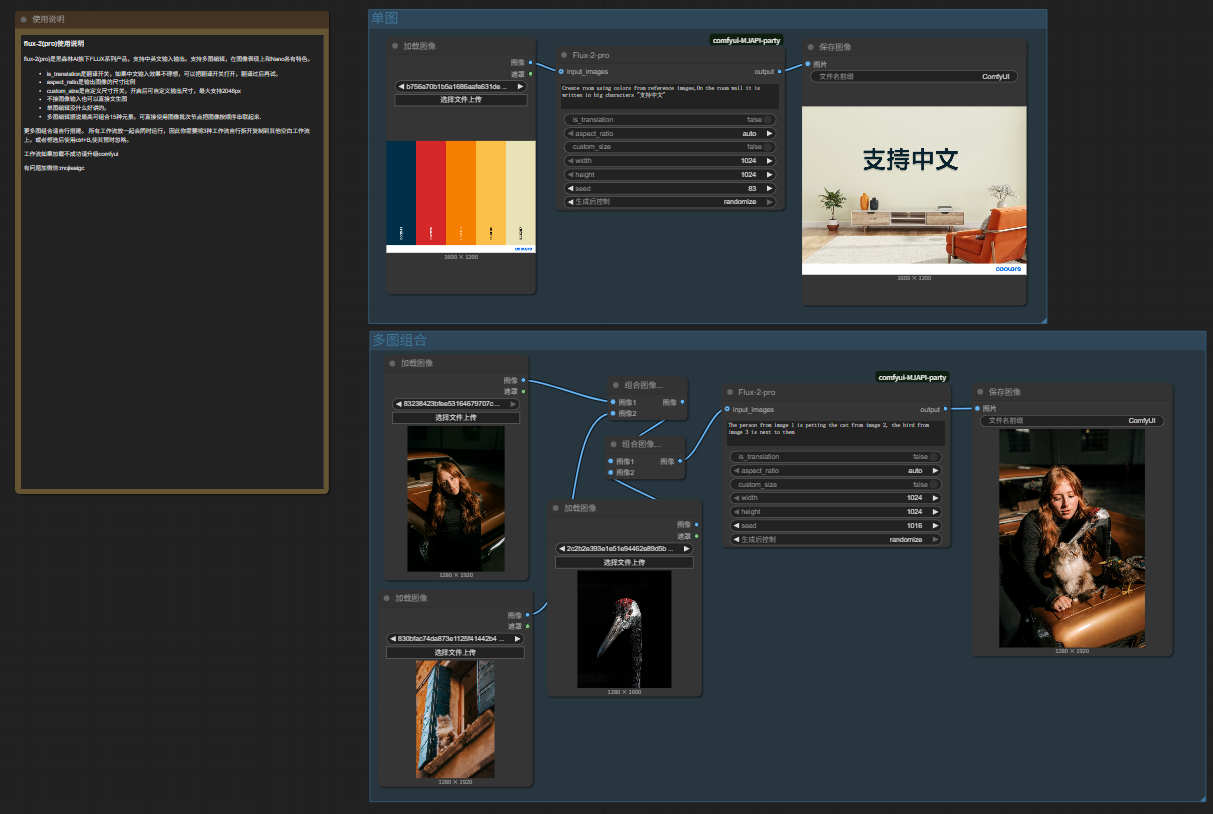
Flux-2-pro节点
flux-2(pro)是黑森林AI旗下FLUX系列产品,支持中英文输入输出。支持多图编辑,在图像表现上和Nano各有特色。并且支持精准的颜色编辑。
-
251030-主要更新更新了Google-Nano节点 Nano节点现在可以设置生成数量和生成尺寸了。 组图方式和以前有了很大改善,无需自己拼合图像,只需要按顺序上传图片即可。 新工作流已放在了/workflow目录下.
-
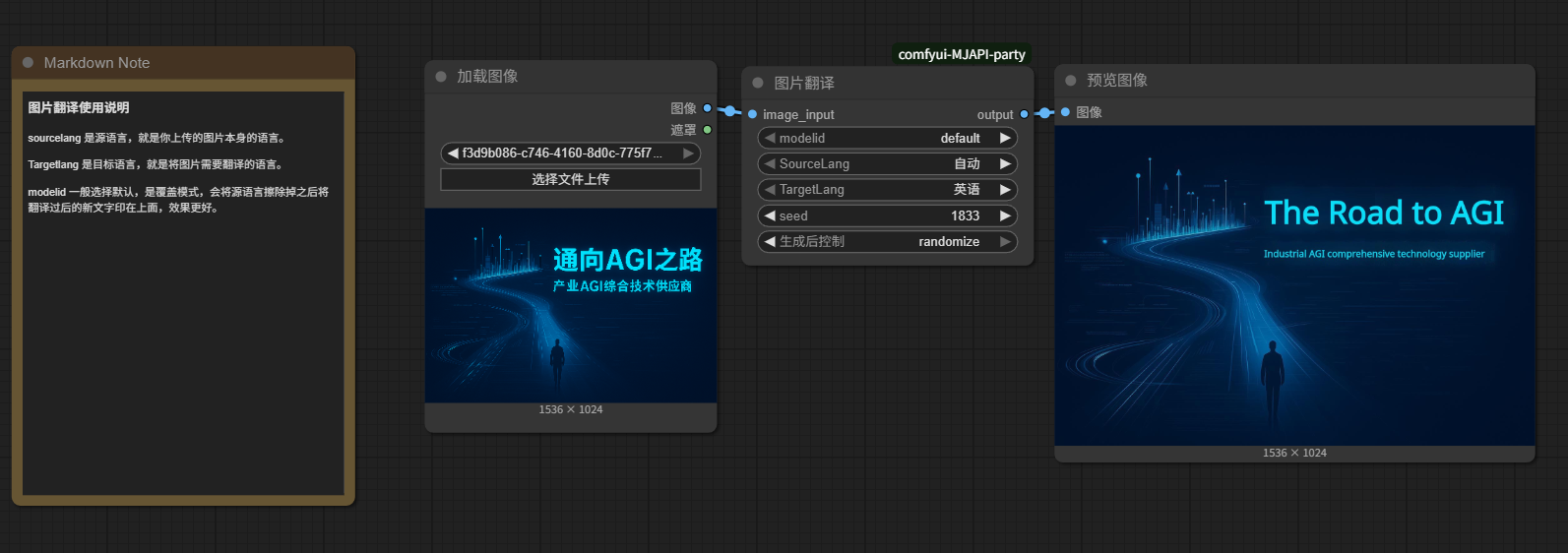
251012-新增图片翻译节点和图片高清放大节点
图片翻译节点
该节点支持20多种语言,包括中文、英文、日文、韩文、法文、德文、西班牙文、葡萄牙文、意大利文、俄语等,可以将图片中的文字翻译成其他语言。
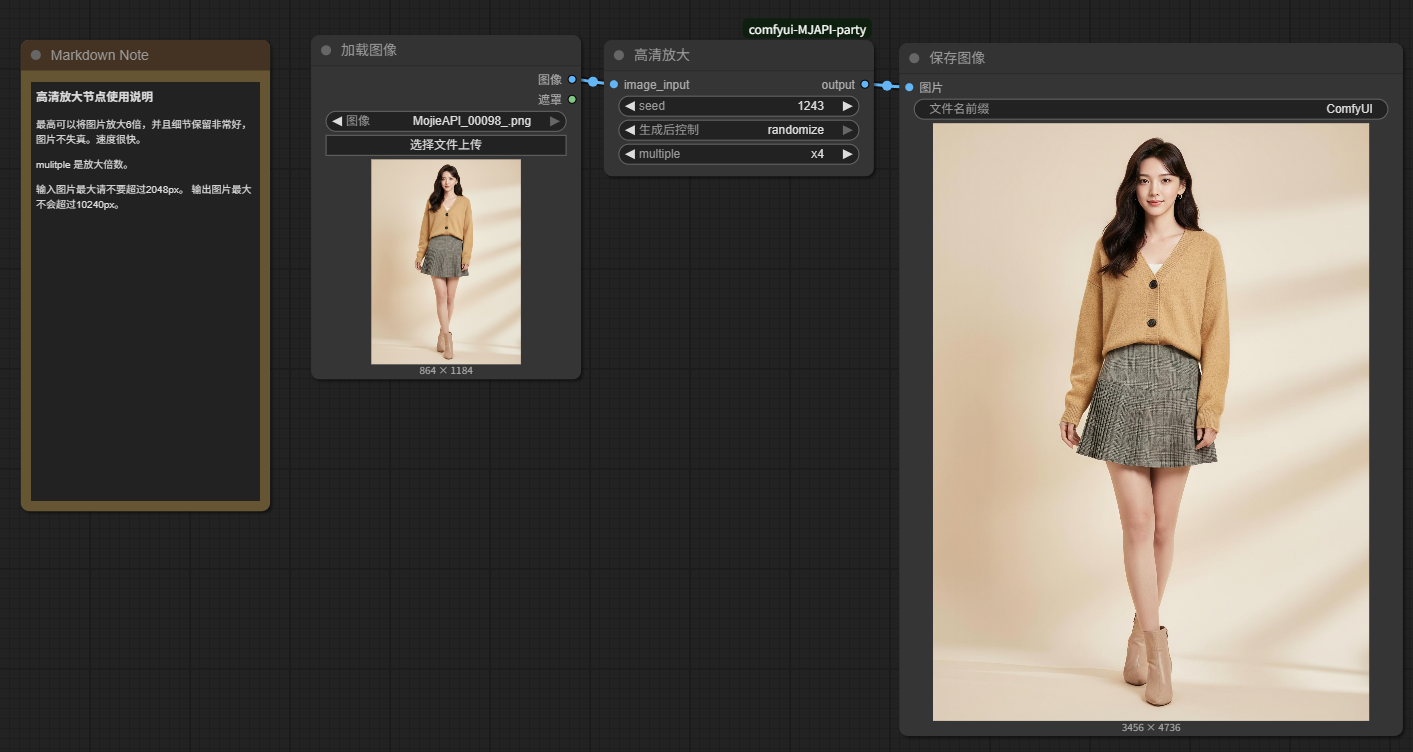
图片高清放大节点
该节点可以将图片放大最高6倍,在保留细节的同时提高图片的清晰度。
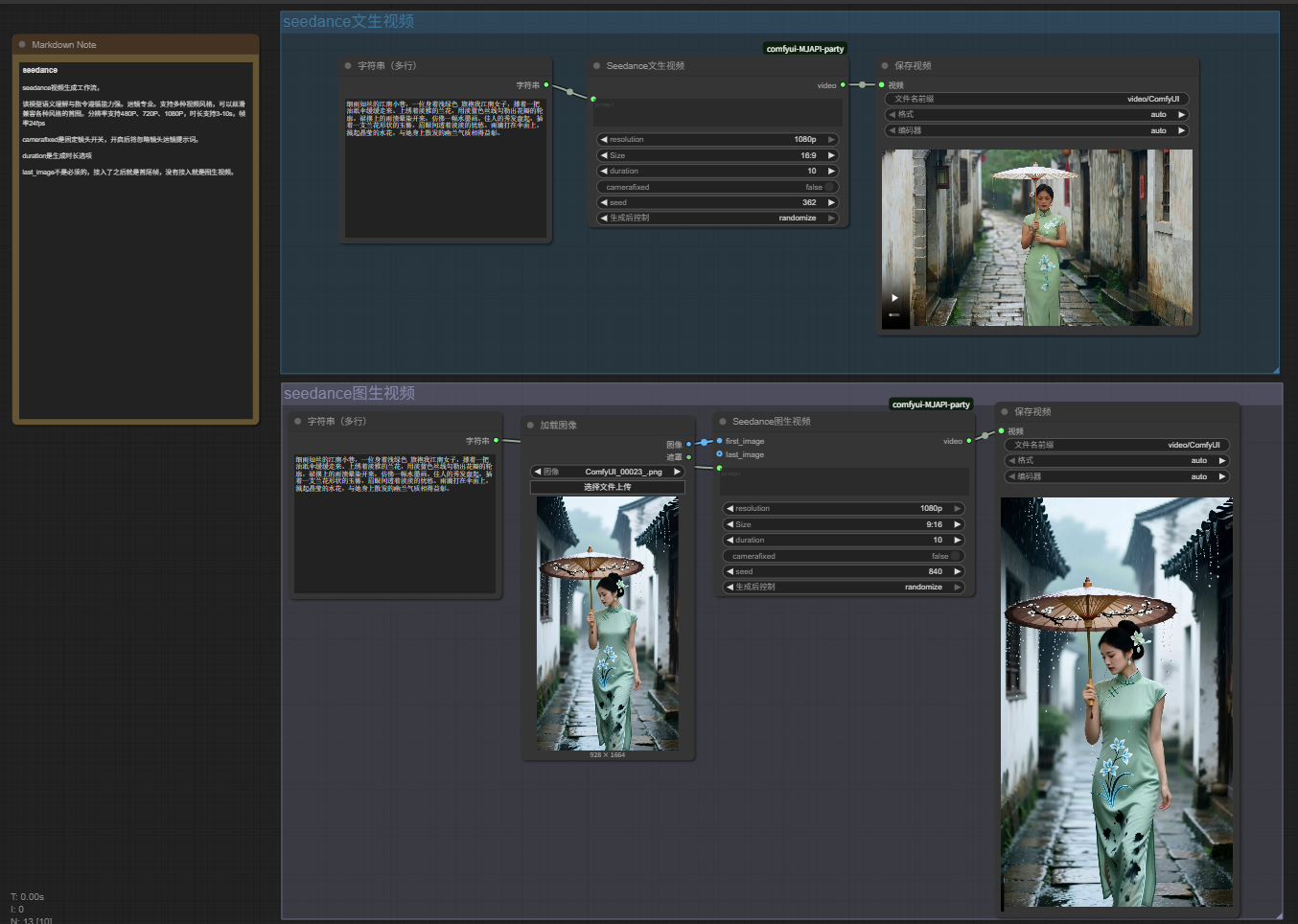
- 250929-新增seedance视频生成节点,原有即梦视频生成已下线.
seedance 视频生成节点使用说明
该模型语义理解与指令遵循能力强。运镜专业。支持多种视频风格,可以丝滑兼容各种风格的首图。分辨率支持480P、720P、1080P,时长支持3-10s,帧率24fps
camerafixed是固定镜头开关,开启后将忽略镜头运镜提示词。
duration是生成时长选项
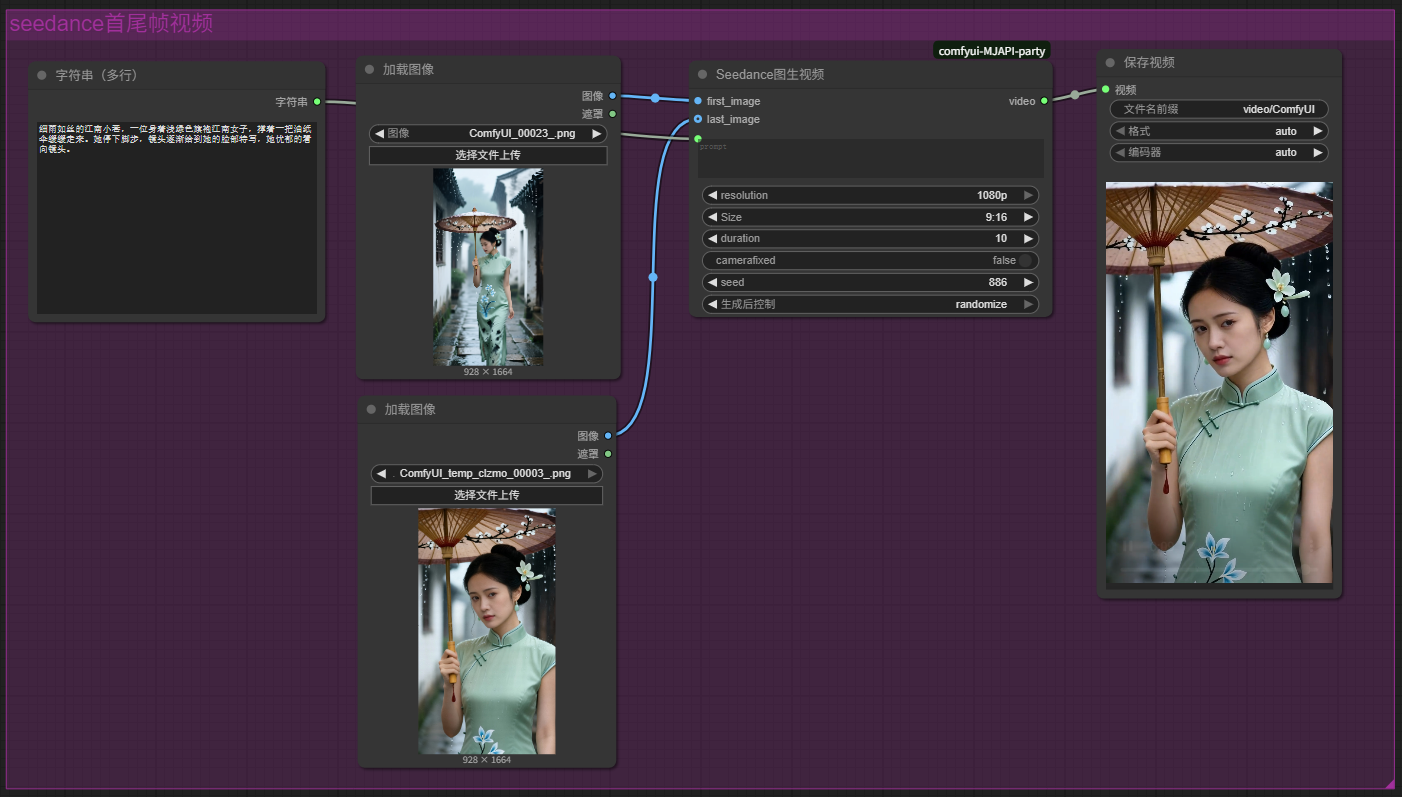
 last_image不是必须的,接入了之后就是首尾帧,没有接入就是图生视频。
- 250920-新增服装系列节点
服装系列节点
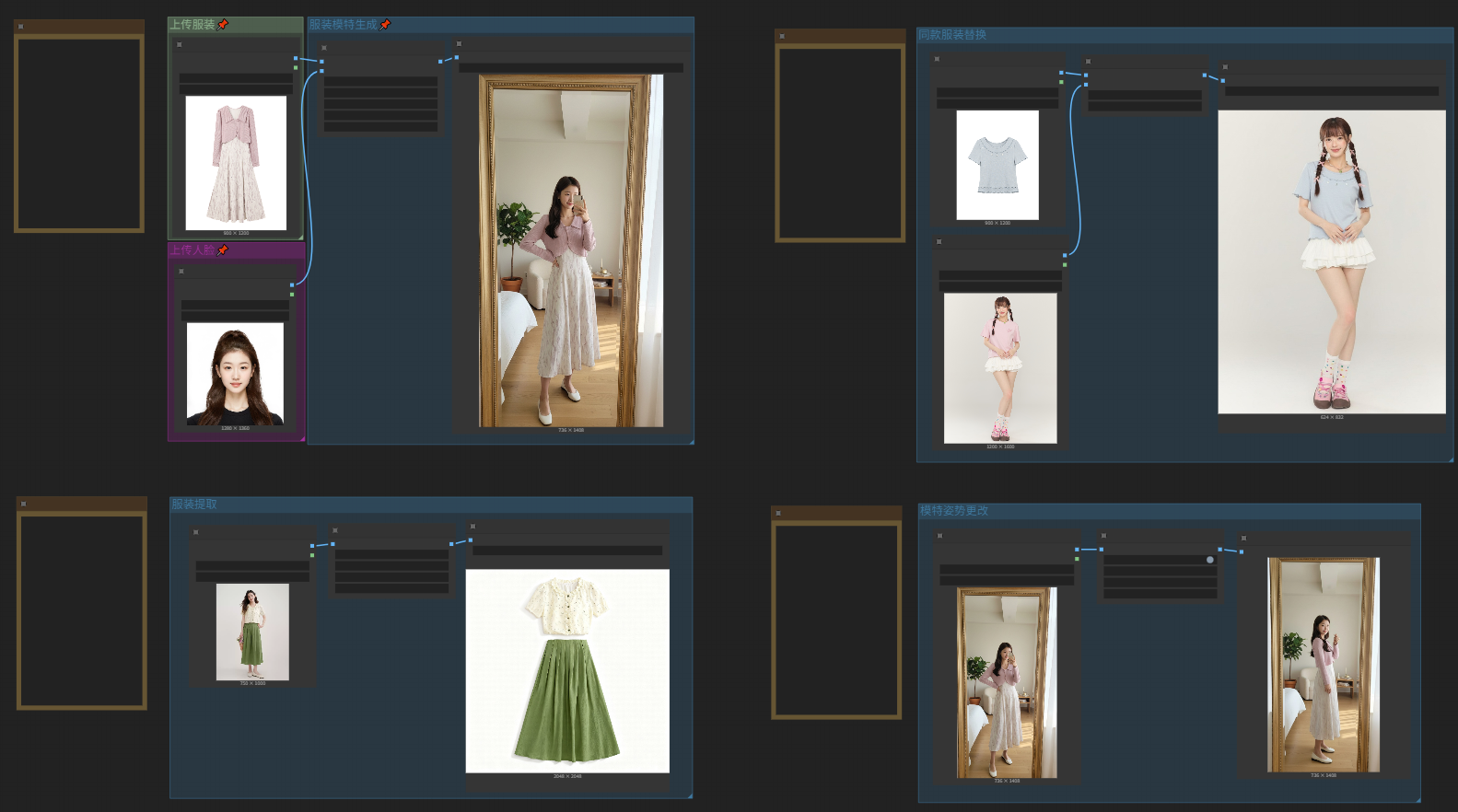
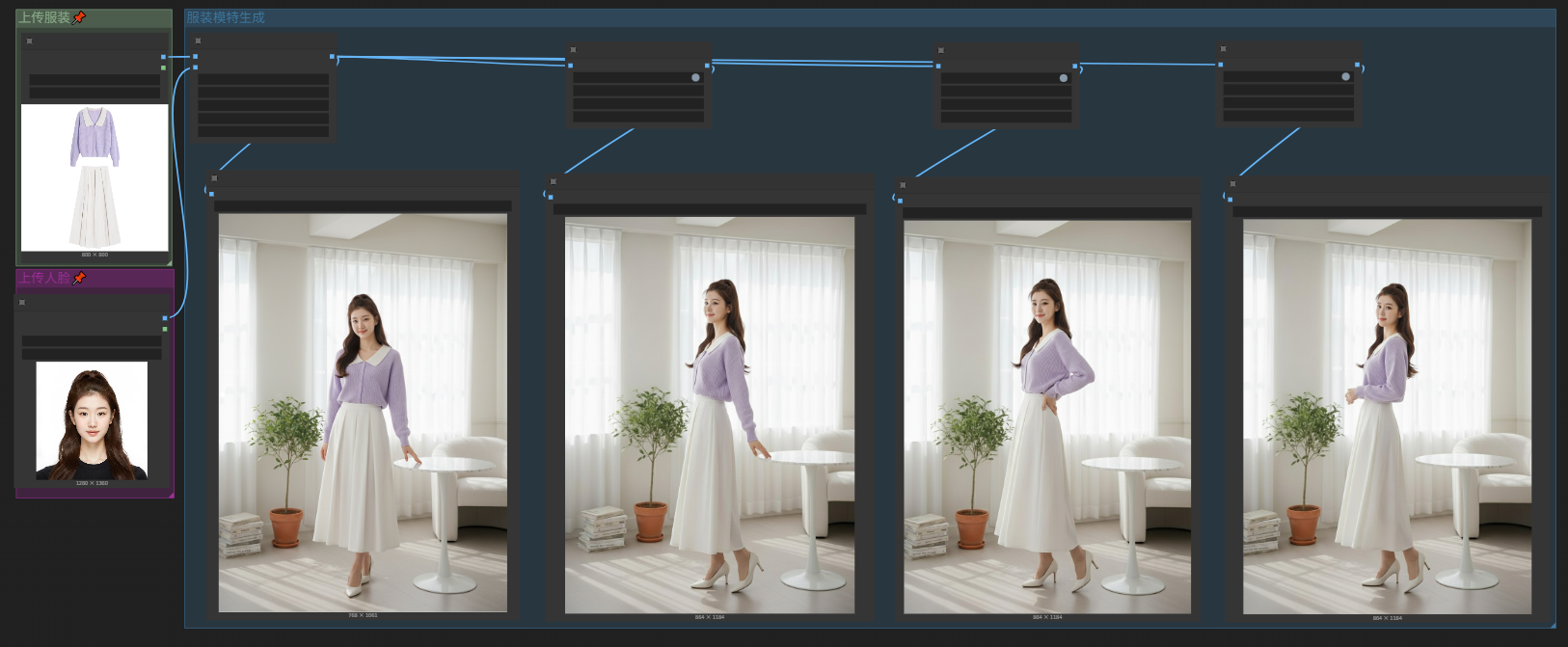
该节点是系列节点,也是摩诘AI首个集成工作流,因此无需复杂操作即可完成服装类的大部分工作,涵盖服装系列全流程工作流。其中有:服装模特生成,服装白底图提取,姿势更改和服装替换。详细操作教程参考工作流。工作流共有2个,1个是4功能合计,另一个是串联后的组图生成。工作流在workflow目录下,拖入comfyui即可使用.
4功能合集:
 组图生成工作流:
- 250915-新增节点
seedream-4.5使用说明
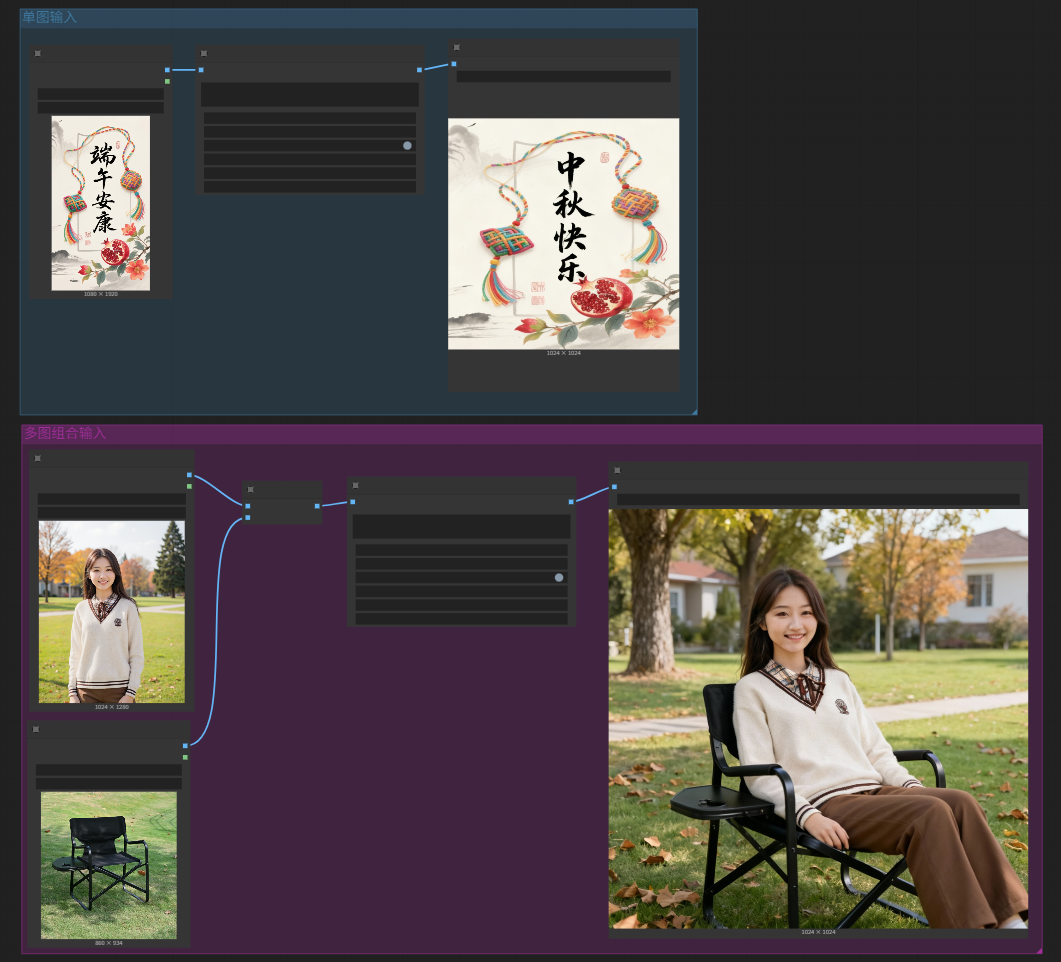
Seedream 4.5 原生支持文本、单图和多图输入,实现基于主体一致性的多图融合创作、图像编辑、组图生成等多样玩法,实现包括组图生成、多参考图生图等图片生成能力。支持中文输入输出,支持多照片组合输入。seedream_v4支持4k高清输出,节点中配置了预设尺寸。 也可以通过自定义宽高来控制输出尺寸。custom_size是自定义尺寸的开关。 多图组合和Nano的不一样,无需拼接,可直接组合批次输入,seedream会自动拼接。最多可支持10张图片进行组合。
- 250902-新增节点
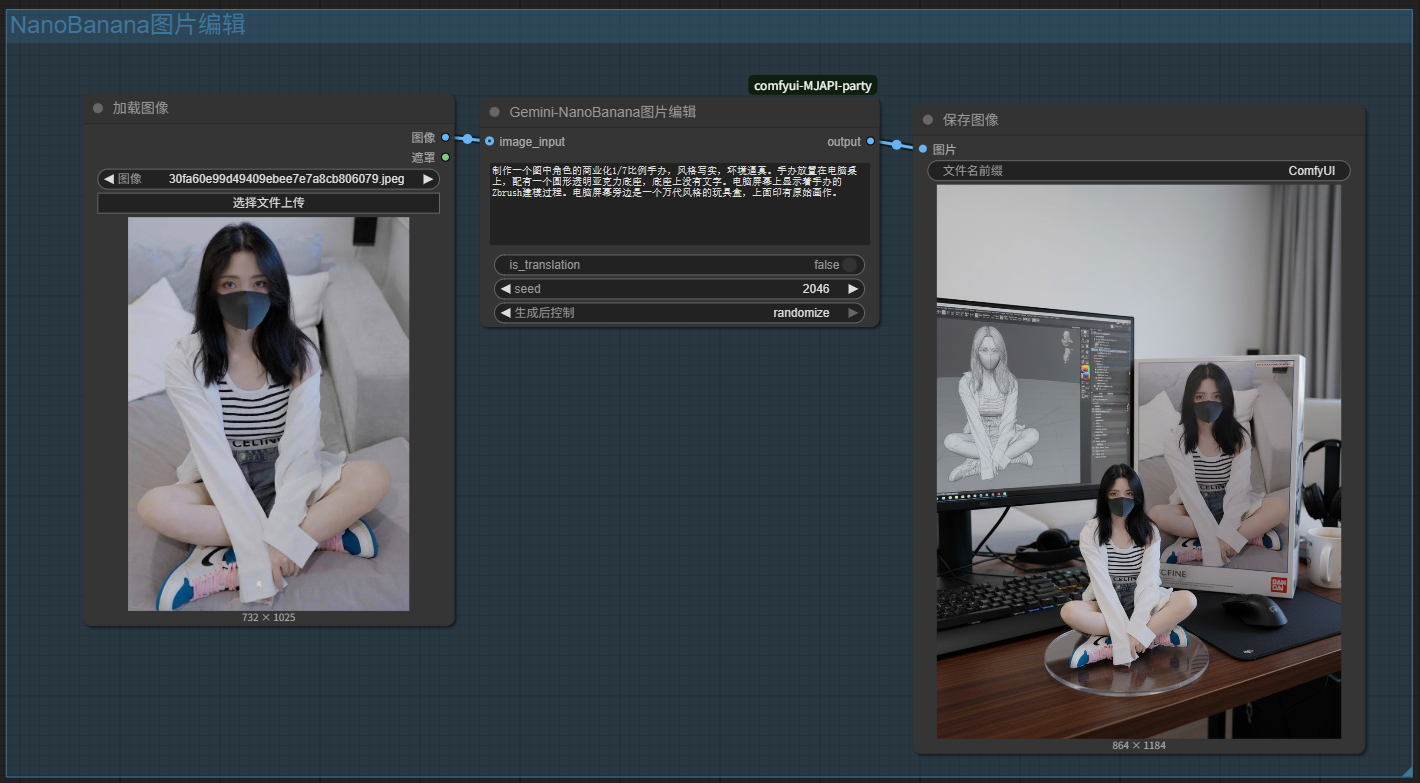
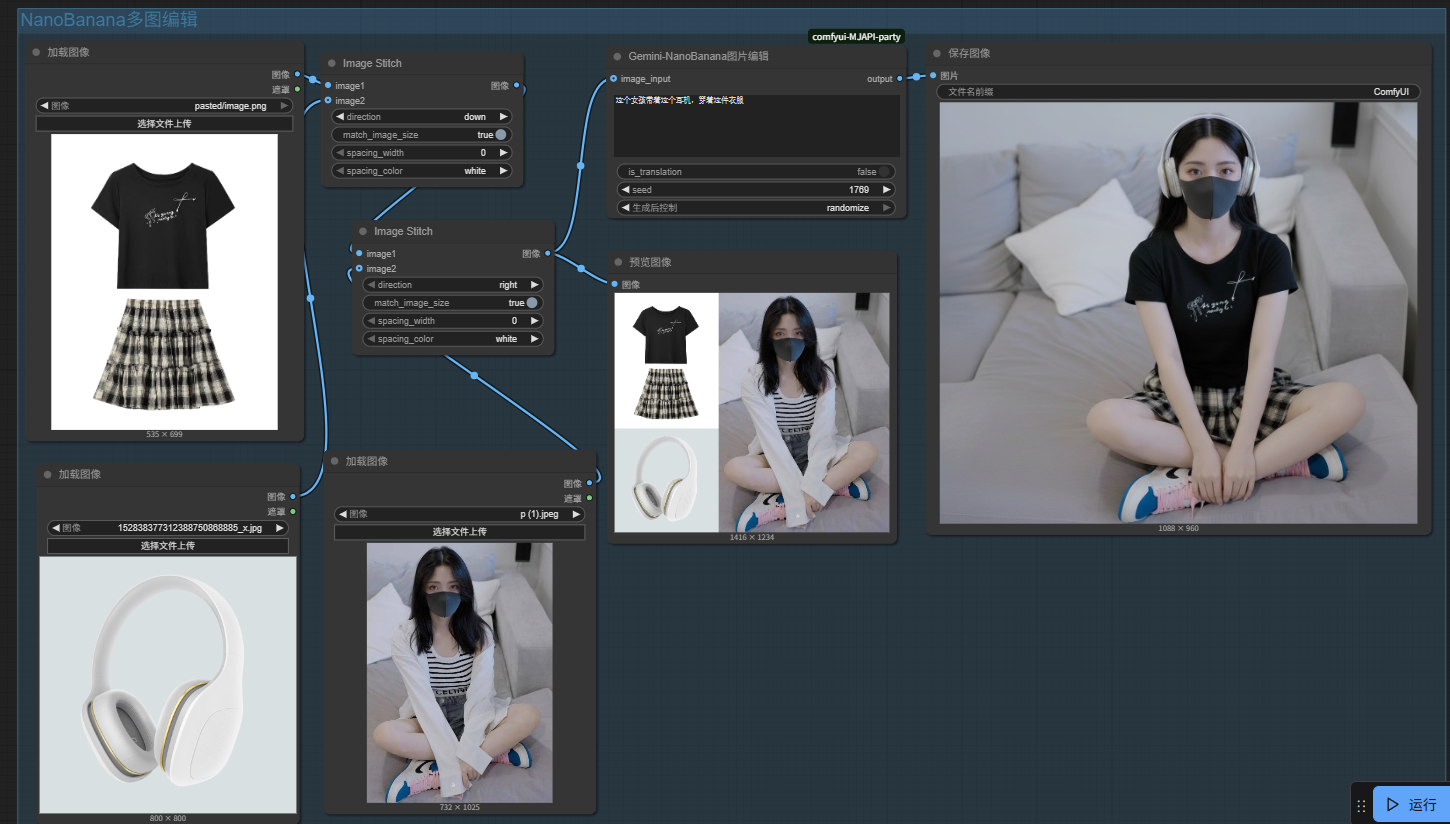
Gemini-NanoBanana使用说明
Gemini 2.5 Flash Image Preview又名NanoBanana是一款强大的图片编辑模型。
支持中文输入,不支持中文输出,同时也自带了翻译开关is_translation默认关闭
- 250820-新增节点
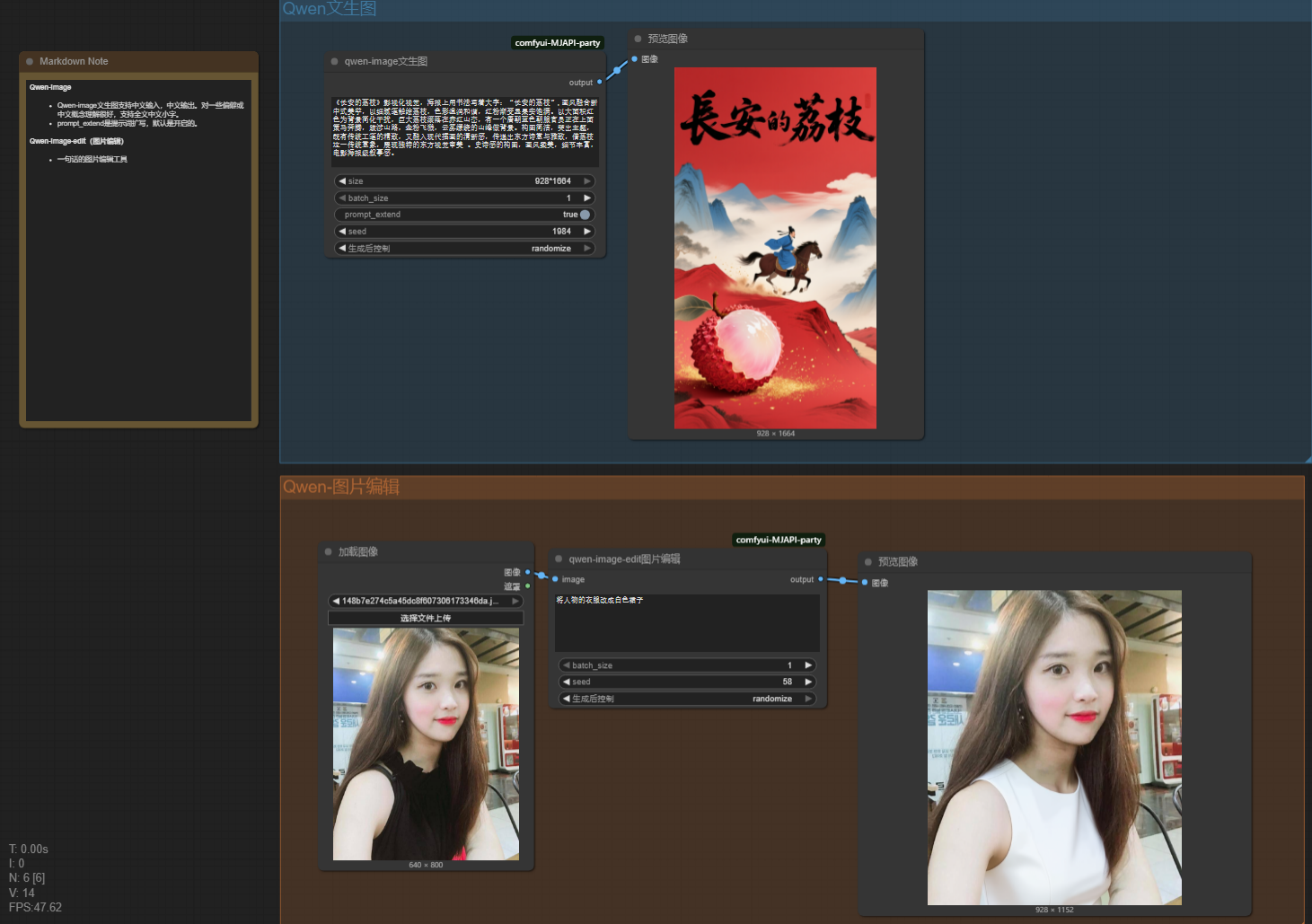
Qwen-image
Qwen-image是阿里开源的AI绘画工具,对中文的支持非常友好,能够准确的画出细节的小字和排版,支持中文输入,中文输出。 prompt_extend是提示词扩写参数,默认开启,仅需简单提示词就可以出来非常不错的画面效果。
Qwen-edit-image
和seededit功能一样能通过文字描述修改图片。各有千秋,价格便宜,支持使用中文提示词,支持输出中文。
安装步骤
- 确保你已经安装了ComfyUI。
- 在comfyui-manager中搜索mojieapi_party直接安装本项目
- 或者在comfyui/custom_nodes目录下
git clone https://github.com/MoJIeAIGC/comfyui-MJAPI-party.git
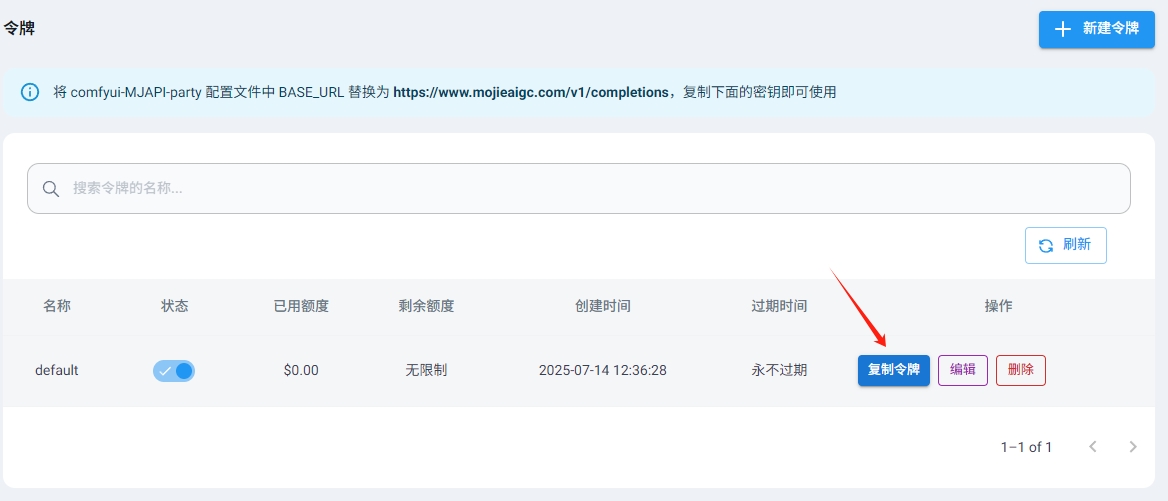
- mojieaigc.com网站上注册一个账户
https://www.mojieaigc.com
- 登录后获取自己的API-KEY
- 修改
config.ini文件,在项目目根目录下,内容示例如下:
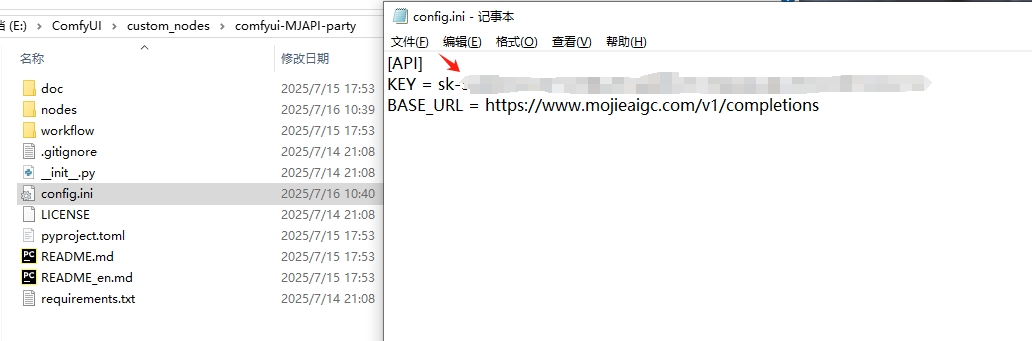
[API]
KEY = your_api_key
BASE_URL = https://www.mojieaigc.com/v1/completions
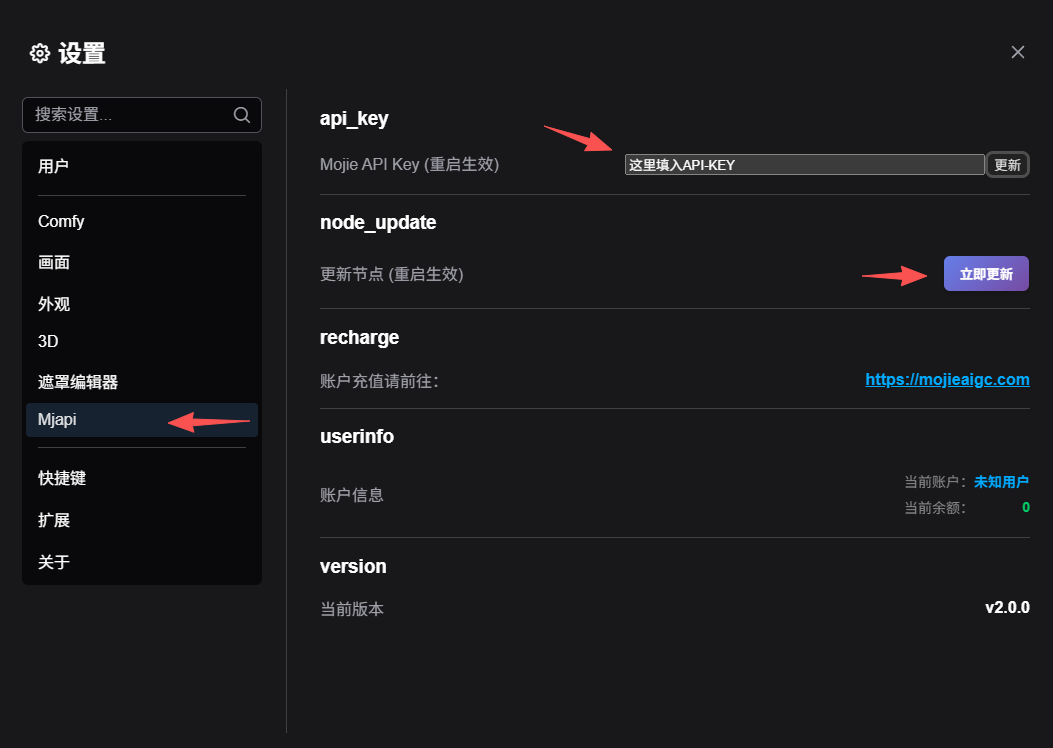
请求地址不要动,填入KEY就行了。 填入密钥key后记得重启comfyui,才能生效
- 更新节点
现在可以直接在comfyui的设置中找到mjapi设置项,更新节点即可。
联系我们
wechat:mojie_AIGC 扫描下方二维码
<div> <img src="doc/assets/qr.jpg" alt="QR Code" style="width: 260px;"> </div>