
Civitai Metadata Bridge
Preserve Civitai LoRA hashes and generation settings in locally generated ComfyUI image metadata.
Nodes (2)
Civitai Metadata Bridge for ComfyUI
Two small ComfyUI nodes for local image generation with Civitai-compatible LoRA and generation metadata.
Why this exists
Civitai's ComfyUI nodes can browse, download, and apply LoRAs locally. However, the CIVITAI_LORAS output from Civitai LoRA Selector is not written into a saved image in the hash format that Civitai's upload process reliably recognizes.
That creates a metadata gap: the correct LoRA was used for generation, but Civitai may not automatically identify its exact version after upload. This matters especially for Civitai Challenges that require a particular resource to be detected.
This package bridges that gap. It does not send image generation to Civitai; sampling remains on your local ComfyUI machine.
[!IMPORTANT] This package improves resource detection by embedding the exact LoRA hashes. It cannot guarantee Challenge acceptance. Civitai can change upload parsing, validation rules, or individual Challenge requirements.
Included nodes
Civitai LoRAs To Hash Metadata
This node accepts the CIVITAI_LORAS stack from Civitai LoRA Selector. For every enabled AIR/model-version entry, it:
- reads the Civitai model version ID;
- requests that version's metadata from Civitai;
- obtains its AutoV2 hash (or a ten-character SHA-256 fallback);
- emits alexopus Image Saver-compatible
additional_hashes, including the LoRA weight.
Example:
My LoRA [Version Name]:1182CD0705:0.7
The main output is additional_hashes. The other outputs (civitai_resources, resolved, missing, and resources_json) are diagnostics that can help identify failed lookups.
The node caches successful version lookups in memory for the current ComfyUI session. It uses Python's standard library and has no additional Python package dependencies.
KSampler + Metadata Outputs
This is a near-drop-in replacement for ComfyUI's standard KSampler. It delegates sampling to ComfyUI's own common_ksampler, then also exposes the values that were actually used:
- seed
- steps
- CFG
- sampler name
- scheduler
- denoise
- inferred width and height
The latent output continues to VAE Decode as normal. Connect the other outputs to Image Saver Metadata so generation settings and saved metadata cannot silently drift apart.
The node cannot recover prompt strings because KSampler receives encoded CONDITIONING, not the original text. Pass positive and negative prompt strings separately to both CLIP Text Encode and Image Saver Metadata.
Example workflow
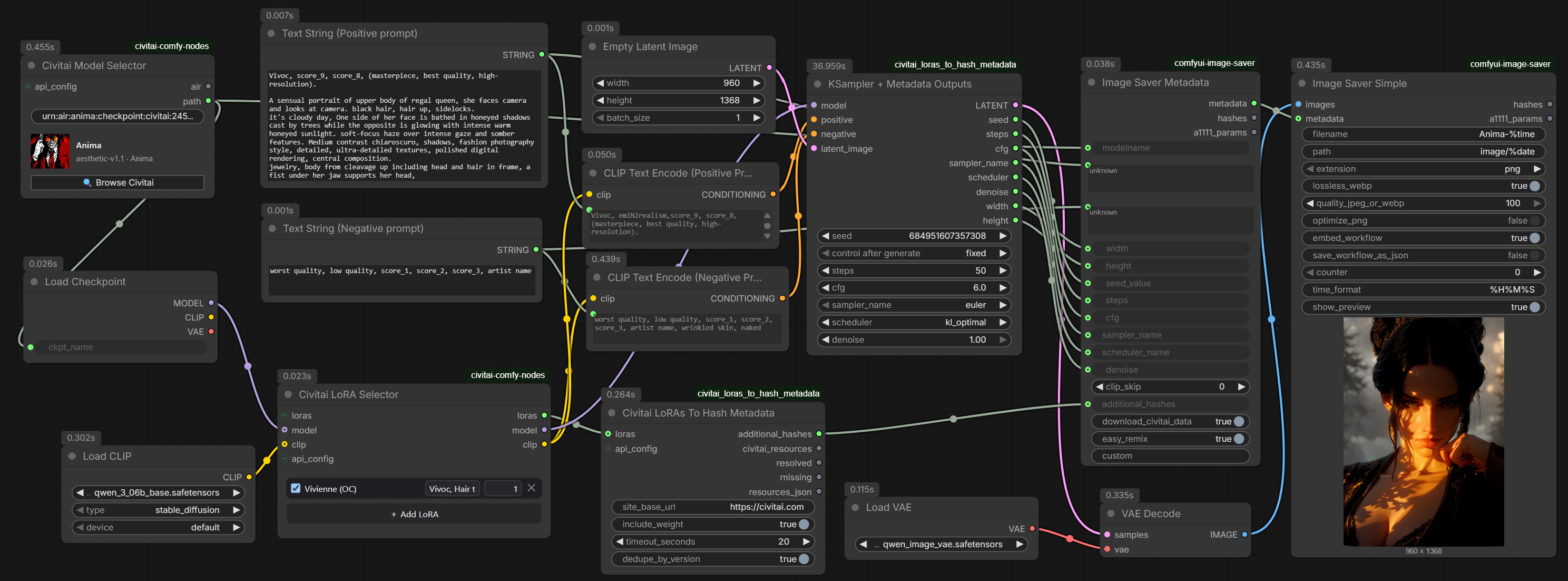
Example image with embedded Comfy UI nodemap metadata and Civital checkpoint and LoRa metadata:
<img src="docs/vivoc2-2.png" alt="Example image containing Comfy UI nodemap metadata and Civitai checkpoint and LoRA metadata" width="25%" />
The generation path shown above is local:
Civitai Model Selector
  -> Load Checkpoint
  -> Civitai LoRA Selector
  -> KSampler + Metadata Outputs
  -> VAE Decode
  -> Image Saver Simple
The LoRA metadata path is:
Civitai LoRA Selector.loras
  -> Civitai LoRAs To Hash Metadata.additional_hashes
  -> Image Saver Metadata.additional_hashes
  -> Image Saver Simple.metadata
For reliable checkpoint detection, also connect the checkpoint path explicitly:
Civitai Model Selector.path
  -> Load Checkpoint.ckpt_name
  -> Image Saver Metadata.modelname
The same path output can feed both inputs. If modelname appears as a text widget instead of a socket, right-click Image Saver Metadata and convert modelname to an input. This lets Image Saver calculate and embed the checkpoint hash instead of relying only on Civitai to infer the model from the embedded workflow.
Connect the sampler outputs as follows:
| KSampler + Metadata Outputs | Image Saver Metadata |
| --- | --- |
| seed | seed_value |
| steps | steps |
| cfg | cfg |
| sampler_name | sampler_name |
| scheduler | scheduler_name |
| denoise | denoise |
| width | width |
| height | height |
If additional_hashes appears as a text widget instead of a socket, right-click Image Saver Metadata and convert that widget to an input. Keep download_civitai_data = true so Image Saver can resolve weighted resource metadata.
Pass the original positive and negative prompt strings explicitly:
Positive prompt -> CLIP Text Encode
                -> Image Saver Metadata.positive

Negative prompt -> CLIP Text Encode
                -> Image Saver Metadata.negative
Set embed_workflow = true on Image Saver Simple. The embedded workflow remains useful evidence of the complete generation setup, while the explicit modelname connection provides reliable checkpoint metadata.
Dependencies
The bridge is designed for:
- Civitai Comfy Nodes, which supplies Civitai LoRA Selector,
CIVITAI_LORAS, and optionalCIVITAI_CONFIG; - ComfyUI-Image-Saver by alexopus, which supplies Image Saver Metadata and Image Saver Simple;
- a current ComfyUI installation.
The custom-node package itself adds no third-party Python libraries.
Civitai selector sidecar compatibility
At the time of the 1.0.1 release, Civitai Model Selector can mistake an Image Saver sidecar file (.civitai.info or .sha256) for the cached checkpoint on a later run. The symptom is a Load Checkpoint error such as _pickle.UnpicklingError or Unsupported operand 123 after the workflow previously worked.
This is an upstream cache-selection issue, not a corrupt checkpoint. Update Civitai Comfy Nodes when a fix becomes available. Until then, its cached-file lookup must exclude .civitai.info and .sha256 files, or those two sidecars beside the affected checkpoint must be removed before retrying. Do not delete the .safetensors checkpoint itself.
Installation
ComfyUI-Manager / Comfy Registry
After the first release is published, search for Civitai Metadata Bridge in ComfyUI-Manager and install it, then restart ComfyUI.
Manual installation
Clone or extract the repository into:
ComfyUI/custom_nodes/civitai-metadata-bridge
Restart ComfyUI and search for:
Civitai LoRAs To Hash Metadata
KSampler + Metadata Outputs
Network and privacy notes
The hash bridge contacts the configured Civitai site URL to resolve model-version hashes. Connecting CIVITAI_CONFIG is optional. If an API token is present, the node forwards it only to civitai.com or a *.civitai.com host; it will not forward the token to an unrelated custom URL.
No generated image is uploaded by these nodes.
Civitai Challenges
The package was created because locally generated images can use the correct Challenge LoRA while lacking machine-readable metadata that proves the exact resource version. The bridge supplies the AutoV2 hash and weight needed by the image saver to write a Civitai resource entry.
Before submitting, upload the saved image to Civitai and confirm that the required LoRA/version is shown in the detected resources. Challenge rules remain authoritative.
Development disclosure
These nodes were initially created by ChatGPT from OpenAI, working from the requested ComfyUI workflow and metadata requirements. ChatGPT assisted with investigation, design, Python implementation, comments, tests, packaging, and this documentation. The code should be reviewed, tested, and maintained like any other community-developed software.
This project is independent and is not an official Civitai, ComfyUI, alexopus, or OpenAI integration.