
Folder Image Picker
Browse image folders in an inline thumbnail grid, where every node remembers its own folder. Includes recursive subfolder browsing, breadcrumb navigation, and a modern Windows folder dialog.
Folder Image Picker for ComfyUI
A node that browses image folders with an inline thumbnail grid, with an explicit folder per node and recursive subfolder support.
Built for workflows that pull from several image directories — characters in one folder, outfits in another — where the built-in upload widget keeps reopening the last folder you used, and where a fixed source folder per node removes the guessing.
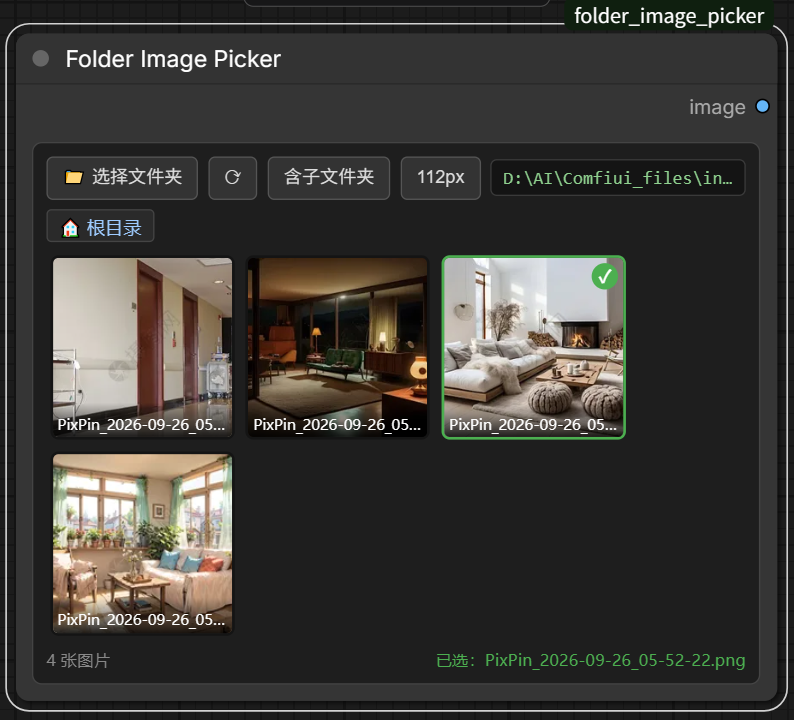
Why
ComfyUI's built-in image loader always reopens the folder you last picked. If two loader nodes point at two different folders, switching the second one drops you in the first one's directory. This node gives every node its own remembered folder, so the picker opens where you expect.
Features
- Per-node folder — the folder is stored in the workflow, so each node keeps its own location
- Inline thumbnail grid — click a thumbnail to select; no dialog round-trip
- Recursive subfolders — optional toggle that also lists images in nested subdirectories
- Breadcrumb navigation — walk into subfolders and back out
- Reopens at the selection — reloading a workflow opens the folder containing the selected image, scrolled to it; the "Selected: …" label is clickable to jump back at any time
- Native folder dialog — modern Windows folder picker (opened at the node's current folder)
- Fixed-size cells — thumbnails stay square when the node is resized; cycle 88 / 112 / 144 / 192 px
- Thumbnail cache — 320 px WebP thumbnails, keyed by path and mtime, so edits invalidate automatically
Installation
Clone into your ComfyUI/custom_nodes directory:
cd ComfyUI/custom_nodes
git clone https://github.com/Martlet-Tech/Folder-Image-Picker
Restart ComfyUI. No extra Python dependencies are required.
For the portable Windows build the path is:
cd ComfyUI_windows_portable/ComfyUI/custom_nodes
git clone https://github.com/Martlet-Tech/Folder-Image-Picker
Usage
Add the Folder Image Picker node (category image).
- Click 📁 Choose Folder to choose a directory, or type a path into the path box.
- Click Subfolders to include nested subfolders. In recursive mode the image key
becomes
subfolder/filename, keeping duplicates distinguishable. - Click a thumbnail to select it; click it again to clear the selection.
- Use the breadcrumb or the folder chips to navigate; ⟳ re-reads the directory.
- The size button cycles thumbnail size (88 / 112 / 144 / 192 px).
- The green Selected: … label in the corner is clickable — it jumps back to the folder containing the selected image and scrolls it into view. If that folder no longer exists, the picker falls back to the root.
The selected image is exposed as an IMAGE output.
Notes
- Non-Windows systems fall back to a manual path entry; the grid and scanning work everywhere.
- The folder dialog uses PowerShell with
IFileOpenDialog. Ifpowershell.exeis unavailable the picker returns an empty path instead of failing. - Requests are confined to the configured folder. Traversal attempts (
../) are rejected with HTTP 403, and paths are re-validated at load time.
License
MIT — see LICENSE.