
ComfyUI-Majoor-ImageOps
Essential Nodes Pack for Images Processing for ComfyUI, with a live embedded preview inside the node (no queue) for supported chains.
Nodes (32)
Glue video clips into one timeline without leaving ComfyUI
Give your highlights the glow a real lens would have
Surface
Handheld energy on demand — deterministic camera shake for stills and clips
Grab any RGB or alpha channel out of your image, one at a time
The two-pixel lie that makes a render look shot
Keep pixels inside bounds — the 30-second fix for blown-out values
A color-correction node that thinks it lives in a grading suite
Stack layers in the graph — a mini compositor that lives inside ComfyUI
Solid colors and checkerboards — the plate generator nobody celebrates and everyone needs
Pin a screen onto anything — this is ComfyUI's Nuke-style CornerPin
Crop by dragging, not by typing — an interactive Resize/Crop with the math handled
Fix one region, keep the whole frame — stitch an edit back into the original
Real bokeh from a depth map, with the aperture shape you asked for
Ripple, warp, and melt — channel-driven displacement inside ComfyUI
Paint inside ComfyUI — brush, eraser, and pen pressure without leaving the graph
Trim, hold, loop, and reverse frame batches — the timeline editor in node form
Film grain that doesn't fight back — deterministic, seeded, and presets included
The one-trick invert node with a hidden second trick — alpha inversion
Chroma keying with an eyedropper — pull a matte by sampling, not by guessing
The node page is real, the node isn't (here's what to do instead)
Turn any image into a mask (and back) with real matte extraction
Blend two images like a compositor — nineteen blend modes and the math to back them
Procedural noise that animates — Perlin plates, animated textures, and seamless tiles
The letterboxing node that doesn't touch a single pixel of your image
The preview node that turns a pile of frames into something you can actually watch
ImageOps Ramp is more useful than it looks
Nuke-style vector masks inside a ComfyUI node, no queue required
Fisheye, barrel, and 360-pano warps — one node, no external tools
Watermarks, subtitles, and title cards on every frame — no extra tools
Pan, rotate, scale, flip — your whole frame batch in one GPU pass
Pull the eye to the middle (or tint the edges any colour you like)
🎨 ComfyUI‑Majoor‑ImageOps
Advanced image processing nodes for ComfyUI with a centralized live preview module (no queue required), batch-first behavior, and comprehensive interop adapters.
✨ Features
- 📦 Batch-First Architecture:
IMAGEinputs/outputs are treated as batches (frames friendly) - perfect for video and animation workflows - 🛡️ Fail-Soft Interop: Unsupported upstream nodes don't break the graph or preview - graceful degradation
- 👁️ Live Preview Widget: Real-time preview on ImageOps nodes without queuing (single frontend module)
- 🎛️ Preview Pro UI (only on
ImageOpsPreview):- 📊 Histogram analysis
- 🌊 Waveform (luma/RGB)
- 🎯 Vectorscope
- 🦓 Zebra/False-color overlays
- ↔️ A/B freeze + wipe comparison
- 🔀 Optional Bypass: All processing nodes expose
bypass(boolean) - when enabled, the node returns input unchanged and live preview skips applying the operation
📋 Requirements
- ComfyUI: Version 0.19.0 or newer (V3 node schema)
- Python: 3.10+ (3.11/3.12 recommended)
- Frontend: Modern browser with ES2022 support
📥 Installation
- Clone/Place this folder in
ComfyUI/custom_nodes/ComfyUI-Majoor-ImageOps - Restart ComfyUI
- Hard refresh the browser:
Ctrl+F5(orCmd+Shift+Ron macOS)
Example workflow
example/All Nodes MIO.json uses all 31 nodes, each wired to an input: Load Image (example.png, shipped with ComfyUI) plus the Constant, Ramp and Noise generators feed the rest, and Crop feeds Crop Stitch. Drag the file onto the canvas to open it.
The file is generated from the node schemas. After changing a node, run this in a ComfyUI Python environment (a test fails while the file is stale):
python scripts/generate_example_workflow.py
🧩 Nodes (image/imageops)
🔧 Processing Nodes
| Node | Internal ID | Description |
|------|-------------|-------------|
| ImageOps Color Correct | ImageOpsColorAjust | Professional color correction with temperature, hue, brightness, contrast, saturation, and gamma controls |
| ImageOps Blur | ImageOpsBlur | Gaussian blur with radius/sigma control and mask support |
| ImageOps Channels | ImageOpsChannel | Extract and manipulate individual RGB/Alpha channels |
| ImageOps Mask Convert | ImageOpsMaskConvert | Convert images and masks with selectable matte extraction, levels, and antialiasing |
| ImageOps Resize/Crop | ImageOpsCrop | Interactive crop and resize with aspect ratio presets |
| ImageOps Distort | ImageOpsDistort | iDistort-style displacement warp driven by source channels, external maps, masks, or internal procedural noise |
| ImageOps Transform | ImageOpsTransform | Translate, rotate, scale with filter options (nearest/bilinear/bicubic) |
| ImageOps Corner Pin | ImageOpsCornerPin | Perspective corner pinning with batched homography warp, bicubic filtering, supersampling, and alpha-safe edges |
| ImageOps Pad Out | ImageOpsPadOut | Add per-side borders with constant, edge-extended, reflected, or blurry fill and optional target aspect ratios |
| ImageOps Invert | ImageOpsInvert | Invert colors and/or alpha channel (separate alpha control) |
| ImageOps Spherize | ImageOpsSpherize | Spherical and fisheye lens projections with five modes, strength control, and circle-mask output |
| ImageOps Clamp | ImageOpsClamp | Clamp pixel values to min/max range |
| ImageOps Merge | ImageOpsMerge | Linear-light two-input compositing with production blend modes and foreground fit controls |
| ImageOps Noise | ImageOpsNoise | GPU-backed procedural noise source with Perlin, value, seamless tiling, 3D Z animation, seed stepping, frame length/FPS controls, and color ramp output |
| ImageOps Paint | ImageOpsDraw | Digital painting with brush/eraser tools, cropped overlay payloads, layer JSON support, and pen dynamics |
| ImageOps Comp | ImageOpsComp | Multi-layer compositor with blend modes, positioning, and opacity per layer |
| ImageOps Grain | ImageOpsGrain | Synthetic film grain with add/overlay/soft_light blend, size, luma response, and per-frame animation |
| ImageOps Camera Shake | ImageOpsCameraShake | Procedural handheld camera jitter (translate/rotate/zoom) with smoothing and frequency control |
| ImageOps Keyer | ImageOpsKeyer | Chroma/luma keying with multi-color keys and despill |
| ImageOps Text | ImageOpsText | Text overlay with font size, alignment, stroke, and opacity |
| ImageOps Frame Range | ImageOpsFrameRange | Trim, hold, and repeat (loop/bounce/reverse) a frame range |
| ImageOps Append | ImageOpsAppend | Concatenate two IMAGE/VIDEO clips with FPS policy and padding options |
| ImageOps Constant | ImageOpsConstant | Solid color, checkerboard, or grid generator |
| ImageOps Ramp | ImageOpsRamp | Linear or radial gradient generator |
| ImageOps Crop Stitch | ImageOpsCropStitch | Paste an edited crop back into its original-image position with feathered edges |
| ImageOps Vignette | ImageOpsVignette | Radial darken-to-color falloff from a configurable center, size, and softness |
| ImageOps Chromatic Aberration | ImageOpsChromaticAberration | Radial red/blue channel shift simulating lens color fringing |
| ImageOps Bloom | ImageOpsBloom | Threshold + blur + additive glow on highlights, HDR-safe |
| ImageOps Defocus | ImageOpsDefocus | Depth-driven defocus/bokeh with shaped aperture kernels (circle/hexagon/octagon/custom) and highlight bloom |
| ImageOps Roto | ImageOpsRoto | Nuke-style vector roto: editable bezier, ellipse, rectangle and freehand shapes with feather, add/subtract/intersect, keyframe animation and live preview |
📤 Output Nodes
| Node | Internal ID | Description |
|------|-------------|-------------|
| ImageOps Preview | ImageOpsPreview | Preview bridge node with multiple display modes (images, strip, animated WebP/GIF) and optional A/B compare against a second input |
🎛️ Node Details
🎨 ImageOps Color Correct
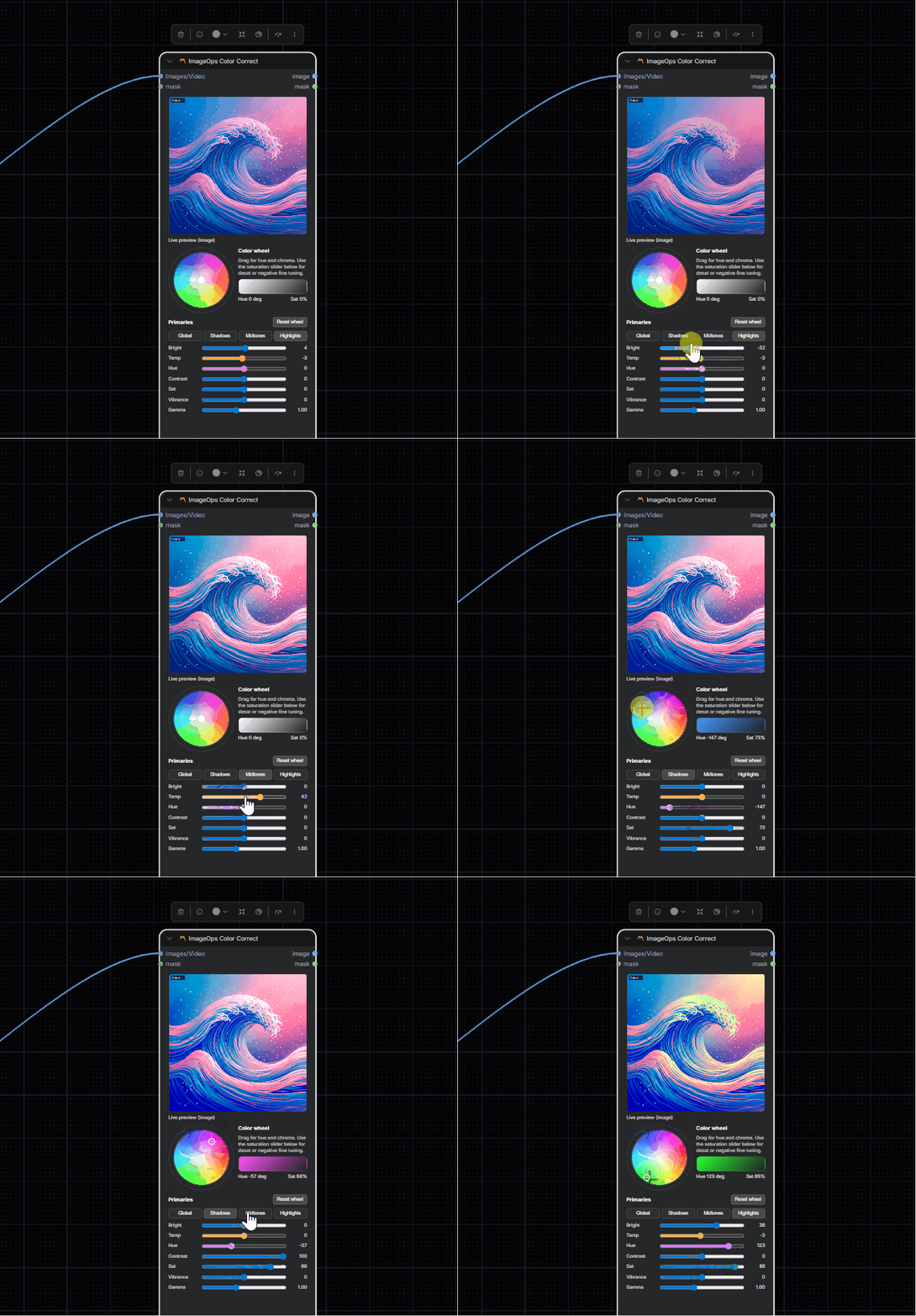
Professional color grading with reference-based correction.
Inputs:
image(IMAGE/VIDEO): Source mediamask(MASK, optional): Effect maskcurve(CURVE, optional): Master curve applied to the RGB channels after the adjustments, with the same interpolation as the core curve editor. HDR values outside 0-1 keep their overshoot.
Parameters:
temperature(-100 to 100): Color temperature adjustmenthue(-180 to 180): Hue rotation in degreesbrightness(-100 to 100): Brightness adjustmentcontrast(-100 to 100): Contrast adjustmentsaturation(-100 to 100): Saturation adjustmentgamma(0.2 to 2.2): Gamma correctioninput_space:srgb(default) orlinear— set tolinearfor scene-linear/HDR sources so the node doesn't gamma-encode them twiceinvert_mask: Invert mask effectbypass: Skip processing
Also exposes per-zone (shadows/midtones/highlights) temperature, tint, hue, contrast, saturation, vibrance, gamma, and brightness wheels for three-way color grading.
Outputs: IMAGE, MASK
🌫️ ImageOps Blur
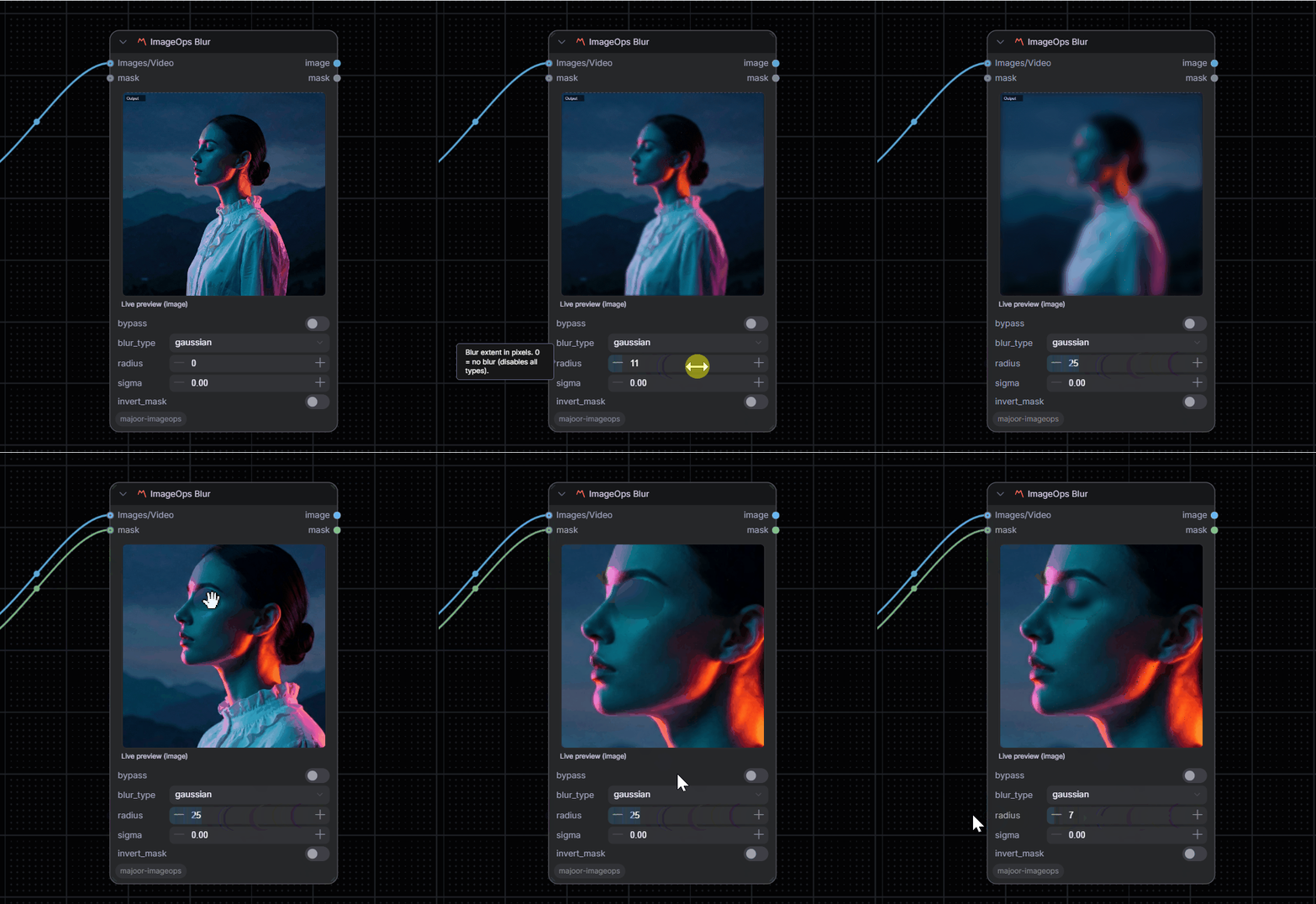
Gaussian blur with optional mask support.
Inputs:
image(IMAGE/VIDEO): Source mediamask(MASK, optional): Effect mask
Parameters:
radius(0 to 128): Blur support radius in pixels; when set to0, support is derived fromsigmasigma(0.01 to 64.0): Gaussian sigma value controlling blur spreadinvert_mask: Invert mask effectbypass: Skip processing
Outputs: IMAGE, MASK
🔴 ImageOps Channels
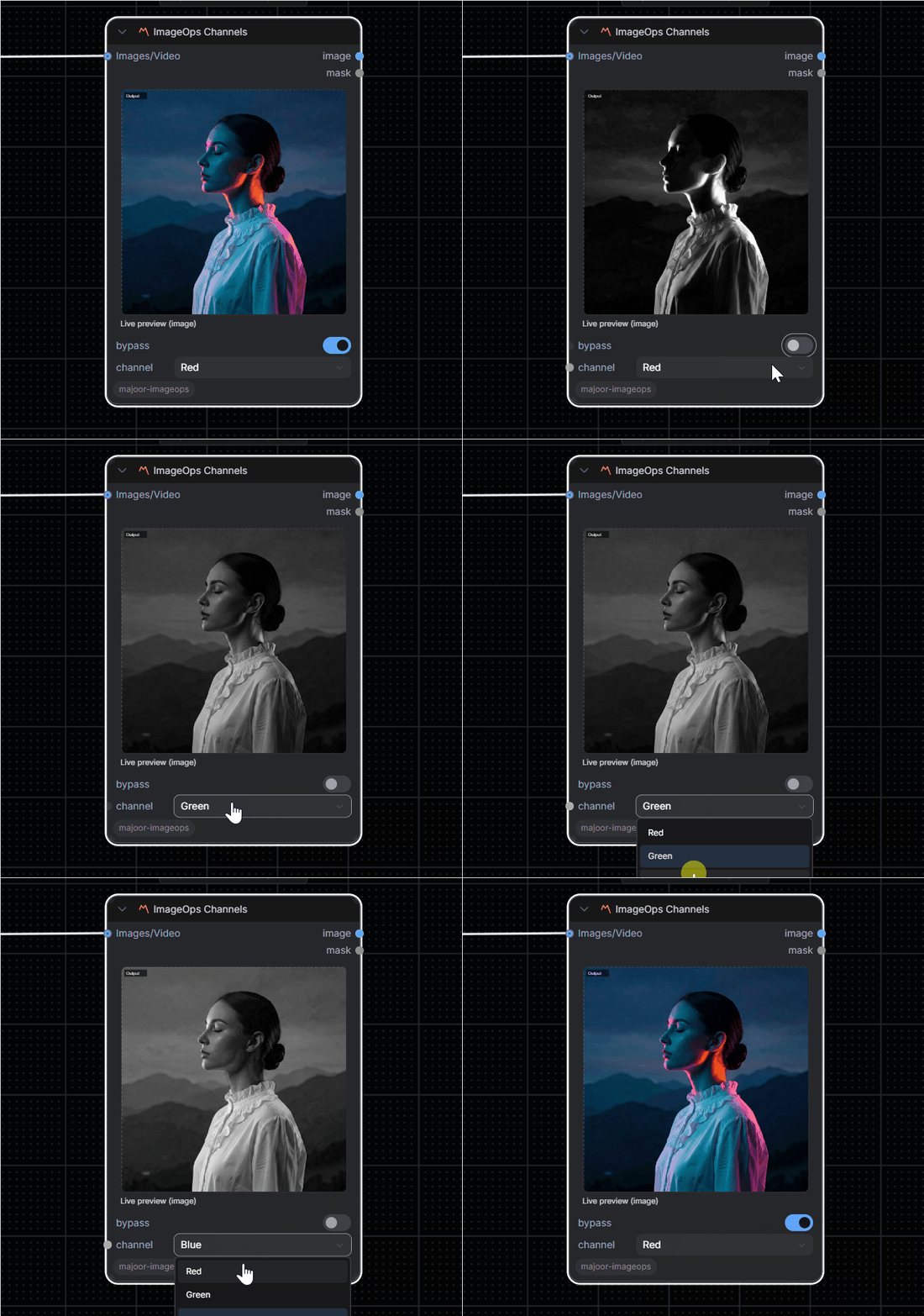
Extract and isolate individual color channels.
Inputs:
image(IMAGE/VIDEO): Source mediamask(MASK, optional): Effect mask
Parameters:
channel: Red, Green, Blue, or Alphainvert_mask: Invert mask effectbypass: Skip processing
Outputs: IMAGE, MASK
🎚️ ImageOps Mask Convert
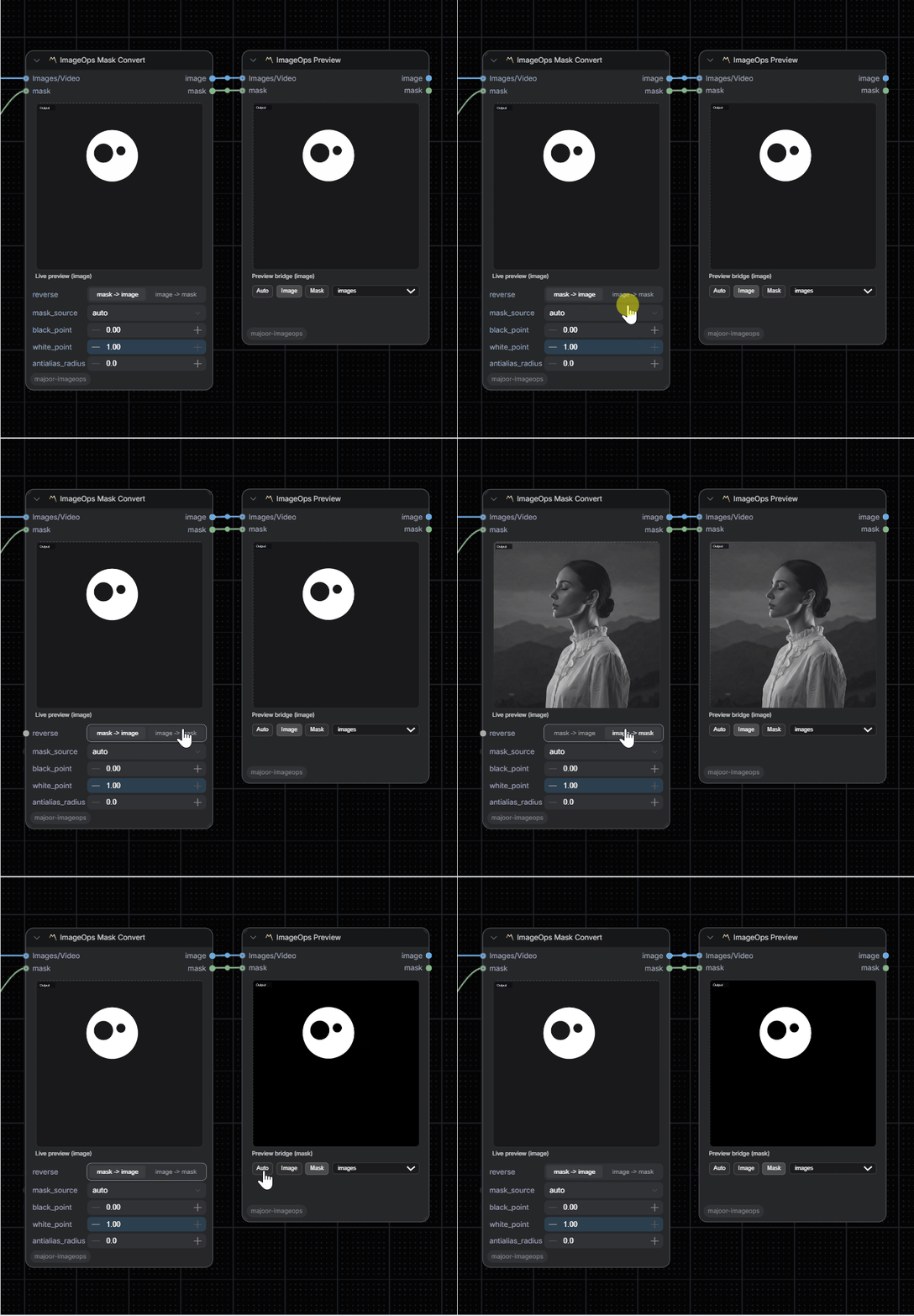
Convert images to masks and masks to previewable images.
Inputs:
image(IMAGE/VIDEO, optional): Source media whenreverseis enabledmask(MASK, optional): Source mask whenreverseis disabled
Parameters:
reverse: image -> mask when enabled, mask -> image when disabledmask_source: auto, luma, max_rgb, saturation, red, green, blue, or alphablack_point/white_point: Remap the extracted matte to harden or soften the maskantialias_radius: Small blur radius before levels to smooth jagged matte edges
Outputs: IMAGE, MASK
✂️ ImageOps Resize/Crop
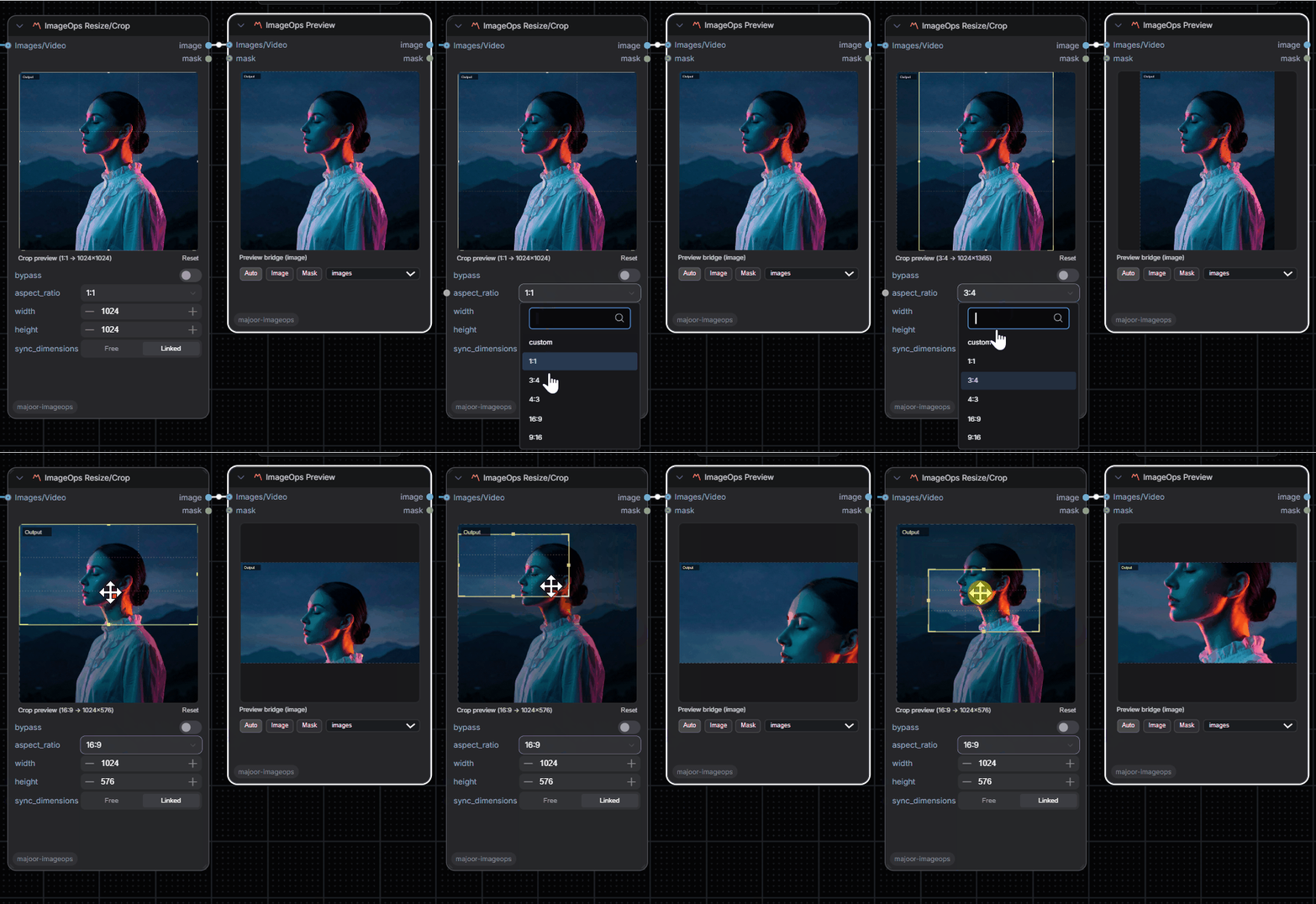
Interactive crop and resize with aspect ratio control.
Inputs:
image(IMAGE/VIDEO): Source mediamask(MASK, optional): Effect mask
Parameters:
aspect_ratio: Preset ratios (1:1, 3:4, 4:3, 16:9, 9:16, custom)width(1 to 8192): Output widthheight(1 to 8192): Output heightsync_dimensions: Link width/height changescrop_center_x(0.0 to 1.0): Horizontal crop positioncrop_center_y(0.0 to 1.0): Vertical crop positioncrop_scale(0.05 to 1.0): Crop zoom level- Crop outputs include
imageops_crop_bboxmetadata in source-image coordinates for UI overlays/extensions invert_mask: Invert mask effectbypass: Skip processing
Outputs: IMAGE, MASK, bbox (for Crop Stitch), bounding_box (core BOUNDING_BOX with the first-frame x, y, width, height in source pixels). Crop Stitch also accepts a core BOUNDING_BOX on its optional bounding_box input.
🌀 ImageOps Distort
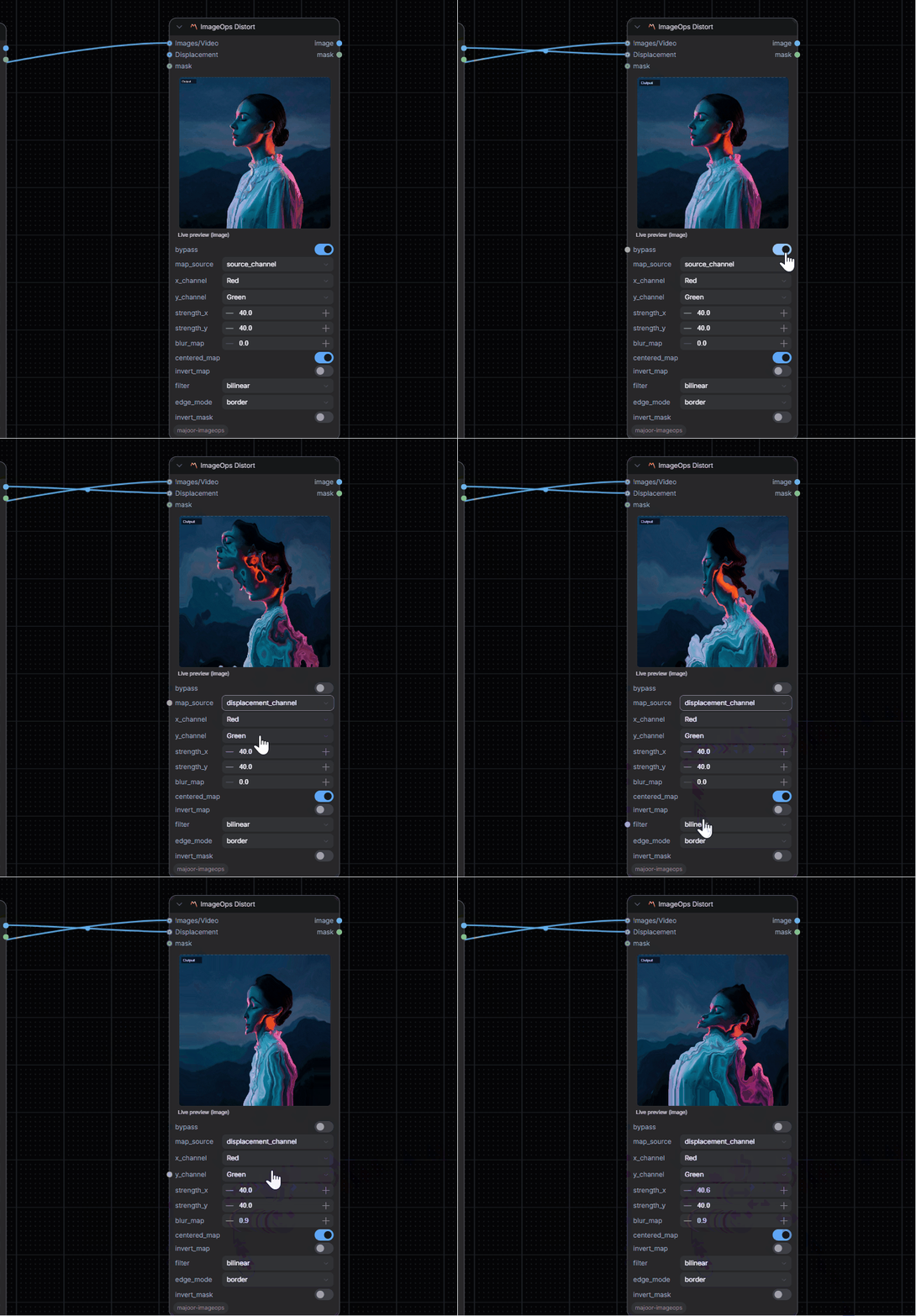
Channel-driven displacement warp inspired by iDistort-style workflows.
Inputs:
image(IMAGE/VIDEO): Source media to deformdisplacement(IMAGE/VIDEO, optional): External displacement plate whenmap_sourceisdisplacement_channelmask(MASK, optional): Used as the distortion map inmaskmode, otherwise acts as an effect mask
Parameters:
map_source: source_channel, displacement_channel, mask, or noisex_channel,y_channel: Choose independent channels for horizontal and vertical deformationstrength_x,strength_y: Warp amplitude in pixelscentered_map: Treat mid-gray as neutral displacementinvert_map: Invert the driving map before warpingfilter: nearest, bilinear, bicubicedge_mode: border, reflection, zeros- Internal noise controls: basis, fractal mode, scale, octaves, lacunarity, gain, seed, and offsets
invert_mask: Invert the effect mask when the mask input is acting as an effect mask
Outputs: IMAGE, MASK
🔄 ImageOps Transform
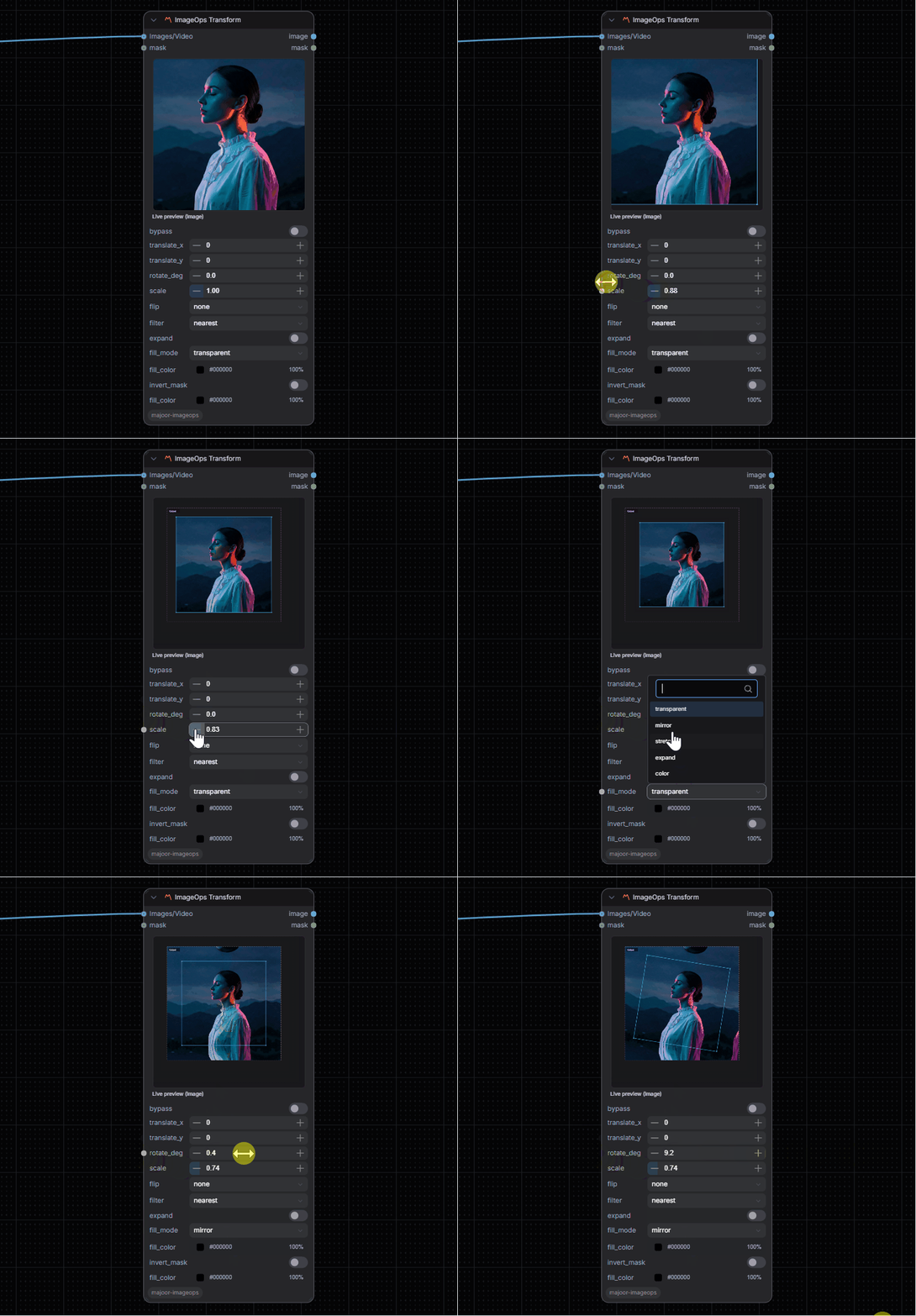
Geometric transformations with quality filters.
Inputs:
image(IMAGE/VIDEO): Source mediamask(MASK, optional): Effect mask
Parameters:
translate_x(-4096 to 4096): Horizontal offsettranslate_y(-4096 to 4096): Vertical offsetrotate_deg(-180 to 180): Rotation angle (clockwise positive)scale(0.01 to 8.0): Scale factorfilter: Nearest, Bilinear, or Bicubicexpand: Compatibility option; the GPU affine path keeps the output size fixedinvert_mask: Invert mask effectbypass: Skip processing
Outputs: IMAGE, MASK
📐 ImageOps Corner Pin
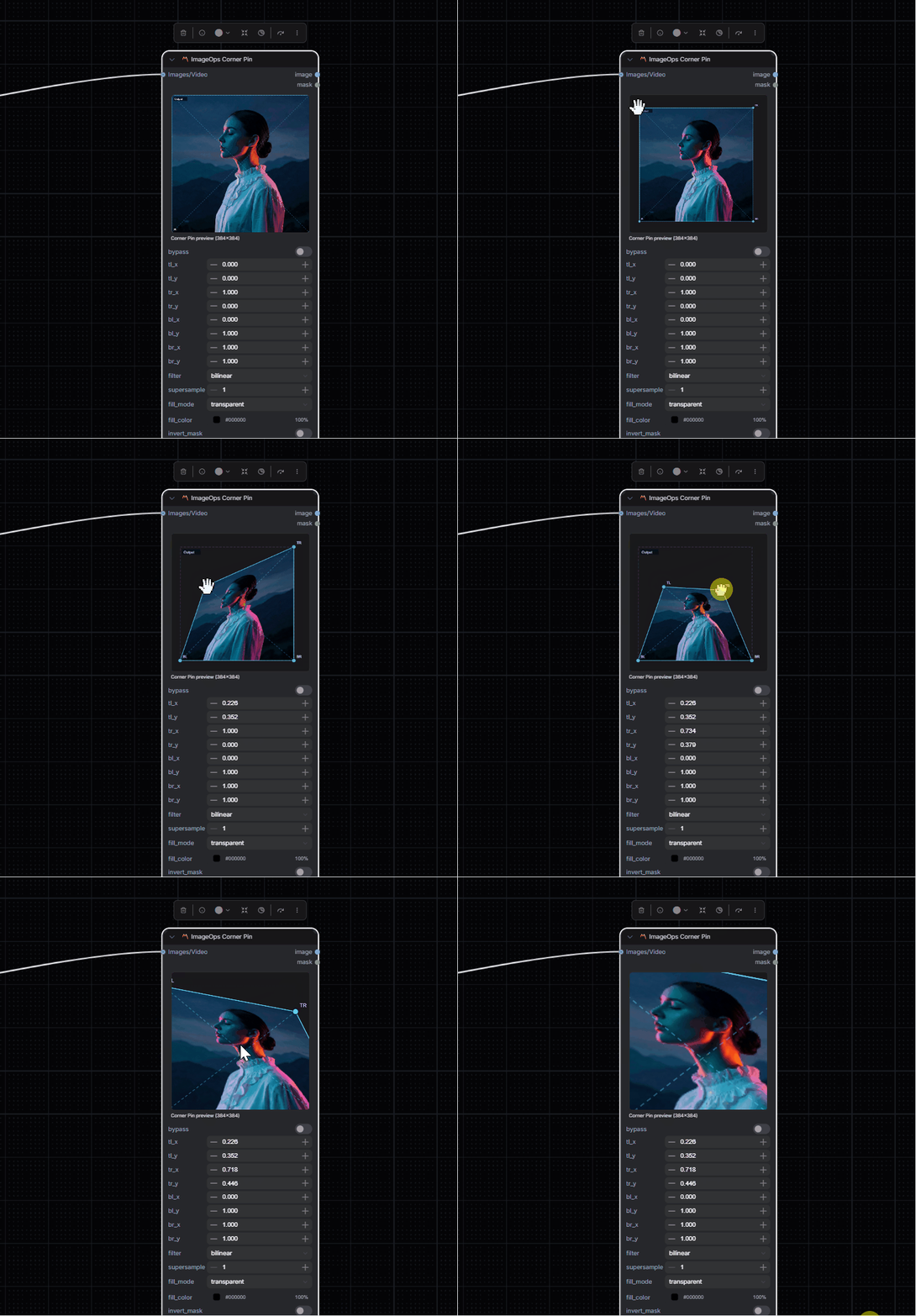
Perspective corner pinning for screen replacement, planar warps, and compositing.
Inputs:
image(IMAGE/VIDEO): Source media
Parameters:
tl_x,tl_y: Top-left destination corner in normalized image coordinatestr_x,tr_y: Top-right destination corner in normalized image coordinatesbl_x,bl_y: Bottom-left destination corner in normalized image coordinatesbr_x,br_y: Bottom-right destination corner in normalized image coordinatesfilter: Nearest, Bilinear, or Bicubicsupersample: 1x to 4x multisampling before downsamplingedge_mode: border, reflection, or zerosinvert_mask: Invert the warped transparency maskbypass: Skip processing
The warp uses batched PyTorch homographies with grid_sample; RGBA input is premultiplied before warping so transparent edges stay clean.
Outputs: IMAGE, MASK
🧱 ImageOps Pad Out
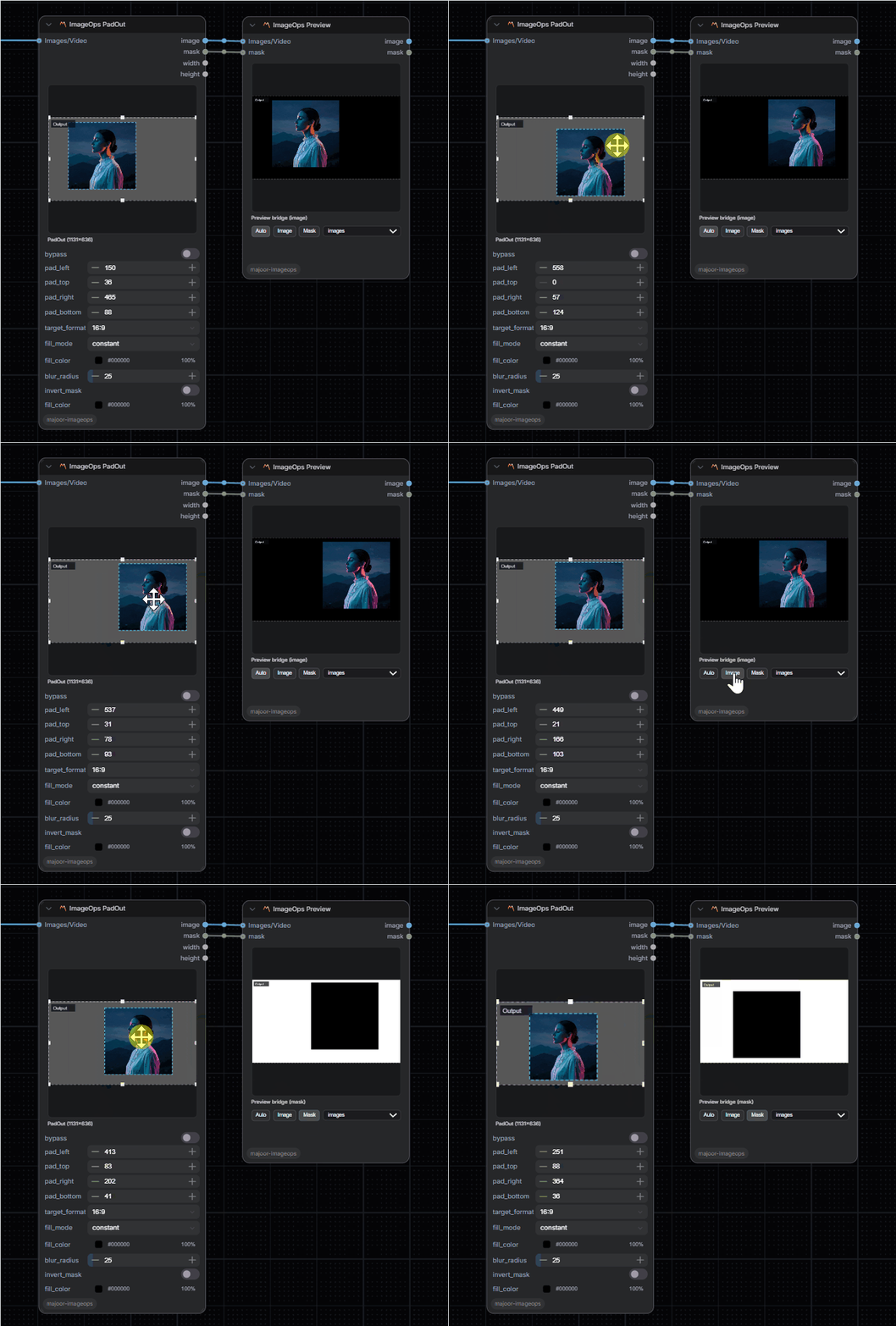
Add borders around an image without scaling the source.
Inputs:
image(IMAGE/VIDEO): Source media
Parameters:
pad_left,pad_top,pad_right,pad_bottom: Per-side padding in pixelstarget_format: custom, 1:1, 16:9, 9:16, 4:3, or 3:4fill_mode: constant, edge_extend, reflect, or blurryfill_color: Solid color for constant paddingblur_radius: Background blur radius for blurry paddinginvert_mask: Invert the padding maskbypass: Skip processing
The target_format option adds only the extra padding needed to reach the selected ratio, so manual side padding can still decenter the source.
Outputs: IMAGE, MASK, INT (width), INT (height)
Note: A dedicated ImageOps PadOut Stitch node (to restore the original into the padded area after outpainting) is planned for a future release.
🎭 ImageOps Invert
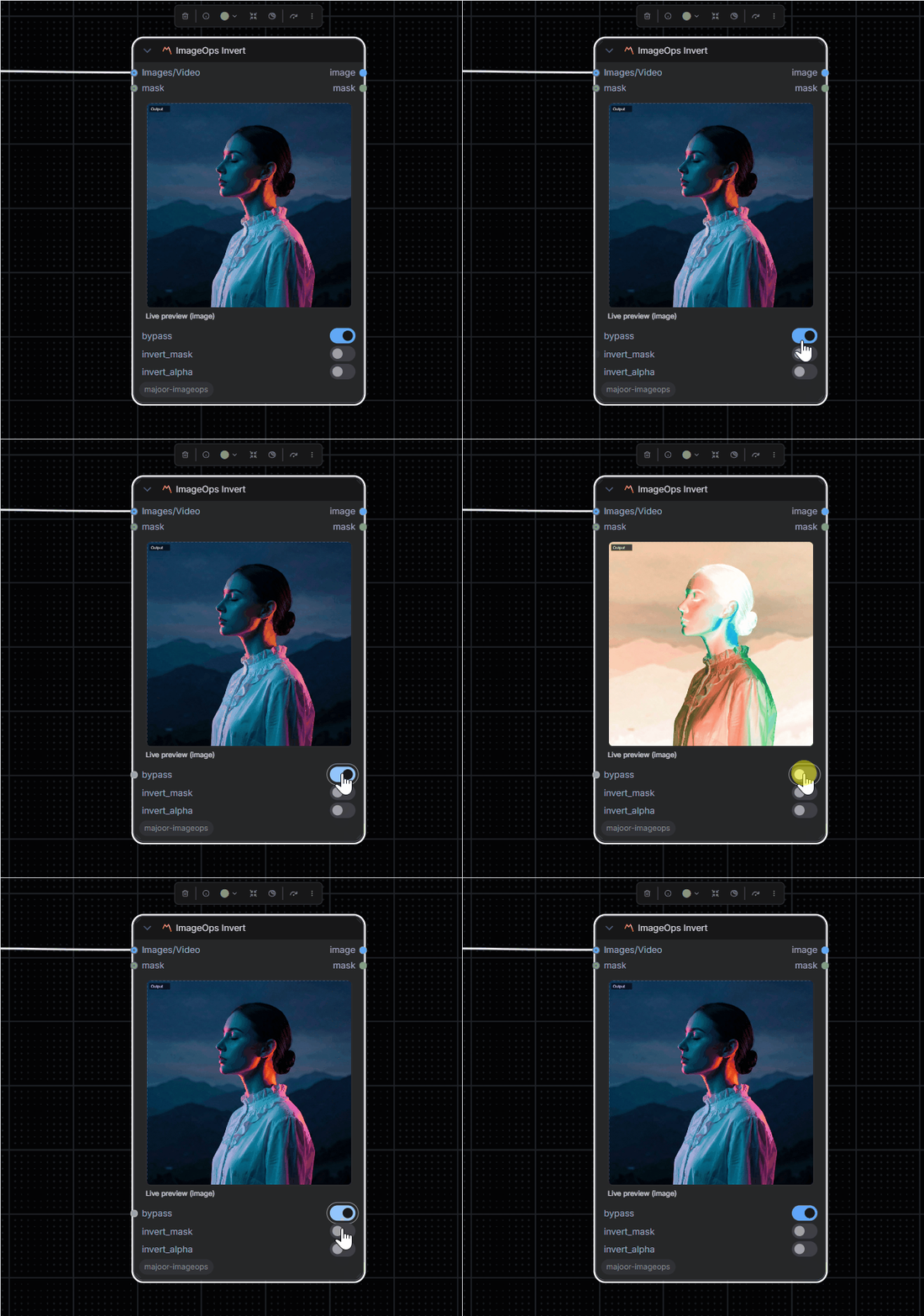
Invert colors and/or the alpha channel independently.
Inputs:
image(IMAGE/VIDEO): Source mediamask(MASK, optional): Effect mask
Parameters:
invert_alpha: Also invert the alpha channel (only applies to RGBA images with 4 channels)invert_mask: Invert the output maskbypass: Skip processing
Outputs: IMAGE, MASK
🔮 ImageOps Spherize
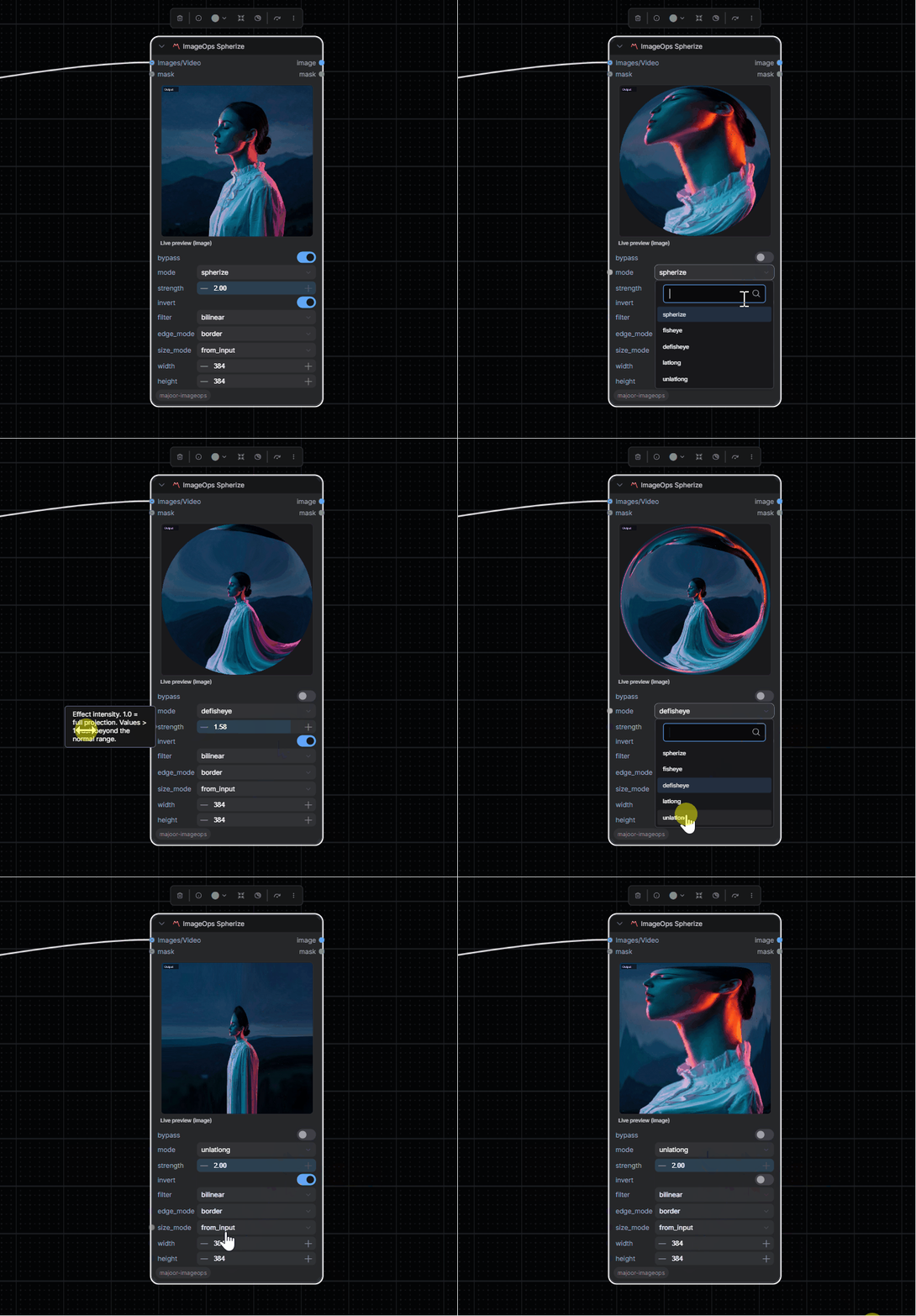
Spherical, fisheye, and equirectangular lens-projection distortions.
Inputs:
image(IMAGE/VIDEO): Source mediamask(MASK, optional): Mask to multiply against the circle boundary
Parameters:
mode:spherize(barrel/pincushion),fisheye(equidistant projection),defisheye(flatten fisheye),latlong(equirectangular → rectilinear),unlatlong(rectilinear → equirectangular)strength(0.0 to 2.0): Effect intensity; 1.0 = full projection, values > 1 push beyond the normal rangeinvert: Swap the forward and inverse mapping directions (e.g. barrel ↔ pincushion, latlong ↔ unlatlong)filter:bilinear,bicubic, ornearest— resampling qualityedge_mode:border,reflection, orzeros— behavior at the image boundarysize_mode:from_input(use input dimensions) orcustom(resize towidth×heightbefore applying)width/height: Target dimensions whensize_modeiscustombypass: Skip processing
The output mask is a unit-circle alpha (1 inside the sphere, 0 outside), multiplied by the optional input mask.
Outputs: IMAGE, MASK
📏 ImageOps Clamp
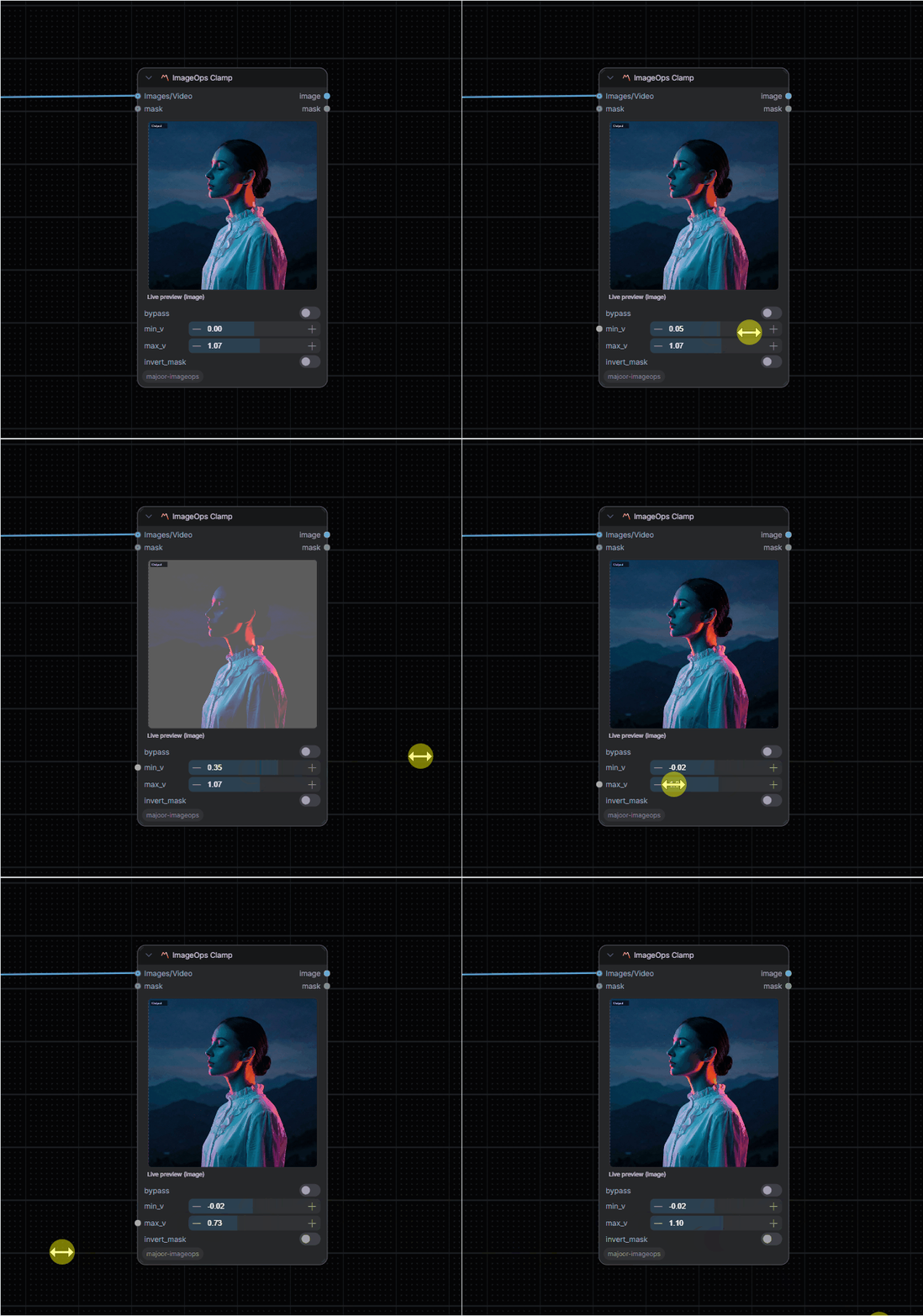
Clamp pixel values to specified range.
Inputs:
image(IMAGE/VIDEO): Source mediamask(MASK, optional): Effect mask
Parameters:
min_v(-1.0 to 1.0): Minimum valuemax_v(0.0 to 2.0): Maximum valueinvert_mask: Invert mask effectbypass: Skip processing
Outputs: IMAGE, MASK
🔀 ImageOps Merge
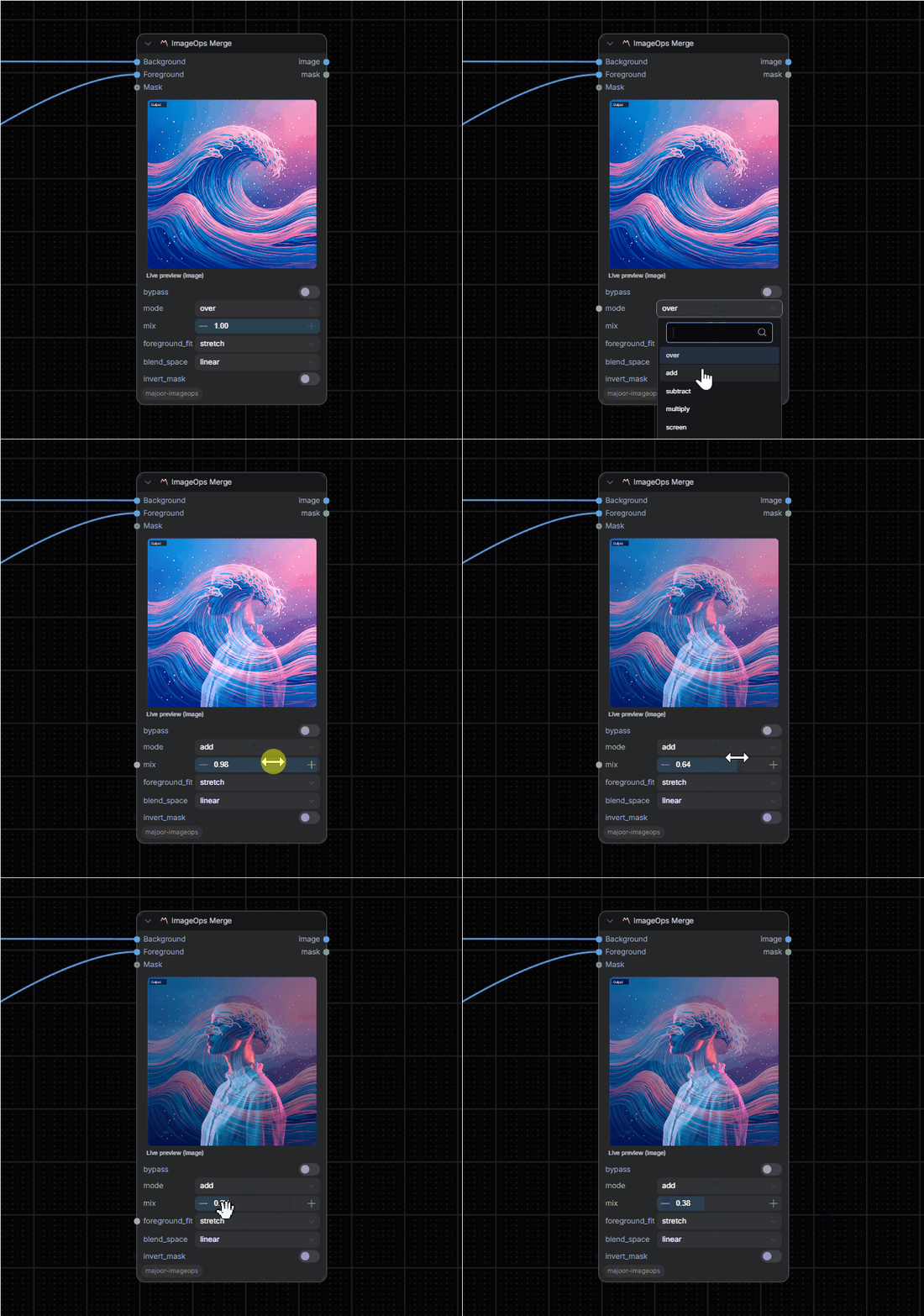
Blend two images with linear-light or sRGB blend modes.
Inputs:
A(IMAGE/VIDEO): Background layerB(IMAGE/VIDEO): Foreground layermask(MASK, optional): Effect mask
Parameters:
mode: over, add, multiply, screen, overlay, soft_light, difference, lighten, darken, color_dodge, color_burn, exclusion, hard_light, subtract, divide, linear_burn, linear_light, vivid_light, pin_light, hard_mix, grain_extract, grain_mergemix(0.0 to 1.0): Blend opacityforeground_fit: stretch, contain, cover, or none for adapting foreground B to background Ablend_space: linear or srgb; linear performs RGB blend math in gamma 1.0 then converts back to sRGBinvert_mask: Invert mask effectbypass: Skip processing
Outputs: IMAGE, MASK
🌫️ ImageOps Noise
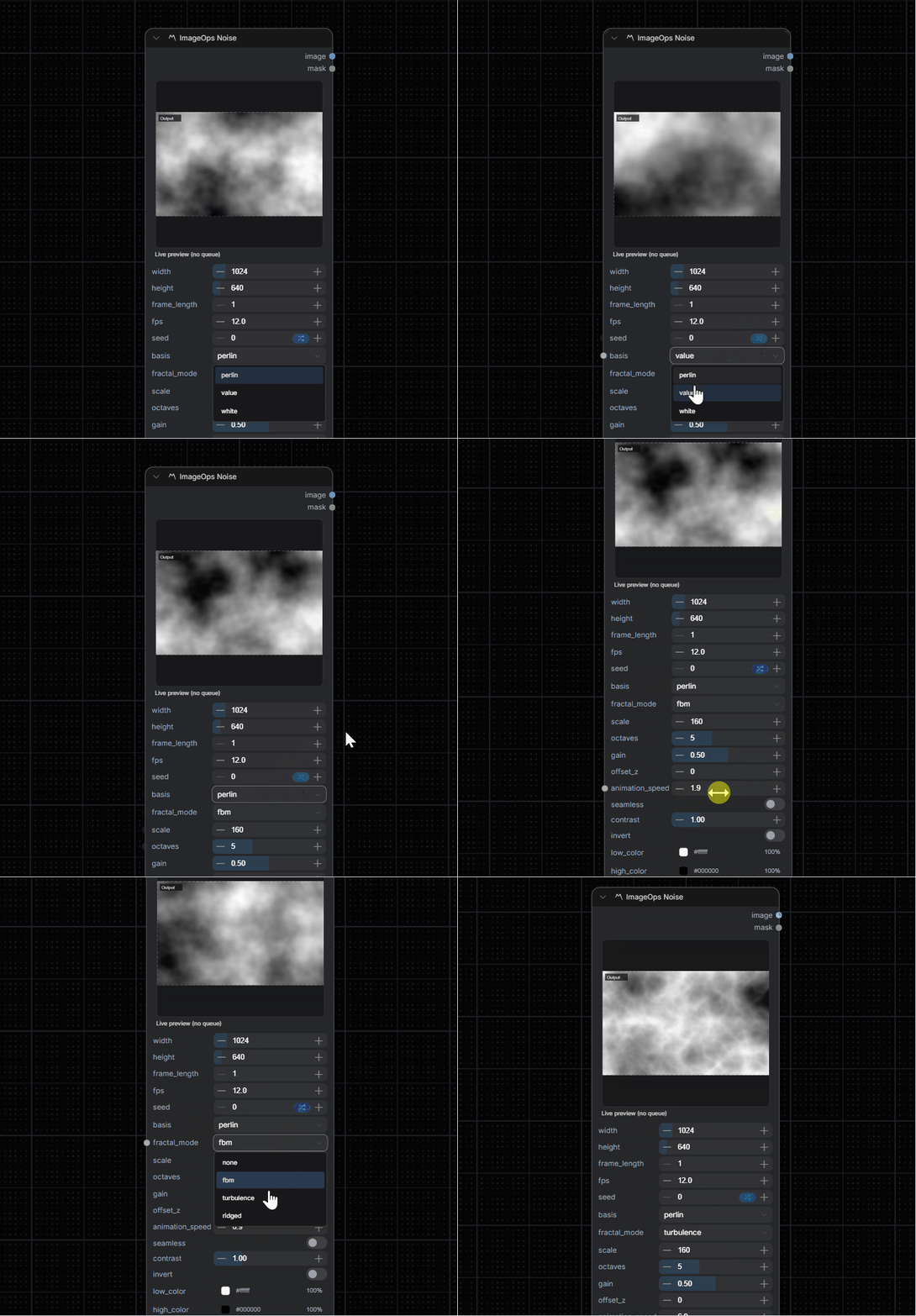
Procedural texture generator for masks and grayscale or color noise plates.
Parameters:
width/height: Output resolution (64 to 8192)frame_length: Number of frames to generate (1 to 256)fps: Preview playback speedseed: Deterministic noise seedbasis:perlin,value, orwhitefractal_mode:none,fbm,turbulence, orridgedscale: Primary feature sizeoctaves(1 to 12),gain(0.0 to 1.0): Fractal shaping controlsoffset_z: Static Z offset into the 3D noise fieldanimation_speed: Z offset added per frame — higher = faster animation, 0 = still imageseamless: Tileable X/Y noise for repeating texturescontrast,invert: Output tonal shapinglow_color,high_color: Color ramp applied to the grayscale output
Outputs: IMAGE, MASK
🖌️ ImageOps Paint
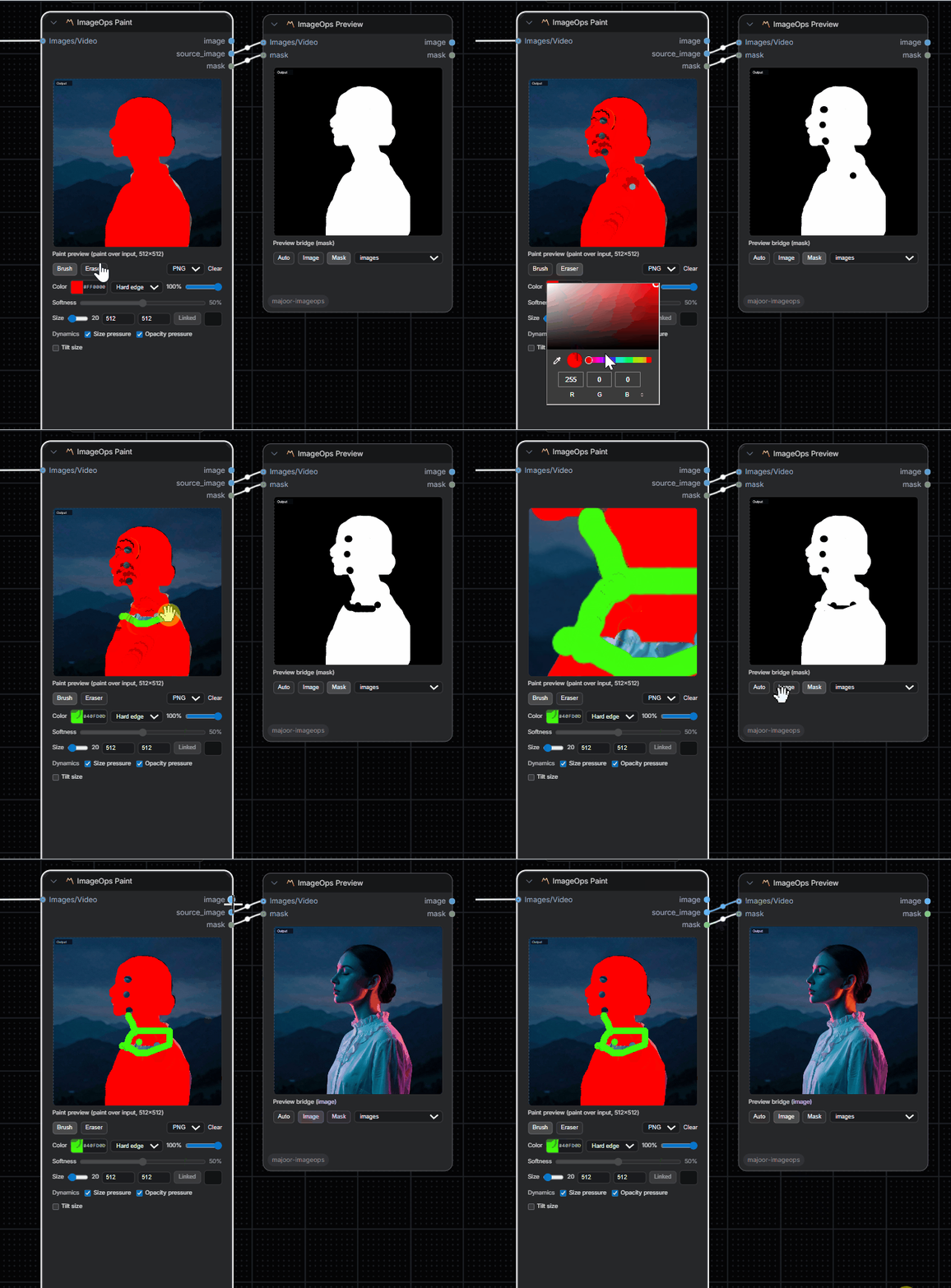
Digital painting and drawing tool.
Inputs:
image(IMAGE/VIDEO, optional): Base media (creates blank canvas if not provided)
Parameters:
width(64 to 4096): Canvas widthheight(64 to 4096): Canvas heightsync_dimensions: Link width/height changesbg_color: Background color (hex)tool: Brush or Eraserbrush_color: Brush color (hex)brush_opacity(0.0 to 1.0): Brush transparencybrush_size(1 to 256): Brush diameterbrush_pressure_size: Pen pressure modulates brush diameterbrush_pressure_opacity: Pen pressure modulates brush opacitybrush_tilt_size: Pen tilt can widen the brush footprintoverlay_format: WebP or PNG payload encodingoverlay_data: Encoded overlay payload; the preview stores cropped visible bounds to reduce transfer sizeoverlay_layers: Optional JSON layer list for composing multiple overlay payloadsinvert_mask: Invert mask effectbypass: Skip processing
The node still accepts older full-frame Base64 PNG overlay_data values. New preview payloads are cropped to the visible painted bounds and can use WebP when the browser supports it; overlay_layers accepts {"layers":[{"data":"...","opacity":1,"enabled":true}]} for non-destructive multi-layer overlays.
Outputs: IMAGE, MASK
🌑 ImageOps Vignette
Radial darken-to-color falloff from a configurable center.
Inputs:
image(IMAGE/VIDEO): Source mediamask(MASK, optional): Effect mask
Parameters:
amount(0.0 to 1.0): Strength of the darkeningsize(0.0 to 2.0): Radius (normalized frame units) where the vignette reaches full amountsoftness(0.01 to 2.0): Falloff width feathering the edge inward fromsizecenter_x,center_y(-1.0 to 2.0): Vignette center, normalizedcolor: Color the vignette darkens toward (default black)invert_mask: Invert mask effectbypass: Skip processing
Outputs: IMAGE, MASK
🌈 ImageOps Chromatic Aberration
Radial red/blue channel shift simulating lens color fringing.
Inputs:
image(IMAGE/VIDEO): Source mediamask(MASK, optional): Effect mask
Parameters:
amount(-30 to 30): Radial channel shift in pixels at the frame corner; positive shifts red outward and blue inwardcenter_x,center_y(-1.0 to 2.0): Aberration center, normalizedinvert_mask: Invert mask effectbypass: Skip processing
Outputs: IMAGE, MASK
✨ ImageOps Bloom
Threshold + blur + additive glow on highlights.
Inputs:
image(IMAGE/VIDEO): Source mediamask(MASK, optional): Effect mask
Parameters:
threshold(0.0 to 4.0): Brightness level above which pixels start to glowintensity(0.0 to 4.0): Strength of the added glowradius(0 to 128): Gaussian blur radius of the glow, in pixelsinvert_mask: Invert mask effectbypass: Skip processing
The glow is added, not screened, so highlights above 1.0 on HDR sources stay correct instead of clamping.
Outputs: IMAGE, MASK
🔵 ImageOps Defocus
Depth-driven defocus/bokeh with shaped aperture kernels.
Inputs:
image(IMAGE/VIDEO): Source mediadepth(IMAGE/VIDEO, optional): Depth map — its luma drives the per-pixel blur amount. Without it connected, the node is a no-opshape_texture(IMAGE/VIDEO, optional): Grayscale bokeh aperture shape, used whenbokeh_shapeiscustommask(MASK, optional): Effect mask
Parameters:
focus_distance(0.0 to 1.0): Depth value that stays in focusfocus_range(0.0 to 0.99): Depth thickness aroundfocus_distancethat stays sharp before blur ramps upmax_blur_radius(0 to 128): Bokeh disc radius in pixels at the depth extremesnum_layers(2 to 32): Depth slices blurred and interpolated between — higher is smoother but slowerbokeh_shape:circle,hexagon,octagon, orcustom(usesshape_texture)highlight_threshold(0.0 to 2.0): Brightness above which pixels bloom into visible bokeh discs when blurredhighlight_boost(0.0 to 8.0): Strength of the bokeh highlight bloominvert_depth: Flip the depth map convention (near/far)
🔵 ImageOps Roto
Vector rotoscoping with an interactive editor in the live preview. Shapes are stored as bezier splines, so they stay editable and resolution independent; the backend rasterises them with supersampled edges at the full image size.
Inputs:
image(IMAGE/VIDEO, optional): Source media. Without it the node outputs a matte ofwidthxheight
Parameters:
feather(0 to 512): Gaussian feather on the final matte, in pixelsexpand(-512 to 512): Grow or shrink every shape, in pixelsopacity,invert: Applied to the final matteframe_offset: Keyframes are looked up at batch index +frame_offsetview: Live preview only.overlay(source with matte tint),matte, orresult(source cut by the matte)
Editor (preview canvas):
- Tools: Select (V), Bezier (B, click to add points and drag to pull handles, click the first point or Enter to close), Ellipse (E, Shift for a circle), Rect (R, Shift for a square), Free (F, the stroke becomes a smooth closed bezier)
- Select tool: drag points and handles (Alt breaks the tangent), drag a shape to move it, double-click a segment to add a point, Delete removes the point or shape, Smooth (S) / Corner (C) convert the selected point
- Per shape:
add/subtract/intersect, feather, opacity, visibility and draw order - Keyframes: pick a frame with the Frame slider (or Hold), then edit. Set key (K) makes a shape animated; edits on an animated shape auto-key at the current frame and points are interpolated linearly between keys. Adding or deleting a point applies to every key
- Ctrl+Z / Ctrl+Shift+Z undo and redo; Ctrl+drag pans and Ctrl+wheel zooms the preview
Hold seeks upstream video files by time using the video's frame rate (24 fps when unknown); for exact frame matching connect a source whose frame rate is known.
Outputs: IMAGE (source with the matte as alpha), MASK
invert_mask: Invert mask effectbypass: Skip processing
In-focus pixels stay pixel-perfect sharp; out-of-focus depth slices are convolved with the chosen aperture shape and interpolated per-pixel to avoid banding. The live canvas preview only approximates this (a few gaussian-blur bands by depth, no shape or highlight bloom) — the real shaped/glowing bokeh appears once the backend runs.
Outputs: IMAGE, MASK
🎬 ImageOps Comp
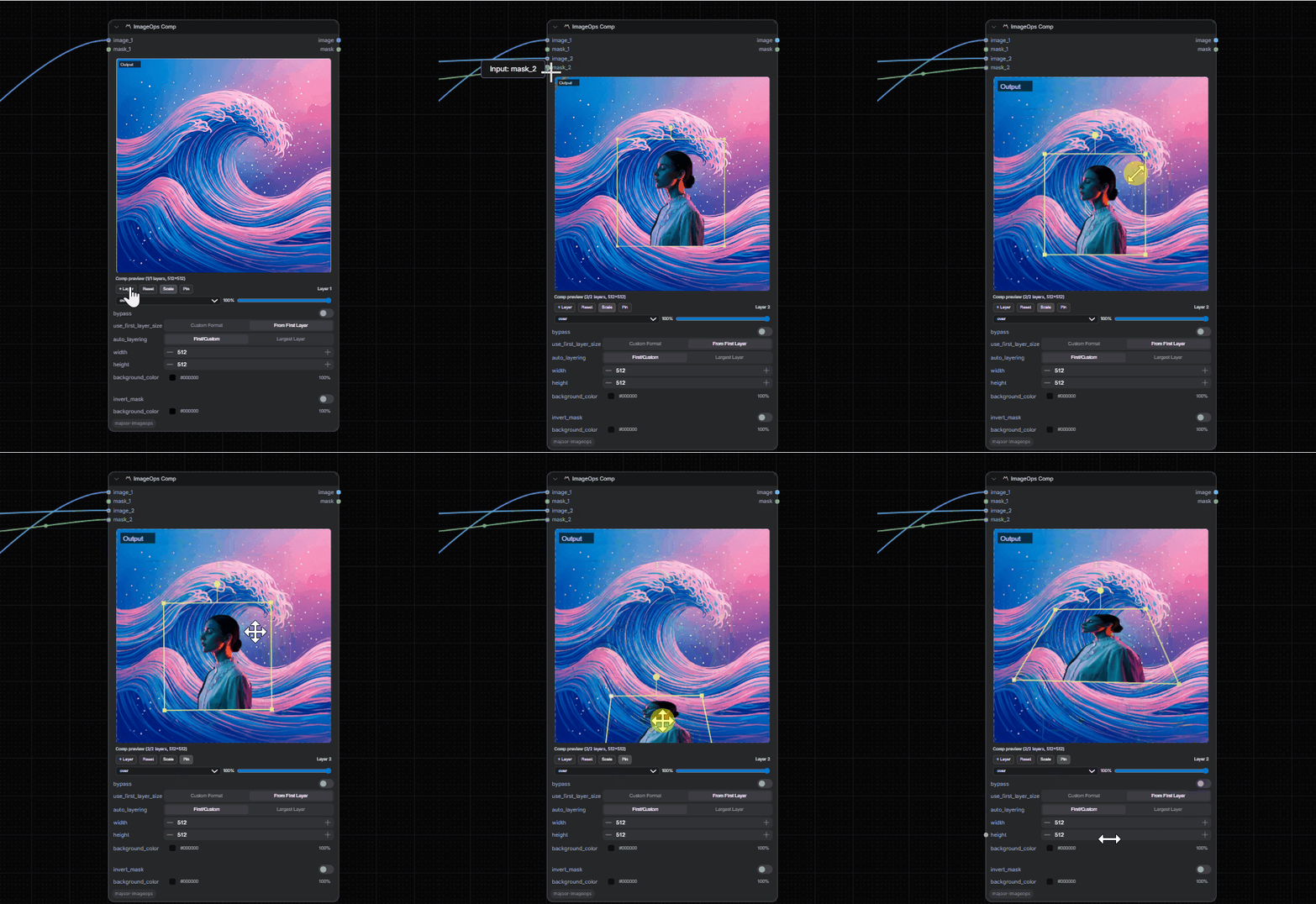
Multi-layer compositor with professional controls.
Inputs:
image_1,image_2, ... (IMAGE/VIDEO): Layer inputsmask_1,mask_2, ... (MASK): Per-layer masks- Dynamic slot system with auto-expansion
Parameters:
bypass: Skip processinguse_first_layer_size: Use first layer as canvas sizeauto_layering: Use the largest connected layer dimensions as canvas sizewidth(1 to 8192): Custom canvas widthheight(1 to 8192): Custom canvas heightbackground_color: Canvas background (hex)layers_json: Layer configuration (auto-managed by UI)invert_mask: Invert output mask
Outputs: IMAGE, MASK, and on ComfyUI 0.31+ layers, the comp as a core LAYERS document for the core layered image editor (first frame of each layer; corner-pin distortion and background color are not included).
Interactive UI Features:
- ➕ Add layer button
- 🔄 Reset layer button
- 🎨 Blend mode selector per layer
- 🎚️ Opacity slider per layer
- 🖱️ Drag-to-position layers on preview
Outputs: IMAGE, MASK
👁️ ImageOps Preview
Preview output node with advanced visualization modes.
Inputs:
image(IMAGE/VIDEO): Source mediaimage_b(IMAGE/VIDEO, optional): Second source to compare againstmask(MASK, optional): Mask to preview
Parameters:
preview_target: auto, image, or maskmode:images: Individual framesstrip: Horizontal strip for batch inspectionanimated_webp: Animated WebP previewanimated_gif: Animated GIF preview
compare_mode:off,side_by_side,wipe, ordiff— whenimage_bis connected, builds the saved/queued preview thumbnail as an A/B comparison instead of Image alonewipe_position(0.0 to 1.0): Split position used bycompare_mode=wipe
While editing (before queuing), the live canvas also offers its own on-demand A/B toggle (Live/B/Wipe/Diff buttons) — this compares the two live-rendered inputs directly and is independent of the compare_mode/wipe_position widgets above, which control what actually gets saved once the prompt runs. Without image_b connected, those same buttons fall back to comparing the live canvas proxy against the last real queued result of image, for checking preview accuracy.
Outputs: IMAGE, MASK
🔧 Bypass Mode
All processing nodes expose a bypass parameter (boolean). When enabled:
- ✅ Node returns input unchanged
- ✅ Live preview skips applying the operation
- ✅ Useful for A/B comparison and workflow debugging
🖥️ Live Preview (Frontend)
Architecture
| File | Purpose |
|------|---------|
| js/preview/host.js | Widget injection, video loop, Preview Pro UI (scopes/overlays/A‑B) |
| js/preview/renderer.js | Recursive render with caching (recursion limit: 64) |
| js/preview/registry.js | Adapter selection (core/WAS/VHS/generic/ImageOps) |
| js/preview/ops.js | Preview ops implementation (single source for preview behavior) |
Preview Pro UI Features (ImageOpsPreview only)
- 📊 Histogram: Luminance distribution
- 🌊 Waveform: Luma or RGB waveform monitor
- 🎯 Vectorscope: Color vector analysis
- 🦓 Zebra/False Color: Exposure visualization
- ↔️ A/B Compare: Freeze and wipe comparison
Interop Support
| Source | Adapters | |--------|----------| | Core | Basic invert/sharpen/blend (best effort) | | WAS | Heuristics for common nodes | | VHS | Video frame sources | | Generic | Fallback adapter |
⚠️ Fail-Soft: Unsupported nodes don't break the graph - they simply bypass preview processing.
⚙️ Configuration
Live Preview Settings
Open ComfyUI settings and search for "ImageOps": idle, playback and editing preview sizes, refresh delay and the graph size limit. The command palette also offers "ImageOps: Refresh all live previews".
Values saved earlier in localStorage (for example localStorage["imageops.preview.canvasSize"] = 512) still apply until the matching setting is changed.
Large Image Warning Threshold
# Environment variable (in MB)
IMAGEOPS_LARGE_IMAGE_WARN_MB=2048  # Default: 2048 MB
Compute Device
Color Correct, Vignette, Clamp, Invert, Chromatic Aberration, Bloom, Grain, Camera Shake, Transform, Spherize and Corner Pin process on ComfyUI's torch device when the frames fit in free memory, then return them to the intermediate device. Otherwise they keep running on the device the frames are on.
IMAGEOPS_COMPUTE_DEVICE=cpu # Default: auto. "cpu" keeps every node on the input tensor's device
Animated Preview Transcoding
GIF, animated WebP and video previews are transcoded to VP9 WebM with PyAV (already required by ComfyUI) and cached in ComfyUI's temp folder. No external ffmpeg is needed.
📝 Notes & Troubleshooting
⚠️ Deprecation Warnings
If ComfyUI logs [DEPRECATION WARNING], another extension is using legacy frontend APIs. This doesn't affect ImageOps functionality.
🎥 Video/Frame Sources
Some packs expose video via custom types. Best results when upstream provides frames as IMAGE batches.
🔌 Input Types
- IMAGE: Standard ComfyUI image batches
[B, H, W, C] - VIDEO: Frame sources from video nodes (VHS, etc.)
- MASK: Single-channel masks
[B, H, W]
🎨 Blend Modes Reference (ImageOps Merge)
| Mode | Description |
|------|-------------|
| over | Standard alpha compositing |
| add | Additive blending (brightens) |
| multiply | Multiply colors (darkens) |
| screen | Screen blend (brightens) |
| overlay | Contrast-boosting multiply/screen mix |
| soft_light | Softer overlay variant |
| difference | Absolute difference |
| lighten | Maximum of each channel |
| darken | Minimum of each channel |
| color_dodge | Brightens base to reflect the blend color |
| color_burn | Darkens base to reflect the blend color |
| exclusion | Lower-contrast difference |
| hard_light | Overlay driven by the blend color |
| subtract | Base minus blend color |
| divide | Base divided by blend color |
| linear_burn | Base plus blend color minus one |
| linear_light | Base plus twice the blend color minus one |
| vivid_light | Color burn/dodge split at the blend color midpoint |
| pin_light | Lighten/darken split at the blend color midpoint |
| hard_mix | Binary result from vivid light |
| grain_extract | Base minus blend color, centered on 0.5 |
| grain_merge | Base plus blend color, centered on 0.5 |
Merge offers every mode. Comp only offers the modes its canvas preview can render (up to hard_light).
🎛️ Compositor Blend Modes
| Mode | Canvas Operation |
|------|------------------|
| over | source-over |
| add | lighter |
| multiply | multiply |
| screen | screen |
| overlay | overlay |
| soft_light | soft-light |
| difference | difference |
| lighten | lighten |
| darken | darken |
| color_dodge | color-dodge |
| color_burn | color-burn |
| exclusion | exclusion |
| hard_light | hard-light |
🏗️ Technical Details
Batch Processing
All nodes process batches natively:
- Single images:
[1, H, W, C] - Image sequences:
[B, H, W, C] - Video frames:
[B, H, W, C]
Mask Handling
- Masks are automatically prepared and matched to reference dimensions
invert_maskaffects both processing and output mask- Alpha channel extracted as mask when available
Color Space
- All processing in linear float32
[0.0, 1.0] - Luma weights:
[0.2126, 0.7152, 0.0722](Rec. 709) - Gamma safe range:
0.2to5.0
Performance
- Live preview uses optimized canvas rendering
- Recursive render cache limit: 64 nodes
- Large image warning threshold: 2048 MB (configurable)
📄 License
Check the repository for license information.
🙏 Credits
Author: Majoor
Category: image/imageops
Version: 0.6.0
📋 Changelog
Recent changes
- ImageOps Lens Artifacts — removed
- ImageOps Append (Autogrow) — removed (the
ImageOpsAppendV2node added, then removed, this release) - ImageOps Vignette, Chromatic Aberration, Bloom, Lens Artifacts — new nodes for common lens/compositing effects: radial darken falloff, red/blue channel fringing, HDR-safe additive glow, and dirt/dust compositing
- ImageOps Defocus — new depth-driven defocus/bokeh node with shaped aperture kernels (circle, hexagon, octagon, or a custom shape texture) and highlight bloom
- ImageOps Color Correct — added
input_space(srgb/linear) so scene-linear/HDR sources aren't gamma-encoded twice - ImageOps Preview — added an
image_binput andcompare_mode/wipe_positionfor a real A/B comparison baked into the saved/queued preview thumbnail, plus a separate live on-demand A/B toggle while editing - Live preview HUD — the frame-count badge now shows the real total (
3 / 24) and hides itself for single-frame sources instead of always showingf 0000; the "Output" overlay only appears for Pad Out (where it's meaningful) and now shows the real pixel size instead of a static label - ImageOps Spherize — new node with five projection modes (spherize, fisheye, defisheye, latlong, unlatlong), bicubic/bilinear/nearest filter, edge modes, custom output size, and circle-mask output
- ImageOps Corner Pin — bicubic interpolation option added
- ImageOps Color Correct — enhanced color correction capabilities
- ImageOps Preview — improved noise node performance and zoom/pan interactions
- ImageOps Invert —
invert_alphais now a proper UI checkbox (previously in the signature but not exposed); RGBA images can invert color and alpha independently - ImageOps Noise — incremental CPU transfer during frame generation reduces peak VRAM usage on large batches; deprecated legacy parameters (
seed_step,compute_device,offset_x/y,frame_offset_x/y/z,lacunarity) removed from UI (still accepted in saved workflows for backwards compatibility)
<div align="center">
Made with ❤️ for the ComfyUI community
</div>