
ComfyUI-MOSS-Layout-UI
ComfyUI custom nodes: visual layout editor for MOSS-Image — draw boxes on a canvas and compile the official summary/items layout JSON.
Nodes (3)
ComfyUI MOSS Layout UI
给 MOSS-Image 用的三节点可视化排版插件:在画布上拖框 → 编辑元素提示词 → 一键编译成模型能吃的 summary/items 紧凑 JSON。不用手写坐标,换画布尺寸也不用重排。
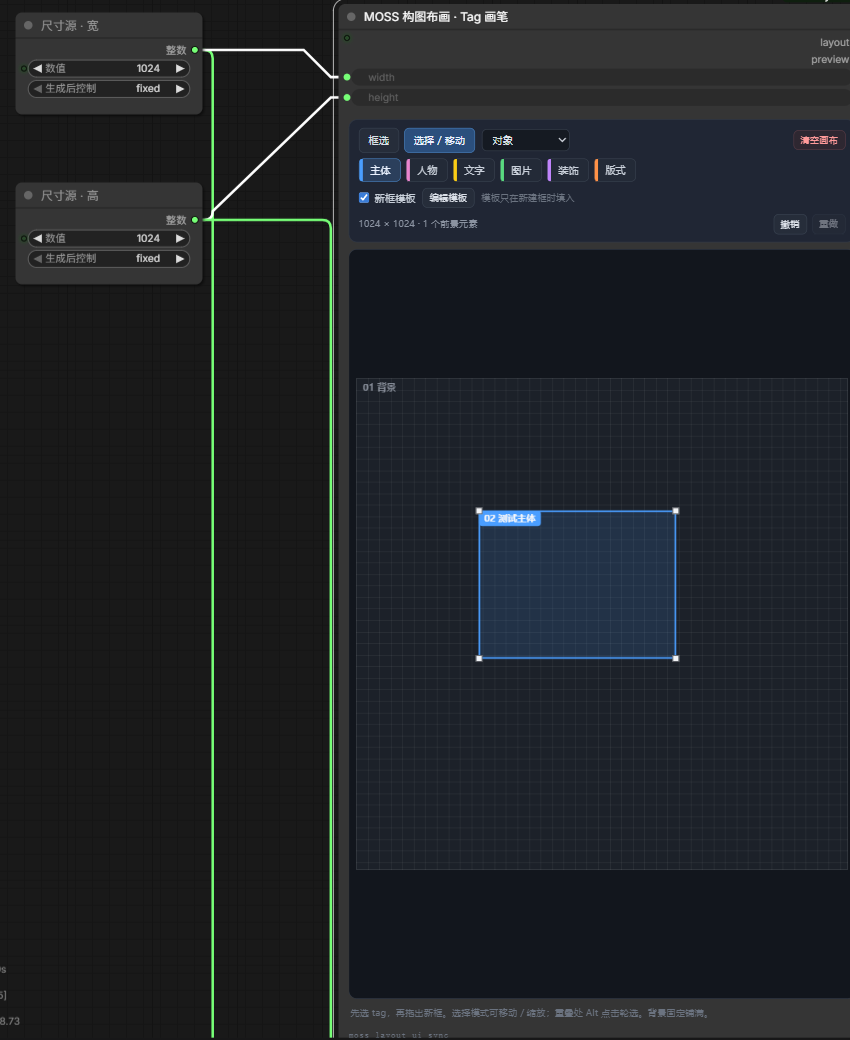
纯前端 DOM 面板 + 一层薄的 Python 编译层。不联网、不装额外依赖(只用 ComfyUI 自带的 torch / numpy / Pillow)。
三个节点
| 节点 | 显示名 | 输入 | 输出 |
| --- | --- | --- | --- |
| MOSSLayoutCanvas | MOSS 构图布画 · Tag 画笔 | width INT、height INT、state(隐藏) | layout STRING、preview IMAGE |
| MOSSLayoutElements | MOSS 元素管理 · 定位 / 提示词 | layout STRING、state(隐藏) | elements STRING、character_boxes STRING |
| MOSSLayoutStandardPrompt | MOSS 标准提示词 · 导入 / 整理 / 导出 | layout / elements / character_boxes STRING、state(隐藏) | prompt STRING、standard_prompt STRING |
同一套三个节点按实际连线共享 moss-layout/v1 布局,每个画布独立保存,多套排版可以放在同一工作流中(百分比坐标,背景永远在 elements[0]、固定 [0,0,100,100] 且不参与生成 items)。
state 是隐藏 widget,用来把布局随工作流一起保存;运行时后端也会读它做兜底。
安装
cd ComfyUI/custom_nodes
git clone https://github.com/MIKOU306/ComfyUI-MOSS-Layout-UI.git moss-layout-ui
或直接下载 zip 解压到 ComfyUI/custom_nodes/moss-layout-ui/,然后:
- 重启 ComfyUI
- 浏览器 Ctrl+F5 重载前端
- 画布上搜索
MOSS,添加三个节点,或导入examples/MOSS-layout-poster-INT8.json
要求:ComfyUI 带新版节点 API(comfy_api.latest,2025 之后的版本均可)。开发与验证环境 = ComfyUI 0.41.0 / 前端 1.55.18 / Python 3.12。
1.0.1 更新
修复多套节点串数据、背景描述未进入提示词、多行文字丢换行,以及清空画布误删描述。更新后请重启 ComfyUI,再按 Ctrl+F5;无需重建工作流或重新下载模型。 31 项浏览器检查与 3 次后端提示词编译通过,具体范围见 验证记录。
使用
① 构图布画:先选 tag(主体 / 人物 / 文字 / 图片 / 装饰 / 版式),在空白处拖出新框;框内拖动 = 移动,四角手柄 = 缩放;重叠处 Alt + 点击 轮选;支持撤销 / 重做(60 步)、新框模板提示词、清空画布。
画布宽高可接 PrimitiveInt 联动(支持 PrimitiveInt、前端 PrimitiveNode、Reroute),元素保留百分比位置,改尺寸不用重排。
「清空画布」只删除前景,保留全局描述、背景和尺寸,可撤销与重做。
② 元素管理:搜索(编号 / 名称 / tag / 提示词)、按 tag 筛选、改名称 / tag / 生成类型 / 提示词 / 左上宽高四个百分比;上移、下移、复制、删除。 生成类型选「文字」时必须填文字内容,否则该元素会按普通物体处理。文字内容支持多行,编辑、保存与最终提示词会保留换行。
③ 标准提示词:写全局提示词(整张图的场景 / 风格 / 光 / 阅读顺序);粘贴标准 JSON 后点「导入新布局」或「合并并保留修改」;「导出回输入框」把当前布局导出成可编辑 JSON;底部两个 tab 在「当前标准 JSON / 最终生成词」之间切换,可一键复制。
连线:画布.layout → 元素.layout 与 标准提示词.layout;元素.elements / character_boxes → 标准提示词同名输入;标准提示词.prompt → CLIPTextEncode.text。
输出格式
prompt 输出的是 MOSS-Image 官方布局格式,直接接正向 CLIPTextEncode.text:
{
  "summary": {"caption": "整张海报的场景、风格与阅读顺序"},
  "items": [
    {"label": "text",      "caption": "字体与承载面描述", "text": "黑暗骑手", "bbox": [358, -320, 493, 320]},
    {"label": "character", "caption": "人物外观描述",                 "bbox": [-447, -266, 293, 266]},
    {"label": "object",    "caption": "物体外观描述",                 "bbox": [-17, -330, 346, 331]}
  ],
  "bbox_coord_space": "abs_centralized",
  "bbox_format": "yxyx"
}
bbox=[y_min, x_min, y_max, x_max],整数,以画布中心为原点;1024² 画布范围 −512…+512。label只有object/character/text;text项必须带text。standard_prompt输出的是带缩进的moss-layout/v1完整布局,方便查看 / 复制 / 版本管理。- 全局描述与背景元素描述共同编入
summary.caption,完全相同的两段只保留一次;没有前景时输出合并后的自然语言提示词。 - 布局内部用百分比
[左%, 上%, 宽%, 高%],所以换尺寸不用改数据;但生成尺寸必须等于画布尺寸,否则坐标语义就错了。
硬规则(不然出图会歪)
- 框只表示位置,外观写在提示词里。不要写「请把电视放在左上角」这类指令,框就是位置指令。
- 一个元素一个框。两个物体塞一个框会被融合成一个。
- 人物框至少占画布宽度 65%(单主体构图时);框太窄会把躯干拉长、四肢挤在一起。
- 文字框宁大勿小,但别大到离谱:中文单行容量 ≈
框宽 ÷ 字高个字。框远大于字量时,模型会把文案重复铺满整条框。 - 文字框离画布边缘 ≥60px,贴边容易诱发「台面 / 前景条」。
- 姿势只写一次(放全局提示词),元素提示词只写外观,两处都写动作必然打架。
- 液体 / 汗渍 / 痕迹这类不要单开 object 框(会被画成一块深色遮挡物),写进对应 character 的提示词里。
已知限制
- 只支持轴对齐矩形。MOSS-Image 的
bbox规范就是四个整数,模型没有 mask 通道;扩多边形 / 圆形只能在 UI 层做,编译时仍得退化成外接矩形(想收紧选区可以用更小的矩形近似)。 - 节点按上游实际连线归属画布;没有连接到画布的编辑节点会独立保存。需要联动时请按上面的连线方式连接。
- 背景元素固定铺满,不参与
items;背景描述会合入整张图的summary.caption。
English quickstart
Three nodes for MOSS-Image layout posters: draw boxes on a canvas, describe each element, and get the official summary/items JSON that MOSS consumes (abs_centralized / yxyx).
- Copy this folder into
ComfyUI/custom_nodes/moss-layout-ui. - Restart ComfyUI and hard-reload the frontend (Ctrl+F5).
- Import
examples/MOSS-layout-poster-INT8.json, or add the threeMOSS ...nodes from the node menu. - Wire
标准提示词 (StandardPrompt).promptinto the positiveCLIPTextEncode.text, and set the empty latent size to the same canvas size.
Layout is stored in percent coordinates, so changing the canvas size never requires re-laying-out boxes. Requires a ComfyUI build with the new node API (comfy_api.latest).
Version 1.0.1 isolates separate canvas chains, includes background descriptions in the compiled caption, preserves multiline text, and keeps background/global descriptions when clearing foreground boxes. Restart ComfyUI and hard-reload the browser after updating. See validation for the tested scope.
License
MIT. MOSS-Image itself is Apache-2.0 by OpenMOSS; this repo only contains the three layout nodes and does not ship any model weights.