
Lyonir Studio
Lyonir Studio nodes for ComfyUI: multi-model sampler, resolution, image comparison, persistent image/video galleries and Qwen3-TTS.
Nodes (9)
Comparing Two Images Without Filling Up Your Output Folder
One Dropdown to Stop Your Video Graph Disagreeing With Itself
Ten Named Voices, One Instruction Field — Lyonir Qwen3-TTS Custom Voice
Clone a Voice From a Clip — and Let It Pick Its Own Best Take
Lyonir Qwen3-TTS Voice Design
Ask for 720p, Generate 768, Crop Back — Why Lyonir Resolution Rounds Up
Sampling, Video Decode and the Crop in One Node
The Filmstrip Inside the Node
Video Combine Without Installing VideoHelperSuite
🐺 ComfyUI Lyonir Studio
Custom nodes for ComfyUI, created by Lyonir Studio.
Current public version: v3.5.23.
Save Image now shows the selected image resolution and recorded generation seed above the clean preview, with Copiar seed. Existing images without recorded seeds show Unavailable; their dimensions are read when loaded. For a batch, the seed is the sampler generation seed, not an inferred per-image seed.
Selected video details in v3.5.17
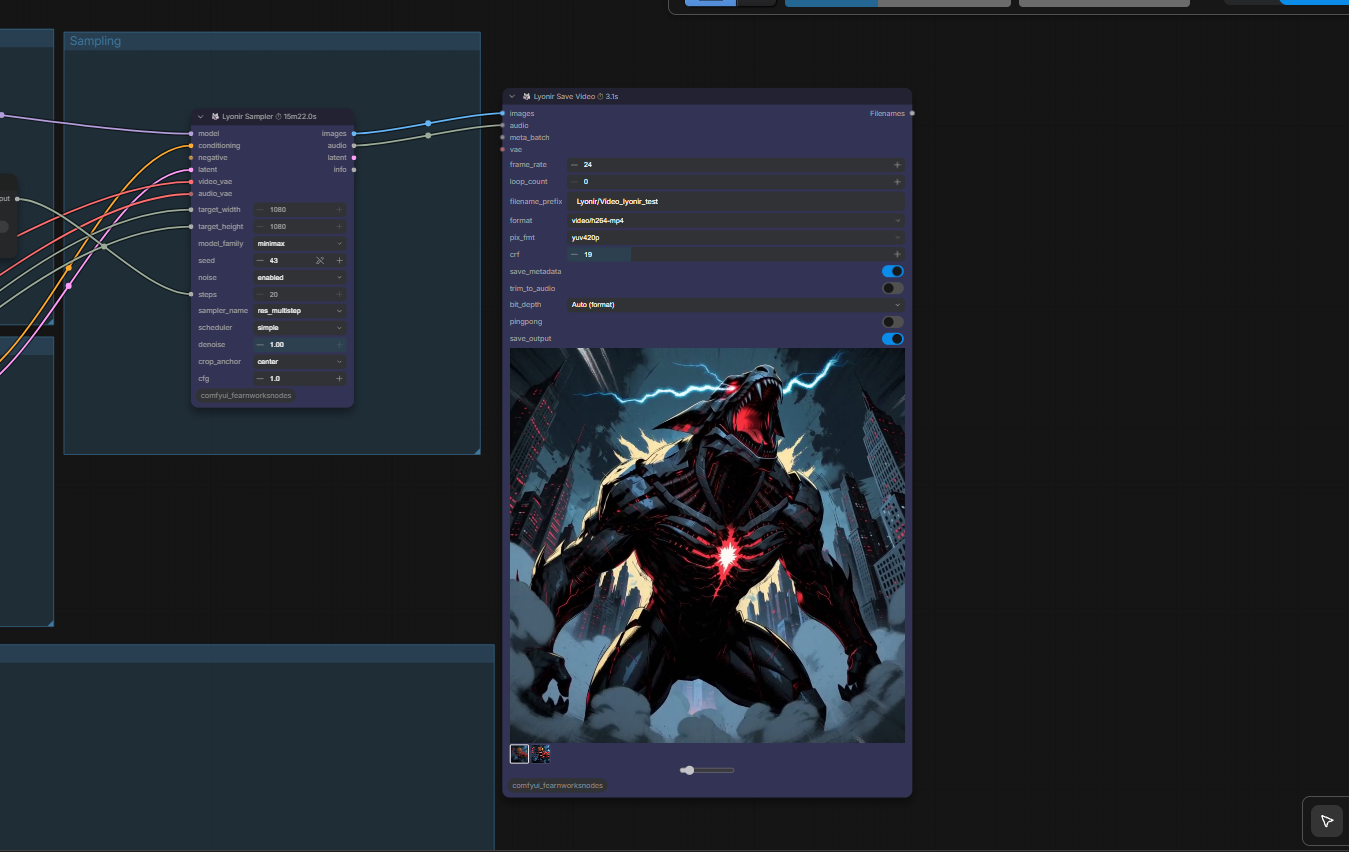
Lyonir Save Video shows recorded generation seed(s) and actual resolution below the controls, above the clean video preview. Select a history thumbnail to inspect that video. Use Copiar seed to copy its seed exactly, including long 64-bit values. Videos saved before this feature, imported media, or unresolvable seed providers show Unavailable instead of the current workflow seed. Export behavior is unchanged.
Sampler total progress in v3.5.16
Lyonir Sampler displays one total progress bar across generation, video decoding, cropping and audio decoding. Progress only moves forward; native preview images and the generation settings are preserved.
Independent Save Video in v3.5.15
The Save Video engine is included in this pack, preserving node identifiers, saved workflow connections, export presets, audio, batch handling and the selectable video history. See TEST_REPORT.md for validation and its limits.
To update an existing Windows installation with the pack dependencies already working: close ComfyUI, back up the old Lyonir folder outside custom_nodes, replace it with the complete new folder, then restart ComfyUI and refresh the browser. Keep only one copy of this pack in custom_nodes. No extra pip command is needed specifically for the Windows video engine.
Included nodes
- 🐺 Lyonir Model Family
- 🐺 Lyonir Sampler
- 🐺 Lyonir Resolution
- 🐺 Lyonir Save Image
- 🐺 Lyonir Save Video
- 🐺 Lyonir Image Compare
- 🐺 Lyonir Qwen3-TTS Voice Clone
- 🐺 Lyonir Qwen3-TTS Voice Design
- 🐺 Lyonir Qwen3-TTS Custom Voice
Lyonir Model Family
Select the model family once and connect the output to the model_family inputs of Lyonir Resolution and Lyonir Sampler. Convert their dropdown widgets to inputs when needed. This node selects a family; it does not load a model.
Example workflows
Download a JSON below and drag it into ComfyUI. These examples use the public Lyonir nodes in v3.5.13 or later. Install the pack requirements. Lyonir Save Video includes its own video encoding engine; no separate VideoHelperSuite installation is required for this node. Models and reference media are not bundled. Screenshots illustrate the author's local workflows; they are not an automated execution guarantee.
Use ComfyUI Manager to identify missing nodes. Depending on the example, your ComfyUI build must provide MiniMax H3, LTX 2.5, ComfyMathExpression and ComfySwitchNode support. Select equivalent model files available in your own installation.
MiniMax H3 first/last-frame video
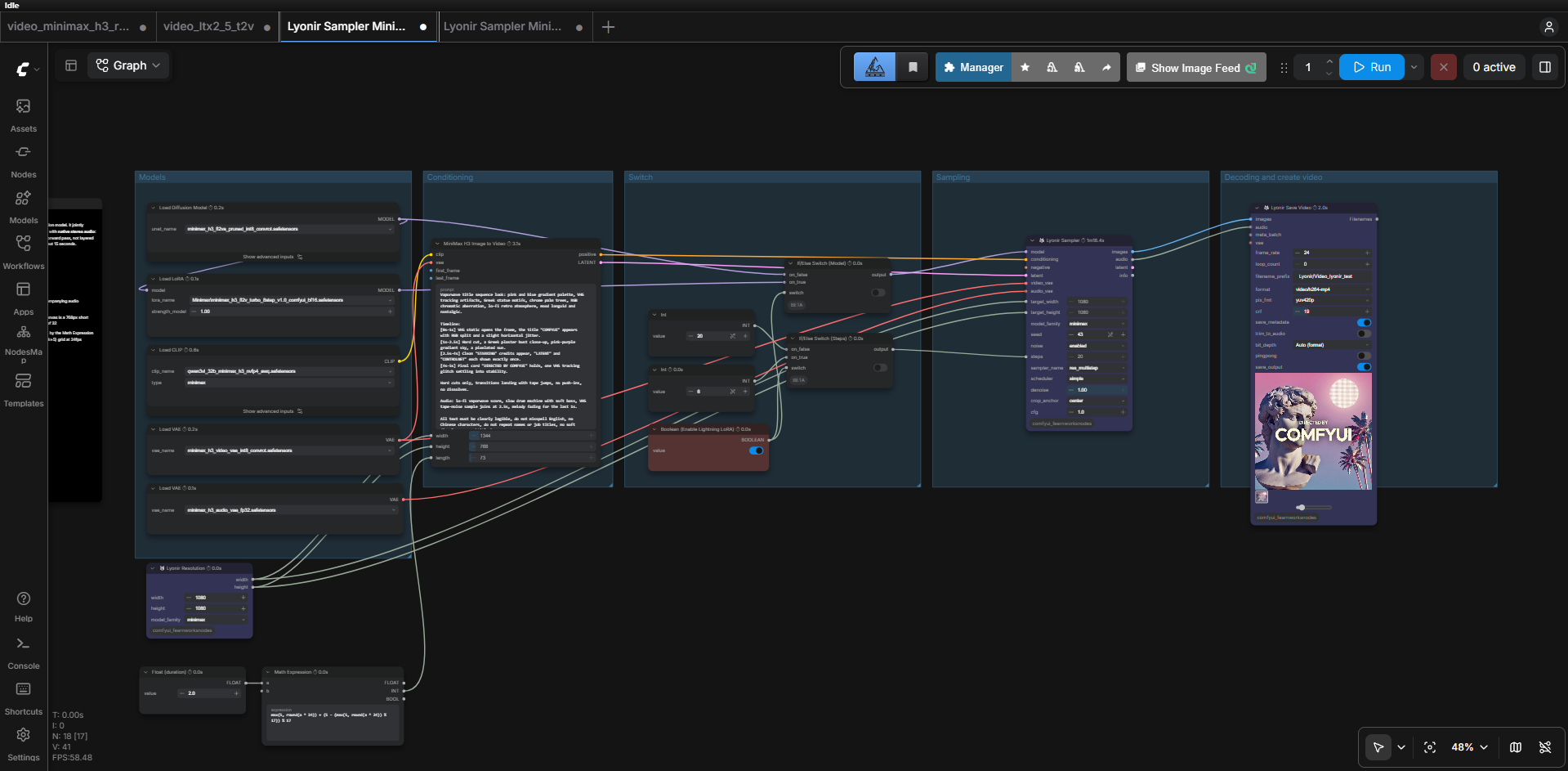
Model filenames used in this example:
minimax_h3_video_vae_int8_convrot.safetensorsminimax_h3_audio_vae_fp32.safetensorsminimax_h3_fl2va_pruned_int8_convrot.safetensorsqwen3vl_32b_minimax_h3_nvfp4_awq.safetensorsMinimax\minimax_h3_fl2v_turbo_8step_v1.0_comfyui_bf16.safetensors
Connect your own first/last-frame images to the conditioning node when using image-guided generation.
MiniMax H3 reference-to-video
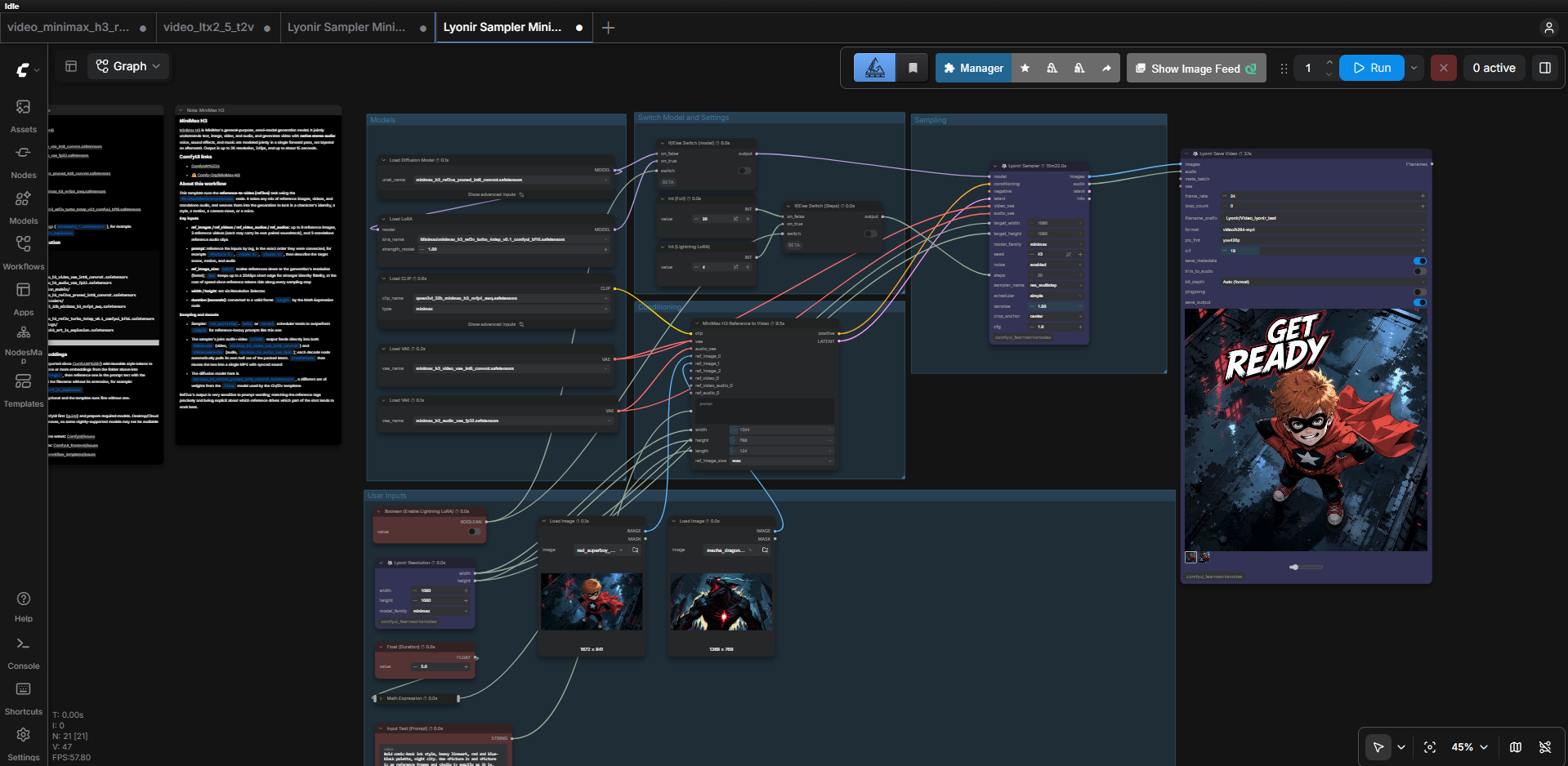
Model filenames used in this example:
minimax_h3_video_vae_int8_convrot.safetensorsminimax_h3_audio_vae_fp32.safetensorsminimax_h3_ref2va_pruned_int8_convrot.safetensorsqwen3vl_32b_minimax_h3_nvfp4_awq.safetensorsMinimax\minimax_h3_ref2v_turbo_4step_v0.1_comfyui_bf16.safetensors
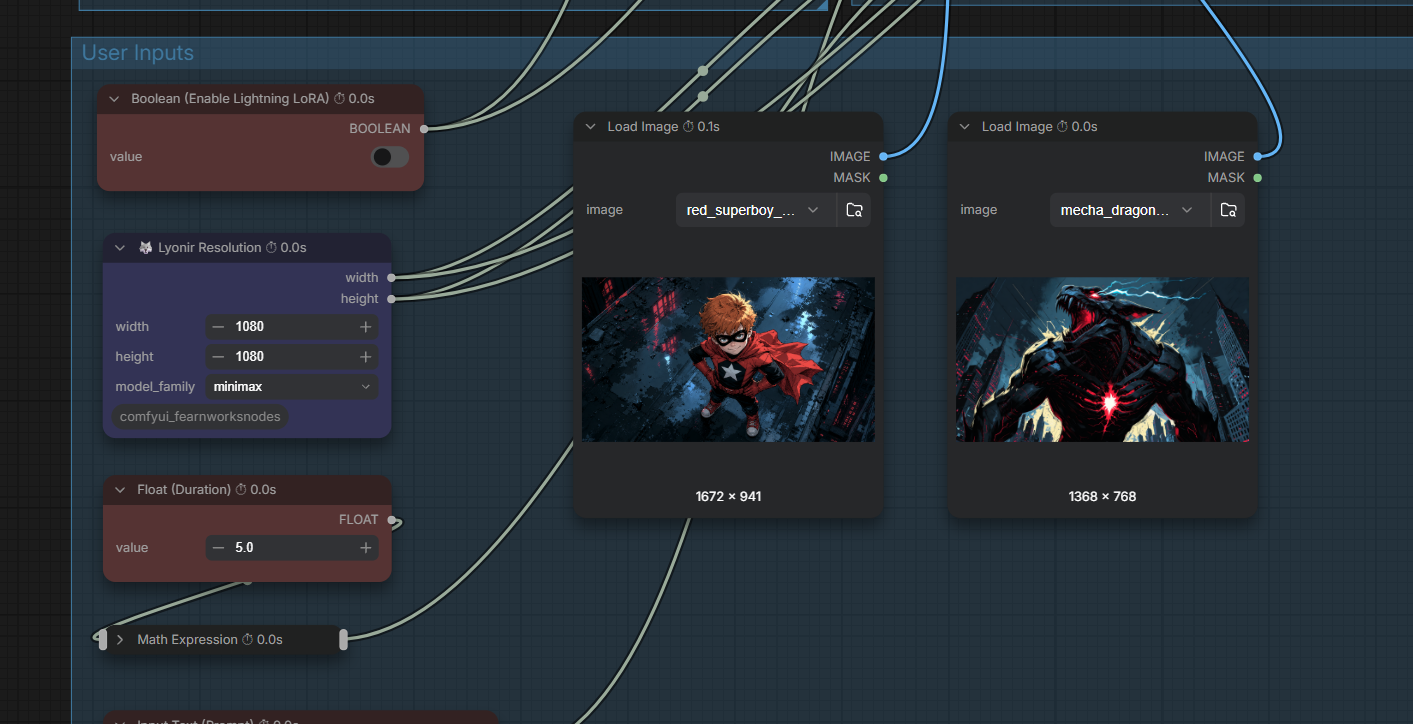
Replace the two Load Image selections with your own reference images; the named input images are not included.
LTX 2.5 video with latent upscale
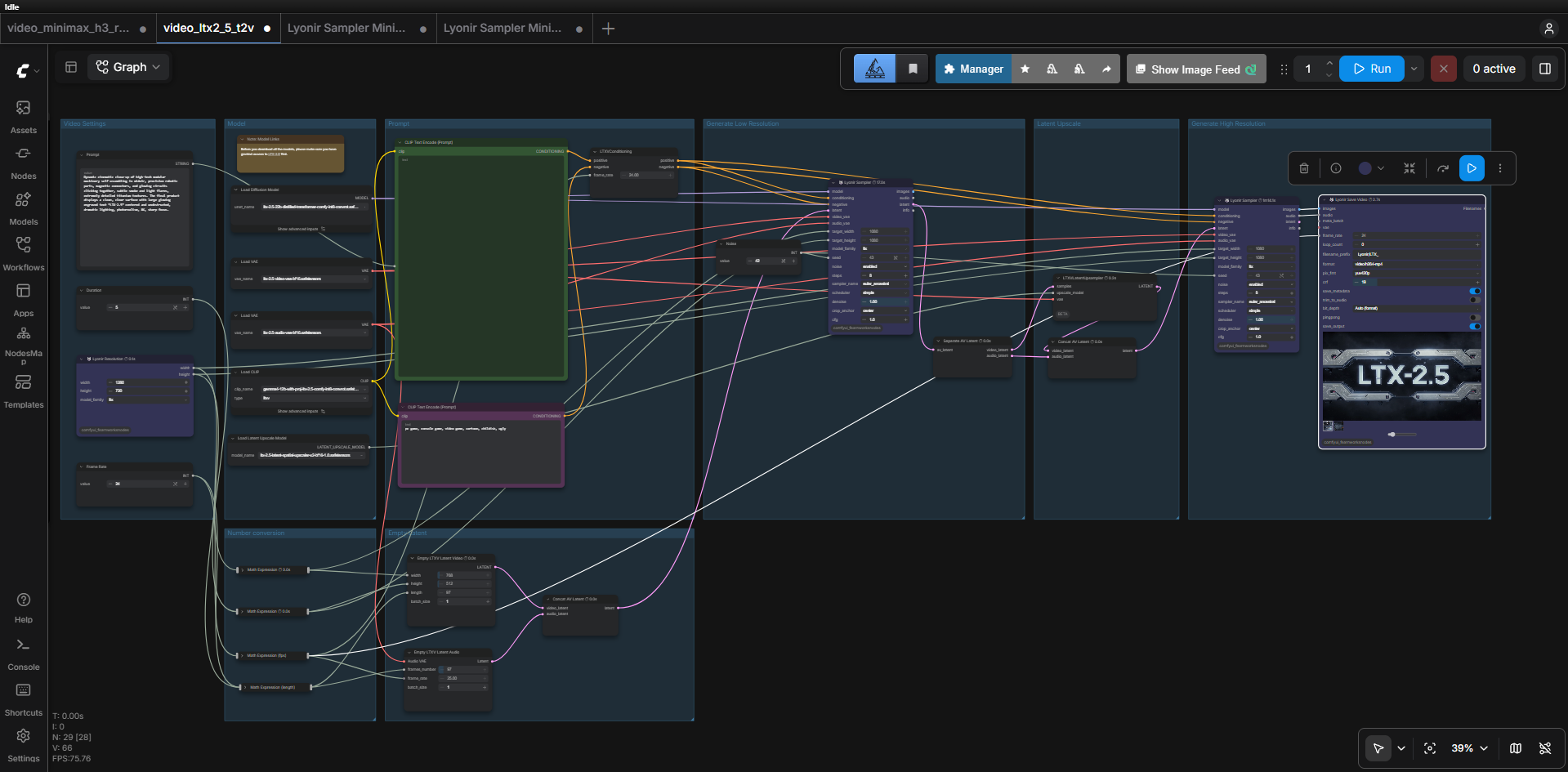
Model filenames used in this example:
ltx-2.5-latent-spatial-upscaler-x2-bf16-1.0.safetensorsltx-2.5-22b-distilled-transformer-comfy-int8-convrot.safetensorsltx-2.5-video-vae-bf16.safetensorsltx-2.5-audio-vae-bf16.safetensorsgemma4-12b-with-proj-ltx-2.5-comfy-int8-convrot.safetensors
Z-Image Turbo and Lyonir Save Image
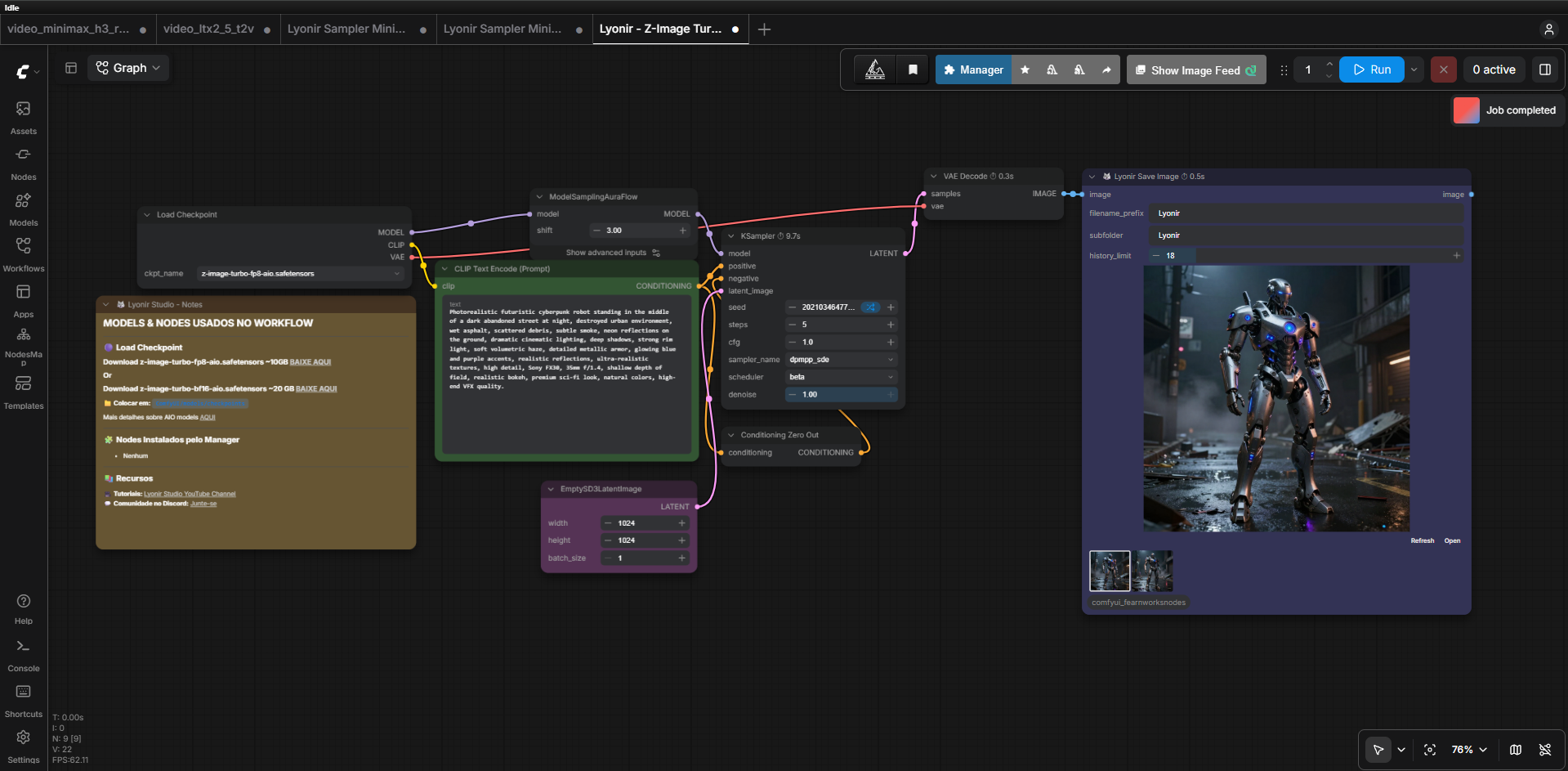
Model filenames used in this example:
z-image-turbo-fp8-aio.safetensors
Running an example
- Install missing nodes and models, then restart ComfyUI.
- Drag the downloaded JSON into ComfyUI.
- Check model selectors, input images, resolution, duration and output filenames.
- Run the workflow. Model memory requirements depend on your hardware and quantization.
Highlights
Lyonir Save Video
Designed to behave like VideoHelperSuite's Video Combine while adding a persistent per-node video history.
- Uses an internal VideoCombine-compatible engine and bundled FFmpeg on Windows x64.
- Uses the formats and format-specific controls exposed by Video Combine.
- Adds bit-depth handling where the selected format exposes a controllable pixel format.
- Keeps previous generated videos available as selectable thumbnails.
- Uses a persistent per-node history identity so new nodes do not inherit old histories.
- Proportional preview/node resizing.
- Adjustable thumbnail-size slider.
- VideoHelperSuite-compatible hover audio and Sync Preview behavior.
- ProRes presets that manage their own pixel format keep their native pixel format and report the actual saved bit depth. ProRes supports up to 12-bit color; selecting 16-bit does not produce 16-bit ProRes color.
Lyonir Save Image
Persistent image history directly inside the node, with quick access to previously saved images.
Lyonir Sampler
Unified custom-sampling workflow for supported model families. See MULTIMODEL.md for model-family notes.
Qwen3-TTS
Voice Clone, Voice Design and Custom Voice nodes. Review NOTICE and COMMERCIAL_LICENSES.md before commercial deployment.
Requirements
-
A working ComfyUI installation.
-
Python dependencies listed in
requirements.txt. -
Lyonir Save Video includes FFmpeg for Windows x64. On first use it extracts the verified executable into
vendor/runtime/inside this pack. No global installation, PATH change, Python/Torch replacement or automatic pip is performed. Other VHS nodes in your workflows still require their own package. -
Qwen3-TTS voice nodes: install ComfyUI-Qwen-TTS and its dependencies in the same ComfyUI environment. This provides the backend used by the voice nodes. Model files are downloaded or configured separately.
Some nodes may require additional model files or upstream packages depending on the workflow.
Installation
Git
Open a terminal inside ComfyUI/custom_nodes and run:
git clone https://github.com/Lyonir/ComfyUI-Lyonir-Studio.git
Then install the Python requirements using the same Python environment used by ComfyUI:
python -m pip install -r ComfyUI-Lyonir-Studio/requirements.txt
Restart ComfyUI.
ComfyUI Windows Portable
Open PowerShell or a terminal in the ComfyUI_windows_portable folder (the folder containing python_embeded and ComfyUI).
If you have not downloaded the pack yet, run:
git clone https://github.com/Lyonir/ComfyUI-Lyonir-Studio.git .\ComfyUI\custom_nodes\ComfyUI-Lyonir-Studio
Then install the dependencies using the Portable's own Python:
.\python_embeded\python.exe -m pip install -r .\ComfyUI\custom_nodes\ComfyUI-Lyonir-Studio\requirements.txt
If the pack is already installed, skip the clone command and run only the dependency command. This command also applies after extracting the ZIP into the custom_nodes folder. Using the bundled Python ensures the dependencies are installed in the environment ComfyUI uses.
Restart ComfyUI after installation.
Manual installation
- Download the repository as ZIP.
- Extract it.
- Make sure the final folder is
ComfyUI/custom_nodes/ComfyUI-Lyonir-Studio/. - Install
requirements.txtusing the same Python environment as ComfyUI. - Restart ComfyUI.
Updating
If installed with Git:
cd ComfyUI/custom_nodes/ComfyUI-Lyonir-Studio
git pull
Restart ComfyUI. If frontend files changed, refresh the browser as well.
Troubleshooting
If a node does not appear after installation:
- Check the ComfyUI terminal for Python import errors.
- Confirm the repository folder is directly under
ComfyUI/custom_nodes/. - Install
requirements.txtusing the same Python environment as ComfyUI. - Restart ComfyUI completely.
- Refresh the browser frontend.
For Lyonir Save Video on Windows x64, keep the complete vendor folder and ensure the pack can write to its own vendor/runtime folder. NVENC presets require compatible NVIDIA hardware and drivers. Optional gifski presets require the gifski executable. Linux/macOS use imageio-ffmpeg from the requirements.
License
This combined distribution is licensed under GPL-3.0 (LICENSE), because its internal video engine includes adapted VideoHelperSuite code. Original Lyonir files retain their Apache-2.0 terms (LICENSE-APACHE-2.0). See THIRD_PARTY_NOTICES.md for upstream credits, source and FFmpeg build information.
Model weights, third-party packages, voice data and upstream projects may have their own licenses and usage restrictions. See NOTICE and COMMERCIAL_LICENSES.md.
Creator
Lyonir Studio
- Website: https://www.lyonirstudio.com/
- Portfolio: https://lyonirstudios.myportfolio.com/
Save Image histories now use a persistent identity per node. New and cloned nodes start separate histories; saving and reopening the workflow keeps its identity. Legacy numeric-ID histories are not imported because their ownership is ambiguous. Existing image files are retained.