
ComfyUI_TinyTerraLyNodes
Resolve the conflict issue between the original plugin and the new comfy environment, adapt Nunchaku and kontext, support Chinese and custom fonts, and quickly measure the best parameters after model fine-tuning without the need for complicated node connections.
Nodes (42)
Grid-test any setting on any node, without rewriting your workflow
Grid-test every option in a dropdown without typing them
Build an xy grid from images instead of re-running generations
Combine two generated axes into one plot without retyping
Hand-write a number range so you never have to hand-write an xyPlot
Turn a pasted list into an xyPlot axis in one go
Stop hand-gluing your prompt pieces together
Prompt + LoRA + weights, all in the node where you need it
Stuck staring at a wire? debugInput shows what's actually flowing through it
The boring converter that stops you adding two extra nodes
The model-based upscale step your two-pass workflow is missing
Preview, save, or both — without breaking the image flow
ImageRemBG wraps rembg (and grabs a model on first run)
A whole number, in every type ComfyUI knows
Tinyterra's tinyKSampler
Blend three checkpoints in the graph with multiModelMerge
From ttN pipe to Impact Pack's basic_pipe — the bridge node
Pipe > detailer_pipe
PipeEDIT
PipeEncodeConcat
PipeIN and why it still exists
The original all-in-one sampler, still in old workflows
Start/end steps on a ttN pipe
PipeKSamplerAdvanced with prompts built in
The legacy SDXL sampler that runs base and refiner in one node
Base and refiner in one node, the SDXL way
The sampler that also upscales, applies a LoRA, and saves
The old loader that taught ComfyUI to use pipes
Base, refiner and prompts in one bundle
The full SDXL loader with global/local prompts
Load, prompt, LoRA, latent — and carry it all down one wire
PipeLoraStack
Unzip a ttN pipe back into raw wires
The boring node that saves your sanity
A text box that doesn't pretend to be anything else
3x TXT Loader MultiConcat
When you need to build a prompt from seven Lego blocks
TextCycleLine
The node that shows you what your prompt actually is
Stop screenshotting your prompts — save them as files
One node instead of three, with the loader settings that actually matter
The old-school grid node (and why you're probably here by accident)
🎨 ComfyUI TinyTerraLy Nodes
<div align="center">Professional ComfyUI Plotting & Visualization Nodes with Advanced Chinese Typography Support




Enhanced TinyTerra fork with perfect Chinese font rendering and professional typography
</div>🌟 Key Features
<table> <tr> <td width="50%">✨ Core Capabilities
- 🎯 Advanced XY Plotting - Professional grid layout generation
- 🔤 Perfect Chinese Support - Intelligent font detection & rendering
- 🎨 Complete Style Control - Colors, fonts, and size customization
- 📐 Precise Layout - Full borders with overlap prevention
- ⚡ Plug & Play - Included sample workflow
🚀 Technical Advantages
- 🔍 2x Anti-aliasing - Crystal-clear text rendering
- 🌐 Cross-platform - Win/Mac/Linux full support
- 🔧 Smart Adaptation - Perfect ComfyUI latest version compatibility
- 📝 Suffix Cleanup - Auto-optimized model name display
- 🎛️ 14-Parameter Control - Pixel-perfect precision
📦 Installation
🎯 Method 1: ComfyUI Manager (Recommended)
- Open ComfyUI Manager
- Search for "TinyTerraLy" or "ttN"
- Click Install and restart ComfyUI
🔧 Method 2: Git Clone
cd ComfyUI/custom_nodes
git clone https://github.com/Ly-scnu/ComfyUI_TinyTerraLyNodes.git
# Restart ComfyUI
📁 Method 3: Manual Download
- Download this repository's ZIP file
- Extract to
ComfyUI/custom_nodes/ComfyUI_TinyTerraLyNodes - Restart ComfyUI
🎬 Preview
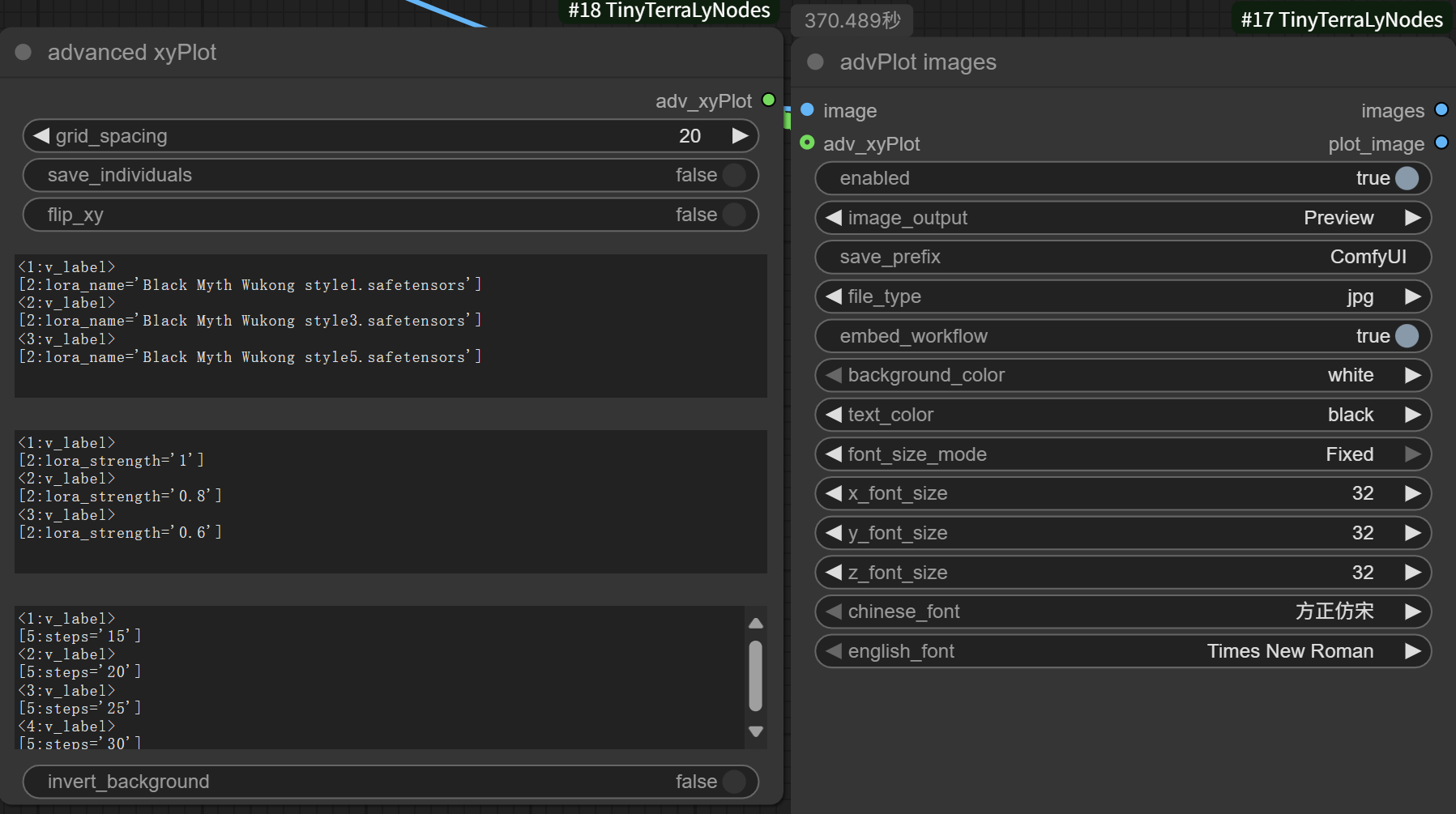
Node Interface
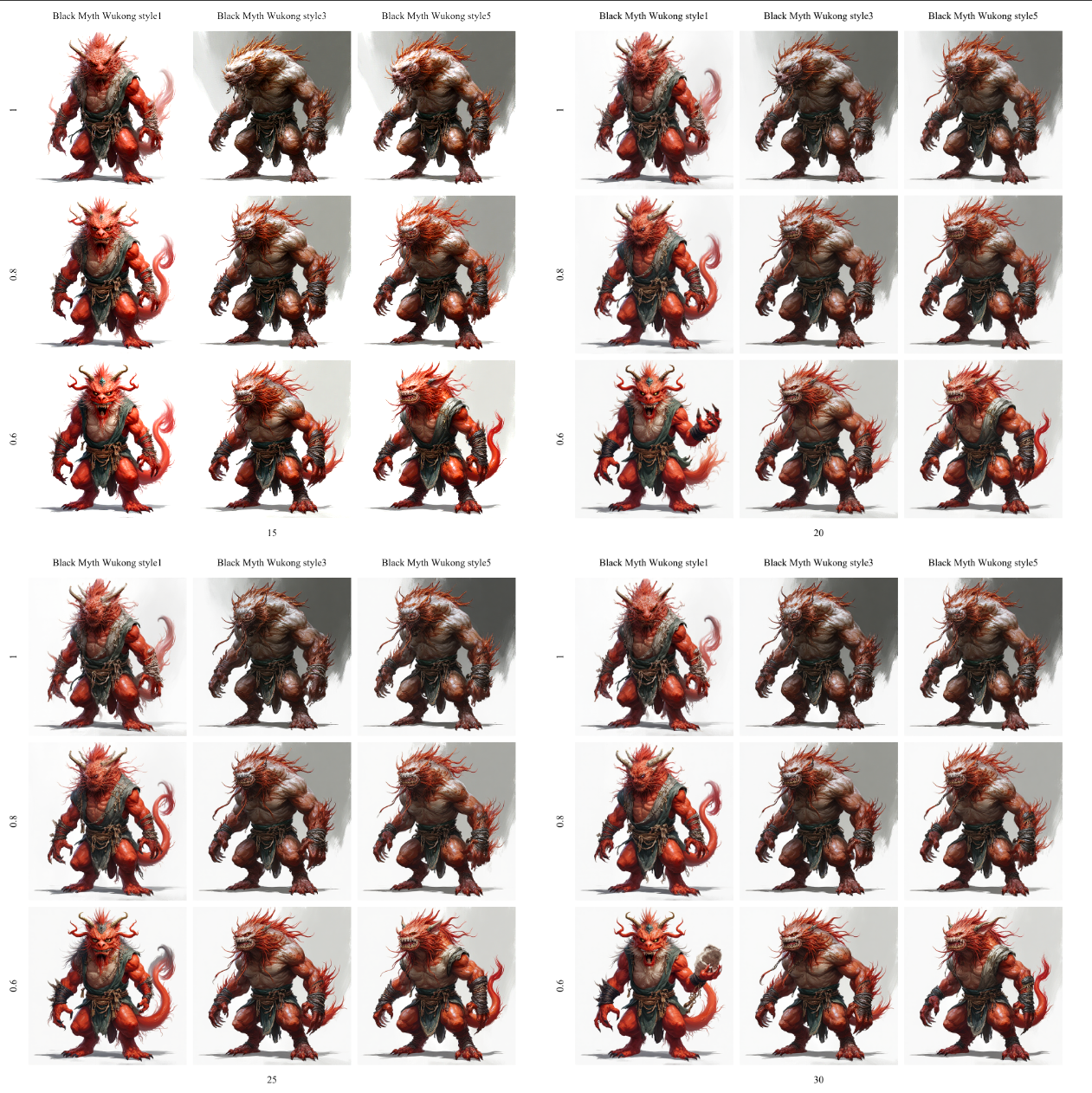
Generated Results
🚀 Quick Start
📋 Complete Workflow Package
🎉 This plugin includes a complete sample workflow!
Usage Steps:
- Load Workflow: Drag
workflow.jsoninto ComfyUI - Setup Models: Configure your checkpoints and other models
- Start Generation: Enjoy professional grid layouts
Workflow Features:
- ✅ Pre-configured XY plotting setup
- ✅ Optimized Chinese font parameters
- ✅ Professional color schemes
- ✅ Multiple parameter variation examples
🎨 Node Usage Guide
Find Nodes: Look for ttN → xyPlot → advPlot images in your node browser
Basic Setup:
- Connect image grid input
- Configure plotting parameters
- Adjust font and color settings
📋 Node Details
Core Nodes
| Node Name | Category | Description |
|-----------|----------|-------------|
| ttN advPlot images | ttN/xyPlot | Advanced XY plotting with Chinese font support |
| ttN advanced xyPlot | ttN/xyPlot | Enhanced plotting parameter control |
Parameter Reference
| Parameter | Type | Default | Description |
|-----------|------|---------|-------------|
| background_color | Dropdown | "white" | Background color selection |
| text_color | Dropdown | "black" | Text color selection |
| font_size_mode | Dropdown | "Auto" | Font mode (Auto/Fixed) |
| x_font_size | Slider | 32 | X-axis font size (12-100) |
| y_font_size | Slider | 32 | Y-axis font size (12-100) |
| z_font_size | Slider | 32 | Z-axis font size (12-100) |
| chinese_font | Dropdown | "方正仿宋" | Chinese font selection |
| english_font | Dropdown | "Times New Roman" | English font selection |
🔧 Core Improvements
🎯 Major Contribution: Perfect Latest ComfyUI Ecosystem Adaptation
- 🔧 ComfyUI v0.345+ Full Compatibility - Adapted for 2025 latest version, resolving original incompatibility issues
- 🚀 Nunchaku & Flux Kontext Support - Perfect adaptation for latest AI toolchain
- 🌟 Forward Compatibility Guarantee - Ensures continued compatibility with future versions
🌏 Core Pain Points Resolved
Issues with Original Version:
- ❌ Chinese Display Squares/Garbled - Lack of Chinese font support
- ❌ Inconsistent Font Sizes - "Large and small" affecting aesthetics
- ❌ Incomplete Borders - Missing right border
- ❌ Version Compatibility Issues - Conflicts with new ComfyUI
Our Solutions:
- ✅ Professional Chinese Font Rendering - Intelligent language detection + FangZheng FangSong font
- ✅ Unified Font Control System - X/Y/Z axis independent size control, goodbye to clutter
- ✅ Complete Four-sided Borders - Rewritten layout algorithm ensuring visual integrity
- ✅ 2x Anti-aliasing Technology - Goodbye to blurry text, enjoy crystal-clear display
✨ New Feature Highlights
🎯 Chinese Font Support
Personal Need: Improve Chinese model name display
Intelligent Bilingual Font Rendering
- Automatic Language Detection: Auto-switches Chinese font when Chinese characters >30%
- Professional Chinese Fonts: FangZheng FangSong/Microsoft YaHei/SimSun/SimHei options
- Elegant English Fonts: Times New Roman/Arial/Calibri/Consolas options
- Mixed Text Support: Chinese-English mixed display, best of both worlds
High-Quality Rendering Technology
- 2x Supersampling Anti-aliasing: Eliminates text edge aliasing, crystal-clear clarity
- LANCZOS High-Quality Scaling: Ensures sharp effects at any size
- Smart Suffix Cleanup: Auto-removes
.safetensors,.ckptetc. suffixes
🌈 Color Selection Extensions
Convenience Feature: Provides more background and text color options
| Background Color | RGB Value | Recommended Use | Best Text Color | |------------------|-----------|-----------------|-----------------| | White | (255,255,255) | Classic light theme | Black | | Black | (0,0,0) | Professional dark theme | White | | Dark Gray | (64,64,64) | Modern professional style | White | | Light Gray | (192,192,192) | Soft neutral theme | Black | | Blue | (70,130,180) | Technical demonstrations | White |
🔧 Font Size Control
Unified Display: Resolves font size inconsistency issues
New Control Options
- font_size_mode: Auto(original) / Fixed(fixed)
- x_font_size: X-axis font size (12-100)
- y_font_size: Y-axis font size (12-100)
- z_font_size: Z-axis font size (12-100)
- Overlap Prevention: Auto-adjusts when fonts too large
- Center Alignment: Label position optimization
📦 Complete Feature Setup (Recommended)
Basic Installation
After installation, basic features are immediately available, including Chinese font support and all core features.
Advanced Font System (Optional)
# Enter plugin directory
cd ComfyUI_TinyTerraLyNodes/fonts

# Install font management system (get FangZheng FangSong and other advanced fonts)
python install_fonts.py

# Preview all available font effects
python font_samples.py
🔧 Compatibility Test Report
| Component | Version Requirement | Test Status | Notes | |-----------|---------------------|-------------|-------| | ComfyUI | v0.345+ | ✅ Full Support | 2025 latest version thoroughly tested | | Flux Kontext | All versions | ✅ Enhanced Adaptation | Specially optimized compatibility support | | Nunchaku | All versions | ✅ Enhanced Adaptation | Perfect support for latest features | | Python | 3.8+ | ✅ Supported | Cross-platform compatible | | Operating System | Win/Mac/Linux | ✅ All Platforms | Font system auto-adaptation |
🎯 Real-World Use Cases
Case 1: Professional Dark Theme Charts
Background: Black
Text Color: White
Font Mode: Fixed
X-axis Font: 28
Y-axis Font: 28
Chinese Font: FangZheng FangSong
English Font: Times New Roman
Effect: "Black Myth Wukong Style1" displays clearly, uniform font size, professional appearance
Case 2: Chinese-English Mixed Technical Documentation Style
Background: Light Gray
Text Color: Black
Font Mode: Fixed
All Axis Fonts: 24
Chinese Font: Microsoft YaHei
English Font: Calibri
Effect: Suitable for technical documentation, Chinese and English each with distinct characteristics, modern minimalist style
📋 Complete Parameter Control Panel
🎛️ advPlot Enhanced Node Parameters (14 Precise Control Items)
| Parameter | Type | Default | Description | New | |-----------|------|---------|-------------|-----| | enabled | Boolean | True | Node enable switch | - | | image | IMAGE | - | Input image grid | - | | image_output | Dropdown | "Preview" | Output mode selection | - | | save_prefix | String | "advPlot" | Save file prefix | - | | file_type | Dropdown | "png" | File format | - | | embed_workflow | Boolean | True | Embed workflow | - | | background_color | Dropdown | "Black" | Background color | ✅ New | | text_color | Dropdown | "White" | Text color | ✅ New | | font_size_mode | Dropdown | "Auto" | Font mode | ✅ New | | x_font_size | Slider | 32 | X-axis font size (12-100) | ✅ New | | y_font_size | Slider | 32 | Y-axis font size (12-100) | ✅ New | | z_font_size | Slider | 32 | Z-axis font size (12-100) | ✅ New | | chinese_font | Dropdown | "方正仿宋" | Chinese font selection | ✅ New | | english_font | Dropdown | "Times New Roman" | English font selection | ✅ New |
🔍 Parameter Details
Font Mode Comparison
- Auto Mode: Original behavior, font size auto-adapts to text length
- Fixed Mode: Uniform font size, goodbye to "large and small" inconsistency
Smart Protection Mechanisms
- Overlap Detection: Auto-fallback when fonts too large in Fixed mode
- Backward Compatibility: Existing workflows need no modification, seamless upgrade
- Cross-platform Adaptation: Font auto-fallback ensures compatibility
🏗️ Extensible Font Management System
📁 Project Structure
ComfyUI_TinyTerraLyNodes/
├── fonts/
│   ├── font_config.json      # Font configuration core
│   ├── install_fonts.py      # Font installation tool
│   ├── font_samples.py       # Font preview generator
│   ├── README.md            # Font system documentation
│   └── FZFSK.TTF            # FangZheng FangSong font file
├── ttNpy/                    # Core code
└── README.md                # Main documentation
⚙️ Advanced User Guide
Adding Custom Fonts
- Add Font Files: Copy
.ttffiles tofonts/directory - Modify Configuration: Edit
fonts/font_config.json
{
  "fonts": {
    "chinese": [
      {"name": "Your Font", "file": "YourFont.ttf"}
    ]
  }
}
- Install Fonts: Run
python install_fonts.py - Restart ComfyUI: New fonts will appear in dropdown menu
Font Preview Tool
cd fonts/
python font_samples.py
# Generate preview images of all fonts for easy selection
🛠️ Technical Implementation Details
🔧 Major Improvement Methods
<table> <tr> <td width="50%">🚀 Core Technical Innovations
- Intelligent Language Detection Algorithm - Auto-switch when Chinese characters >30%
- 2x Supersampling Anti-aliasing - Eliminates text aliasing, crystal-level clarity
- LANCZOS High-Quality Scaling - Ensures sharp effects at any size
- Layout Algorithm Reconstruction - Resolves border missing issues
🔧 Engineering Achievements
- 14-Parameter Precision Control - Pixel-level customization capability
- Smart Fallback Mechanism - Auto-protection against overlap
- Cross-platform Font System - Win/Mac/Linux full compatibility
- Backward Compatible Design - Seamless upgrade guarantee
🛠️ Specific Problem Resolution Comparison
| Issue Type | Original Status | Enhanced Solution | Actual Effect | |------------|-----------------|-------------------|---------------| | Chinese Display | ❌ Squares/Garbled | ✅ Smart font selection | "Chinese fonts" display perfectly | | Font Size | ❌ Large-small inconsistency | ✅ Fixed mode unified control | All labels same size, professional appearance | | Layout Borders | ❌ Missing right border | ✅ Rewritten layout algorithm | Complete four-sided borders | | File Suffixes | ❌ .safetensors display | ✅ Smart suffix cleanup | "Model1" instead of "Model1.safetensors" | | Version Compatibility | ❌ New ComfyUI conflicts | ✅ v0.345+ full adaptation | Zero conflict stable operation |
🎓 Learning Achievements & Open Source Spirit
💝 Acknowledgments & Respect
First, our sincere thanks to the original author TinyTerra!
This enhanced version is built entirely on TinyTerra's excellent foundational architecture. We:
- ✅ Respect Original: Maintain original core functionality integrity
- ✅ Extend & Enhance: Add new features without breaking original version
- ✅ Learning-Oriented: Motivated by learning and community contribution
- ✅ Open Source Giving Back: Share improvements with entire community
🎯 Project Motivation
- 📚 Learning Practice: Improve programming and UI design skills through actual projects
- 🌏 Solve Pain Points: Improve Chinese user experience in ComfyUI
- 🤝 Community Contribution: Give back learning results to the open source community that helped us
- 🔧 Technical Exploration: Explore adaptation and optimization of cutting-edge AI tools
🚀 Quick Start Guide
Step 1: Install and Restart
cd ComfyUI/custom_nodes
git clone https://github.com/Ly-scnu/ComfyUI_TinyTerraLyNodes.git
cd ComfyUI_TinyTerraLyNodes/fonts
python install_fonts.py  # Install font system
# Restart ComfyUI
Step 2: Test Enhanced Features
- Find Node: ttN → xyPlot → advPlot images
- Recommended Settings:
📍 Background: Black 📍 Text Color: White 📍 Font Mode: Fixed 📍 Chinese Font: FangZheng FangSong 📍 English Font: Times New Roman 📍 All Axis Font Size: 28 - Test Effect: Use model names containing Chinese, like "Black Myth Wukong Style"
Step 3: Enjoy Professional Results
✅ Chinese model names display clearly
✅ Unified coordinated font sizes
✅ Complete four-sided borders
✅ Professional color coordination
🎉 Support Our Learning Journey
🌟 Star This Project
If our enhancements help your workflow, please ⭐ star this repository to support student learning in open source!
🤝 Contribute
- Report Issues: Help us learn by reporting bugs
- Suggest Features: Share ideas for typography and UX improvements
- Share Fonts: Contribute fonts to our community collection
- Improve Documentation: Help enhance our learning resources
💖 Original Support
Love the original TinyTerra foundation? Buy TinyTerra a coffee ☕
<div align="center">
Made with 💚 for learning, sharing, and growing together
🎓 Student Project • 🌍 Open Source • 🤝 Community Driven


