
Region Edit Toolkit
Unified RegionEdit toolkit for region selection, mask editing, cropping, tiling, color and detail harmonization, and strict compositing in ComfyUI. Includes example workflows for smart removal and object replacement.
Nodes (42)
The difference mask that never lets a stray pixel escape the edit zone
How to hand a big image to a small model without losing your mind
A feathering tool that actually respects the edge of your crop
Plan the edit size before you touch a pixel, and stop guessing at megapixels
Turn raw SAM3 bounding boxes into clean, ready-to-edit crops
The 16-aligned integer downscale that doesn't smear your edit budget
The smart difference mask for face edits that don't want a hard seam
The face crop that keeps the shoulders, never upscales, and stops at 1024
Put the original irises back into the AI's eyes, without a pasted-eye look
Stop the identity reference from importing its eyes — without touching the composite
A prompt builder that writes the boring preservation paragraphs so you don't have to
Pick the right face out of a crowd — and refuse the ones too small to edit
The one node that plans the entire face edit — crop, mask, coordinates, and all
An audit node that measures whether the face actually changed structure
The literal, explainable difference mask — no perception, just pixels
Scan a huge image with SAM3 without resizing it into mush
SAM3's auto mask plus your brush, minus the protection
A tiny gate that saves you from a wasted five-minute render
Fix the color mismatch without the masked-zero bias that ruins every other match
Steal back the texture your edit model smoothed away — without importing the flat color
Turn your hand-painted mask edits into a final mask without nuking the auto result
The node that turns your auto mask into something you can actually paint on
Fix the 'the edited region has a different exposure' problem, without re-running the model
One node to blend auto mask, brush strokes, and a protection mask into a single target
A translation node for prompts that are allowed to be empty — no API key, no network
A lint check for your portrait prompts, because the model won't tell you they're too thin
Stop forgetting the 'keep everything else unchanged' clause on every regional edit
One node that picks your edit route — natural regen, identity transfer, or approved candidate
When the edited face looks sharp but the untouched body suddenly reads as 'too crisp'
The most parameter-heavy mask node in the pack — and you mostly just need the defaults
Pick which photo the face edit actually references, from one clean switch
One instruction in, three ready-to-use prompts out — tuned for the model you actually chose
A SAM prompt translator that never touches the internet — and refuses to give you broken text
Put the skin grain back after a face edit, without ever copying the source face's pixels
The node that refuses to paste your edit in the wrong place — and that's exactly right
Turn a tile plan into actual crops, masks, and coordinates — in one batch node
The tile presets that size the whole edit for you
Sew the edited tiles back into one image without a visible seam at every boundary
The unglamorous node that reads one tile out of a plan, and it's worth knowing
The node that chops a big mask into model-sized crops without ever splitting a target
Paste a local edit back without seams — or not at all
SAM3 masks from overlapping scan windows, merged by vote
ComfyUI 图像分区编辑工具包
Region Edit Toolkit 为 ComfyUI 提供一组可组合的图像分区处理节点,覆盖区域定位、裁切、遮罩编辑、分块处理、颜色与细节协调,以及局部结果的精确回贴。
当前版本包含 42 个 RegionEdit... 节点,统一位于 Region Edit Toolkit 菜单下。
功能
- 从人脸、检测框或扫描窗口建立处理区域
- 组合自动遮罩、手涂修正和保护遮罩
- 为大图或多个离散目标规划并合并分块
- 按原始坐标将局部处理结果精确合回原图
- 匹配局部颜色、低频、高频和皮肤微纹理
- 构建并检查局部编辑 Prompt
- 可选使用本地 Argos 模型完成中文到英文的离线翻译
安装
需要 Python 3.10 或更高版本。依赖必须安装到 ComfyUI 实际使用的 Python 环境中。
使用 ComfyUI Manager(推荐)
本节点已发布到 ComfyUI Registry。
通过示例工作流安装缺失节点包
- 下载智能消除示例工作流 JSON,或下载物品替换示例工作流 JSON。
- 将 JSON 文件拖入 ComfyUI 画布,或通过“工作流 → 打开”加载。
- 打开 ComfyUI Manager 的“缺失节点”(
Install Missing Custom Nodes)页面。 - 安装列表中的
Region Edit Toolkit(包 ID:native-region-tile-planner-merge)及工作流需要的其他节点包,然后重启 ComfyUI。 - 重新加载工作流,替换示例图片,并按本机目录选择所需模型。
在 Manager 中直接搜索安装
- 打开 ComfyUI Manager 的自定义节点管理器。
- 搜索
Region Edit Toolkit或native-region-tile-planner-merge。 - 点击安装,完成后重启 ComfyUI。
使用 Comfy CLI
comfy node install native-region-tile-planner-merge
使用 Git
在 PowerShell 中进入 ComfyUI\custom_nodes,执行:
git clone https://github.com/Liu-Bot24/ComfyUI-Region-Edit-Toolkit.git
Set-Location .\ComfyUI-Region-Edit-Toolkit
& "<ComfyUI 实际使用的 Python>" -m pip install -r requirements.txt
常见的 Python 路径:
- Windows 便携版:
ComfyUI_windows_portable\python_embeded\python.exe - Python 虚拟环境:
ComfyUI\venv\Scripts\python.exe - 启动器整合包:以启动器实际配置的 Python 路径为准
安装完成后重启 ComfyUI。在节点搜索中输入 图像分区 或 RegionEdit 即可找到本工具包。
更新
Set-Location "<ComfyUI>\custom_nodes\ComfyUI-Region-Edit-Toolkit"
git pull
& "<ComfyUI 实际使用的 Python>" -m pip install -r requirements.txt
更新后需要重启 ComfyUI。若界面仍保留旧控件,再硬刷新浏览器页面。
快速使用
局部编辑
选择区域
→ 规划尺寸并裁切
→ 使用图像编辑或生成节点处理裁块
→ 处理差异、颜色或细节
→ 严格坐标合成
局部结果进入严格合成前,应与原裁块保持相同的宽高和坐标空间。
手涂修正遮罩
自动遮罩
→ RegionEditMaskEditorCanvas
→ PreviewBridge
→ 在 MaskEditor 中补画或擦除
→ RegionEditMaskEditorApply
→ 羽化或合成
连接方法:
- 将
RegionEditMaskEditorCanvas的mask_editor_rgba接到PreviewBridge。 - 在
PreviewBridge中打开 MaskEditor,完成补画或擦除并保存。 - 将
PreviewBridge的MASK接到RegionEditMaskEditorApply的edited_mask。
这条交互式手涂路径需要 ComfyUI Impact Pack 提供 PreviewBridge。
大图多区域处理
目标遮罩
→ RegionEditTilePlanner
→ RegionEditTileBatchPrepare
→ 分别处理各个局部块
→ RegionEditTileMerge
该流程适合原图较大、目标分散或单次模型输入尺寸受限的情况。
示例工作流
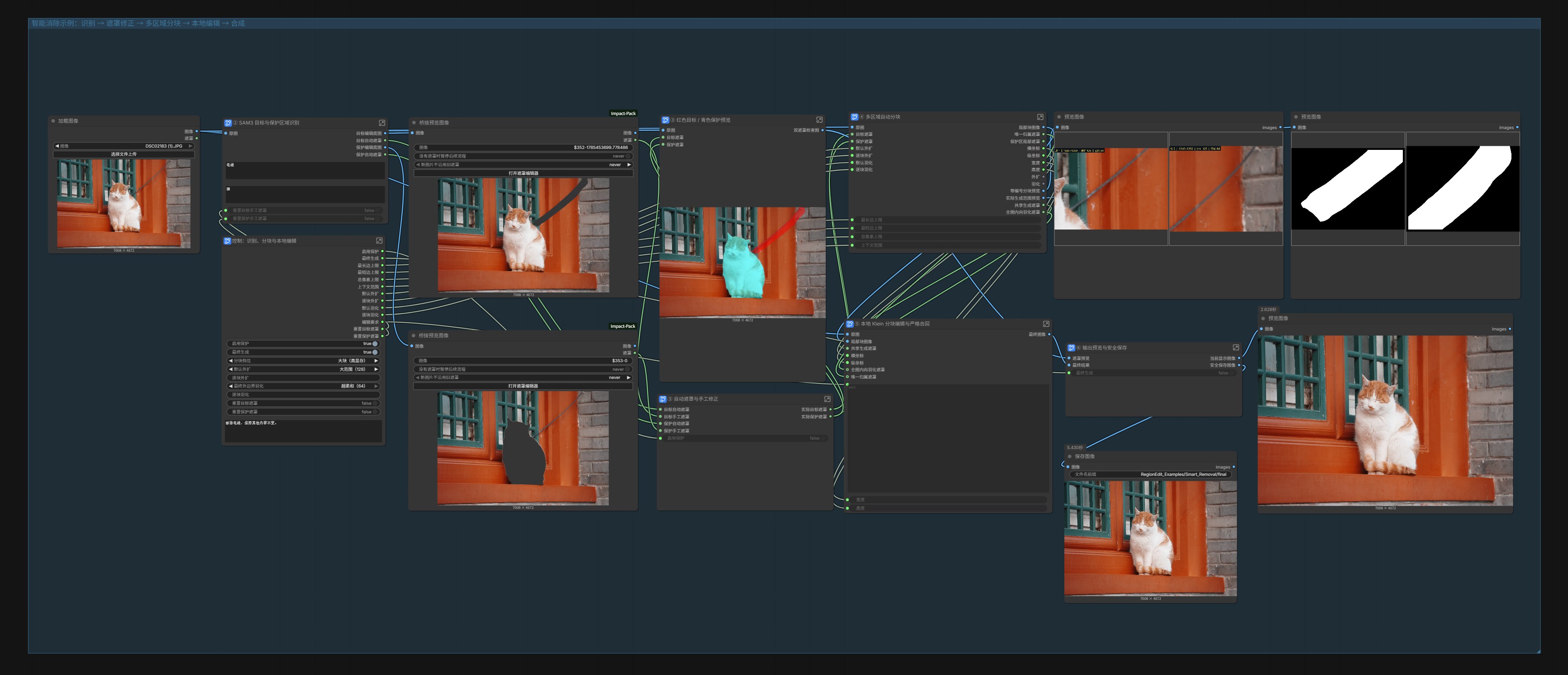
智能消除
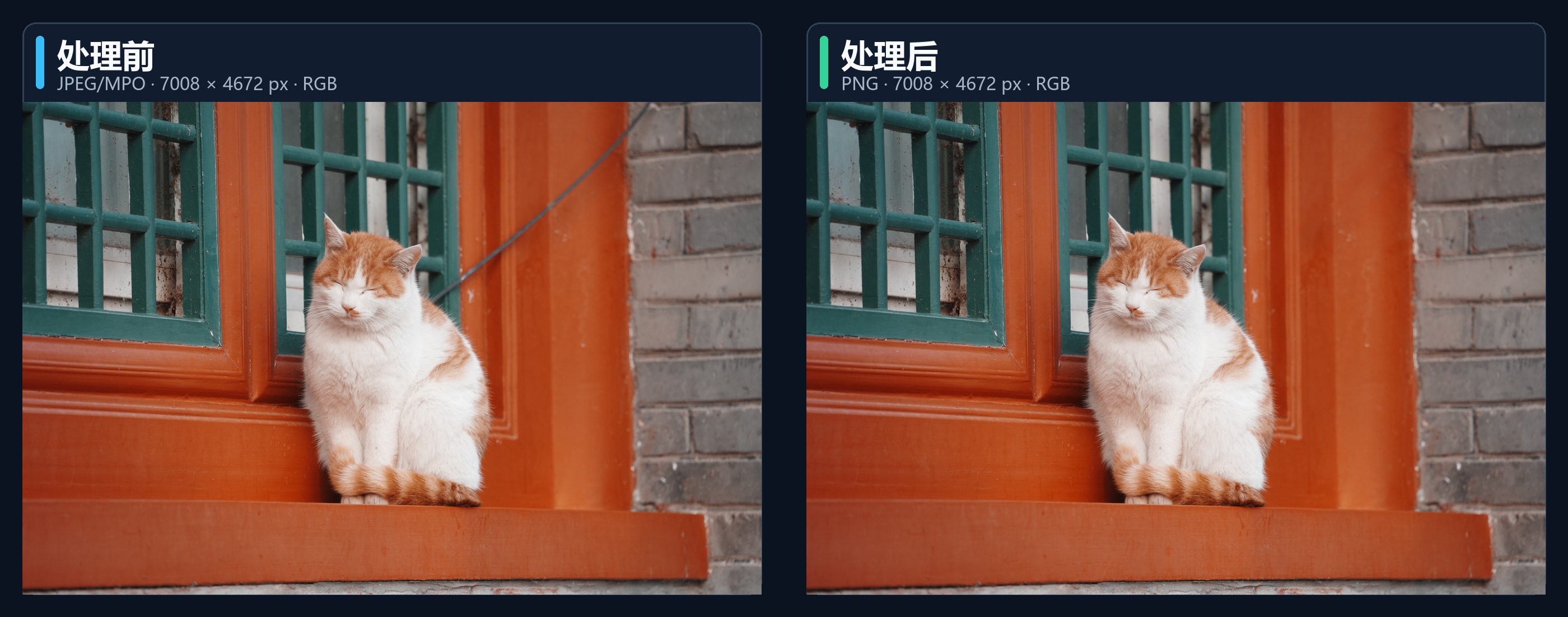
该示例演示 SAM3 目标与保护区域识别、手工遮罩修正、多区域分块、本地 Klein 编辑、严格合成,以及只保存最终生成结果的安全输出链。
效果对比
物品替换
该示例演示 SAM3 目标与可选保护区域识别、手工遮罩修正、单一上下文裁块、参考图引导的本地 Klein 编辑、差异遮罩、严格合成,以及最终结果保存。
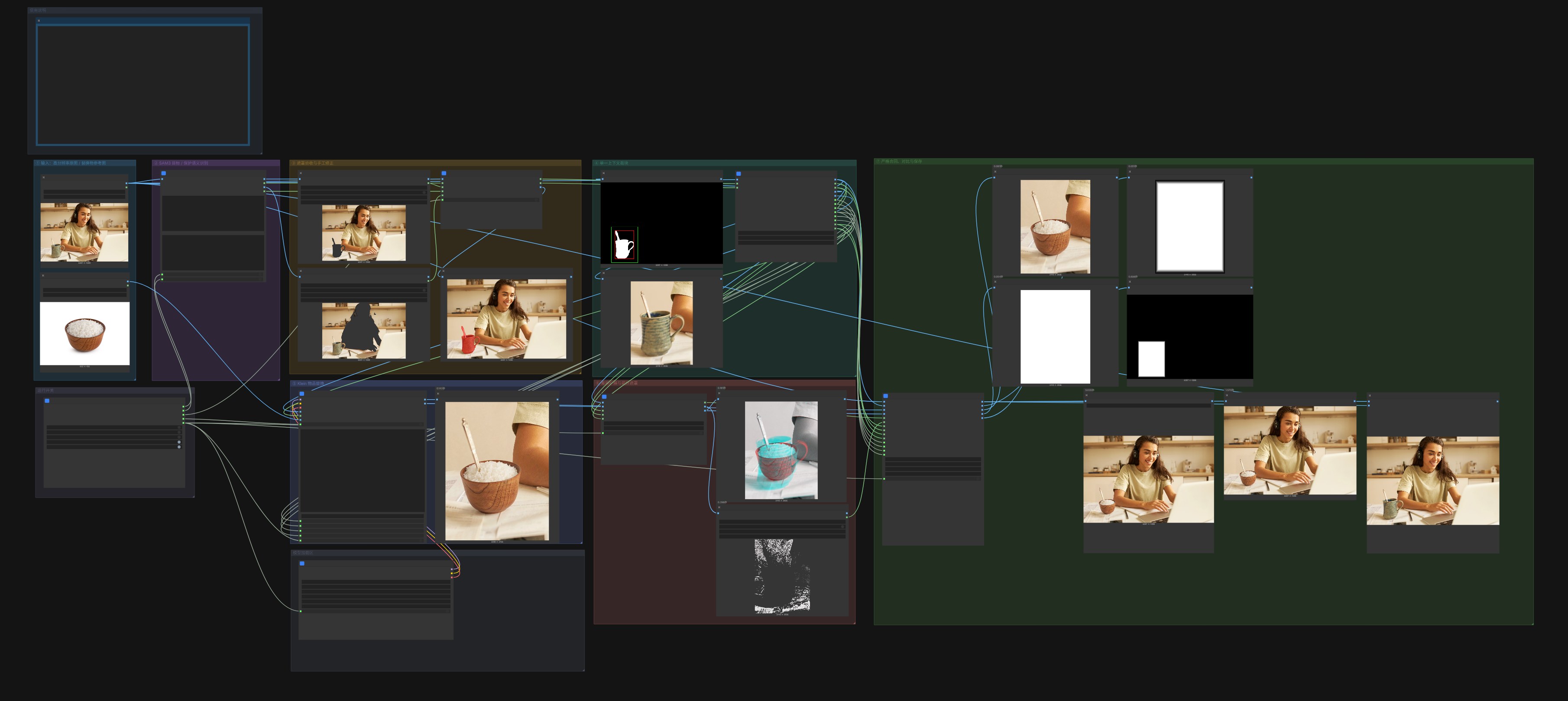
效果对比

导入后,可替换示例图片,并按本机模型目录选择 SAM3 与 Klein 模型即可运行。
节点
Selection
| 节点 | 用途 |
|---|---|
| RegionEditFaceSelect | 从人脸检测结果中选择指定人脸 |
| RegionEditDetectionsToRegionCrops | 将检测框转换为区域裁块与坐标 |
| RegionEditImageGridWindows | 按网格生成图像扫描窗口 |
Geometry
| 节点 | 用途 |
|---|---|
| RegionEditBoundedImageSizePlan | 在指定像素范围内规划等比处理尺寸 |
| RegionEditExactIntegerDownscale | 执行 16 对齐的整数倍缩小 |
| RegionEditFaceContextCrop | 裁取包含周围上下文的人脸区域 |
| RegionEditTilePlanItem | 读取分块计划中的指定项目 |
Mask
| 节点 | 用途 |
|---|---|
| RegionEditMaskSetCompose | 合成一组处理遮罩 |
| RegionEditInteractiveMaskCompose | 组合自动、手工与保护遮罩 |
| RegionEditAlignedDifferenceMask | 从两张已对齐图像中提取差异遮罩 |
| RegionEditMaskEditorCanvas | 生成供 MaskEditor 使用的手涂画布 |
| RegionEditMaskEditorApply | 将手工编辑结果应用到自动遮罩 |
| RegionEditMaskContentGate | 检查遮罩是否包含有效处理区域 |
| RegionEditBoundaryFeather4Side | 分别控制裁块四条边的羽化宽度 |
| RegionEditProtectedOuterBoundaryFeather | 羽化外围边界并保护核心区域 |
Face
| 节点 | 用途 |
|---|---|
| RegionEditFaceAdaptiveDifferenceMask | 生成人脸自适应差异区与强制核心 |
| RegionEditFaceThresholdDifferenceMask | 按阈值生成人脸差异区与强制核心 |
| RegionEditFaceIdentityConditioningMask | 生成人脸身份参考遮罩 |
| RegionEditFaceEyeMaterialRestore | 恢复或协调眼部内部材质 |
| RegionEditFaceStructureDelta | 分析两张人脸之间的结构变化 |
| RegionEditFaceSemanticCrop | 按人脸语义区域生成局部裁块 |
Tile
| 节点 | 用途 |
|---|---|
| RegionEditTilePlanner | 根据目标遮罩规划多个处理块 |
| RegionEditBasicTileBatchPrepare | 批量裁取计划中的图像和遮罩 |
| RegionEditTileBatchPrepare | 按控制参数准备局部块、遮罩和坐标 |
| RegionEditTileMerge | 将多个局部结果归一化后合回完整图像 |
| RegionEditWindowMaskMerge | 将扫描窗口中的局部遮罩恢复到整图 |
Workflow
| 节点 | 用途 |
|---|---|
| RegionEditTileControlPreset | 提供成组的分块控制参数 |
| RegionEditReferenceSourceSelector | 选择实际使用的参考图来源 |
| RegionEditPromptRouteSelector | 选择实际使用的 Prompt 来源 |
Composite
| 节点 | 用途 |
|---|---|
| RegionEditStrictCoordinateComposite | 按坐标和遮罩将局部结果严格合回原图 |
| RegionEditWideSupportStrictComposite | 在更宽的支持区域内执行严格坐标合成 |
Color & Detail
| 节点 | 用途 |
|---|---|
| RegionEditMaskedGlobalLabMatch | 匹配遮罩区域内的整体 Lab 颜色 |
| RegionEditMaskedSpatialColorFieldMatch | 匹配随空间变化的低频颜色分布 |
| RegionEditMaskedHighFrequencyTransfer | 在限定区域内迁移高频纹理 |
| RegionEditSkinMicrotextureSynthesis | 在皮肤区域生成受控微纹理 |
| RegionEditProtectedDetailHarmonizer | 在保护指定区域的同时协调局部细节 |
Text
| 节点 | 用途 |
|---|---|
| RegionEditFacePromptContract | 整理人脸编辑 Prompt |
| RegionEditPortraitPromptQualityGate | 检查人像 Prompt 的必要信息 |
| RegionEditReplacementPromptContract | 整理局部替换 Prompt |
| RegionEditPreservationPromptBuilder | 构建需要保持不变的编辑约束 |
| RegionEditRequiredOfflineEnglish | 对必填文本执行离线中译英 |
| RegionEditOptionalOfflineEnglish | 对可选文本执行离线中译英 |
离线中译英
requirements.txt 会安装 Argos Translate,但中文到英文的语言模型需要单独安装。
检查本机是否已经安装 zh → en 模型:
& "<ComfyUI 实际使用的 Python>" scripts\install_argos_zh_en.py --check
主动下载并安装:
& "<ComfyUI 实际使用的 Python>" scripts\install_argos_zh_en.py
安装完成后重启 ComfyUI。不使用离线翻译节点时,无需安装该语言模型。
使用注意事项
- 差异分析和严格合成所使用的图像、遮罩、裁块尺寸与坐标必须对应。
- 外部编辑结果如果改变了宽高或裁切范围,应先恢复到原裁块尺寸。
- 尺寸或坐标不一致时,严格合成节点会停止执行并给出明确错误。
- 需要保持不变的区域应通过保护遮罩明确指定。
- Python 节点或前端扩展更新后,必须重启 ComfyUI。