
ComfyUI Face Detection Node
A ComfyUI custom node for face detection and cropping using OpenCV Haar cascades, with full ComfyUI v3 schema support and backward compatibility.
ComfyUI Face Detection Node
A ComfyUI custom node for face detection and cropping using OpenCV Haar cascades — optimized for H100 cloud pipelines and LTX-Video avatar workflows. Full ComfyUI v3 schema support with backward compatibility for v1/v2.

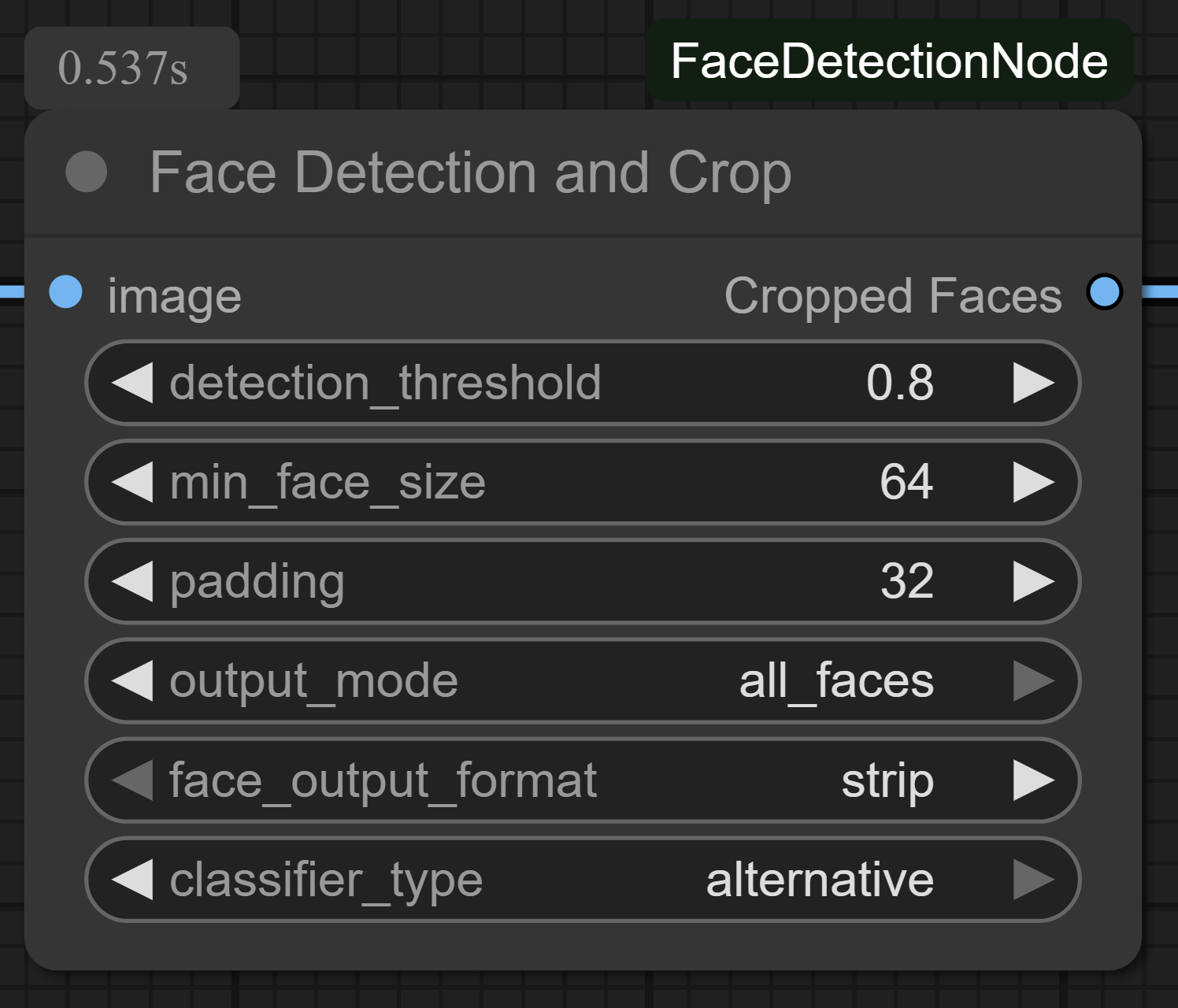
Features
- Auto-Padding: Adaptive padding based on detected face size (no hardcoded values)
- Temporal Smoothing: Exponential moving average of bbox coordinates across video frames — eliminates jitter in batch/video processing
- Aspect Ratio Presets:
1:1,9:16,16:9,4:3,auto— with forced crop recalculation - Full Batch Processing: Iterates all batch items, outputs aligned batch tensors
- GPU-First:
torch.no_grad()everywhere, minimal CPU transfers, stateless class-level caching - Face Output Format:
strip(horizontal layout) orindividual(separate batch items) for multi-face output - Dual Classifiers: Choose between default and alternative Haar cascades
- Proper Error Signaling: Returns flagged tensor + metadata when no face detected
- ComfyUI v3 Ready: Full schema support with async execution
- Legacy Workflow Compat: Handles old v1.x workflows with positional
widgets_valuesmisalignment gracefully
Installation
Via ComfyUI Manager (Recommended)
- Open ComfyUI Manager
- Search for "Face Detection Node"
- Click Install
Manual Installation
- Navigate to your ComfyUI custom nodes directory:
cd ComfyUI/custom_nodes
git clone https://github.com/Limbicnation/ComfyUI_FaceDetectionNode.git
cd ComfyUI_FaceDetectionNode
pip install -r requirements.txt
Usage
- Add the "Face Detection and Crop v2" node to your workflow
- Connect an image batch input
- Adjust parameters as needed
Parameters
| Parameter | Type | Range | Default | Description |
|-----------|------|-------|---------|-------------|
| detection_threshold | Float | 0.1–1.0 | 0.8 | Face detection confidence threshold (0.1=lenient, 1.0=strict) |
| min_face_size | Int | 32–512 | 64 | Minimum face dimension in pixels |
| auto_padding_ratio | Int | 0–100 | 35 | Padding as percentage of detected face size |
| aspect_ratio | Combo | — | auto | Crop aspect ratio: auto, 1:1, 9:16, 16:9, 4:3 |
| output_mode | Combo | — | largest_face | largest_face or all_faces |
| temporal_smoothing | Int | 0–100 | 0 | 0=disabled (image mode) · 1–100=EMA smoothing strength for video |
| output_height | Int | 256–2048 | 512 | Output height for cropped faces (width derived from aspect ratio) |
| instance_id | String | — | "0" | Unique ID for temporal smoothing (share across frames). Use "0" for image mode |
| classifier_type | Combo | — | default | Haar cascade: default or alternative |
| face_output_format | Combo | — | strip | strip (horizontal) or individual (separate batch items) |
| padding | Int | 0–256 | 0 | Legacy padding in pixels — if >0, overrides auto_padding_ratio |
Outputs
| Output | Type | Description |
|--------|------|-------------|
| cropped_faces | IMAGE | Batch of cropped face tensors [B, H, W, C] |
| face_metadata | FLOAT | Per-face metadata [x, y, w, h, score, detected] normalized to image dims. Shape: [B, 6] — NOT an image, use for downstream bbox logic only |
Temporal Smoothing for Video
When processing video frames through ComfyUI, face detection bboxes can jitter frame-to-frame. Enable temporal smoothing to stabilize:
- Set
temporal_smoothingto 1–100 (higher = more smoothing) - Use a consistent
instance_idacross all frames in the same video sequence - Set to
"0"for single-image mode (no smoothing)
Changelog
v2.1.3
- FIX:
VALIDATE_INPUTSnow includes required combo fields (aspect_ratio,output_mode,classifier_type) in its signature, forcing ComfyUI to delegate their validation to our method instead of doing strict framework-level "Value not in list" checks. Legacy workflows with misaligned positionalwidgets_values(e.g.'auto'landing onoutput_mode,0landing onclassifier_type) are now caught and replaced with defaults. - FIX: Added defensive combo sanitization in both v1 and v3 execute methods — invalid combo values are replaced with defaults at runtime as a safety net.
v2.1.2
- FIX:
instance_idinput type changed from INT to STRING. Legacy workflows passinstance_id="default"(string) from old v1 nodes — ComfyUI'svalidate_inputsruns beforeexecute(), so_coerce_intnever fires. Sinceinstance_idis only a dict key, STRING is the correct type.
v2.1.1
- FIX:
temporal_smoothinginput validation error — moved to optional section inINPUT_TYPESto prevent ComfyUI framework-levelint()coercion crash when legacy workflows pass string"default"(fromclassifier_type) into this slot via positionalwidgets_valuesmapping - FIX: Added
_coerce_int()helper for safe string→int conversion with fallback to defaults, applied defensively in both v1 and v3 execute methods - FIX: Enhanced
VALIDATE_INPUTSto handle type mismatches gracefully (was only handlingface_output_formatbefore)
v2.1.0
- BACKWARD-COMPAT: Re-added optional
face_output_formatparam (strip/individual) — old workflows now work; invalid values auto-fallback with warning - BACKWARD-COMPAT: Re-added optional
paddingparam — auto-converts toauto_padding_ratio - FIX:
all_facesmode now actually detects ALL faces (not just largest) - FIX:
OUTPUT_NODE=Trueon v3 schema - FIX:
VALIDATE_INPUTSon v1 wrapper to catch invalid combo values early
v2.0.0
- Auto-Padding, Temporal Smoothing, Aspect Ratio Presets, Full Batch Processing, GPU-First, Proper Error Signaling
Compatibility
- ComfyUI v3: Full schema support with async execution (
DEFINE_SCHEMA) - ComfyUI v1/v2: Backward compatibility via
FaceDetectionNodeV1wrapper class - Auto-detection: Automatically selects appropriate implementation based on available ComfyUI API
Requirements
- Python ≥ 3.10
- OpenCV ≥ 4.5.0
- PyTorch ≥ 2.0.0
- NumPy ≥ 1.21.0
License
Apache License Version 2.0, January 2004 — see LICENSE file for details.