
ComfyUI-RandomSeedGenerator
Advanced seed generator for ComfyUI with multiple modes, state persistence, and cross-library synchronization
ComfyUI-RandomSeedGenerator
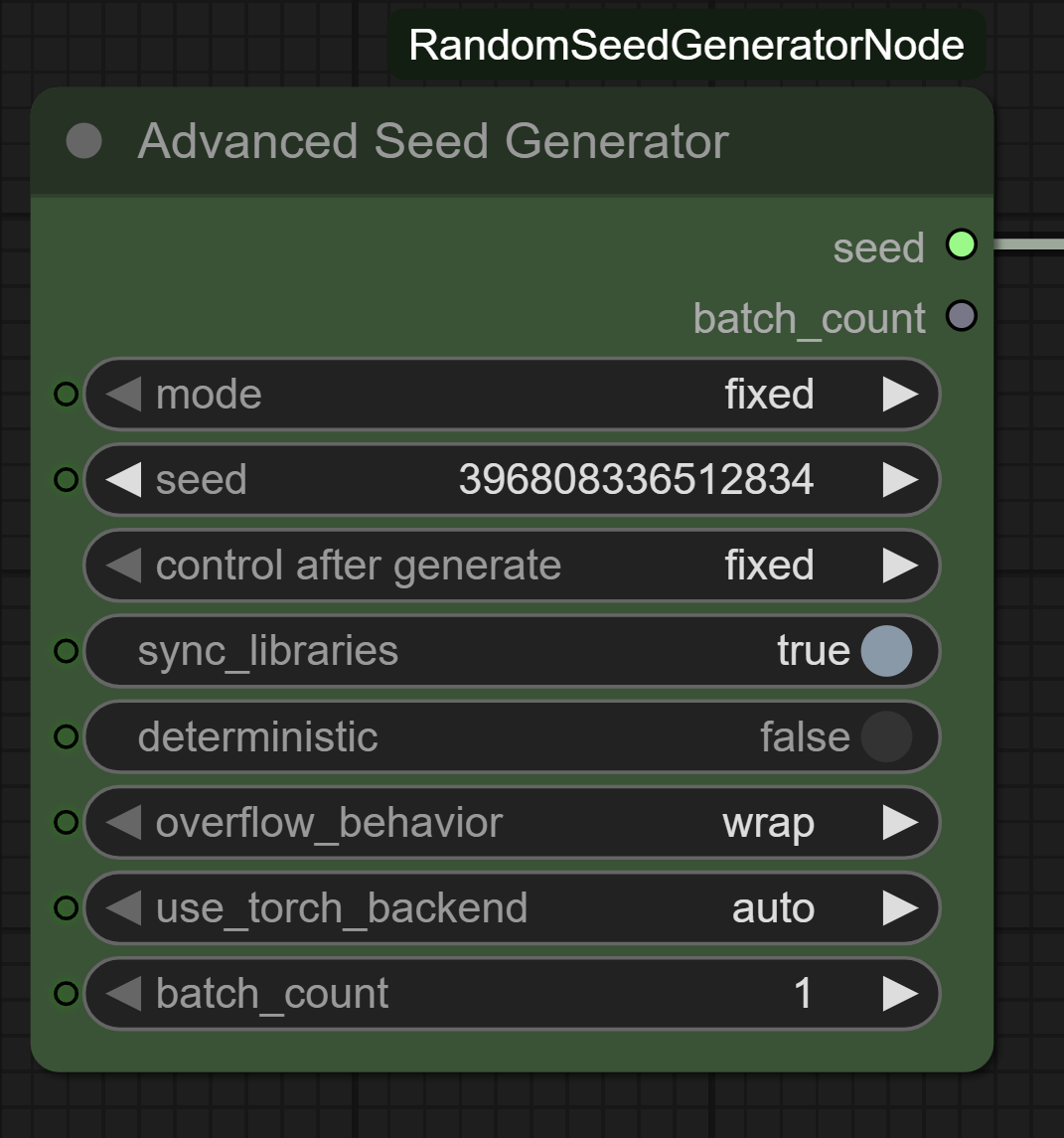



🎲 Advanced Seed Generator — a small, focused custom node for ComfyUI that produces seed values in four modes: fixed, random, increment, and decrement. Pure Python standard library, no external dependencies.
✨ Features
- 🎯 Four generation modes:
fixed,random,increment,decrement - 🔁 Cross-execution state: increment/decrement remember the last seed across workflow runs
- 🌐 Full 64-bit range: seeds span
0to2⁶⁴ − 1(18,446,744,073,709,551,615) - ♾️ Safe wrap-around: increment past MAX wraps to
0; decrement past0wraps to MAX - 📦 Zero dependencies: uses only
random,time, andloggingfrom the Python stdlib - 🧩 Registry-ready: published to the ComfyUI Registry
🚀 Installation
Method 1 — Manual
cd ComfyUI/custom_nodes
git clone https://github.com/Limbicnation/ComfyUI-RandomSeedGenerator.git
Restart ComfyUI. The node appears under utils as 🎲 Advanced Seed Generator.
Method 2 — ComfyUI Manager (recommended)
- Install ComfyUI Manager.
- Search for Random Seed Generator.
- Install and restart ComfyUI.
Method 3 — ComfyUI Registry
comfy node install randomseedgenerator
📖 Usage
Parameters
| Parameter | Type | Default | Description |
|-----------|------|---------|-------------|
| mode | Dropdown | fixed | One of fixed, random, increment, decrement |
| seed | Integer | 0 | Used directly in fixed mode; ignored in the others |
Modes
🔒 Fixed
Returns the exact seed value provided. Use for reproducible generations.
seed=12345 → 12345 (always)
🎲 Random
Returns a fresh random seed in [0, 2⁶⁴−1] on every execution.
→ 4831672946…, 9573821047…, …
⬆️ Increment
Returns last_seed + 1. State persists across workflow runs.
run 1: 42 → run 2: 43 → run 3: 44 …
⬇️ Decrement
Returns last_seed − 1. State persists across workflow runs.
run 1: 42 → run 2: 41 → run 3: 40 …
Wrap-around
Increment and decrement wrap at the 64-bit boundary: MAX → 0 and 0 → MAX. No configuration; this is always the behavior.
State scope
The _last_seed counter is class-level — shared across every instance of the node in the current ComfyUI process. ComfyUI does not surface per-node identity to the executor, so isolated counters per node aren't possible without upstream API changes. If you need independent counters, use random mode and seed downstream samplers directly.
📋 Requirements
- ComfyUI: any current version
- Python: 3.9+
- Dependencies: none (Python stdlib only)
🔍 Troubleshooting
Node not appearing in the menu
- Restart ComfyUI completely.
- Check the ComfyUI console for import errors.
Increment/decrement counter is "wrong"
- The counter is shared across every instance of this node in the workflow. See State scope above.
- The simplest reset is to restart ComfyUI —
_last_seedlives in process memory only. - If you need a known starting point without restarting, switch to
randommode for one execution; the nextincrementwill start from that random value plus one. - For scripts/tests,
AdvancedSeedGenerator.reset_state()zeroes the counter directly.
🤝 Contributing
Pull requests welcome. Please:
- Fork and create a feature branch.
- Add tests under
tests/for new behavior. - Run
python -m pytest tests/. - Open a PR.
📝 License
Apache License 2.0 — see LICENSE.
⭐ If this node helps your workflow, please consider starring the repository.
For issues or feature requests, see GitHub Issues.