
🗂️ Dict Tools
Essential nodes to use dictionaries in ComfyUI: for smart prompt-formatting, general organization (passing a single connection instead of spaghetti), or anything else.
Nodes (50)
Shove Anything Into a Dict
Dictionaries With Dict-of-Your-Choice Keys
Store a Yes/No in Your Dict
Carry the Text Encoder in Your Bus
The Vision Encoder, On the Bus
Bundle Your Conditioning Into the Bus
Bundle Your ControlNet Into the Bus
The Denoise Value, Finally in One Place
The GLIGEN Model, Parked in the Dict
The Guider, Boxed and Ready
Images In, One Wire Out
Park a Number in the Dict Without a Wire
Keep Your Latents Off the Spaghetti Heap
Stack Your LoRAs Into the Bus
The Mask That Rides Along
Your Checkpoint, Packed Into the Bus
Your Noise Source, Parked in the Bus
The Sampler Object, On Board
The Sigma Schedule, Rides Along
Your prompts, one key at a time
Stash your upscaler on the bus
Keep your VAE from being the wildcard
The untyped escape hatch for your dict
For when your dict keys aren't strings
The on/off switch living inside your dict
One CLIP, shared across every text encoder
Route your CLIP-vision through the bus
Your conditioning, extracted on demand
ControlNet presets, as dict entries
Every denoise, strength, and CFG, in one place
The rare GLIGEN extractor, for grounding boxes
For the advanced-sampling crowd
Pull images out of the bus when you need them
Seeds, steps, and sizes, keyed and centralized
Pass latents around without losing the plot
Your LoRA stack, carried by one wire
Masks in the bus, applied where they matter
Pull the Checkpoint Back Out of the Bus
Noise objects, keyed for the sampler purists
Carry your sampler selection in the bus
Pull the noise schedule out of a dict
The Dict Tools node you'll actually reach for every day
Keep your upscaler of choice in the bus
Decode straight from the bus
Text → Dict, wearing its old ID
The legacy ANY → Dict node, explained
Add a prompt chunk the legacy way
The legacy Dict → string, and its literal-key trap
Text → Dict, first generation (look for the 'strings' input)
Build a whole prompt bundle from one text box
"Do one thing and do it well." — Peter H. Salus / Doug McIlroy, core Unix principle
<div align="center">"Simple is better than complex." — Zen of Python
🗂️ Dict Tools for ComfyUI
Essential nodes to use dictionaries in ComfyUI: for smart prompt-formatting, general organization (passing a single connection instead of spaghetti), or anything else.<br />
</div>TL;DR
- In python, there's a built-in "dictionary" (
dict) data type. - It's both simple and powerful: it's a single container that lets you put many pieces of data into it, and still access them individually - by their unique names aka keys. For example, you can put there:
seed(int)denoisevalue (float)textprompt (string)- ... and even have multiple versions of them for different stages of workflow - as long as each value has its own unique key.
- Even though ComfyUI actively uses dicts under the hood, there's no built-in
DICTdata type exposed to users, nor there are any nodes to build/modify/use dicts. - This node pack aims to fix that.
[!IMPORTANT] I highly recommend using it together with:
- Basic Data Handling pack. It exposes all the built-in python methods to work with dicts as ComfyUI nodes.
- My other String Constructor/Formatter node. I will NOT pile up all my nodes into another one uber-mega "Comfy-Darlog-Tools" pack. Install only what wou need, separately.
What for?
In short:
- Advanced text formatting;
- Utilizing the well-known "bus" workflow to reduce spaghetti, while letting you decide what categories of data are contained inside the bus - not the node author deciding for you;
- Any other uses for dicts - your choice!
Now, specifics.
Formatting
Originally, all these nodes were just a part of my String Constructor pack as "supporting" nodes. So they let you prepare a dictionary with various text chunks, and then build the actual prompt from them, easily reusing the same descriptions across the workflow. Like this:
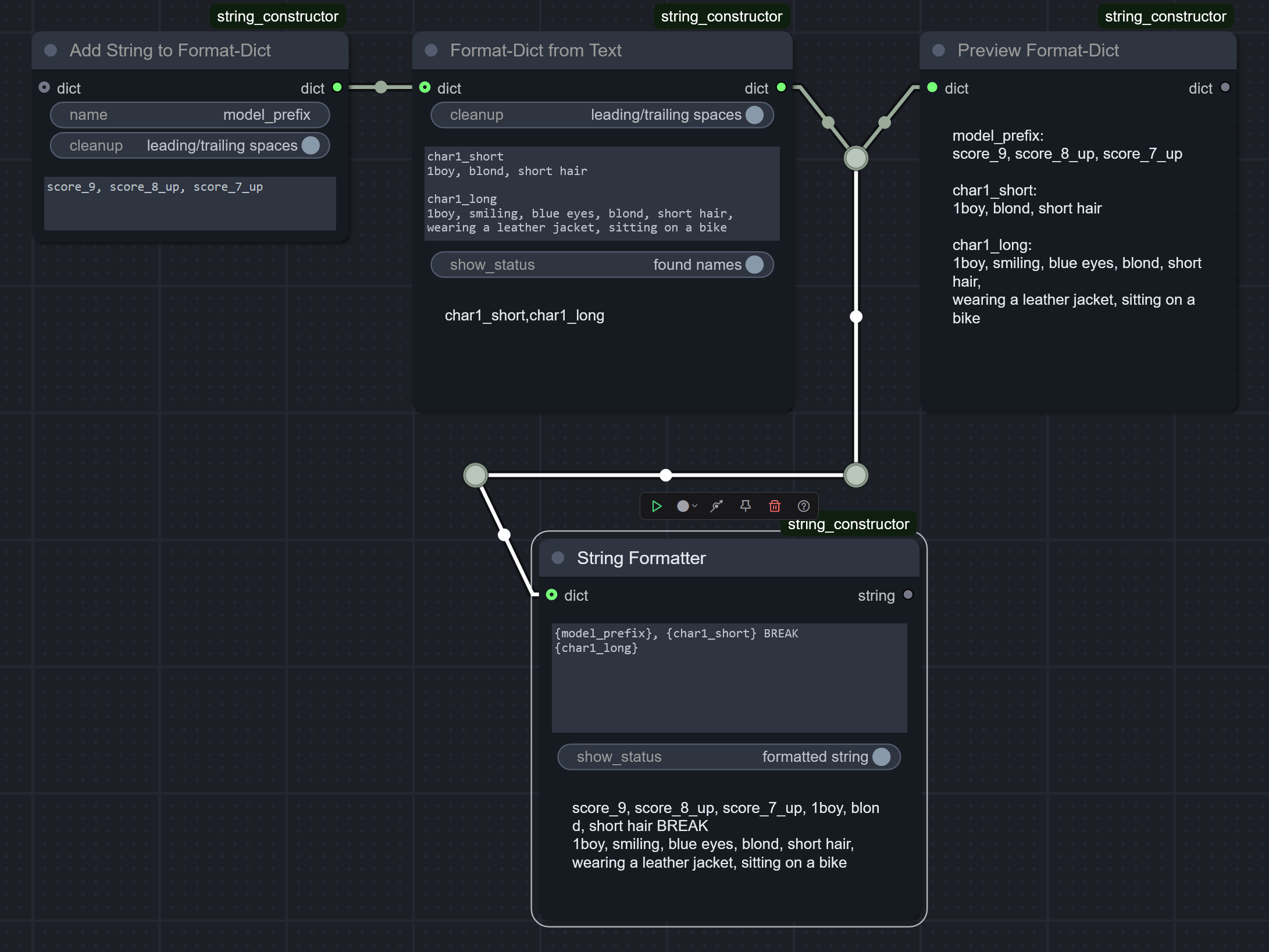
Bus connection
... but it quickly became apparent, that dicts are good not only for that - they're perfect as general-purpose "wrappers" over big sets of any data, no matter what is its type. So:
- You put all your seeds/prompts/denoise values/whatever (even models) into a single dictionary.
- You pass it as a single connection across the graph.
- Yes, if you wish, also using any other spaghetti-reducing nodes - like
Set/Getnodes from KJNodes pack or any nodes from UE pack.
- Yes, if you wish, also using any other spaghetti-reducing nodes - like
- When needed, you extract these values back from the dict and connect them as usual. No special bus-understanding nodes required.
Also, dicts are designed to be easily updated, so you could initially build one "base" dict, another "override" dict, and somewhere down the workflow you apply the latter - getting a third dict which preserves all the original values from the first one, but takes the updated values from the second one.
This "base-then-override" approach lets you build your own templates containing entire sets of values, applied all at once with a single node when you need it. If you're familiar with Automatic1111 UI, then it's basically a "style preset" concept, but much, much, MUCH more flexible and powerful.
Examples 🚧🏗️
(Section under construction)
Implementation details for programmers
The exact datatype the nodes in this pack output is actually frozendict (not native dict) - to prevent accidentally mutating the same dict by multiple nodes.
Versioning scheme
I adopted a custom versioning scheme, which looks like a regular SemVer, but is slightly different:
- First number is internal node-API version.
- Second is major update - when it bumps, it contains breaking changes.
- Last is a minor update.