
ComfyUI-Unblend
Character separation for anime art in ComfyUI: detection, instance masks, exclusive regions, prompt routing and pose extraction — fixes character blending on multi-character images.
Nodes (6)
Your SAM masks are anonymous. This node names them.
The Unblend Dynamic Sampler
A line counter that remembers where it was
Anime pose detection that actually sees anime
Your whole prompt collection, one JSON file away
Per-character img2img without the twins problem
ComfyUI-Unblend


Auto-separation of multiple anime characters in one image — no hand-drawn masks, no regional-prompting spaghetti. Built for SDXL / Illustrious and compatible finetunes.
The problem
You write a prompt for two characters and hit generate. Then it happens: their hair colors mix, the eyepatch jumps to the wrong face, one character's signature accessory ends up on the other — and at worst you get "twins," two people with the same face. The closer they are (hugging, kissing, leaning on each other), the worse it gets.
The usual fix is regional prompting with a pile of hand-drawn masks. It works, but it's slow, fiddly, and falls apart on busy scenes. Unblend removes that manual grind: you just write the prompt. The nodes find each character, build clean per-character masks automatically, turn them into mutually-exclusive regions, and feed those to regional attention. No hand-drawing.
Before / after
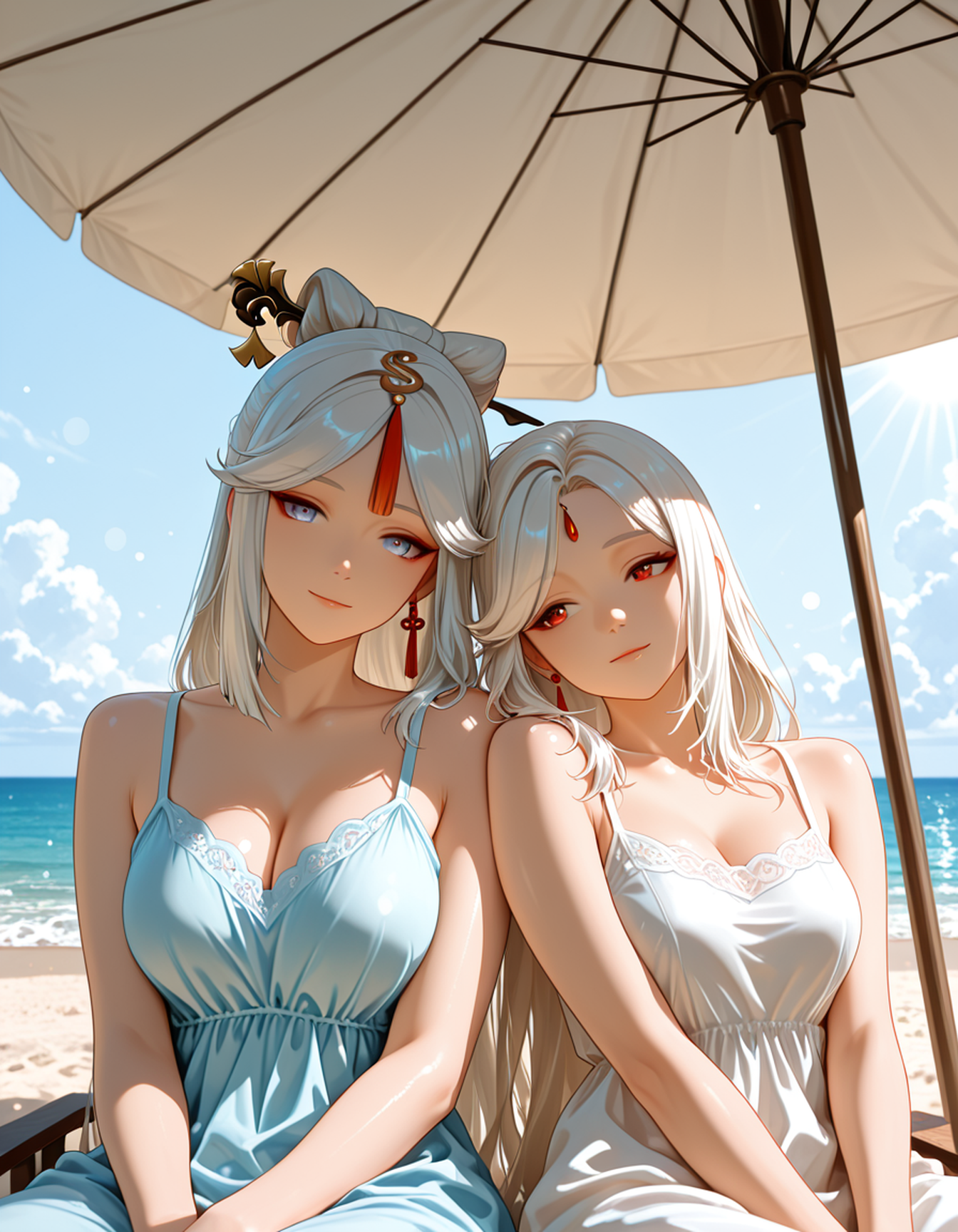
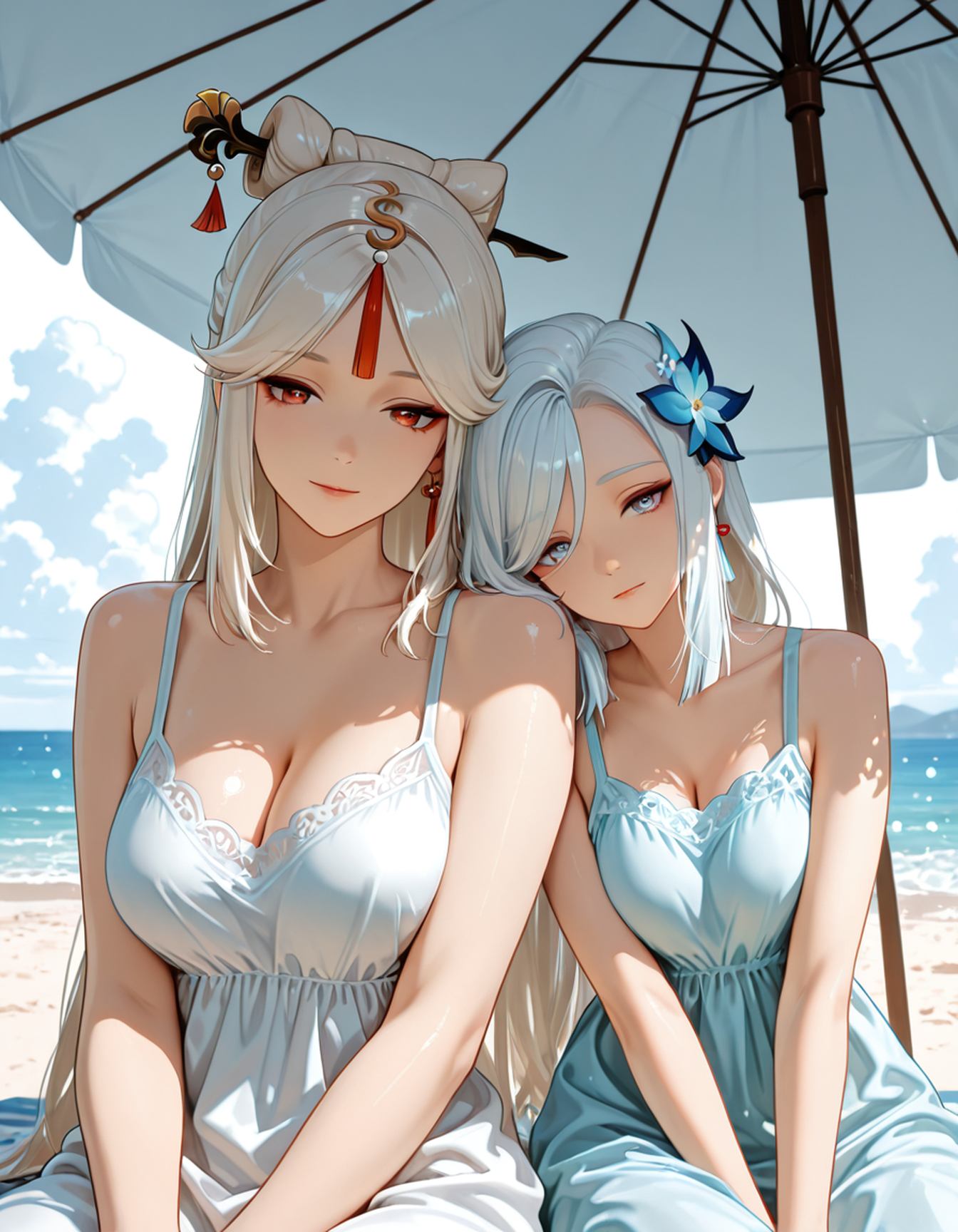
A hard case on purpose: Ningguang × Shenhe (Genshin Impact) — two white-haired characters, so a plain sampler blends their faces and swaps their accessories. That makes the difference easy to see.
| Standard generation (no masks) | With Unblend |
|---|---|
|  |
|  |
|
Left — a normal prompt on a plain sampler: hair mixes, the forehead jewel and hair ornament swap faces. Right — the same prompt through Unblend: you write the text, the nodes do the masking, and each character stays herself.
Install
ComfyUI Manager (recommended). Open the Manager, search "Unblend", click Install, and restart ComfyUI. The Python dependencies install automatically.
Manual (git):
cd ComfyUI/custom_nodes
git clone https://github.com/LatentDesireAI/ComfyUI-Unblend
pip install -r ComfyUI-Unblend/requirements.txt
Then restart ComfyUI. Install into the same Python environment ComfyUI runs in
(Windows portable build: python_embeded\python.exe -m pip install -r ComfyUI-Unblend\requirements.txt).
You also need a SAM segmentation node for the hi-res instance masks — it is not part of ComfyUI core. Install one separately (see Requirements).
Quick start
Unblend uses tagged prompts so it knows what to lock to whom. A minimal prompt looks like this:
[QUALITY] masterpiece, best quality, ultra detailed, absurdres
[STYLE] detailed hair, intricate details, very aesthetic
[SCENE] beach under a large parasol, white sand, bright sea behind, summer
[CHAR1] ningguang \(genshin impact\), hair stick, forehead jewel, long white hair, red eyes, (white sundress:1.15), sitting
[CHAR2] shenhe \(genshin impact\), hair ornament, long white hair, light blue eyes, (pale blue sundress:1.15), sitting
[INTERACT] sitting close under the parasol, shenhe resting head on ningguang's shoulder, arms linked
char_points = 0.3,0.45; 0.7,0.45
char_points are normalized 0..1 anchors on each character's head, in
[CHARn] order. Same y, different x = side by side; same x, different y
= stacked / lying.
Three rules that save the most pain (all learned from real bugs):
- Put the other character's name only in
[INTERACT], never inside[CHARn]— otherwise it binds to the wrong mask and you get identity mixups. - Keep each
[CHARn]compact (~35–45 tokens) and the same length for both — a long one breaks across the 77-token CLIP boundary, the character gets no mask, and you get a square instead of a silhouette. - Maximize contrast between characters (hair / eyes / clothes) — that's what the model tells them apart by.
Scales to 4 characters in theory ([CHAR1] … [CHAR4]); 2 is the sweet spot in
practice.
📝 Full cheat sheet — token order,
char_pointsrecipes, and troubleshooting (twins, style drift, traits leaking, disappearing signatures) — is in PROMPTING.md (Russian: PROMPTING_RU.md).
How it works (in plain terms)
Unblend runs as a two-pass pipeline.
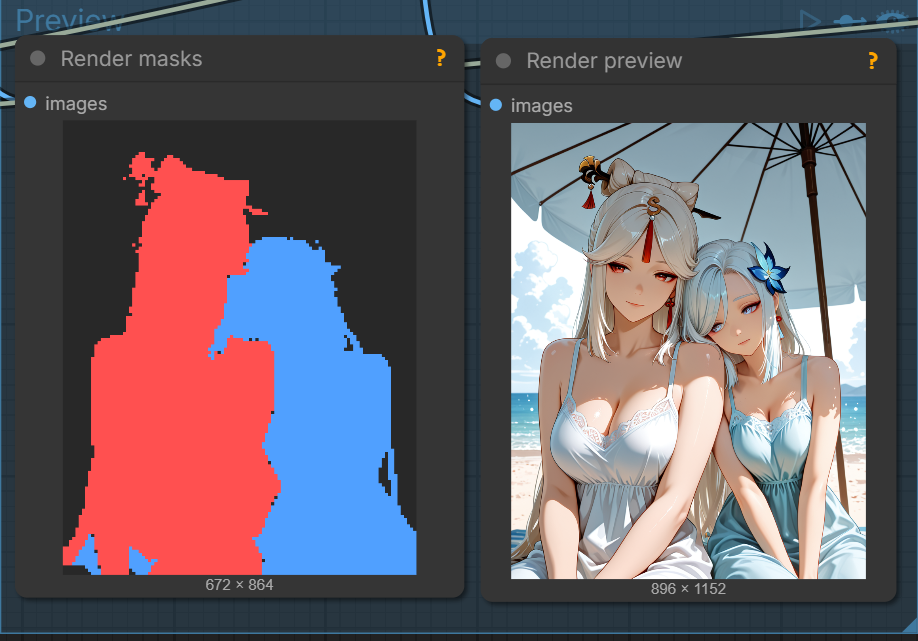
1. Composition pass — Unblend Dynamic Sampler. Generates both characters in a single pass. It rebuilds each character's mask from the model's own cross-attention maps every few steps, then keeps her tokens locked inside her own zone. No hand-drawn masks needed — the two come out already separated.
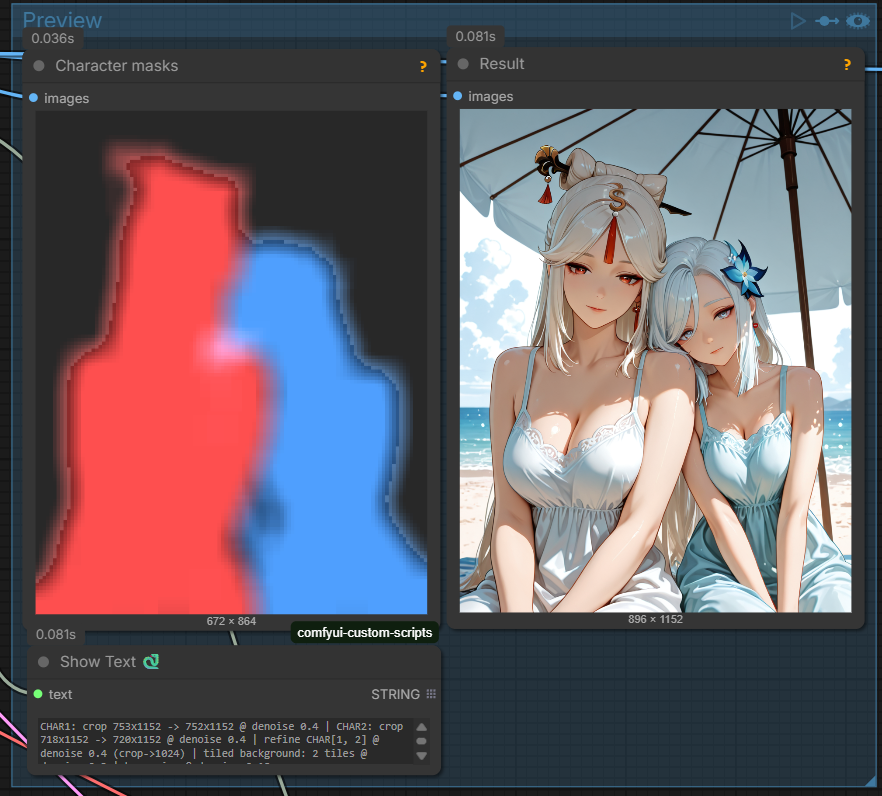
2. Detail pass — Unblend Sequential Refine. Instead of a second KSampler, it
redraws each character with only her own [CHARn] (zero neighbour tokens →
no feature leak), then details the background separately. The result: crisp
faces, clean accessories, no characters duplicated onto in-scene decor.
Between the two passes, an external SAM node produces clean instance masks
and Assign Masks labels them back to the right character using the same
char_points. Everything stays consistent.
Nodes
| Node | What it does |
|---|---|
| Unblend Dynamic Sampler (Bounded Attention) | Main sampler: one pass, character masks are rebuilt from the model's own cross-attention maps every N steps + bias. char_points — normalized anchors (position + head identity, deterministic). identity_lock — boosts a character's own tokens inside its zone. early_jail — self-attn jail on the soft phase for side-by-side points. Solo fallback for 0–1 [CHARn]. Outputs a patched couple+jail model + draw conds for the detail pass. |
| Unblend Assign Masks (SAM → CHARn by points) | Bridge: labels unnamed instance masks (SAM, etc.) by char_points (the mask containing a point becomes that character). Handles occlusion. Solo mode (1 point → 1 character; no points → largest mask). Outputs ordered char_masks for Sequential Refine. |
| Unblend Sequential Refine (per-char img2img) | Detail pass in place of a second KSampler: per-character masked img2img with ONLY that [CHARn] (no neighbour tokens → zero feature leak), then a background pass (scene-only prompt — also suppresses character duplication onto in-scene paintings) and an optional seam harmonize. Pose is held by noise_mask. Run it AFTER the joint composition pass. per_char_upscale crops each character by its mask, upscales the crop and details it there — sharp faces even for a small hero on wide / horizontal art. bg_tiled splits the background into native-resolution tiles for canvas-wide detail (characters stay mask-locked, so no duplication on decor). |
| Unblend Scene Book (JSON prompts) | JSON "scene book": a shared prefix ([QUALITY]/[STYLE]) + a list of prompts, each with its own char_points and recommended orientation horizontal (true = landscape / false = portrait). By index, outputs prefix / prompt / full_prompt / char_points / name / horizontal separately. wrap pairs with the Line Counter for batch runs. Example: example_workflows/scenes_demo.json. |
| Unblend Line Counter | Prompt-file line number with auto-advance: repeat / increment / random / fixed. For a "file → stream of arts" pipeline. |
| Unblend Pose Engine | Pose extraction with engine choice: rtmlib_humanart (RTMPose + HumanArt — sees anime proportions, recommended) or dwpose. Returns an OpenPose image for ControlNet + a JSON of bodies. Can take boxes from a detector ("one skeleton per character"). |
Pipeline
Scene Book (JSON) ─┬─► full_prompt ──► Dynamic Sampler ──► decode ──► SAM (external) ──┐
                   ├─► char_points ───────────┘                                        │
                   └─► horizontal ──► latent size switch                  Assign Masks ◄┘ (char_points)
                                                                                │
                                                                          Sequential Refine ──► upscale ──► save
- Dynamic Sampler separates the bodies in the composition pass.
- A SAM node (external) gives clean instance masks; Assign Masks labels them
by the same
char_points. - Sequential Refine redraws each character with only its
[CHARn]and details the background separately — no feature leak, no duplicates on decor. - Scene Book + Line Counter drive a whole prompt collection by index.
A ready example graph ships in example_workflows/unblend_workflow_example.json.
It is minimal on purpose — it only shows the nodes wired together. Bring your
own checkpoint, style and upscalers.
Requirements
If you install via ComfyUI Manager, the Python packages below are handled for you. For a manual install (or just for reference), Unblend needs:
- An SDXL / Illustrious checkpoint.
dghs-imgutils/dghs-realutils— internal silhouette + head detection used by the Dynamic Sampler. (Inrequirements.txt.)- A SAM segmentation node for the hi-res instance masks feeding Assign Masks. SAM is not part of ComfyUI core — install a pack via ComfyUI Manager (search "segment anything" / "SAM"); SAM2 (kijai) and SAM3 packs both work.
rtmlib(andonnxruntime) forrtmlib_humanartin the Pose Engine. (Inrequirements.txt.)
Community
- Question, idea, or want to show a result? → open a thread in Discussions.
- Found a bug? → open an Issue.
- Got a fix? → PRs welcome.
Why I built this
Hi! I got into AI art generation, and over time I kept hitting the same thing: characters tend to bleed details into each other. It bugged me, so I went digging into the what / how / why. Most fixes use regional prompting and a pile of masks — all by hand, which eats a ton of time. (There were automatic options too, but they were complex and fiddly, and didn't always hold up, especially on busy scenes.)
When Anthropic released Fable 5, I caught a short window with it and spent a couple of days sketching out the ideas I had and testing them. After that I finished the work with Opus 4.8. I'd love to see Fable 5 come back — I still have ideas for optimizing a few of the steps.
So here they are — a lazy person's shortcuts that might make your generations a little easier. If they saved you time, I'd be glad for any little bit via Ko-fi 😋 — I burned a lot of time and tokens dialing in the result.
Best regards, Alex
Support the art
Unblend is free and MIT-licensed. The best way to give back is through the art it was built to make:
🔗 linktr.ee/latentdesire — Patreon, Ko-fi and public galleries (Pixiv).
⚠️ 18+ / NSFW. The Patreon and galleries contain adult artwork and the pages are age-gated. Not safe for work — 18+ only. The node itself is general-purpose.
Credits
Built by LatentDesireAI, in collaboration with Fable 5 and Claude Opus 4.8 — from the attention-kernel research through to this release.
Development
Offline unit tests (no ComfyUI needed):
python tests/test_dynamic.py
python tests/test_helpers.py
python tests/test_patches.py
python tests/test_scene.py