
Hermes Nodes
WAN Dual LoRA Loader
Nodes (9)
Wan 2.2 wants two LoRA loaders. This is the one node that does both.
Hermes Nodes
Custom nodes for ComfyUI: WAN 2.2 dual-model (HIGH/LOW noise) LoRA loading and sampling, image prep helpers, and in-graph video preview/compare.
Feature requests and bug reports are welcome - please open an issue on GitHub.
Installation
- ComfyUI Manager / Registry: search for "Hermes Nodes".
- Manual: clone into
ComfyUI/custom_nodesand restart ComfyUI:git clone https://github.com/Lannister34/ComfyUI-HermesNodes custom_nodes/hermes-nodes
No extra Python dependencies - everything used ships with ComfyUI.
Nodes
| Node | Category | What it does |
|------|----------|--------------|
| WAN Dual LoRA Loader | loaders/wan | Separate LoRA stacks for the HIGH and LOW models, presets, wildcard prompt |
| WAN Dual KSampler | sampling | HIGH model for the first switch_step steps, LOW model for the rest; separate CFG per phase |
| WAN Dual KSampler (Boundary) | sampling | Same, but switches where the timestep crosses boundary (0.875 T2V / 0.9 I2V) |
| Image Scale To | hermes/image | Scale so the shorter/longer side hits a size, keep aspect, snap to a multiple (e.g. 16) |
| Pad Image to Square | hermes/image | Scale longest side to size and center on a square canvas of a fill color |
| Random Image Loader | hermes/image | Seeded random image from a folder, with a folder picker and in-node preview |
| Video Preview | hermes/video | Encode frames (+ audio) to mp4 and play in the node: autoplay, sound on hover, click to pause |
| Video Player | hermes/video | Same encoding, native player controls for scrubbing |
| Video Compare (Side-by-Side) | hermes/video | Tile up to 6 videos into one grid clip for A/B comparisons |
Node ids (for API-format workflows): WANDualLoraLoader, WANDualKSampler, WANDualKSamplerBeta,
and Hermes + the node name for the rest (HermesImageResize, HermesVideoPreview, ...).
Video nodes save to temp/ by default (preview only); enable save_output to write to output/.
Saved mp4 files embed the workflow, so they can be dragged back into ComfyUI.
WAN Dual LoRA Loader
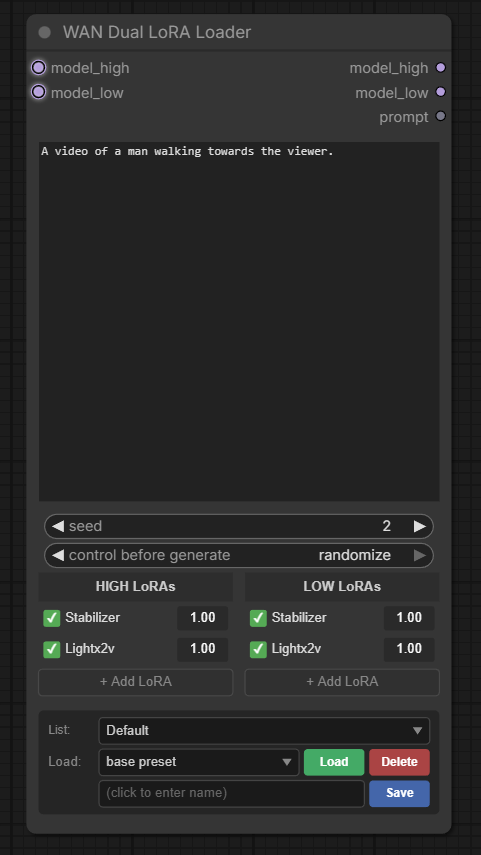
LoRAs are read from a dedicated folder tree (created on first start):
models/loras/wan/
├── I2V/          <- LoRAs here appear in both HIGH and LOW lists
│   ├── HIGH/
│   └── LOW/
└── T2V/
    ├── HIGH/
    └── LOW/
- Auto-match - adding
x_HIGHto one column also adds itsx_LOWtwin to the other - Presets - save/load prompt + both LoRA stacks, grouped into lists
(stored in
ComfyUI/user/hermes_presets/wan_lora_presets.json) - Wildcards in the prompt:
{option1|option2|option3}- random choice__filename__- random line fromComfyUI/user/wildcards/filename.txt<random:0.5:1.0>- random float in range
Outputs: model_high, model_low, prompt (wildcards resolved).
License
MIT