
ComfyUI Lackluster Nodes
Custom ComfyUI nodes for AllTalk TTS integration
Nodes (24)
Peek at what your AllTalk server is actually running
Give your ComfyUI videos an actual voice
Ask the AllTalk server who's actually available
Steer a 3D camera without leaving your prompt
Queue a whole orbit of camera angles in one node
Translate camera terms to Chinese, Japanese, or Korean
Camera presets for people who don't think in degrees
Orbit a subject with auto-sweep, no per-angle typing
Localize camera prompts without an API call
Grab the first or last frame of a video batch
Pick a different attention kernel per model, without restarting ComfyUI
Enhance prompts with a local LLM and task-specific templates
The original Qwen Multiangle Camera node, by its first name
The camera-glossary translator under its original name
The batch-angle node, under its Qwen-era name
Queue up to 10 shots from an interactive 3D scene
A ten-shot queue built from named camera presets
See any string in your graph, right on the node
A shared multiline text box that always re-runs
Check for outdated pip packages from inside the graph
The attention-backend switcher that shows up twice in your menu
Build trap-music prompts without remembering a single tag
A beat-description typewriter, not a beat machine
Fifty pre-written trap style blurbs in one dropdown
ComfyUI-Lackluster-Nodes
A collection of custom ComfyUI nodes spanning TTS, camera control, prompt generation, and workflow utilities.
📦 Installation
Method 1: Using ComfyUI Manager
- Open ComfyUI Manager
- Search for "ComfyUI Lackluster Nodes"
- Click Install
- Restart ComfyUI
Method 2: Manual Installation
cd path/to/ComfyUI/custom_nodes
git clone https://github.com/LacklusterOpsec/ComfyUI-Lackluster-Nodes.git
cd ComfyUI-Lackluster-Nodes
pip install -r requirements.txt
Restart ComfyUI after installation.
🗂️ Node Categories
| Category | Nodes |
|---|---|
| Lackluster/Camera | CamOrbit, CamOrbit Sequence, CamOrbit Translate, Lackluster-Camera, Lackluster-Camera Sequence, Lackluster-Camera Translate, Lackluster-Shot Queue, Lackluster-Shot Queue V2 |
| Lackluster/Prompt | Lackluster Prompt Enhancer |
| Lackluster/Audio/Trap | Trap Prompt Generator, Trap Prompt Generator v2, Trap Style Selector |
| Lackluster/Text | Text Multiline, Show Text |
| Lackluster/Video | First/Last Frame Selector |
| Lackluster/System | Pip/UV Outdated Packages |
| audio/tts | AllTalk TTS Generator, AllTalk Voice Loader, AllTalk Settings Loader |
🎥 Camera Nodes
CamOrbit (lackluster_cam_orbit.py)
Category:
Lackluster/Camera
A single-shot camera angle picker with built-in named presets and an optional 3D scene preview.
Inputs:
preset— Named angle preset (e.g. "Front (eye-level)", "Right Profile", "Overhead", "Worm's-eye", etc.)azimuth— Horizontal rotation 0–360°elevation— Vertical tilt -30° to 60°distance— Camera distance (0 = wide, 10 = close-up)prefix— Token prepended to the prompt (e.g.<sks>)extra_prompt— Extra text appended after the generated promptcamera_view— Toggle 3D preview widgetimage(optional) — Image to display in the 3D scene
Outputs: prompt (STRING), label (STRING), camera_info (LOAD_3D_CAMERA)
CamOrbit Sequence (lackluster_cam_orbit.py)
Category:
Lackluster/Camera
Batch camera angle sequence builder. Accepts angles via JSON, CSV, or auto-sweep and emits a list of prompts for sequential generation.
Modes:
json_sequence— Array of{azimuth, elevation, distance, label?, extra?, prefix?}objectscsv_sequence— CSV with columnslabel,azimuth,elevation,distance[,extra]auto_sweep— Linearly interpolate betweensweep_startandsweep_endoversweep_steps
Outputs: prompts (STRING list), prompt_text (STRING), labels_text (STRING), count (INT), camera_info (LOAD_3D_CAMERA list)
CamOrbit Translate (lackluster_cam_orbit.py)
Category:
Lackluster/Camera
Translates the English camera/shot terms in a prompt (e.g. "front view", "close-up") into Chinese, Japanese, or Korean using a built-in glossary.
Inputs: prompt (STRING), target_language (中文 / 日本語 / 한국어 / English)
Outputs: prompt (STRING)
Lackluster-Camera (lackluster_qwen_multiangle.py)
Category:
Lackluster/Camera
Single 3D camera angle control node. Outputs a formatted angle prompt and LOAD_3D_CAMERA metadata for multi-angle generation pipelines.
Inputs: horizontal_angle, vertical_angle, zoom, default_prompts, camera_view, image (optional)
Outputs: prompt (STRING), camera_info (LOAD_3D_CAMERA)
Lackluster-Camera Sequence (lackluster_qwen_multiangle.py)
Category:
Lackluster/Camera
Queue multiple camera angles via an interactive list and batch-process them sequentially. Supports two output modes:
sequential_batch— Emits a list triggering one ComfyUI execution per anglemultiline_text— Concatenates all prompts into a single multiline string
Outputs: prompts (STRING list), prompt_text (STRING), camera_info (LOAD_3D_CAMERA list), sequence_count (INT)
Lackluster-Camera Translate (lackluster_qwen_multiangle.py)
Category:
Lackluster/Camera
Translates camera/shot terminology in prompts to a target language via a maintained glossary. Supports Chinese, Japanese, and Korean.
Inputs: prompt (STRING), target_language
Outputs: prompt (STRING)
Lackluster-Shot Queue (lackluster_shot_queue.py)
Category:
Lackluster/Camera
Interactive 3D camera widget for selecting angles and queuing up to 10 shots, then running ComfyUI to execute each shot sequentially.
Inputs: horizontal_angle, vertical_angle, zoom, camera_view, custom_prefix, sequence_json (optional), image (optional)
Outputs: prompts (STRING list), prompt_text (STRING), camera_info (LOAD_3D_CAMERA list), queue_count (INT)
Lackluster-Shot Queue V2 (lackluster_shot_queue_v2.py)
Category:
Lackluster/Camera
Preset-based camera shot queue. Select from 15 named presets (Front Close-Up, Low Angle Hero, Dutch Angle, Aerial Shot, etc.), add them to a queue (max 10), and execute them sequentially.
Presets include: Front Close-Up, Front Medium, Front Wide, Low Angle Hero, Low Angle Close-Up, High Angle, Over Shoulder, Right/Left Profile, Back View, Three-Quarter Front, Dutch Angle, Aerial, Extreme Close-Up, Cowboy Shot
Inputs: camera_preset, add_to_queue, run_queue, clear_queue, custom_prefix, sequence_json (optional)
Outputs: prompts (STRING list), prompt_text (STRING), camera_info (LOAD_3D_CAMERA list), queue_count (INT)
✨ Prompt Enhancement
Lackluster Prompt Enhancer (lackluster_prompt_enhancer.py)
Category:
Lackluster/Prompt
Rewrites short prompts into detailed generation/editing prompts using an LLM (Ollama or any OpenAI-compatible endpoint). Uses task-specific templates based on Bernini's official per-task prompt engineering.
Task Types:
| Code | Description |
|---|---|
| v2v | Video-to-Video editing |
| rv2v | Reference-image guided video editing |
| r2v | Subject-driven video generation |
| t2v | Text-to-Video generation |
| t2i | Text-to-Image generation |
| r2i | Subject-driven image generation |
| i2i | Image-to-Image editing |
| i2v | Image-to-Video generation |
| mv2v | Multi-reference video editing |
| vi2v | Video content propagation |
| ads2v | Ad insertion in video |
| vrc2v | Video with reference camera/action control |
Inputs:
prompt— Raw instructiontask_type— Enhancement template to useollama_url— LLM endpoint (default:http://127.0.0.1:11434)ollama_model— Model name (leave empty to pass through without enhancement)api_format—OllamaorOpenAI / vLLMauto_enhance— Enhance on every queue runimage0–image4(optional) — Reference images sent to multimodal LLMstext_input(optional) — Text connection input (overrides the prompt field when connected)negative_prompt(optional) — Custom negative prompttemperature,max_tokens,seed— LLM generation parametersprepend_system_prompt— Prepend the task system prompt to outputunload_ollama— Unload model from VRAM after enhancement
Outputs: enhanced_prompt (STRING), negative_prompt (STRING)
🎵 Trap Music Prompt Nodes
Trap Prompt Generator (trap_prompt_generator.py)
Category:
Lackluster/Audio/Trap
Generates structured trap music production prompts from 10 musical categories. Each category can be set manually or randomised with a seed for reproducibility.
Categories: genre, BPM, energy, bass, drums, rhythm, melody, vocals, atmosphere, mix
Inputs: seed, plus one dropdown per category (each with a 🎲 Random option)
Outputs: prompt (STRING) — comma-separated tag list
Trap Prompt Generator v2 (trap_prompt_generator2.py)
Category:
Lackluster/Audio/Trap
Enhanced version with 14 musical categories, expanded option pools, three output formats, optional category exclusion, and custom tag injection.
Additional categories over v1: key, mood, fx, arrangement
Output Formats:
tags— Comma-separated listnatural— Flowing natural-language sentencestructured—[label] valuetoken format
Inputs: seed, prompt_style, one dropdown per category (each with 🎲 Random and — None — options), custom_tags (optional)
Outputs: prompt (STRING)
Trap Style Selector (trap_style_selector.py)
Category:
Lackluster/Audio/Trap
Selects a pre-written description from a library of 50+ named trap subgenre styles. Each style includes characteristic instrumentation and a scene/atmosphere descriptor.
Example styles: Dark Trap, Memphis Phonk, Witch House Trap, Rage Trap, Drift Phonk, UK Drill Trap, Trap Soul, Gospel Trap, Doom Phonk, Circus Trap, and many more.
Inputs: trap_style — Dropdown of all available styles
Outputs: text (STRING) — Formatted style description
📝 Text Nodes
Text Multiline (text_multiline.py)
Category:
Lackluster/Text
A simple multiline text input node with dynamic prompt support. Displays the current text value in the node UI.
Inputs: text (multiline STRING with dynamicPrompts enabled)
Outputs: text (STRING)
Show Text (text_multiline.py)
Category:
Lackluster/Text
Displays connected text output directly on the node widget. Useful for previewing prompt strings mid-workflow.
Inputs: text (STRING, force input)
Outputs: text (STRING)
🎬 Video Nodes
First/Last Frame Selector (first_last_frame_selector.py)
Category:
Lackluster/Video
Takes a batch of images (e.g. video frames) and returns either the first or last frame based on a mode switch.
Inputs: images (IMAGE batch), mode (first / last)
Outputs: frame (IMAGE)
🔧 System Nodes
Pip/UV Outdated Packages (uv_outdated.py)
Category:
Lackluster/System
Runs uv pip list --outdated (or pip list --outdated) and outputs the result as a string. Useful for keeping your ComfyUI environment up to date.
Inputs: check (BOOLEAN — enable/disable the check), use_uv (BOOLEAN — use uv or plain pip)
Outputs: outdated_packages (STRING)
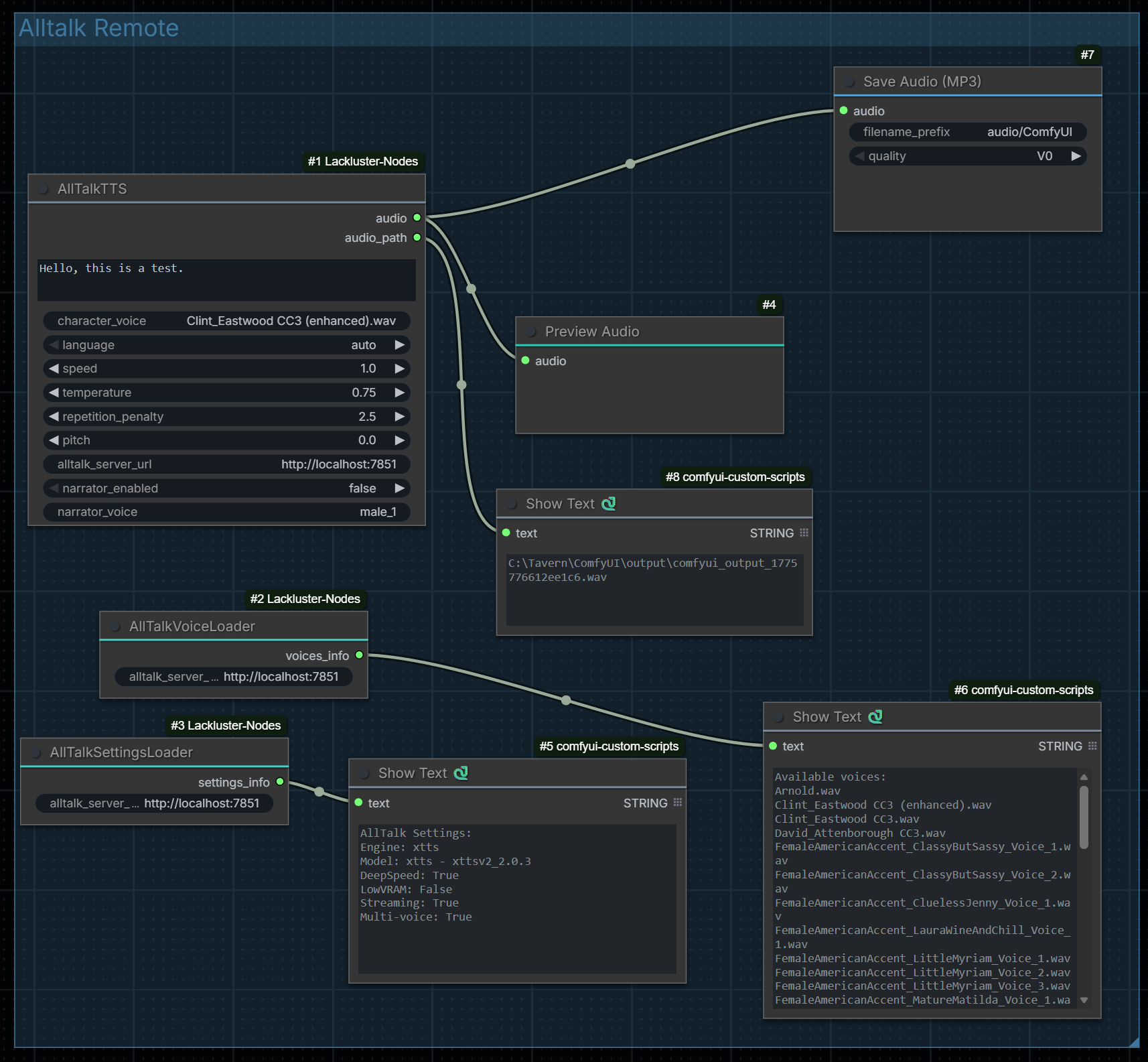
🔊 AllTalk TTS Nodes
Requires an AllTalk TTS server running at a reachable URL (default:
http://localhost:7851).
AllTalk TTS Generator
Category:
audio/tts
Generates text-to-speech audio via an AllTalk installation.
Inputs:
text— Text to convert to speechcharacter_voice— Voice to use (e.g. "female_1")language— Language code (auto, en, es, fr, de, it, pt, nl, ru, ja, zh, ko)speed— Speech speed (0.25–2.0)temperature— Generation temperature (0.1–1.0)repetition_penalty— Repetition penalty (1.0–20.0)pitch— Voice pitch (-10.0–10.0)alltalk_server_url— AllTalk server URLnarrator_enabled— Enable narrator (false / true / silent)narrator_voice— Narrator voice character
Outputs: audio (AUDIO), audio_path (STRING)
AllTalk Voice Loader
Category:
audio/tts
Fetches and lists available voices from the AllTalk server.
AllTalk Settings Loader
Category:
audio/tts
Displays current settings from the AllTalk server.
Installing AllTalk (for TTS nodes)
Windows (Recommended)
git clone -b betav2 https://github.com/erew123/alltalk_tts.git
cd alltalk_tts
# Run atsetup.bat and follow prompts
Using uv
git clone -b betav2 https://github.com/erew123/alltalk_tts.git
cd alltalk_tts
uv venv
.venv\Scripts\activate
uv pip install -r .\system\requirements\requirements_standalone.txt
python script.py
Verify AllTalk is running: http://localhost:7851/api/ready
License
MIT