
Latent Residue Cleaner
Latent Residue Cleaner — a ComfyUI node that removes diffusion noise residue from AI-generated images using GPU-accelerated guided, bilateral, flat snap, and hue snap filters
Nodes (2)
Latent Residue Cleaner
A ComfyUI node that removes the invisible diffusion noise residue baked into every AI-generated image. Diffusion models leave behind a thin layer of micro-noise (often just 1–3 out of 255 per channel) that bloats file size and leaves detectable AI fingerprints. This node scrubs it away in one pass with no visible quality loss.
Inspired by Removing Diffusion Gunk. The original approach uses OpenCV on CPU; this node reimplements and extends the idea on CUDA with some extra post-processing techniques.
Pipeline
The node runs three stages in sequence:
- Latent Scrub — Guided filter + bilateral filter. Removes the diffusion noise coat while keeping edges and detail intact.
- Flat Snap — Flood-fill finds connected regions of near-identical color (like backgrounds) and snaps them to one uniform value. Catches micro-variations the bilateral pass misses.
- Hue Snap — Near-white and near-black pixels have random garbage hue (invisible normally, but detectable). This unifies their hue to a single consensus direction.
Key Features
- Runs entirely on GPU (cuda) — no OpenCV or other dependencies needed
- ~20x faster than original cpu opencv approach. "4MP takes 5.16s / 1MP takes 1.59s (tested on rtx 3060)"
- ~50%+ smaller image file sizes with no perceptible difference
- Images above 2048w/h are automatically tiled to prevent guided filter freezing itself
Notice
I recommend using this node before any final image upscaling as the larger resolutions are always slower to process.
Bilateral D and Sigma Space parameters can be lowered to increase speed with expected accuracy loss.
Increase Hue Snap if there are noticeable amount different hues sections "2-20" are good values to use
Noise visualization Comparison
| #1 | #2 | #3 |
|--------|-------|-------|
| 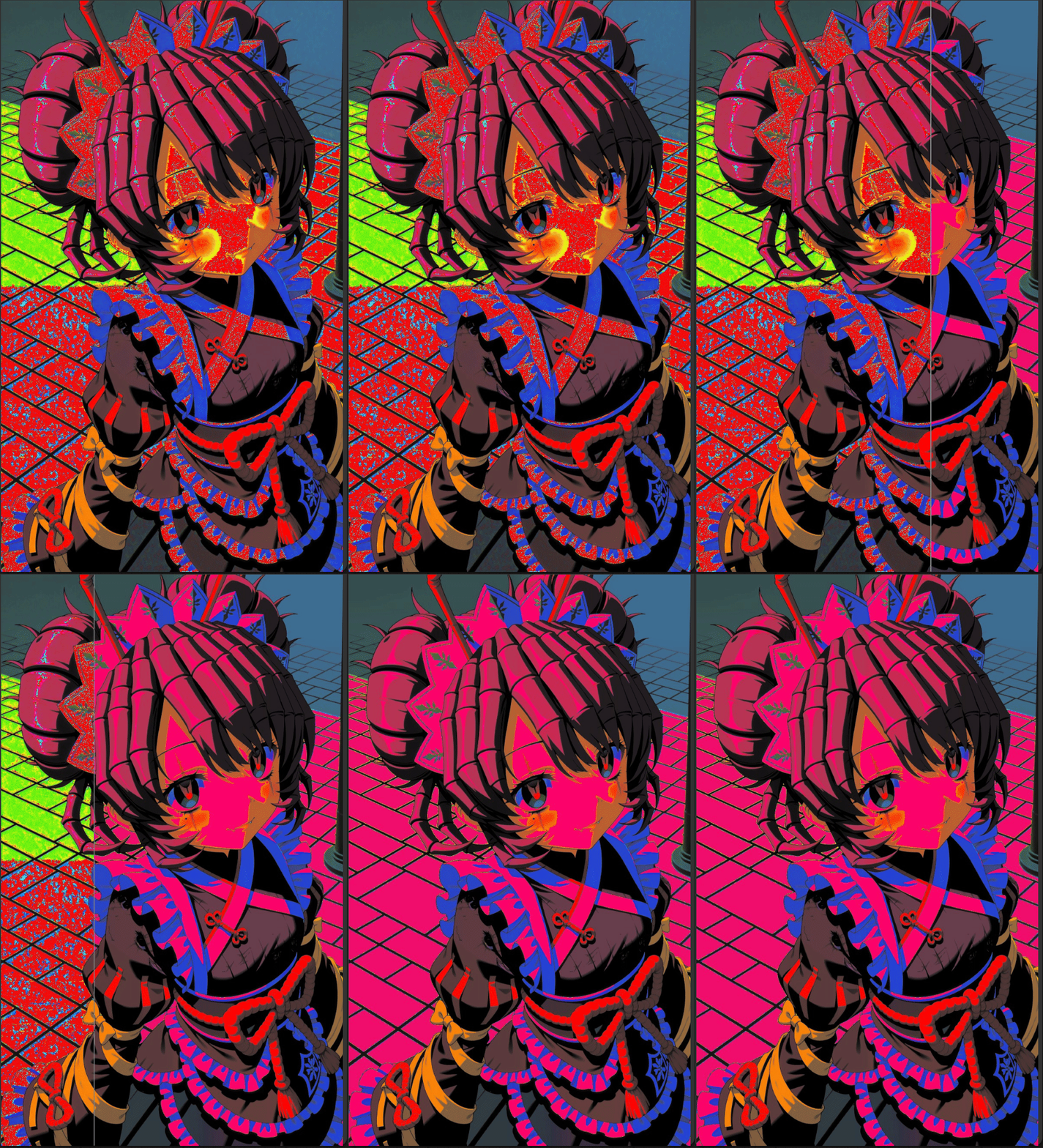 |
|  |
|  |
You will need a special tool or technique to see noise residue, if want do comparisons by yourself, like Comfyui Channel Ops
|
You will need a special tool or technique to see noise residue, if want do comparisons by yourself, like Comfyui Channel Ops
Installation
Clone or copy into your ComfyUI custom_nodes/ directory:
ComfyUI/custom_nodes/ComfyUI_LatentResidueCleaner/
License
MIT