
Mosaic Restore
Lightweight ComfyUI node for mosaic / pixelation restoration, based on lada.
Nodes (1)
ComfyUI-MosaicRestore
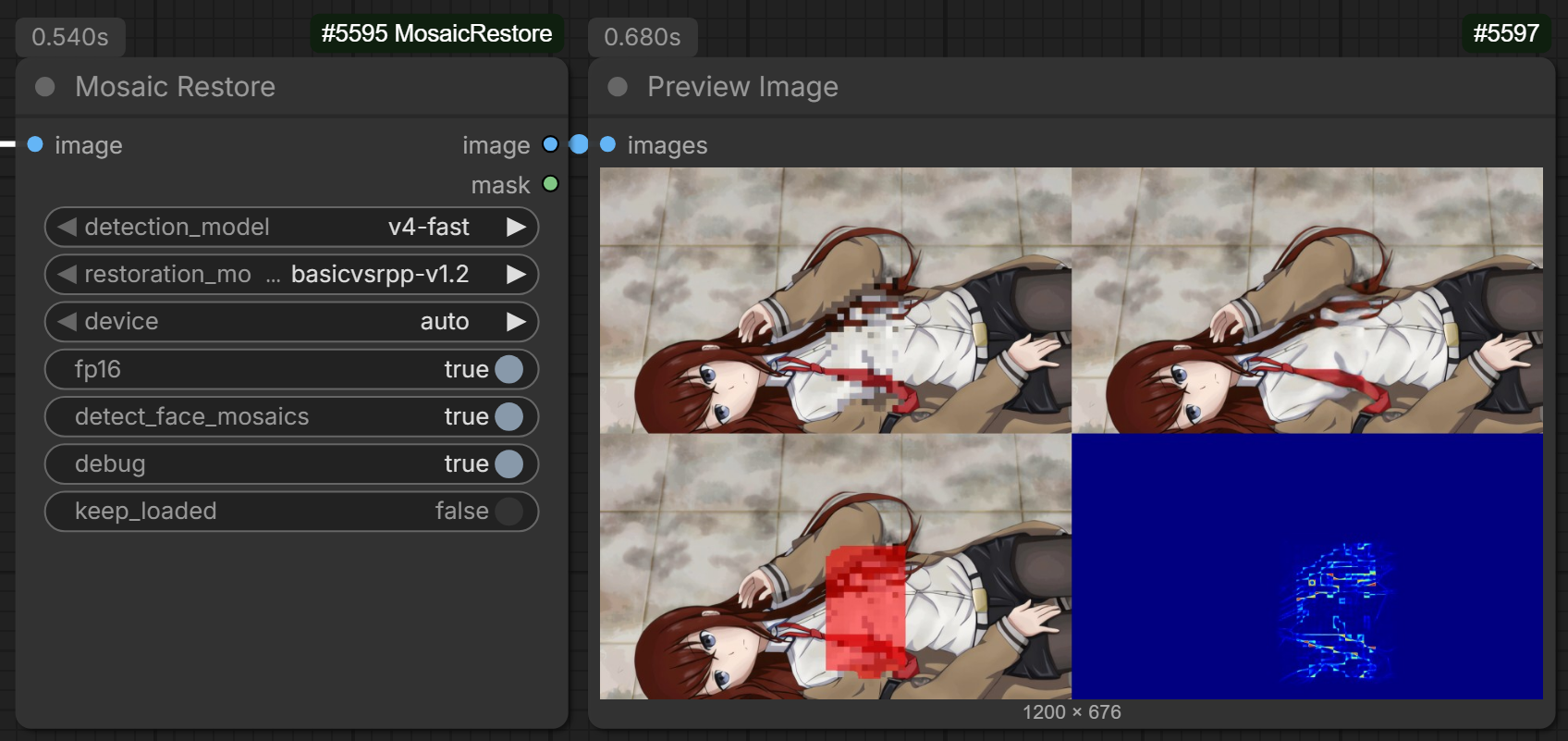
A ComfyUI custom node that detects and restores mosaic / pixelated regions in images and image batches. Based on the inference pipeline of ladaapp/lada.
Features
- Single image, batch, or video frames — automatic. Connect one image or many; the node figures out which mode to run. No toggle to flip.
- Auto-downloads its own models from HuggingFace into
ComfyUI/models/mosaic_restore/the first time you pick one. Nothing bundled with the repo. - Mask output showing what the detector found, so you can re-use it downstream.
- Debug toggle that returns a 4-panel preview (input / output / detections / change heatmap) for diagnosing bad results.
- Multiple model choices — pick the YOLO detector and the restoration model from dropdowns.
Not happy with the result?
Mosaic restoration is fundamentally limited by how much information the censoring destroyed. This node mirrors the original lada implementation as closely as possible, so the output quality is the same as lada's own app — sometimes that's enough, sometimes it isn't.
If you need stronger restoration, take a look at Schwi-AI/DiffusionCreamPy. It uses a diffusion model instead of a deterministic restorer and generally produces noticeably better results, especially on heavier mosaics. It costs more compute per image, but it's the better tool when this node isn't getting you there.
Installation
- Drop this folder into
ComfyUI/custom_nodes/. - Restart ComfyUI. The first run will pip-install
ultralyticsif you don't have it. - Add the
Mosaic Restorenode from theimage/restorationcategory and pick your models — the weights are pulled on first use.
Inputs
| Input | Type | Default | Notes |
| --------------------- | ------- | -------------------- | ---------------------------------------------------------------------- |
| image | IMAGE | — | Single image or a batch of frames. Multi-frame input is auto-detected. |
| detection_model | enum | v4-fast | Which YOLO detector to use. See table below. |
| restoration_model | enum | basicvsrpp-v1.2 | Which restoration model to use. See table below. |
| device | enum | auto | auto / cuda / mps / cpu. |
| fp16 | BOOLEAN | true | Half precision on GPU. Disable on CPU or if outputs look broken. |
| detect_face_mosaics | BOOLEAN | false | Also restore mosaics the detector classifies as faces / heads. |
| debug | BOOLEAN | false | Replace the image output with a 4-panel debug grid. |
| keep_loaded | BOOLEAN | false | Keep models in VRAM between runs for faster re-use. |
Outputs
| Output | Type | Notes |
| ------- | ----- | --------------------------------------------------------------------------- |
| image | IMAGE | Restored frames. Becomes the 4-panel debug grid when debug is enabled. |
| mask | MASK | Detection mask per frame (1.0 inside mosaic regions, 0 elsewhere). |
Models
Detection (detection_model) — YOLO11 segmentation:
| Name | Size | Notes |
| ----------------- | ----- | ---------------------------------------------- |
| v3.1-fast | ~6 MB | Older, fast. |
| v3.1-accurate | ~21 MB| Older, more accurate. |
| v4-fast | ~6 MB | Default. Good balance of speed/accuracy. |
| v4-accurate | ~45 MB| Largest detector. Slower but a bit more recall.|
Restoration (restoration_model):
| Name | Size | Notes |
| ----------------------- | ------- | ---------------------------------------------------------------------------------------------------- |
| basicvsrpp-v1.2 | ~78 MB | Default. Best general-purpose quality. |
| basicvsrpp-v1.1 | ~78 MB | Older generic model from lada. Kept for comparison. |
| deepmosaics | ~102 MB | Legacy DeepMosaics model (downloaded from Google Drive). Comparison baseline — usually worse output. |
How it works
The node has two paths and picks one automatically based on how many frames you give it.
Single image. Feeding the model a still gives it nothing to track. To work around this, the node makes 5 tiny pan-shifted copies of the detected region, runs them through BasicVSR++ as if they were a short video, then averages the results back into one image. This noticeably beats the obvious "send the same frame 5 times" approach.
Multi-frame batch. Each frame is detected, overlapping detections are linked across frames into a clip, and the whole clip goes through BasicVSR++ in one pass so the model can use the real motion between frames. This matches what lada's own app does for videos.
License
This project re-uses code from ladaapp/lada (AGPL-3.0) and DeepMosaics (GPL-3.0). The combined
work is distributed under AGPL-3.0. See LICENSE for details.