
ComfyUI-Flux2KontextConditioner
Advanced conditioning node for Flux2 Klein Kontext image editing workflows. Encodes up to 3 reference images via the Flux2 VAE and attaches them as reference latents for Kontext attention. Text is encoded through the Qwen3-8B LLM-based text encoder with optional instruct prompt wrapping. Supports per-image strength and resolution control, VAE tiling for high-resolution encoding, and bakes the Flux2 guidance scale directly into the conditioning.
Nodes (1)
ComfyUI-Flux2KontextConditioner
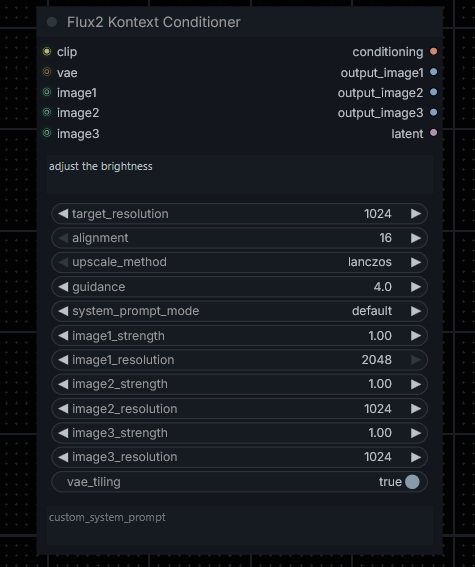
An advanced conditioning node for Flux2 Kontext - Klein image editing workflows in ComfyUI. Encodes up to 3 reference images through the Flux2 VAE, attaches them as reference latents for Kontext attention, and encodes text via the Qwen3-8B LLM-based text encoder — all in a single node.
Features
- 🖼️ Up to 3 reference images — each independently VAE-encoded and attached as a Kontext reference latent
- 🎛️ Per-image strength control — scale each reference latent individually to tune its influence
- 📐 Per-image resolution control — set the VAE encoding resolution independently for each image slot
- 🧠 Qwen3-8B text encoder — pure text encoding, no vision tokens, compatible with Flux2 architecture
- 💬 System prompt modes — optionally wrap the prompt with a Qwen3 instruct chat template (
default,creative,minimal,custom,none) - ⚡ Guidance embedding — bakes the Flux2 guidance scale directly into the conditioning
- 🔲 VAE tiling — optional tiled encoding for high-resolution images to reduce VRAM usage
- 🖼️ Text-to-image support — generates a correctly sized empty latent when no images or VAE are connected
- 🔗 All-in-one pipeline — replaces the need for separate Scale Image to Pixels, VAE Encode, and Reference Latent nodes. Connect your reference images directly to this node — it handles resizing, encoding, and latent attachment internally.
- 🔍 Debug image outputs — inspect resized input images before encoding
⚠️ No extra nodes needed: This node fully replaces Scale Image to Pixels, VAE Encode, and Reference Latent nodes. Connect your reference images directly to
image1/image2/image3— do not pre-process them through those nodes first.
See basic usages here and here.


Compatible Models
| Model | File |
|--------------------------------|---|
| Flux2 Klein 9B diffusion model | flux-2-klein-9b.safetensors |
| Qwen3-8B text encoder | qwen_3_8b_.safetensors |
| Flux2 VAE | flux2-vae.safetensors |
Installation
Via ComfyUI Manager (recommended)
Search for ComfyUI-Flux2KontextConditioner in the ComfyUI Manager and install.
Manual
cd ComfyUI/custom_nodes
git clone https://github.com/KursatAs/ComfyUI-Flux2KontextConditioner
Usage
Image Editing Workflow
- Add the Flux2 Kontext Conditioner node to your workflow (
flux/conditioningcategory). - Connect your CLIP (Qwen3-8B), VAE (Flux2 VAE), and at least one reference image.
- Write your edit prompt.
- Connect
conditioning→ KSampler,latent→ KSampler. - Decode the KSampler output with a VAE Decode node.
Text-to-Image Workflow
- Connect only CLIP — leave VAE and all image slots disconnected.
- Set
target_resolutionto your desired canvas size. - Connect
conditioning→ KSampler,latent→ KSampler. - Decode with a separate VAE Decode node.
Inputs
Required
| Name | Type | Description |
|---|---|---|
| clip | CLIP | Qwen3-8B text encoder |
| prompt | STRING | Edit instruction or generation prompt |
| target_resolution | INT | Canvas size for text-to-image (no-VAE) fallback latent. Ignored when VAE is connected. |
| alignment | 16 / 32 / 64 | Snaps resized image dimensions to the nearest multiple. 16 is the safe minimum for the Flux2 VAE. |
| upscale_method | ENUM | Interpolation method used when resizing reference images |
| guidance | FLOAT | Flux2 guidance scale baked into conditioning. Default: 3.5 |
| system_prompt_mode | ENUM | Qwen3 instruct chat template wrapping mode. none passes the raw prompt. |
Optional
| Name | Type | Description |
|---|---|---|
| vae | VAE | Flux2 VAE for encoding reference images |
| image1 | IMAGE | First reference image |
| image1_strength | FLOAT | Latent scale for image1 (1.0 = full influence) |
| image1_resolution | INT | VAE encoding resolution for image1 |
| image2 | IMAGE | Second reference image |
| image2_strength | FLOAT | Latent scale for image2 |
| image2_resolution | INT | VAE encoding resolution for image2 |
| image3 | IMAGE | Third reference image |
| image3_strength | FLOAT | Latent scale for image3 |
| image3_resolution | INT | VAE encoding resolution for image3 |
| vae_tiling | BOOLEAN | Enable tiled VAE encoding to reduce VRAM usage |
| custom_system_prompt | STRING | Custom system prompt text (used when system_prompt_mode = custom) |
Outputs
| Name | Type | Description |
|---|---|---|
| conditioning | CONDITIONING | Text + reference-image conditioning for KSampler |
| output_image1 | IMAGE | Debug: resized image1 after scaling and alignment snapping. 1×1 black pixel if not connected. |
| output_image2 | IMAGE | Debug: resized image2 after scaling and alignment snapping. 1×1 black pixel if not connected. |
| output_image3 | IMAGE | Debug: resized image3 after scaling and alignment snapping. 1×1 black pixel if not connected. |
| latent | LATENT | VAE-encoded latent of image1 (when VAE connected), or empty canvas latent (text-to-image). |
Note:
output_image1/2/3are for debugging only. Connect to a Preview Image node to inspect the resized input. They are not required for generation.
Tips
- VAE tiling is useful when encoding images at 1536px or higher. It reduces peak VRAM at the cost of slightly slower encoding.
image_strengthvalues above 1.0 amplify the reference latent beyond its original scale — useful for stronger style transfer but may introduce artifacts.system_prompt_modehas a minor effect. Flux2 does not natively process system prompts, but Qwen3-8B was trained with these templates, so wrapping can subtly shift the token distribution. Usenoneif unsure.- The
alignmentsetting affects all image slots simultaneously. Set to 16 for maximum resolution fidelity.
Requirements
- ComfyUI
- Python packages:
torch - Flux2 flux-2-klein-9b.safetensors, Qwen3-8B text encoder, Flux2 VAE
License
See LICENSE.