
Model Fetcher
Top-bar button that reads a workflow's Markdown notes, downloads the models it needs into the right folder, and relinks loader nodes to copies you already own.
Comfy Model Fetcher
A top-bar button for ComfyUI that reads the Markdown notes of the open workflow, extracts the models it needs, tells you what is already on disk, and downloads what is missing — into the right folder.
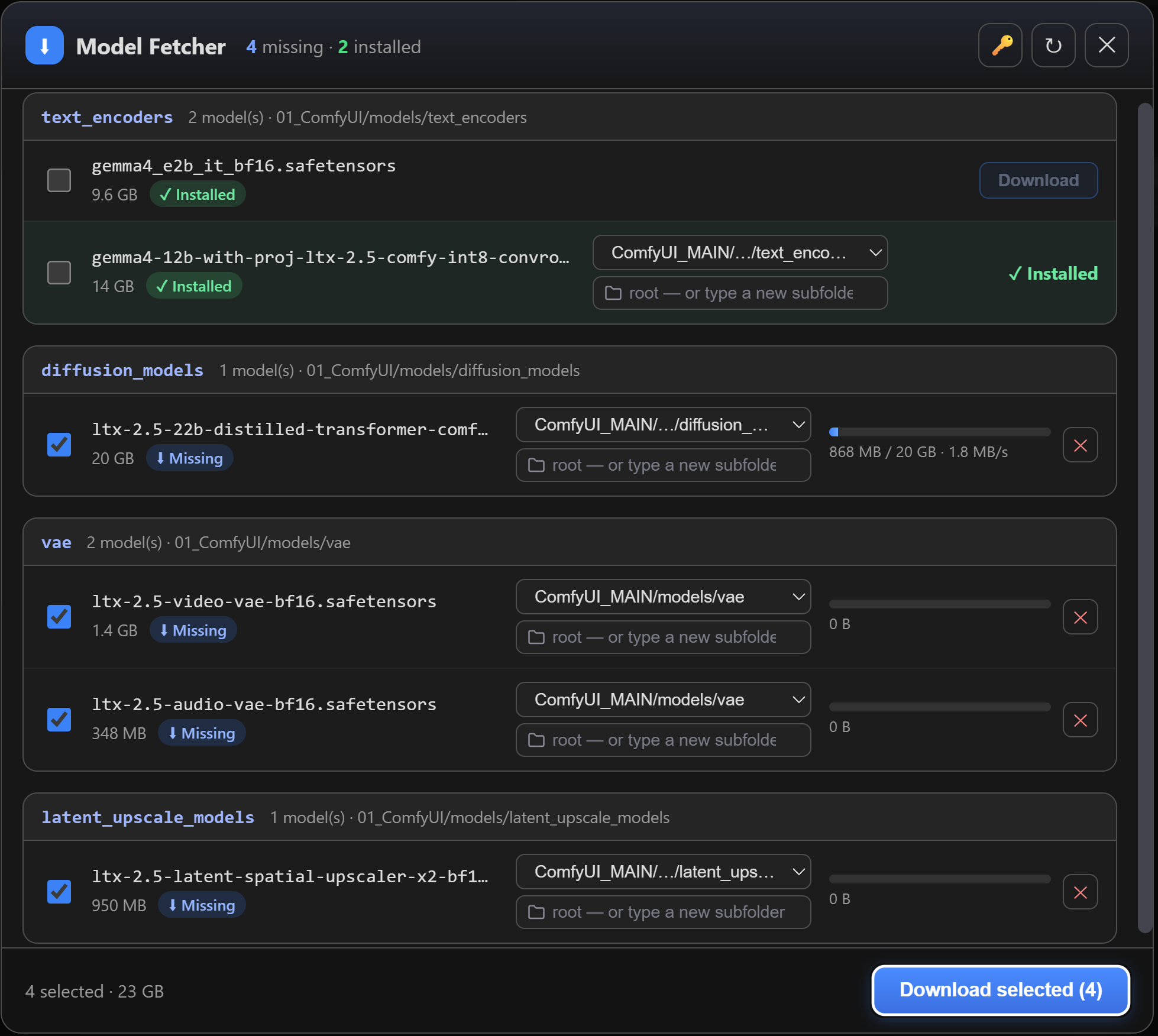
Most ComfyUI templates ship a "Model Link(s)" note listing every checkpoint, VAE and text encoder the graph expects. This plugin turns that note into a working install: one click, correct destinations, progress bars, and gated-model handling.
It also fixes the other half of the problem: when you already own a model but keep it in a subfolder, the workflow's loader still points at the category root and fails. The Relink button rewrites the node instead of downloading a second copy.
Features
Reads the workflow
- Parses
MarkdownNote/Notenodes of the open graph, subgraphs included. - Understands both note styles:
**checkpoints**-style bold sections, and the📂 ComfyUI/ → models/ → …"Model Storage Location" tree (the tree wins — it is the only one that expresses subfolders such ascheckpoints/SDXL). A bold section ends at the next Markdown heading. - A link outside both (a tip, a community note) takes its folder from the HuggingFace file
path when that folder is a category ComfyUI registers
(
…/resolve/main/split_files/diffusion_models/x.safetensors→diffusion_models). - Recognises direct-download links: HuggingFace
/resolve/, Civitai/api/download/, GitHub/releases/download/, or any URL ending in a model extension (.safetensors .ckpt .pt .pth .bin .sft .gguf .onnx .pkl .pt2). A HuggingFace/blob/link (the page that displays the file) is turned into its/resolve/download link, and a download that answers with a web page is refused instead of being saved as a model. - A badge on the button shows how many models are still missing, and refreshes on every workflow load, tab switch and finished download.
Tells you what you already have
Each model is classified against your disk — every folder registered for the category,
including the extra roots from extra_model_paths.yaml, scanned recursively:
| Status | Meaning | |---|---| | ✓ Installed | the loader finds it under its plain filename — the file sits at the root of one of the category roots (main folder or any extra path), with the right size | | ≈ Likely duplicate | same filename, same size, but in a subfolder — the loader would not find it, so the row offers Relink | | ⚠ Same name, different size | same filename, different content — probably another version | | ⬇ Missing | not on disk | | ? Unknown destination | neither the note nor the file's HuggingFace path says where it goes: pick a folder yourself |
Sizes come from a HEAD request (HuggingFace's x-linked-size, else Content-Length), so
"likely duplicate" means same name and same byte count.
Relink — fix the graph instead of re-downloading
ComfyUI templates point at the root of a category (flux1-dev.safetensors), but you may keep
the file in checkpoints/Flux/. On a Likely duplicate, press Relink:
- every loader widget in the workflow that points at that filename is rewritten to the real
relative path (
Flux/flux1-dev.safetensors), subgraphs included; - same-named files from a different category are left alone — the widget's own value list is used to tell them apart;
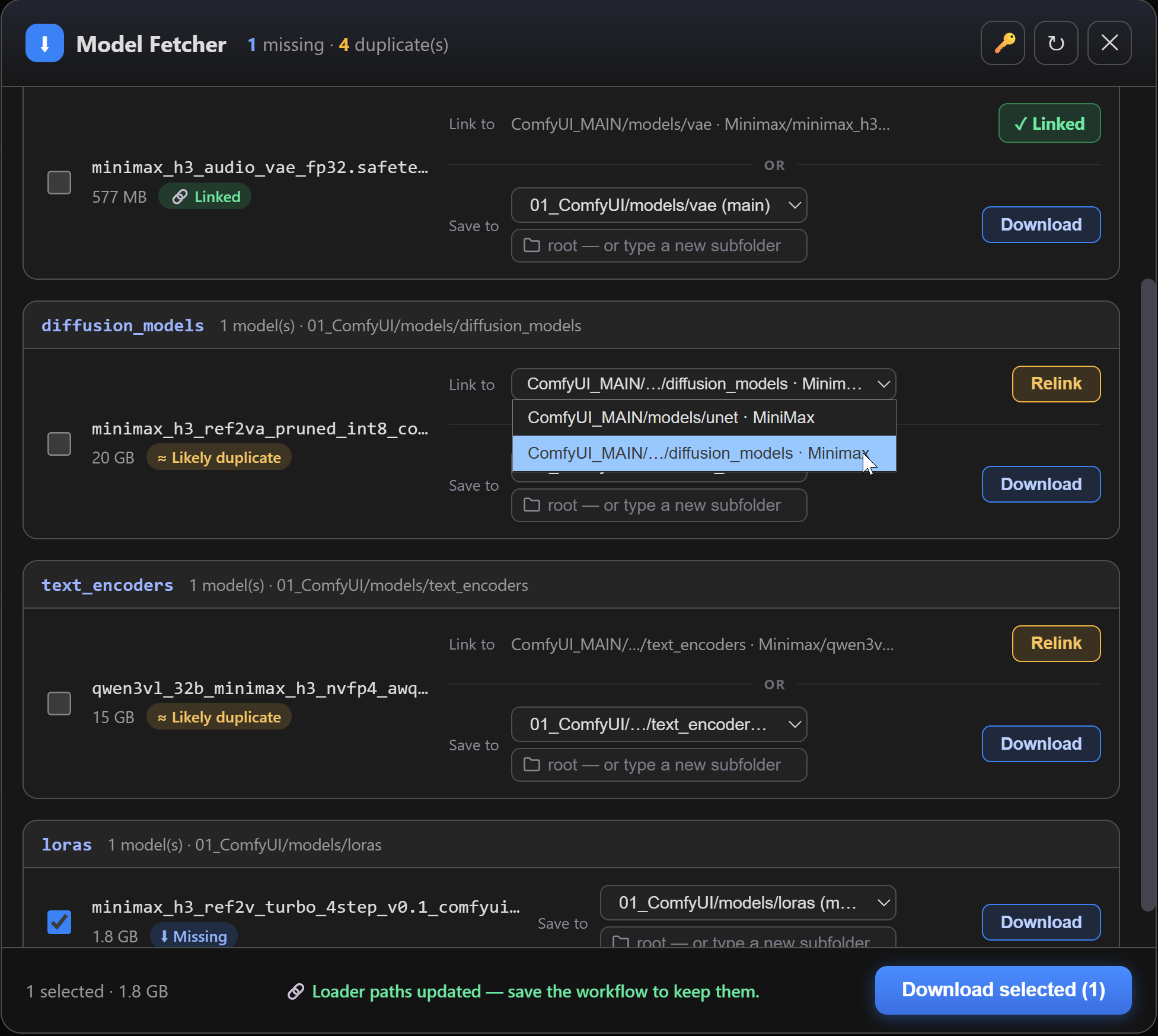
- the button becomes a green ✓ Linked pill, the row turns to 🔗 Linked, and the footer reminds you to save the workflow (the change lives in the graph, not on disk);
- the state is read back from the graph on every render, so an undo, a reload or another workflow shows the button again — nothing is cached or guessed;
- if no node in the workflow uses that file, the button is disabled and says so.
Each row carries its two decisions on separate lines — Link to … Relink above, Save to … Download below — so every button sits next to the field that drives it.
Several copies on disk? When the same filename sits in more than one subfolder, Link to becomes a menu and Relink points where you tell it to. It opens on the copy the workflow already uses, falling back to the first same-size one — preferred install first (see below), alphabetical within it — and only ever lists real choices: copies whose size contradicts the source are left out — those are another version of the model, which is also why a size mismatch never gets a Relink button at all — and copies sharing a relative path under two roots count once, since ComfyUI would load the same file either way. With a single copy, Link to simply shows its path.
Each entry says where the copy lives rather than repeating the filename: the subfolder, and
the root as soon as the category registers more than one location — 01_ComfyUI/models/unet · Minimax next to 01_ComfyUI/…/diffusion_models · MiniMax. Roots are labelled over the same
set as the Save to menu, so the same folder reads the same in both menus — on a machine
with two installs, every entry says which one it lives in, even when the copies' own roots
would already differ. The full path stays one hover away.
Downloads
- Sequential queue with a single worker, live progress (bytes, total, speed) pushed over the ComfyUI websocket.
- Cancel at any time: a queued job disappears instantly, an active one stops at the next chunk. Re-queueing a job that is still running is handled correctly.
- Resumable. Downloads go to a
.partfile that survives a cancel, a dropped connection or a truncated transfer; the next attempt sends aRangeheader and continues where it stopped. Losing a connection at 95 % of a 20 GB checkpoint no longer means starting over. The.partname carries a fingerprint of the source URL, so bytes from two different sources that happen to share a filename can never end up in the same file. If the server ignoresRange, the download simply restarts — correctness never depends on it. - Renames atomically on success — an interrupted download never leaves a corrupt model in place. Disk-full, 404 and incomplete transfers are reported per row (only a full disk discards the partial file, since keeping it would make things worse).
- Choose the destination: when a category has several roots (main folder +
extra_model_paths.yaml), a location menu lets you pick; roots missing on the machine are greyed out. Entries are labelled with just enough of the path to tell them apart — two installs that both end inmodels/clipshow up asComfyUI_MAIN/models/clipandAI/models/clip, not twice the same thing. Long paths keep both ends visible (ComfyUI_MAIN/…/text_encoders) and the full path stays on hover. ComfyUI also registersoutput/<category>for each model type (so models written by save nodes can be loaded again); those stay scanned for duplicates but are never offered as a destination. The subfolder field suggests existing folders and accepts a new one (created on download). Empty = category root. - The server only ever accepts a folder actually registered for that category, and confines the final path inside it.
Preferred install
With several model roots registered (main folder + extra_model_paths.yaml), ComfyUI itself
lets you mark one stanza as the preferred one — no plugin-specific setting to learn:
comfyui_main:
  base_path: D:/ComfyUI_MAIN/
  is_default: true          # ← this install's folders go first
  checkpoints: models/checkpoints/
  diffusion_models: |
       models/unet/
       models/diffusion_models/
is_default: true puts that install's folders at the head of every category's list (see
ComfyUI's own extra_model_paths.yaml.example), and the fetcher follows: its folders become
the Save to default — marked (main) — and Relink's automatic pick prefers a copy
living there when several same-size copies exist. Either can still be overridden per row.
Gated models (HuggingFace token)
- When a model returns 401, the popup explains the whole path in plain language: free account → accept the repo licence (direct links to the exact repos) → create a Read token → paste it.
- The token is applied immediately and saved once in ComfyUI's
userfolder (cf_mf_hf_token.txt, mode0600), then reloaded on later starts. HF_TOKEN/HUGGING_FACE_HUB_TOKENfrom the environment always win.- A Remove button deletes the saved token (shown only when the plugin is the one that saved it — a token exported in your shell is left untouched).
- The token is only ever sent to HuggingFace hosts. A workflow note pointing at any other server never receives your credentials.
- Token validation and HuggingFace file sizes go through
huggingface_hub(which ships with ComfyUI), so mirrors and enterprise endpoints (HF_ENDPOINT) work and the HF protocol stays upstream's problem. Other hosts keep the plainHEADpath.
Per-workflow state
Your choices in the popup (location, subfolder, ticked boxes) survive closing it, but stay attached to the workflow you made them in — several open workflows never contaminate each other. If the popup is open while you switch tabs, it re-analyses the new graph.
The button itself
Docked in the top bar by default; drag it anywhere to float it, drop it back on the bar to re-dock. Position and docked state persist across sessions.
Install
Via ComfyUI Manager — search for Model Fetcher in the Manager's custom-node list, or install it from the Comfy Registry:
comfy node install comfyui-modelfetcher
Manually:
cd ComfyUI/custom_nodes
git clone https://github.com/KoLt-Real/ComfyUI-ModelFetcher.git
Restart ComfyUI. That's it — no dependencies to install (it only uses requests and
aiohttp, both already required by ComfyUI) and no build step (the frontend is plain
JS/CSS).
Requires ComfyUI with the current frontend (subgraph support) and Python 3.10+.
To update:
cd ComfyUI/custom_nodes/ComfyUI-ModelFetcher && git pull
This package registers no nodes — it only adds the button and its HTTP routes. If anything goes wrong at import time it logs and steps aside; it can never prevent ComfyUI from starting.
Usage
- Open a workflow that carries a Model Link(s) note (all official templates do).
- Click Models in the top bar. The popup lists every model, grouped by destination folder.
- Missing models are pre-ticked → Download selected, or use the per-row Download.
- On a Likely duplicate, press Relink, then save the workflow.
HTTP API
All routes live under /cf_mf and are registered on ComfyUI's own server.
| Route | Purpose |
|---|---|
| POST /cf_mf/analyze | notes → models + status + remote sizes + per-category destinations |
| POST /cf_mf/count | light count of missing models (drives the button badge, no network) |
| POST /cf_mf/download | queue jobs (destination resolved server-side) |
| POST /cf_mf/cancel | cancel one job (id) or all (all: true) |
| GET /cf_mf/status | active + pending job ids |
| GET/POST /cf_mf/token | token state / save-and-validate a token |
| POST /cf_mf/token/clear | delete the saved token |
Progress is pushed on the ComfyUI websocket as cf_mf.progress, cf_mf.done, cf_mf.error.
Security
These routes write to your disk and hold your HuggingFace token, so they are locked down
by default. Three rules, each one enforced server-side and covered by tests/test_security.py
and tests/test_routes.py:
- Local only. Every
/cf_mfroute answers loopback peers only (127.0.0.1,::1) and returns403to anyone else, even when ComfyUI runs with--listen. The check reads the socket's peer address, never a header. Two ways to widen it, both set in ComfyUI's environment:CF_MF_TRUSTED_PROXIES=<address or network, comma-separated>serves the requests that come through a reverse proxy on another host (a router in front of several ComfyUI servers: name the router's address, the rest of the network still gets a 403);CF_MF_ALLOW_REMOTE=1serves every peer, for a container with a mapped port (the browser then arrives from the bridge address) or a trusted single-user network — it is your call to expose the routes to whoever can reach that port. - Host allow-list. A model is only fetched from
huggingface.co,hf.co,civitai.com,github.com, and the CDNs those redirect to (githubusercontent.com,r2.cloudflarestorage.com) — subdomains included, look-alikes excluded. Redirects are followed one hop at a time and every hop is checked. The host ofHF_ENDPOINT(mirrors) is accepted automatically; add your own withCF_MF_ALLOWED_HOSTS=my-mirror.example,other.example. A note pointing elsewhere shows the row with its Download button disabled, andPOST /cf_mf/downloadrefuses the job withhost not allowed: <host>. - Confined writes. A destination is resolved server-side from the category and must be
one of the folders ComfyUI registered for models (
extra_model_paths.yamlincluded, neveroutput/). The downloader re-checks this on its own right before it touches the disk, so it refuses anything outside those folders whatever it was handed. The token file lives at a fixed path in ComfyUI'suserfolder and only ever holds a single printable line.
Upgrading to 1.2: if you used the popup from a browser on another machine, it now shows
a 403 message until CF_MF_ALLOW_REMOTE=1 is set on the ComfyUI side.
1.3: CF_MF_TRUSTED_PROXIES for a reverse proxy on another host, so that
CF_MF_ALLOW_REMOTE=1 is no longer the only answer behind a router.
Architecture
| File | Role |
|---|---|
| fetcher/notes_parser.py | pure parsing, no ComfyUI import — testable standalone |
| fetcher/scanner.py | category resolution (folder_paths), disk index, classification, relink target |
| fetcher/remote.py | remote size — huggingface_hub on HF, plain HEAD elsewhere; cached (sizes forever, errors briefly) |
| fetcher/downloader.py | queue + worker, resumable .part writes, websocket progress |
| fetcher/routes.py | the /cf_mf/* API; blocking I/O runs off the event loop |
| fetcher/hf_token.py | token storage, validation, and the HuggingFace-only auth header |
| fetcher/access.py | the loopback-only gate on every route (CF_MF_TRUSTED_PROXIES, CF_MF_ALLOW_REMOTE) |
| fetcher/urlpolicy.py | host allow-list (CF_MF_ALLOWED_HOSTS, HF_ENDPOINT) and the only redirect-following code |
| web/main.js | top-bar button, badge, note collection |
| web/popup.js | the panel: rows, destinations, downloads, token, per-workflow state |
| web/relink.js | reads and rewrites loader widgets in the open graph |
Check the parser against a folder of workflow templates without running ComfyUI:
python -m fetcher._validate_parser <folder-of-workflow-json>
Tests
./tests/run_all.sh
The Python and JavaScript suites need nothing beyond what ComfyUI already provides. The browser
suite needs Playwright (pip install playwright && playwright install chromium) and is skipped
cleanly when it is absent, as is anything else that cannot run in the current environment.
They cover the status classification (proven equivalent over its full truth table), relink target resolution, the security boundaries (loopback-only routes, download host allowlist, token host allowlist, path-traversal confinement, the downloader's own destination check), model-id uniqueness, the remote-size cache, the downloader's concurrency races, the API contract and that handlers stay off the event loop, plus the popup itself in a real browser — Relink, per-workflow state, error rows and the token panel.
The JS and browser tests copy the actual web/ sources into a temporary fake-ComfyUI tree at
run time, so they always test the current code. See AGENTS.md for the invariants
those tests protect.
Licence
Apache License 2.0 — see LICENSE.