
LLM Text Processor
Process text and images with GGUF LLMs in ComfyUI using llama.cpp, including Qwen3-VL, Qwen3.5, Qwen3.6, Gemma 4, and gpt-oss.
ComfyUI LLM Text Processor
Process text and images with GGUF LLMs in ComfyUI using llama.cpp, including Qwen3-VL, Qwen3.5, Qwen3.6, Qwen3.7, Qwen3.8, Gemma 4, and gpt-oss.
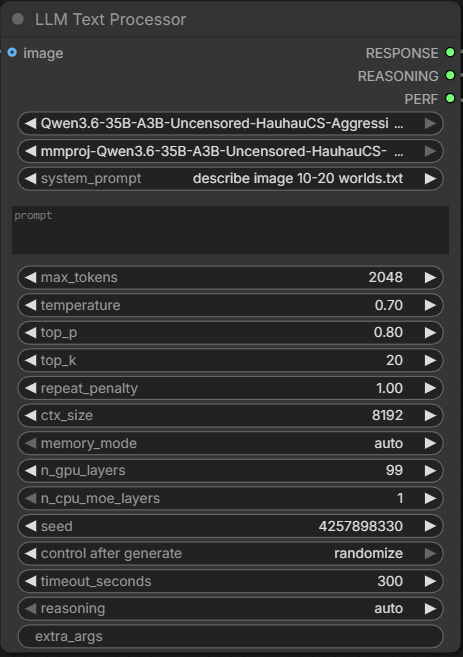
This extension adds a local LLM node for prompt writing, prompt rewriting,
translation, captioning, extraction, and other text processing tasks inside
ComfyUI. It discovers local GGUF models from ComfyUI/models/LLM, and it can
also accept a single image or a ComfyUI image batch for multimodal models that
use an external mmproj.
Features
- Text generation and text transformation with local GGUF models
- Optional image input for multimodal llama.cpp models that use
mmproj, including multi-image batches - Separate
RESPONSEandREASONINGoutputs - System prompt presets from text files
- Recursive model discovery from
ComfyUI/models/LLM - Automatic llama.cpp setup on supported Windows systems
- Download progress logs during automatic llama.cpp setup
- Advanced llama.cpp options for users who need them
- Optional
enable_processingtoggle for switching between node processing and direct passthrough
Supported Model Families
Works with local GGUF models for Qwen, Gemma 4, gpt-oss, and other llama.cpp-compatible families.
Common examples:
- Qwen text and vision families such as
Qwen3-VL,Qwen3.5,Qwen3.6,Qwen3.7, andQwen3.8 - Gemma 4 GGUF models such as
gemma-4-E2B,gemma-4-E4B,gemma-4-26b-a4b, andgemma-4-31b - OpenAI
gpt-oss-20bandgpt-oss-120b
Notes:
- For image workflows, choose a matching
mmprojfile from the same model family when the GGUF release provides one. - Gemma 4 text generation works well. Vision support depends on the specific
GGUF and
mmprojrelease, and can be less reliable on some Windows CUDA setups. - In this node,
gpt-ossis used as a text model through llama.cpp-compatible GGUF releases.
Installation
ComfyUI Manager
Open ComfyUI Manager, choose Install Custom Nodes, search for
LLM Text Processor, install it, then restart ComfyUI.
Manual Git Clone
Open a terminal in ComfyUI/custom_nodes and run:
git clone https://github.com/KingManiya/ComfyUI-LLM-text-processor.git
Restart ComfyUI. The node appears under:
LLM Text Processor -> LLM Text Processor
No extra setup is needed for basic use.
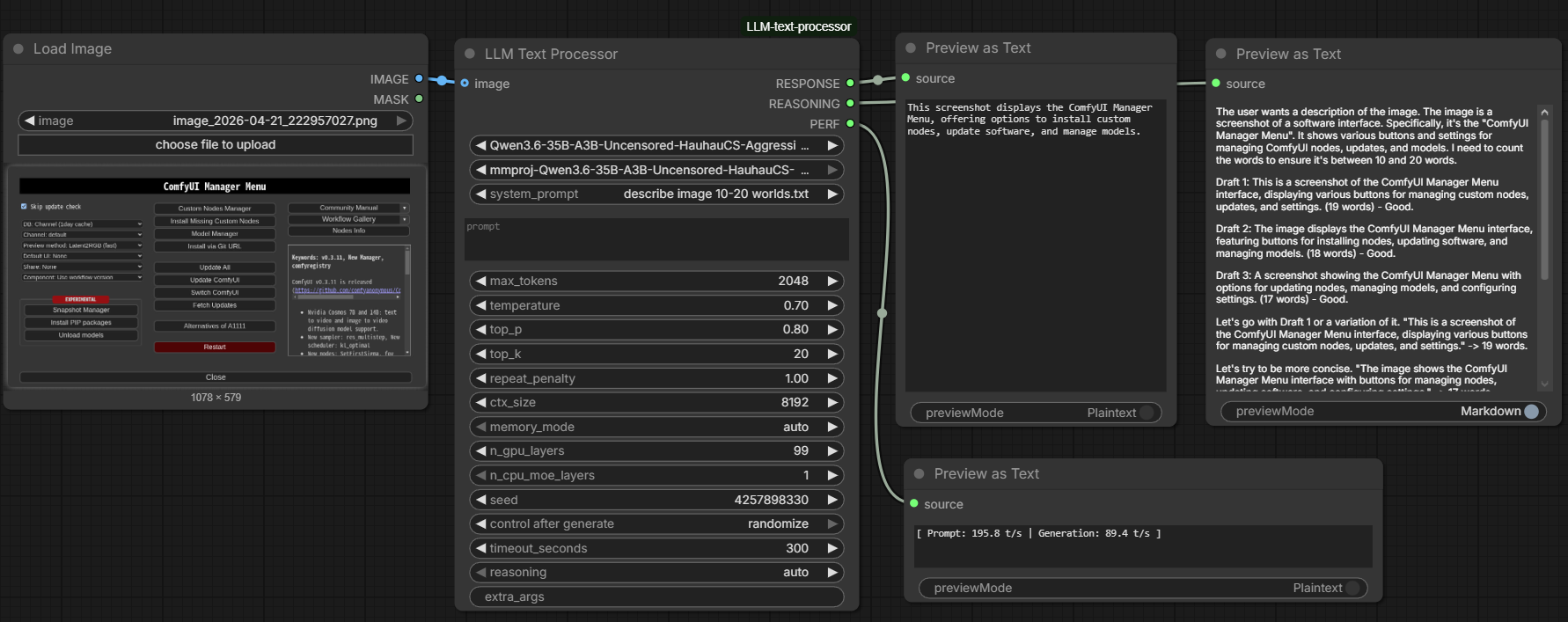
Example workflow
llama.cpp
The node uses official llama.cpp release binaries. Automatic setup is currently available on:
Windows x64 + CUDA 13
Other platforms require manual setup.
The extension downloads llama.cpp only. It does not download model weights.
During automatic setup, the console shows download progress, total size when available, and current download speed so slow connections do not look like a freeze.
Model Placement
Put your GGUF files anywhere under:
ComfyUI/models/LLM
Example:
ComfyUI/models/LLM/My-Model/model-q4_k_m.gguf
ComfyUI/models/LLM/My-Model/mmproj-bf16.gguf
The model dropdown shows model .gguf files. The mmproj dropdown shows
vision projector files and none.
For image workflows, choose the mmproj file that belongs to the selected
model. You can connect either one image or a ComfyUI image batch; batch items
are sent together in the same llama.cpp request.
System Prompt Presets
Create text files in:
ComfyUI/models/LLM/prompts
Example:
ComfyUI/models/LLM/prompts/captioner.txt
Each top-level .txt file appears in the system_prompt dropdown. Choose
none to run without a system prompt.
Recommended Settings
These presets are a good starting point for common models and tasks.
Qwen
Qwen starting presets:
| Model family / use case | reasoning | temperature | top_p | top_k | repeat_penalty |
| --- | --- | ---: | ---: | ---: | ---: |
| Qwen3-VL Instruct | off | 0.7 | 0.8 | 20 | 1.0 |
| Qwen3-VL Thinking | on | 0.6 | 0.95 | 20 | 1.0 |
| Qwen3.5 / Qwen3.6 thinking, general tasks | on | 1.0 | 0.95 | 20 | 1.0 |
| Qwen3.5 / Qwen3.6 thinking, precise coding | on | 0.6 | 0.95 | 20 | 1.0 |
| Qwen3.5 / Qwen3.6 instruct, general tasks | off | 0.7 | 0.8 | 20 | 1.0 |
| Qwen3.5 / Qwen3.6 instruct, reasoning tasks | off | 1.0 | 1.0 | 40 | 1.0 |
Reference: Qwen3 docs
Gemma 4
Gemma 4 starting preset:
| Model family / use case | reasoning | temperature | top_p | top_k | repeat_penalty |
| --- | --- | ---: | ---: | ---: | ---: |
| Gemma 4 it models, general tasks | off | 1.0 | 0.95 | 64 | 1.0 |
| Gemma 4 it models, reasoning tasks | on | 1.0 | 0.95 | 64 | 1.0 |
| Gemma 4 multimodal tasks | off | 1.0 | 0.95 | 64 | 1.0 |
Common Gemma 4 variants:
gemma-4-E2Bgemma-4-E4Bgemma-4-26b-a4bgemma-4-31b
Gemma 4 supports configurable thinking modes across the family. For simple
prompt writing, translation, captioning, and extraction, start with
reasoning=off. For harder reasoning or coding tasks, try reasoning=on.
Reference:
gpt-oss
gpt-oss starting preset:
| Model family / use case | reasoning | temperature | top_p | top_k | repeat_penalty |
| --- | --- | ---: | ---: | ---: | ---: |
| gpt-oss-20b, direct answers and lower-latency local tasks | off | 1.0 | 1.0 | 20 | 1.0 |
| gpt-oss-20b, reasoning-heavy tasks | on | 1.0 | 1.0 | 20 | 1.0 |
| gpt-oss-120b, general purpose and stronger reasoning | on | 1.0 | 1.0 | 20 | 1.0 |
Use the preset as shown. Leave the other values at default unless you already know you want different sampling.
Common gpt-oss variants:
gpt-oss-20bgpt-oss-120b
OpenAI describes gpt-oss-20b as the lower-latency option for local or
specialized use cases, and gpt-oss-120b as the larger option for production,
general purpose, and higher-reasoning workloads.
OpenAI also documents configurable reasoning effort for gpt-oss. This node
does not expose the native low / medium / high control directly, so the presets
above use the simpler reasoning toggle available here: start with off for
direct answers, and try on for harder reasoning tasks.
Reference: gpt-oss docs
Node Inputs
| Input | Description |
| --- | --- |
| model | GGUF model file from ComfyUI/models/LLM. |
| mmproj | Vision projector GGUF. Required when using image input, whether it is one image or a batch. |
| system_prompt | Prompt preset from models/LLM/prompts, or none. |
| prompt | User prompt sent to the selected model. |
| max_tokens | Maximum generated tokens. |
| temperature | Sampling temperature. Lower values are more deterministic. |
| top_p | Nucleus sampling threshold. |
| top_k | Top-K sampling cutoff. |
| repeat_penalty | Penalty for repeated tokens. |
| ctx_size | Context window size. Larger values use more memory. |
| memory_mode | Advanced memory placement mode: auto, gpu_layers, cpu_moe_layers, or gpu_and_cpu_moe_layers. |
| n_gpu_layers | Used only in gpu_layers and gpu_and_cpu_moe_layers modes. |
| n_cpu_moe_layers | Used only in cpu_moe_layers and gpu_and_cpu_moe_layers modes. |
| seed | Random seed. Use -1 for a random seed. |
| timeout_seconds | Maximum runtime before generation is stopped. |
| reasoning | Reasoning output mode: auto, on, or off. |
| image | Optional image input. Accepts a single image or a ComfyUI batch, and sends the batch together to llama.cpp. |
| enable_processing | When enabled, the node runs normally. When disabled, the node forwards prompt directly to RESPONSE and skips all model checks and llama.cpp execution. |
| extra_args | Optional advanced llama.cpp parameters. Leave empty for normal use. |
Node Outputs
| Output | Description |
| --- | --- |
| RESPONSE | Final model response with reasoning blocks removed, or the input prompt when enable_processing is disabled. |
| REASONING | Extracted reasoning when present in model output. Empty when enable_processing is disabled. |
| PERF | Prompt and generation speed reported by llama.cpp. Empty when enable_processing is disabled. |
Troubleshooting
No models appear
Place at least one .gguf model under:
ComfyUI/models/LLM
Then refresh or restart ComfyUI.
Image input fails
Make sure mmproj is not set to none and that the projector belongs to the
same model family as the selected GGUF model.
llama.cpp setup fails
Check your internet connection and GitHub access, then run the node again.
Unsupported platform
Automatic llama.cpp setup currently supports Windows x64 CUDA 13 only.
Out of memory
Lower ctx_size first. If that is not enough, use a smaller model, a smaller
quant, or adjust memory placement.
Generation takes too long
Try lowering max_tokens, reducing ctx_size, using a smaller GGUF model, or
increasing timeout_seconds.
Use extra_args only if you already know which llama.cpp options your setup
needs.
Response is empty or cut off
Increase max_tokens. This is especially important when reasoning is set to
on or auto, because the model can spend part of the token budget on
reasoning before it reaches the final answer.