
GLB Face Retexture (Preserve Geometry)
Face-only photo texture projection for static GLBs in ComfyUI, preserving geometry.
ComfyUI-GLB-Face-Retexture
Project a matching RGB face photo onto the visible face texture of an existing static GLB. GLB Face Retexture (Preserve Geometry) (GLBFaceRetexture) uses face landmarks and semantic masks to register and blend the photo, without reconstructing or deforming the mesh.
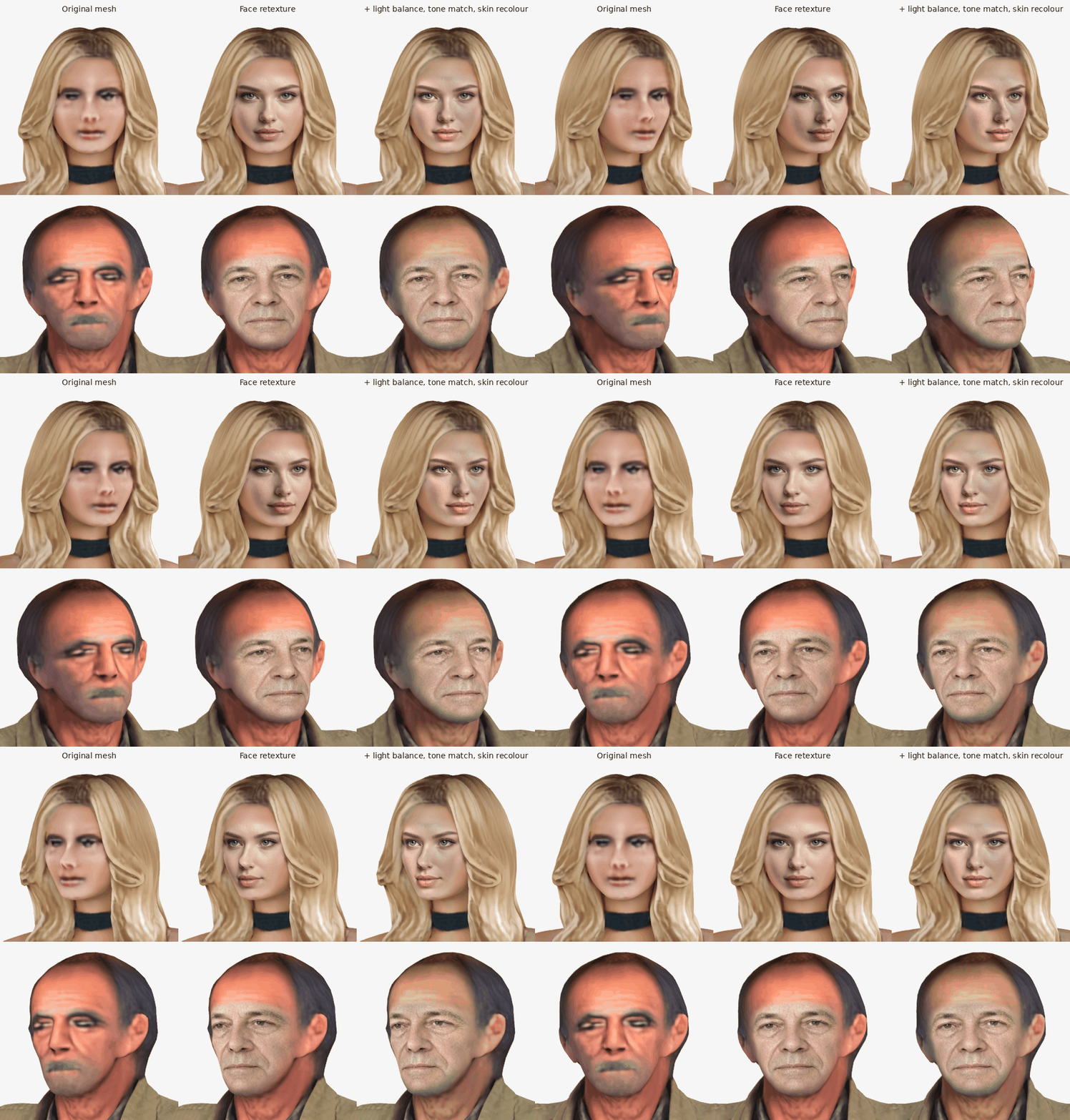
Two image-to-3D meshes, each column the same unchanged geometry: the original mesh (left), the projected face photo (middle), and the projection with light_balance, tone_match and skin_recolor at 1 (right). Image-to-3D generators often shift the skin tone away from their input image — the lower character's mesh came out strongly red, also on the scalp and neck. skin_recolor corrects that on the whole mesh skin, so the face photo no longer stands out against it; on the upper character, whose generator kept the tone, it changes little. Rendered unlit (albedo only) with tools/before_after.
Geometry is preserved, but the output is not a byte-identical GLB: original triangles are partitioned into body and face primitives and a dedicated face texture/material is added. Original vertex positions, UVs, normals, tangents and original image bytes remain unchanged.
Requirements
- A modern ComfyUI with native
Load3DAdvanced,Preview3DAdvanced,SaveGLBandcomfy_api.latest.Types.File3D. The supplied workflow records Comfy core 0.37.0, the version in the verified source setup. Earlier versions are not claimed compatible. - The ComfyUI Python interpreter must support Python 3.10 or newer and already provide ComfyUI's torch, NumPy and Pillow dependencies.
- A separate Python 3.12 installation, or uv on PATH to obtain it. Network access is needed for worker dependencies and official model downloads.
- Your own supported GLB and matching RGB photo. No source meshes, photos or sample assets are bundled.
The CPU worker runs in a private .venv with its own MediaPipe dependencies. It does not install worker dependencies into ComfyUI, use ComfyUI's GPU environment, or silently fall back to the ComfyUI interpreter. The interactive workflow was verified on Linux with ComfyUI 0.37.0, frontend 1.53.6 and Comfy Python 3.13.14. A Windows ComfyUI GUI session has not yet been verified.
Worker dependency selection uses standard pip platform markers: Linux ARM64 (sys_platform == "linux" and platform_machine == "aarch64") uses MediaPipe 0.10.18; all other platforms retain 0.10.21. Version 0.10.21 has no Linux ARM64 wheel. The official 0.10.18 PyPI release provides a CPython 3.12 manylinux_2_17_aarch64 wheel; this does not cover musl/Alpine, 32-bit ARM, or Windows ARM64. The private worker and native workflow were also verified on Linux ARM64 / NVIDIA GB10, Python 3.12.3, ComfyUI 0.37.0 and frontend 1.53.6: all 14 worker tests of release 1.0.1 pass, and a real photo/GLB run preserves every original triangle and reports zero changed protected-body pixels. ComfyUI's main environment remains separate.
Install
ComfyUI Manager
Use Manager's Install via Git URL with:
https://github.com/KaletoAI/ComfyUI-GLB-Face-Retexture
Prepare the private worker using the installer below if Manager has not already completed that step. A manual Git clone alone does not prepare the worker.
Manual installation
From your ComfyUI directory:
git clone https://github.com/KaletoAI/ComfyUI-GLB-Face-Retexture custom_nodes/ComfyUI-GLB-Face-Retexture
cd custom_nodes/ComfyUI-GLB-Face-Retexture
Prepare the CPU worker
Use the actual ComfyUI interpreter to launch the stdlib installer. For a typical Linux ComfyUI venv, starting in the custom-node directory:
../../venv/bin/python install.py
If you normally launch ComfyUI with an activated environment instead:
python install.py
For Windows portable, starting in ComfyUI_windows_portable\ComfyUI\custom_nodes\ComfyUI-GLB-Face-Retexture, run in Command Prompt:
..\..\..\python_embeded\python.exe install.py
The three parent steps are intentional: the embedded interpreter is beside ComfyUI, not inside it. In PowerShell prepend & to that interpreter command.
The installer finds an existing Python 3.12 or uses uv. To select either explicitly, append one of these options to the interpreter command above:
install.py --python /path/to/python3.12
install.py --uv /path/to/uv
PYTHON312 and UV_BIN can also select these executables. Use an actual Python 3.12 executable for --python; ComfyUI itself may run another supported version. If neither prerequisite is available, the installer reports a clear error rather than changing ComfyUI's environment.
The installer creates .venv, installs requirements-worker.txt there, and downloads hash-checked models into models/. Restart ComfyUI after installation, then hard-refresh the browser so the node and native widgets load.
Re-running the installer updates an intact worker. If the existing .venv is unusable (wrong Python version, system site-packages enabled, deleted interpreter, or a link pointing outside the package), the installer refuses it and asks you to rebuild it with install.py --recreate. That option deletes only this package's .venv (a link is removed, never followed) and only when Python 3.12 or uv is available to rebuild it.
Package mirrors and corporate certificates work through environment variables: PIP_INDEX_URL, PIP_EXTRA_INDEX_URL, PIP_TRUSTED_HOST, PIP_CERT, UV_INDEX_URL, UV_DEFAULT_INDEX, UV_INDEX, UV_SYSTEM_CERTS, UV_CACHE_DIR, SSL_CERT_FILE and related index/proxy/cache settings are passed through. pip and uv configuration files and install-target overrides such as PIP_TARGET, PIP_PREFIX, PIP_USER or UV_SYSTEM_PYTHON are ignored so nothing can be installed into ComfyUI's environment.
Use the editable workflow
Open workflows/glb-face-retexture.json in ComfyUI. Its seven visible nodes are fully editable; upload selectors are deliberately empty:
- Load3DAdvanced: upload/select your own static textured source GLB.
- LoadImage: upload/select its matching RGB face photo, exactly one image.
- GLB Face Retexture: adjust the controls below and queue the workflow.
- Preview3DAdvanced: inspect the corrected GLB in the native viewer.
- PreviewImage: inspect the reference/before/after comparison.
- SaveGLB: save the corrected model using the default
3d/GLBFaceRetextureprefix or your own prefix. - Note: usage reminders, not an execution dependency.
| Control | Default / node range | Purpose |
| --- | --- | --- |
| strength | 1.0 / 0.01–1.0 | Photo blending strength within the selected face region. |
| feather | 0.18 / 0–0.5 | Mask-edge feathering relative to landmark eye span. |
| render_resolution | 768 / 256–2048, step 64 | CPU registration/render resolution; higher settings require more work. |
| light_balance | 0.0 / 0–1, step 0.05 | Remove broad photo shading (side light, darker face edges) while keeping features. |
| tone_match | 0.0 / 0–1, step 0.05 | Match photo skin colour and brightness to existing mesh skin. |
| brightness | 1.0 / 0.5–1.5, step 0.05 | Final linear brightness scale before projection. |
| skin_recolor | 0.0 / 0–1, step 0.05 | Recolour the original mesh skin toward the photo skin tone; 0 = off. |
| yaw | 0 / −180–180 degrees | Source viewing yaw for face registration; not mesh deformation. |
The optional photo controls run in linear light before projection: broad shading removal (delighting), then skin tone matching, then manual brightness. Light balance divides a skin-only low pass of the luminance out of the photo face and replaces it with the median skin luminance, so side light and the darker cheek sides (which read as a shadow along the projection edge) disappear while features and asymmetry stay; tone matching pulls the photo face's linear median colour toward the mesh's own face skin (the semantic face mask of the source render, hair excluded) — the skin the projection blends into. The proof records the measurements; the comparison shows the adjusted photo. Defaults preserve the previous output bytes and proof.
For a generator that shifted skin toward red, enable skin_recolor (for example 1 with light_balance=1 and tone_match=1). This corrects skin-coloured texels across the original texture — face, neck, arms and hands — toward the photo face median measured after light balance and before tone matching or brightness. Only the colour moves: the per-channel linear gain (photo skin / mesh face skin) ** skin_recolor (limited to 0.5–2) shifts a texel's chroma, and the texel is then rescaled to its own luminance, so bright highlights cannot clip into white blotches. Tone match then targets the recoloured mesh skin, and the projected face feathers into the recoloured atlas. Brightness still affects only the photo projection.
The colour model uses confidently segmented body/face skin from the full front albedo render (skin > 0.6, hair < 0.1, visible triangles only). The model records the linear-RGB median and measures distance in log(R/G), log(B/G), and log(linear luminance), using per-coordinate 1.4826 × median absolute deviation (floors 0.06, 0.06, 0.12) to distinguish skin colours from clothing and hair despite broad shading. Deviations toward redder count a quarter and toward brighter a third (the generator's red shift and baked highlights are still skin); texel weights are 1 within 1.5 spreads and smoothly fall to 0 at 3.5, and a nonzero weight is lifted to its 1.5-texel neighbourhood blur so no speckles remain. Texels the model rejects stay byte-exact. Partially transparent texels are excluded. Colours include glTF's linear baseColorFactor during measurement and correction. Colour selection cannot distinguish clothing with the same colour as skin; inspect the comparison for your mesh. The proof's skin_recolor block records the gain, medians, model and affected texel counts. Default 0 keeps the v1.2.0 GLB, comparison and proof bytes unchanged.
With recolour enabled, export appends a new body atlas/material as well as the private face atlas. Original embedded image bytes and the binary prefix remain exact. protected_body_changed_render_pixels then compares the exported body against a render of the recoloured original atlas, so it still detects any change beyond the requested recolour. The after panel is labelled “(recoloured)”.
Outputs are native FILE_3D (corrected_glb), IMAGE (comparison) and STRING (proof_metrics). The metrics are also shown as node text and describe geometry/texture preservation observations. They are measured on the exported GLB itself: its materials' embedded atlases are decoded and rendered again, so protected_body_changed_render_pixels checks the written file, not the in-memory intent. The corrected GLB can connect directly to native preview and save nodes.
The photo color is matched under glTF's baseColorFactor, which multiplies the decoded (linear) texture. Where a factor below 1 cannot reproduce a bright photo color, the texel saturates and factor_clipped_texture_pixels counts it.
Cancelling the prompt in ComfyUI stops the CPU worker. A worker that runs longer than 1800 seconds is stopped with an error; set the environment variable GLB_FACE_RETEXTURE_TIMEOUT (seconds) before starting ComfyUI to change that limit.
Supported inputs and limits
- A single mesh with one indexed triangle primitive and an embedded, uncompressed opaque texture.
- Static assets only: no rigs, skinning, morph targets or external assets. Orient the model Y-up, +Z front.
- Start each edit from the original single-primitive GLB. The corrected output contains separate body/face primitives and is not supported as input for another projection pass.
- One matching RGB reference image, not a batch. A detectable face must be visible in both the source registration view and photo.
- This is planar photo projection, not 3D face reconstruction. It cannot improve silhouette, add missing geometry, or repair hidden eye anatomy. Perspective and expression differences can remain visible.
- Registration, masking and texture projection run locally on CPU. There is no cloud generation service and no automatic model regeneration.
Models and licenses
The repository code is licensed under Apache License 2.0. See NOTICE for the retained AI-Hub attribution and derivation note.
The installer downloads (does not bundle) official Google MediaPipe model assets:
- Face Landmarker,
face_landmarker.task, from the official model source. - Image Segmenter,
selfie_multiclass.tflite, from the official model source.
MediaPipe software and model assets are separate upstream works. Consult the MediaPipe upstream license and linked model documentation for their applicable terms; this repository's license does not replace those terms. Other worker dependencies retain their own licenses. Only use source meshes/photos you have permission to process and redistribute.
Development and registry publication
Tests run in the private worker environment, not the ComfyUI environment:
.venv/bin/python -m unittest discover -s tests -t .
On Windows:
.venv\Scripts\python.exe -m unittest discover -s tests -t .
GitHub CI installs the private worker on Ubuntu and Windows and runs the suite there. The suite includes synthetic photo-control tests and byte-identical default regression coverage; Windows skips the one symlink-creation test that requires additional privileges. It covers the ComfyUI bridge with stub Comfy/torch modules and a real CPU MediaPipe run on a public-domain portrait fixture (see tests/fixtures/README.md), but does not establish a verified Windows ComfyUI GUI session.
The registry package is glb-face-retexture by publisher kaleto, version 1.3.0. Every release tag (v*) publishes the version in pyproject.toml to the Comfy Registry through .github/workflows/publish.yml (the official Comfy-Org/publish-node-action, pinned to a commit, authenticated by the repository secret REGISTRY_ACCESS_TOKEN); it can also be started by hand from the Actions tab. The GitHub URL installation above keeps working.
To release: raise version in pyproject.toml, add the CHANGELOG entry, merge, and push the matching v<version> tag — release.yml creates the GitHub release and publish.yml the registry version.