
Spectrumify (ZX)
ZX Spectrum pixel-art converter for ComfyUI. Based on spectrumify-public by JGF.
ComfyUI_Spectrumify
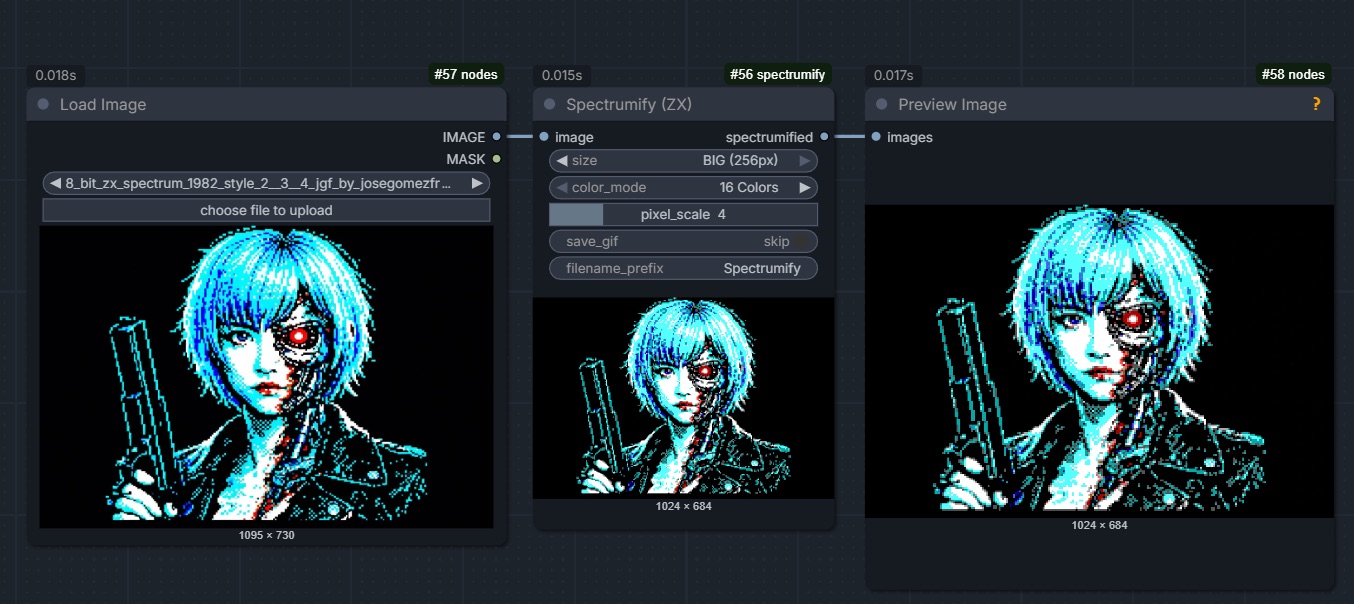
A custom ComfyUI node that converts any input image into pixel-art using the classic ZX Spectrum palette. The node is a clean-room reimplementation of the conversion pipeline from spectrumify-public by JGF, adapted to the ComfyUI tensor convention.
Three widths (SMALL 80px, MEDIUM 153px, BIG 256px), three colour modes
(16 Colors, Grayscale, Black & White) and a pixel_scale slider give you
the same nine presentation modes that spectrumify ships with, plus an
inline preview and optional GIF export.
Screenshot
Installation
ComfyUI Manager
- Open ComfyUI Manager.
- Search for
Spectrumifyand click Install. - Restart ComfyUI.
Manual
cd ComfyUI/custom_nodes
git clone https://github.com/JoseGomezFreelance/ComfyUI_Spectrumify_A-public.git
cd ComfyUI_Spectrumify_A-public
pip install -r requirements.txt
Restart ComfyUI. The node appears under image/transform → Spectrumify (ZX).
Usage
Connect any IMAGE output to the image input and configure:
| Widget | Values | Description |
|------------------|-----------------------------------------------|-------------------------------------------------------------------------------|
| size | SMALL (80px), MEDIUM (153px), BIG (256px) | Downscaled width before quantisation. Height is computed preserving aspect. |
| color_mode | 16 Colors, Grayscale, Black & White | Palette used for nearest-neighbour quantisation. |
| pixel_scale | 1..16 | Integer upscale factor (nearest-neighbour) applied after quantisation. |
| save_gif* | skip / save | When save, writes an animated GIF (one frame per image in the batch) to the ComfyUI output/ folder. |
| filename_prefix*| arbitrary text | Prefix for preview and GIF filenames. Non-alphanumeric characters are stripped. |
*optional inputs — accessible via the node's widget panel.
The output spectrumified is a standard IMAGE tensor (B, H, W, 3 float32
in [0, 1]), ready for the rest of your workflow (e.g. saving, VAE encoding,
upscalers). The node is an OUTPUT_NODE so ComfyUI displays the result inline.
Development
python -m venv .venv
source .venv/bin/activate
pip install -r requirements-dev.txt
pytest --cov=spectrumify --cov=nodes --cov-report=term-missing
The test suite does not depend on ComfyUI or torch: when torch is missing, the tensor helpers transparently fall back to numpy arrays, so the pipeline can be exercised in isolation.
Credits
- Original conversion logic, palette and algorithm design: JGF (José Gómez Freelance) — spectrumify-public.
- ZX Spectrum hardware palette © Sinclair Research, 1982 (public reference).
Speedrun
This node was written in speedrun mode. Total wall-clock time: 20 min 40 s, in a single session of Claude Code (Opus 1M Max) piloted by JGF.
| Milestone | Time |
|---|---|
| Full package generation (code + tests + README + LICENSE) | ~10 min 43 s |
| Dependency security & reputation analysis (docs/) | ~between 10:43 and 12:00 |
| Dependency install into .venv + first pytest run | included |
| Debugging 14 failures (BW shape, palette expectations, importlib) | included |
| 144 tests passing, 98.18% coverage | 20 min 40 s |
Internal technical report estimate: 2-4 hours. Actual result: ~1/6 of that budget.
By the way, writing the original internal report took 1 hour.
License
Apache 2.0 — same as the upstream spectrumify-public project. See
LICENSE for the full text.