
ComfyUI-LTXV-TimeGated-LoRA
Temporally apply visual LTX 2.3 LoRAs to selected regions of a single continuous video sampling run.
Nodes (9)
Make an LTX 2.3 LoRA appear for one part of the clip — no stitching required
See your LTX 2.3 LoRA envelope before you spend a render on it
Give your LTX 2.3 LoRAs the same clock as your prompts
The master clock of the Temporal Director
Segment planning for PromptRelay, without the Director
A five-second way to trim a sigma schedule for pass-two experiments
Check LTX 2.3 timing and envelopes without touching the model
See the whole LTX 2.3 schedule before you burn a render
The node that puts a LoRA exactly where you want it in time
ComfyUI-LTXV-TimeGated-LoRA
Place LoRA effects exactly where they belong in an LTX 2.3 video.
Shape one or more visual LoRAs over the video timeline, align them with prompt segments, and inspect the complete schedule before sampling.
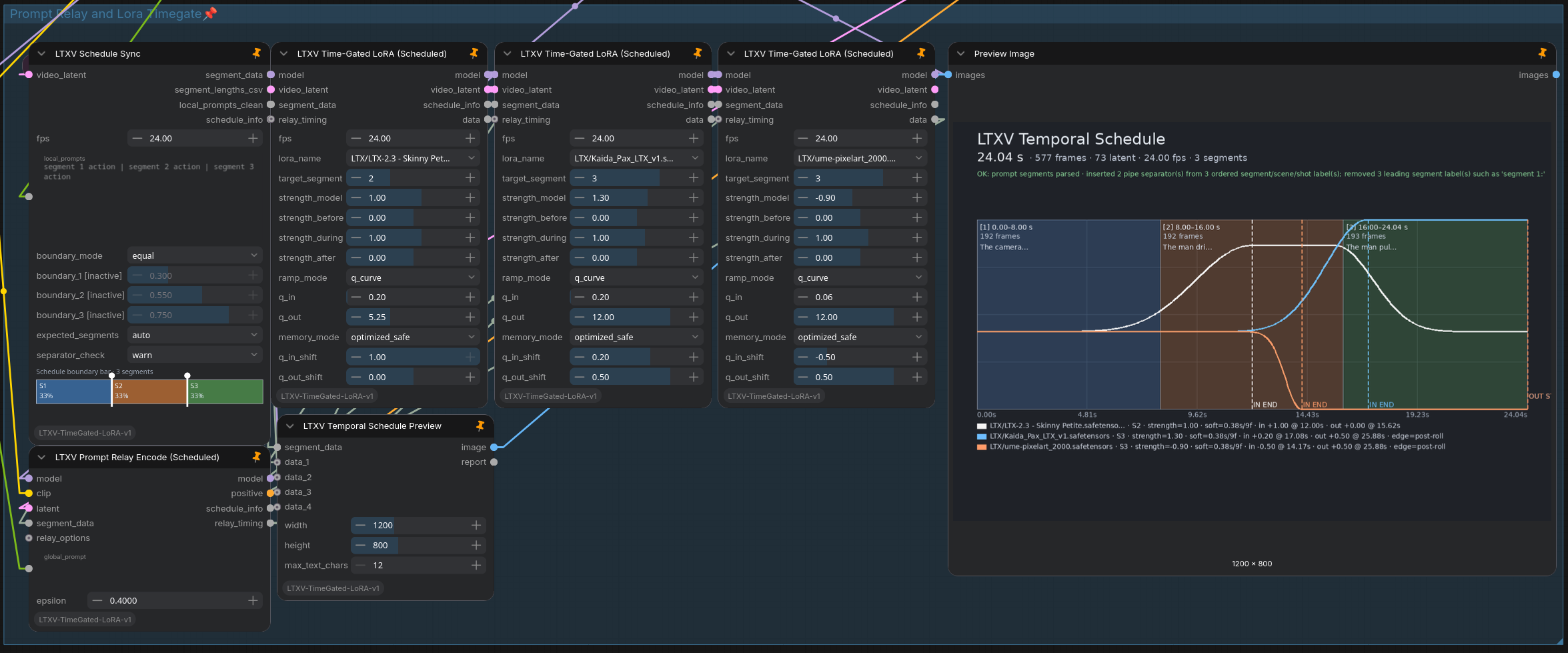
What it does
ComfyUI-LTXV-TimeGated-LoRA provides two ways to control LoRAs over time:
Temporal Director
A shared timeline for prompt changes and multiple LoRAs.
- Divide a video into up to 4 semantic segments
- Route a different prompt into each segment
- Assign one or more LoRAs to selected segments
- Shape how each LoRA enters, holds, and leaves
- Shift LoRA transitions ahead of or behind prompt transitions
- Preview the complete schedule in seconds and frames
Time-Gated LoRA
The original standalone node remains available for workflows that need direct temporal LoRA control without the shared Director schedule.
Highlights
- Shared prompt and LoRA timeline
- Stackable Scheduled Time-Gated LoRAs
- Prompt Relay integration
- Automatic prompt separator recovery
- Independent incoming and outgoing q-curves
- Movable curve anchors and centered LoRA peaks
- Symmetric first- and last-segment behavior
- Seconds-first visual schedule preview
- Native sigma tail and trim utility
- Runtime patching without rewriting LoRA files
Automatic prompt parsing
Prompts may use explicit pipe separators:
The camera holds still | The subject begins to move | The action reaches its peak
The Schedule Sync node can also recover missing separators from ordered labels:
segment 1: The camera holds still.

segment 2: The subject begins to move.

segment 3: The action reaches its peak.
This is normalized automatically to three clean prompt segments.
Blank-line-separated paragraphs can also be used when no pipes or segment labels are present.
Main nodes
| Node | Purpose | |---|---| | LTXV Schedule Sync | Creates the shared segment schedule | | LTXV Prompt Relay Encode (Scheduled) | Encodes segment prompts and provides shared transition timing | | LTXV Time-Gated LoRA (Scheduled) | Applies a LoRA to a selected schedule segment | | LTXV Temporal Schedule Preview | Displays segments, durations, prompts, and LoRA curves | | LTXV Time-Gated LoRA (LTX 2.3) | Standalone classic TimeGate workflow | | LTXV Sigma Tail / Trim | Selects or trims a native ComfyUI sigma schedule |
Additional envelope preview, inspection, and segment-planning helpers are included.
Temporal Director setup
Connect the same segment_data output from LTXV Schedule Sync to:
- LTXV Prompt Relay Encode (Scheduled)
- every LTXV Time-Gated LoRA (Scheduled)
- LTXV Temporal Schedule Preview
Connect relay_timing from the Scheduled Prompt Relay node to every Scheduled TimeGate.
Each Scheduled TimeGate can then target a different segment while remaining synchronized to the same prompt timeline.
LTXV Schedule Sync
 ├─ segment_data ──> Prompt Relay Encode (Scheduled)
 ├─ segment_data ──> Time-Gated LoRA (Scheduled) #1
 ├─ segment_data ──> Time-Gated LoRA (Scheduled) #2
 └─ segment_data ──> Temporal Schedule Preview

Prompt Relay Encode (Scheduled)
 └─ relay_timing ──> all Scheduled TimeGate nodes
The data output of each Scheduled TimeGate can be connected to data_1 through data_4 on the preview node.
LoRA curve controls
Each Scheduled TimeGate provides three strength levels:
strength_beforestrength_duringstrength_after
With ramp_mode = q_curve, the transition shape is controlled by:
q_inq_outq_in_shiftq_out_shift
The shift controls can move transitions between neighboring segment midpoints.
This supports:
- gradual lead-ins before a prompt change
- delayed LoRA activation
- effects that continue into the following segment
- early fade-outs
- centered LoRA peaks without a plateau
The first and last segments use symmetric virtual pre-roll and post-roll regions, so their curves behave like internal segment boundaries.
Installation
ComfyUI Manager
Search for:
ComfyUI-LTXV-TimeGated-LoRA
Install the node package and restart ComfyUI.
Git
cd ComfyUI/custom_nodes
git clone https://github.com/Jinx138/ComfyUI-LTXV-TimeGated-LoRA.git
Restart ComfyUI and hard-refresh the browser.
To update later:
cd ComfyUI/custom_nodes/ComfyUI-LTXV-TimeGated-LoRA
git pull
Requirements
- ComfyUI
- Python 3.10 or newer
- An LTX 2.3 video workflow
- Visual LTX 2.3 LoRA files
Companion node: The Temporal Director's Scheduled Prompt Relay node requires an installed and enabled ComfyUI-PromptRelay. The classic Time-Gated LoRA nodes and Sigma Tail / Trim can be used without it.
No additional Python packages are required by this repository.
Scope
- Temporal control currently targets visual LTX 2.3 LoRA layers
- Temporal audio LoRA gating is not included
- The Temporal Director supports up to 4 prompt segments
- Existing classic Time-Gated LoRA workflows remain supported
Because LoRAs can affect motion, anatomy, detail, and temporal consistency differently, test unfamiliar LoRAs individually before stacking them.
Prompt Relay credits
Prompt scheduling support references:
- Prompt Relay by Gordon Chen, Ziqi Huang, and Ziwei Liu
- ComfyUI-PromptRelay by Kijai
See NOTICE.md for attribution details.