
JezzWTF QoL Nodes
Quality-of-life nodes for ComfyUI: Compare videos, character chat and cards, MiniMax H3 RefMod, optimised GIFs, run timer, paste stack, and plenty more
JezzWTF QoL Nodes
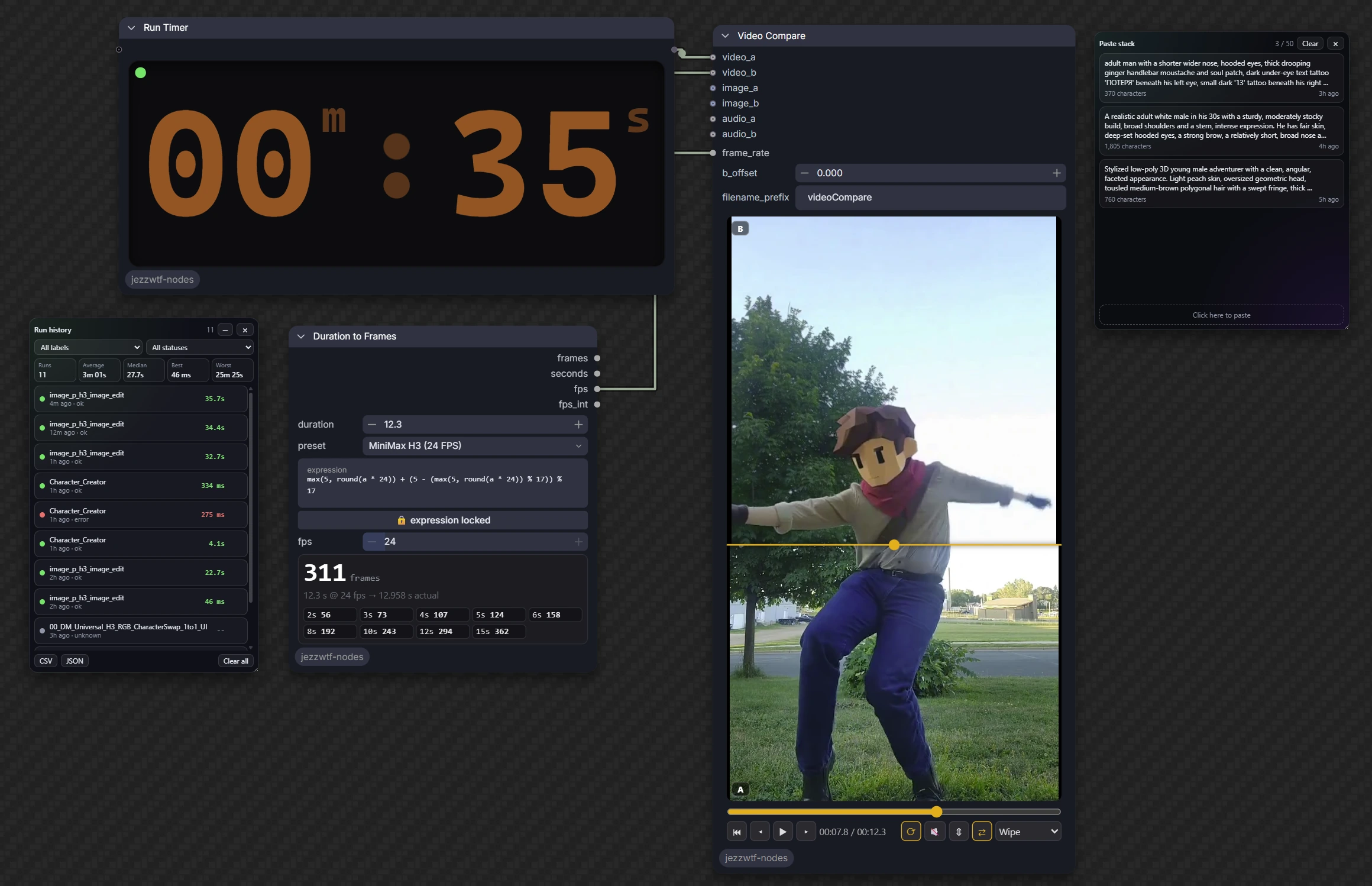
Quality-of-life nodes and canvas tools for ComfyUI: utilities, character chat and cards, LoRA and model loaders, MiniMax H3 RefMod, GIF tools, a run timer with history, an image gallery loader, audio tools and a clipboard paste stack.
Each node family loads in its own try/except, so a problem in one can't take down the others.
Table of contents
Installation
ComfyUI Manager
Search for JezzWTF QoL Nodes and install it.
Manual
cd ComfyUI/custom_nodes
git clone https://github.com/JezzWTF/jezzwtf-nodes
Restart ComfyUI, then hard-refresh the browser tab.
Requirements
- ComfyUI 0.44.0 or newer. This is the version the pack is tested on.
- Local ComfyUI only. The pack reads and writes local folders, talks to LM Studio and Civitai, keeps run history on disk and reads the OS clipboard, so it is not meant for Comfy Cloud.
- Nothing else to install. Some features use optional packages when they are present:
| Package | Used for |
|---|---|
| imageio-ffmpeg or a system ffmpeg | GIF Tools (falls back to Pillow with a warning) |
| opencv-python | Video frame sampling for LM Studio and Character Chat |
| soundfile | Sending audio to LM Studio |
| requests | LM Studio streaming |
Model-specific nodes also need the matching model: a Qwen3.5 text encoder for Character Chat, a MiniMax H3 checkpoint for the H3 nodes, and so on.
Nodes
Utilities
Categories JezzWTF/utils, JezzWTF/image, JezzWTF/dataset and JezzWTF/conditioning.
| Node | What it does |
|---|---|
| Set (Remote) / Get (Remote) | Pass any value across the graph by key, no wires |
| Text Box | Reusable prompt card with live counts, copy and clear |
| Text Encode (Zero Negative) | Encode the positive prompt and build a zeroed or empty negative in one node |
| Title Font | Styled title banner for organising workflows |
| Edit Prompt Template | Edit instruction plus optional suffix and separator |
| Duration to Frames | Seconds to frame count, with model presets and a safe expression field |
| Resolution Picker | Aspect ratio and megapixels (or a preset) to width, height and an empty latent |
| Match Image Size | Resize or pad one image to another's size, with several fit modes |
| Image Aspect Size | Aspect-aware size output for an image |
| Get Image | Grab an in-graph image as IMAGE and MASK |
| Draw Image | Layered sketch pad that loads like Load Image, with pressure, undo and zoom |
| Multi Load Image | Up to 16 image slots, each with its own output |
| Gallery Load | Pick one or many images in a floating gallery window (input or output folders, folders, search) and load them as a batch |
| Multi Switch | Route several values by one switch |
| Folder Image Batch / Folder Video Batch | One file per run from a folder, with whole-folder auto-run |
| Save Caption (Match Image) | Save a caption as a .txt named after the file just loaded |
| Batch Timer | Counts finished items across queued prompts, with progress and ETA |
| Refresh Page (VRAM Cleaner) | Pass-through node that frees VRAM and reloads on demand |
Run Timer
Times every workflow run, with or without the node on the canvas. The node is a display you can add at any time, even mid-run.
- Big clock card on the node, digital or a circular smartwatch ring, with your choice of colour, font and background (hover the card and click style). It has a status dot and colons that alternate one second on and one second off while running.
- A floating timer, on by default (turn it off in Settings → JezzWTF → Run Timer): always on screen without a node, no frame so the ring is truly round, draggable and resizable, with laps, ticks or comet motion, and it remembers its place and style.
- Every timed run is saved on the server (newest 500), so history survives reloads.
- A floating history panel, like Paste Stack: draggable, resizable, minimizes to a chip showing the running time. It has count, average, median, best and worst, filters by label and status, per-row delete, and CSV and JSON export.
- Rename the node to label its runs in the history.
Characters and LLMs
Categories JezzWTF/LLM and JezzWTF/Cards.
| Node | What it does |
|---|---|
| Character Chat | Chat with V1, V2 and V3 character cards (PNG, JSON or refmod .safetensors) on Qwen3.5 through ComfyUI's text generation, with lorebooks, a chat panel and Save chat |
| Character Card PNG Baker | Bake a Character Card V2 into a PNG, saved to input/characters so Character Chat lists it |
| Workflow PNG Baker | Embed a workflow or prompt into a PNG |
| LM Studio Bridge / Prompt Box | Streaming chat, vision, audio and video through any model in LM Studio |
| Bounding Boxes / Layout LLM Prompt | Draw layout boxes on a canvas, or let an LLM draw them |
Loaders and LoRA
Categories JezzWTF/loaders and JezzWTF/lora.
| Node | What it does | |---|---| | Diffusers Loader | Load a Diffusers folder as MODEL, CLIP and VAE | | Ultimate Model Loader | Diffusion model, two CLIPs and two VAEs with attention backend and quantisation options | | LoRA Stack / LoRA Folder Stack (+ Multi-Model) | LoRA stack editor with favourites, folder filter and a randomizer | | LoRA Inspector | Identify a LoRA through Civitai: trigger words, base model, samples | | Regional Character LoRA | Two character LoRAs in one image, each confined to its own region |
MiniMax H3 RefMod
Categories JezzWTF/refmod and JezzWTF/sampling.
A RefMod is a .safetensors file of reference latents (portraits, a short clip, a voice sample) baked through H3's own VAEs, then injected into video conditioning as reference tokens. A refmod can also carry a character card in its header, which Character Chat reads.
| Node | What it does |
|---|---|
| RefMod Bake (Character) / Loader / Apply | Bake references into a file, load it, and apply it with strength, curves and scramble |
| Tail RefMod / Capture / Load | The same idea for continuing a clip from its tail |
| Image RefMod Bake / Apply | References for Qwen Image 2.1, Fibo 2 and Flux 3 |
| Refmod Character Card Baker | Put a character card into a refmod header, saved to models/refmods |
| MiniMax H3 Image Edit | One-node H3 image edit |
| H3 Upscale Picker | Same-scale target sizes for the H3 latent upscaler |
| Ultimate KSampler / H3 KSampler | Samplers with live video preview |
Audio
Category JezzWTF/audio.
| Node | What it does | |---|---| | Audio Loader | Load an audio file from the input folder (subfolders included) with an upload button, a player, trim and mono mix | | Album Cover | Embed an image as the cover art of an mp3, flac or m4a file, with optional title, artist and album tags |
Video
Category JezzWTF/video.
| Node | What it does | |---|---| | Prompt Relay Encode / Timeline / Options | Per-segment temporal prompts for LTX video, with a draggable timeline | | Video Compare | Compare two videos |
GIF Tools
Category JezzWTF/gif. Built to keep GIF quality up and file size down.
| Node | What it does | |---|---| | Video to GIF (Optimised) | Two-pass palette, auto dither, duplicate-frame merging, and a target-size mode that searches width, fps and colours for the best-looking GIF under your budget | | GIF Optimise | Re-encode an existing GIF with the same engine | | GIF Analyse / Compare | Sizes, frame counts and SSIM/PSNR between two GIFs, with side-by-side, split or difference output | | Load GIF | GIF to IMAGE frames, mask, fps and frame delays | | Frames to Animated WebP / APNG | Smaller animated formats, with a size-targeted lossy WebP mode |
Uses ffmpeg (the imageio-ffmpeg build, a system ffmpeg, or the JWTF_FFMPEG environment variable) and falls back to Pillow with a warning when none is found.
Frontend extensions
- JezzWTF Workflows opens a floating browser for saved workflows with graph previews, folder filters, search and favourites.
- JezzWTF Documentation opens a floating editor for searchable pages that travel with the saved workflow. Both panels are available from the canvas context menu and command palette.
- Paste Stack: a floating clipboard history for text, images and files. Click a card to copy it back, or drag an image card onto a Load Image node. Persists across reloads and minimizes to a chip.
- Workflows window: browse your saved workflows and the bundled examples as cards with thumbnails. Search looks inside workflows (models, prompts, notes), with folders, favourites and what-it-makes and model categories. A floating panel like Paste Stack: it never blocks the canvas and remembers its place. Open it from the top bar, Alt+Shift+W, the canvas right-click menu or the command palette.
- Canvas tools: tidy a graph by dependency, align and distribute, group the selection, and a Ctrl+Alt bypass slash. They live in the command palette (Alt+Shift+T tidies, Alt+Shift+G groups).
- Documentation window: a floating, searchable, read-only help for every node in the pack, including where each node saves its files (Alt+Shift+D).
Example workflows
Drag a file from example_workflows/ into ComfyUI.
| Workflow | What it does | Needs |
|---|---|---|
| Character_Creator.json | Qwen3.5 writes a Character Card V2 from a concept, bakes it with your portrait into a PNG (and optionally a character .safetensors), then chats with it | Qwen3.5 |
| Character_Chat.json | The minimal setup: load Qwen3.5, pick a character card, chat, and Save chat | Qwen3.5 and a character card |
| Video_to_GIF_Optimised.json | Load a video and optimise it into the best-looking GIF under a size budget | Nothing beyond core |
| GIF_Optimise_and_Compare.json | Load a GIF, re-encode it, and compare the result with the original: sizes, SSIM and a side-by-side | Nothing beyond core |
| Dataset_Captioning.json | Caption a whole folder of images with Qwen3.5 and save a .txt next to each one, ready for LoRA training | Qwen3.5 |
| RefMod_Bake_and_Apply_H3.json | Bake a character portrait into a RefMod, apply it to MiniMax H3 reference-to-video and generate a clip | MiniMax H3 reference model, text encoder and VAEs |
License
MIT. See LICENSE.