
ComfyUI MiniMax H3 Context IR Agent
OpenAI API based prompt rewriting agents for MiniMax H3 T2VA/I2VA/L2VA/FL2VA and Ref2VA workflows, using the official H3 skill files.
Nodes (2)
ComfyUI MiniMax H3 Context IR Agent
ComfyUI prompt optimizer nodes for MiniMax H3. The nodes use the OpenAI Agents SDK to rewrite simple user prompts into H3 prompt structures, with optional image inputs and optional H3 style-skill tool use.
This is not the MiniMax cloud Context-IR endpoint. It is a local ComfyUI adapter around OpenAI-compatible multimodal models and the MiniMax H3 skill files.
Implementation Scope
The current implementation focuses on using the OpenAI API path for H3 Context-IR style prompt rewriting. It currently sends text and image references to the agent; audio and video reference support may be added later as needed. Support for additional open-source models, closed-source models, or other model platforms may also be added later.
Nodes
-
MiniMax H3 FL2VA Prompt Agent (OpenAI API)
- Supports T2VA, I2VA, L2VA, and FL2VA.
first_frameandlast_frameare optional.- Mode is inferred from connected images:
- none: T2VA
- first only: I2VA
- last only: L2VA
- both: FL2VA
-
MiniMax H3 Ref2VA Prompt Agent (OpenAI API)
- Supports Ref2VA.
- Uses autogrow
ref_image_inputs, matching the official MiniMax H3 reference node pattern. - Supports up to 9 reference images.
Both nodes output:
optimized_promptselected_skillsraw_json
Connect optimized_prompt into the official MiniMax H3 conditioning node's prompt.
Basic Wiring
For the MiniMax H3 FL2VA Prompt Agent (OpenAI API) node, place it before the official MiniMax H3 video node and wire it like this:
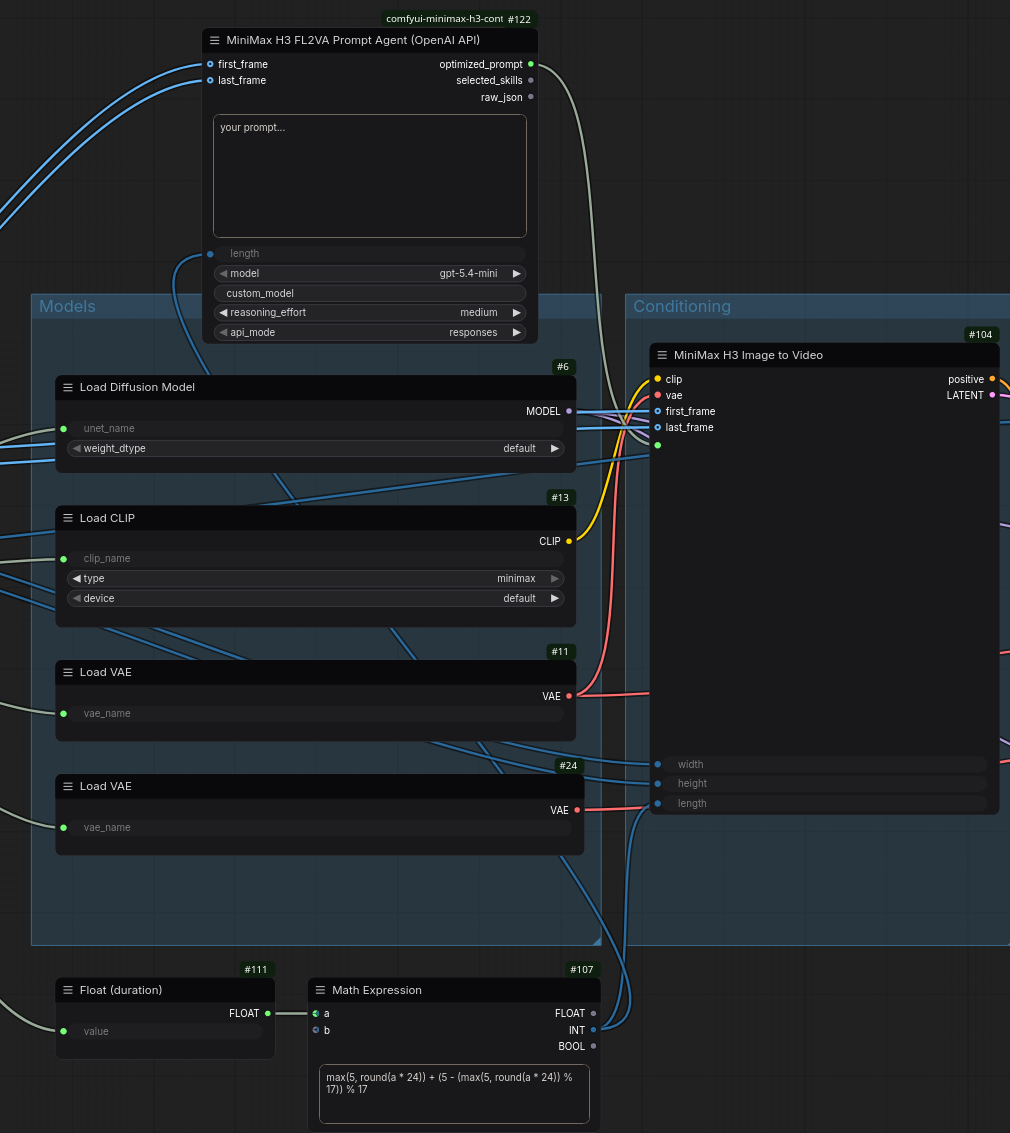
- Connect your simple text prompt to
prompt. - Connect
optimized_promptto the official MiniMax H3 node's prompt/positive text input. - Connect the same
first_frameandlast_frameimages to both this prompt agent and the official MiniMax H3 node. - Keep the original
lengthcalculation from your MiniMax H3 workflow and connect it to both nodes when you want the prompt agent to know the target video duration.
Mode is inferred from the image inputs:
- no image connected: T2VA
- only
first_frameconnected: I2VA - only
last_frameconnected: L2VA - both
first_frameandlast_frameconnected: FL2VA
In the common image-to-video case, connect only first_frame; the agent will treat it as I2VA. If no image is connected, the same node can still be used as a T2VA prompt optimizer.
For the MiniMax H3 Ref2VA Prompt Agent (OpenAI API) node, connect the same reference images to both this prompt agent and the official MiniMax H3 Reference to Video node:
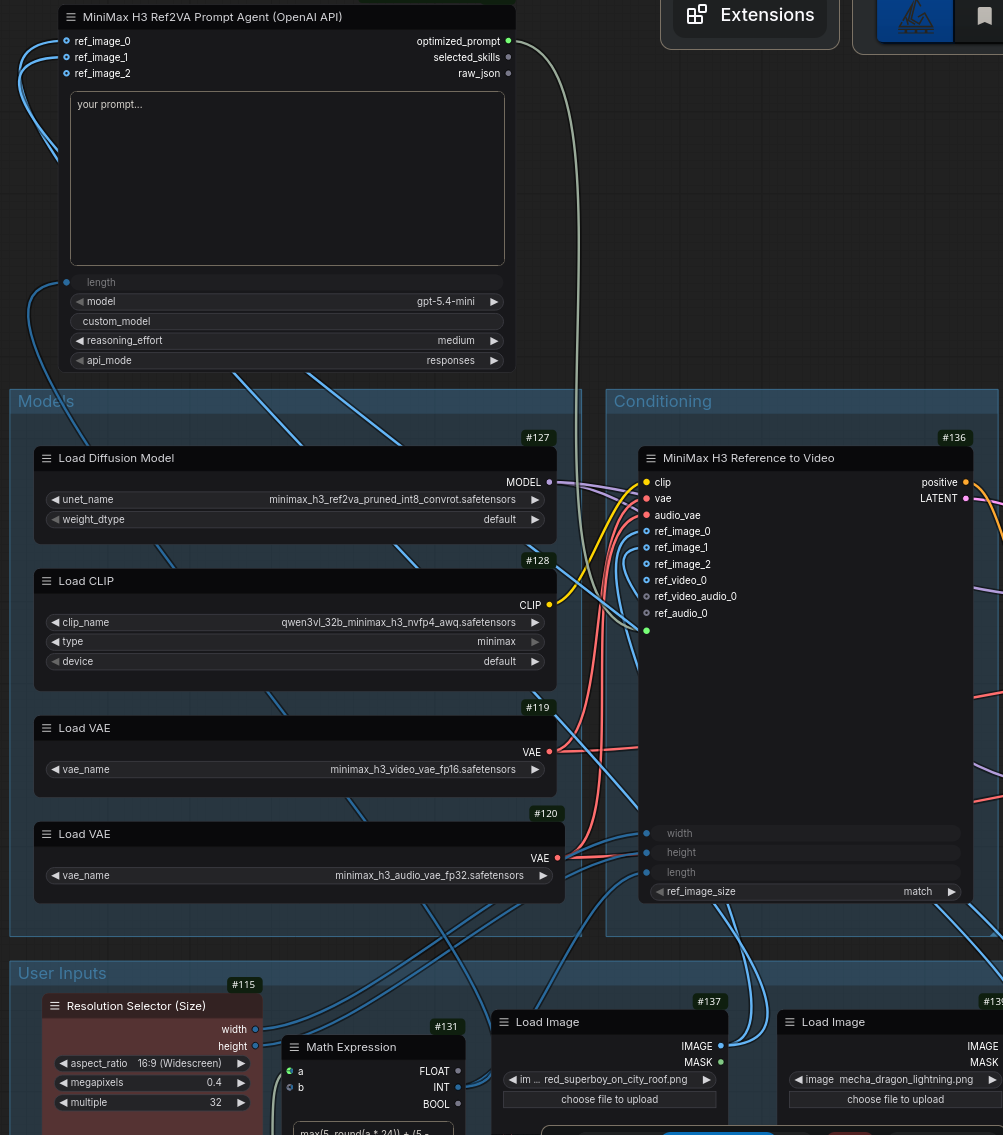
- Connect your simple text prompt to
prompt. - Connect
optimized_promptto the official MiniMax H3 Reference to Video node's prompt/positive text input. - Connect each reference image to matching
ref_image_inputs on both nodes. - Keep the original
width,height, andlengthcalculation from your MiniMax H3 workflow. - Keep other model inputs such as
clip,vae,audio_vae, and diffusion model wiring unchanged.
Image inputs are converted from ComfyUI tensors to JPEG data URLs before calling the model. The node keeps this automatic: detail is fixed to auto, and images are resized locally only when their longest edge is above 2048 pixels.
The model input is a dropdown with these built-in choices:
gpt-5.4-mini, gpt-5.4, gpt-5.5, gpt-5.6-luna, gpt-5.6-terra, gpt-5.6-sol, custom
When model is custom, the node reads custom_model. Otherwise custom_model is ignored. The reasoning_effort input supports low, medium, high, and xhigh; the default is medium.
Requirements
This node requires a recent ComfyUI build with the typed node API and io.Autogrow support.
Install dependencies in the same Python environment that runs ComfyUI:
pip install -r requirements.txt
Environment Variables
Secrets are read from environment variables or an ignored local config.toml. They are not stored in workflow JSON.
export OPENAI_API_KEY="..."
export OPENAI_BASE_URL="https://api.openai.com"
export H3_CONTEXT_IR_MODEL="gpt-5.4-mini"
OPENAI_BASE_URL is optional for the official OpenAI API. If it is set to a host without a path, such as https://api.openai.com, the node appends /v1 automatically. The node defaults to responses. Use chat_completions only when your OpenAI-compatible endpoint does not support the Responses API.
For local development, you can also create config.toml in this node directory. It is ignored by git:
[config]
OPENAI_API_KEY = "..."
OPENAI_BASE_URL = "https://api.openai.com"
H3_CONTEXT_IR_MODEL = "gpt-5.4-mini"
If OPENAI_BASE_URL already includes a path, the code keeps it unchanged. A simple unquoted KEY=value file is also accepted for local testing.
Tracing is disabled by default. To enable OpenAI Agents tracing:
export OPENAI_AGENTS_DISABLE_TRACING=0
H3 Skills
By default, the node reads:
./skills
Advanced configuration is intentionally not exposed as node inputs. Use these environment variables when needed:
export H3_CONTEXT_IR_AGENT_CONFIG="/path/to/config.toml"
export MINIMAX_H3_SKILLS_DIR="/path/to/MiniMax-H3/skills"
The main h3-prompt-writing skill and the selected guide are placed into the agent instructions. Style skills are exposed as tools and are loaded only when the agent decides they are relevant.
Vendored Skill Source
The bundled skills/ directory is copied verbatim from the official MiniMax H3 repository:
Repository: https://github.com/MiniMax-AI/MiniMax-H3
Source path: skills/
Commit: 8d8824efaf94586c0cc9ac7ad8d0723d4d6420ea
No official skill files were modified in this repository. At the time of vendoring, diff -qr /home/zric/project/MiniMax-H3/skills ./skills produced no differences.