
ComfyUI_FileGallery
A custom node for ComfyUI that allows you to easily browse and select images directly inside the node editor.
ComfyUI File Gallery
A custom node for ComfyUI that allows you to easily browse and select images directly inside the node editor.
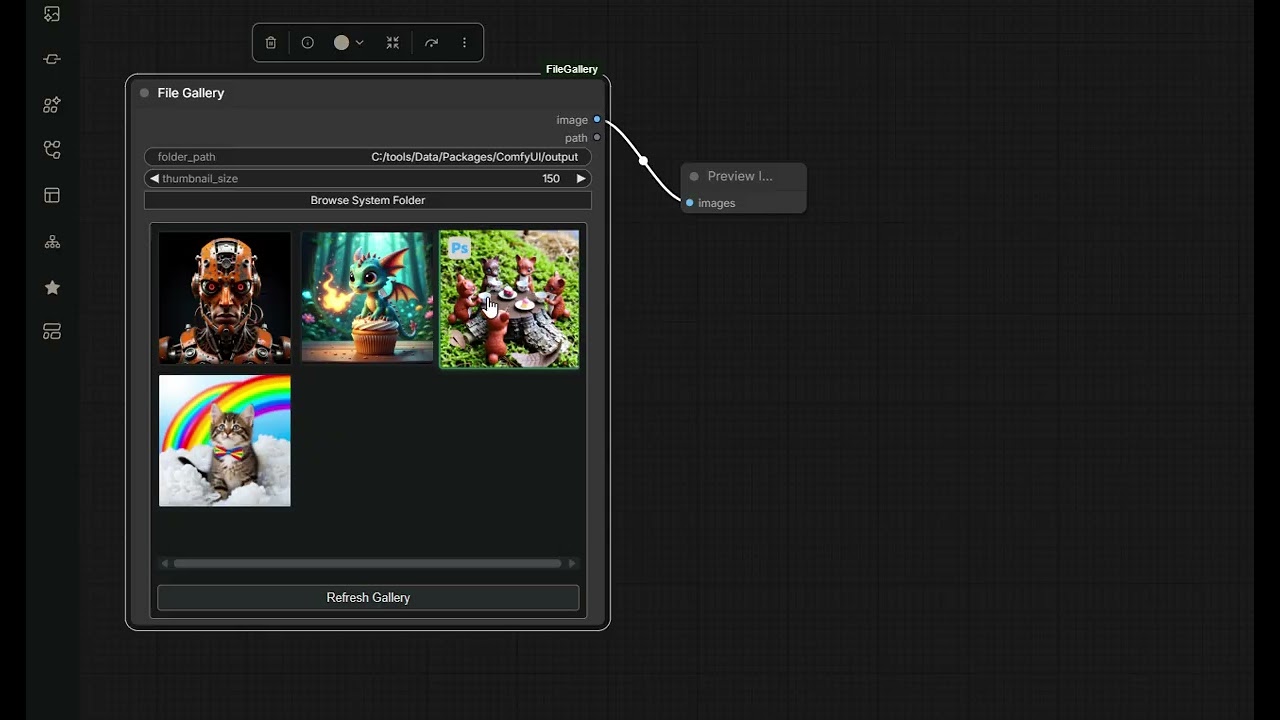
Features
- System Folder Browser: Open a native system file dialog to quickly pick an image folder.
- Dynamic Thumbnail Gallery: A flexbox grid displaying high-quality thumbnails of all images inside the selected folder.
- Adjustable Size: Live scaling for thumbnails via a dedicated node slider (50px to 300px).
- Responsive Layout: The gallery perfectly stretches along with the ComfyUI node and maximizes interface space.
- Efficient Caching: Generates and caches lightweight thumbnails powered by Pillow for incredibly fast reloading.
- File Explorer Toolbar: A built-in toolbar makes the node feel like a real file browser:
- ← (Back): Navigate back to the previously visited folder (history stack, greyed out when unavailable).
- ⇑ (Up): Jump to the parent directory of the current folder.
- Sort dropdown: Sort images by Name, Date (modification time), or Size.
- ASC / DESC toggle: Switch between ascending (blue) and descending sort order with a single click.
- Filter input: Live-filter displayed images — type a substring (e.g.
cat), a glob extension pattern (e.g.*.jpg), or a prefix pattern (e.g.holiday*). - ↻ (Refresh): Rescan the current folder for new or removed files.
Installation
Method 1: Comfy-CLI (Recommended)
If you have comfy-cli installed, simply run:
comfy node install filegallery
Method 2: ComfyUI Manager
Search for File Gallery in the ComfyUI Manager and click Install.
Method 3: Manual Clone (Git)
- Go to your
ComfyUI/custom_nodes/directory. - Clone this repository:
git clone https://github.com/JanisBe/ComfyUI_FileGallery.git - Restart ComfyUI.
No additional installation needed. This node relies only on libraries that are already bundled with ComfyUI (
Pillow,numpy,torch,aiohttp). Nopip installstep is required.
Usage
Add the node via the regular Add Node menu under the image category (it's named File Gallery).
- Use Browse System Folder to select a directory safely via a native file dialog, or type the path directly into the
folder_pathinput. - The gallery will auto-populate with thumbnails (
.png,.jpg,.jpeg,.webp). - Click any image to instantly select it. Its path/tensor and original dimensions are sent via the outputs (
IMAGE,STRING,width,height). - Use the toolbar at the top of the gallery to sort, filter, and navigate folders without leaving the node editor.
Requirements
The node uses standard ComfyUI dependencies (Pillow, numpy, torch).
To display the system folder selection window, your environment needs to support tkinter (which is typically bundled with standard Python distributions on Windows/Mac/Linux).