
ComfyUI-IntoTheLatent-Utils
ComfyUI utility nodes by Into The Latent.
Nodes (22)
The Node That Decides Whether Breeze TTS Fits on Your Card
The Breeze TTS Unload Node
Clone a Voice From a Few Seconds of Audio (Breeze TTS Voice Clone)
Temperature, Top-p and the Rest
Invent a Voice With One Sentence (Breeze TTS Voice Design)
Design Advanced, Explained Without Hand-Waving
Breeze TTS Voice Direction
Direction Advanced for Long Takes
The ITL Prompt Builder
The Style Wizard
Load several audio files onto one node, each on its own socket
Multi Audio Loader, with a filename socket per clip
Load up to 8 images with one node, each on its own output socket
Multi Image Loader, plus masks and filenames per image
Load several clips on one node — video and audio sockets per file, decoded lazily
Multi Video Loader, with filename sockets so you know which clip is which
Run N different prompts by queueing one batch — the ComfyUI for-loop
A resolution picker that knows your model's rules (and your aspect ratios)
Save with A1111-style metadata
Save Civitai-readable metadata, with override sockets for the volatile fields
Pick a Size, Skip the Terminal
The Transcript Node That Unlocks Voice Cloning (Whisper Transcribe)
ComfyUI-IntoTheLatent-Utils
ComfyUI nodepack by Into The Latent
ℹ️ Published for reference. Issues are disabled and pull requests are closed automatically — this repo doesn't accept contributions, and no support is provided. You're welcome to fork and adapt it under the GPL-3.0 license.
🔄 This pack replaces
ComfyUI-AI2Go-Utils, which is no longer maintained. Node IDs changed (AI2Go*→ITL*), so workflows saved with the old pack won't pick these nodes up — keep the old pack installed if you need them, the two coexist without conflict.
Contact
- 📹 YouTube: Into The Latent
- 📬 Newsletter: AI News
- 🌐 Website: Into The Latent
- ❤️ Patreon: AIKnowledgeCentral
- 📆 Book a 1-on-1 Session: Stable Diffusion Coaching
- ✉️ Email: [email protected]
- 🎨 Civitai: Into_The_Latent
Installation
Clone into your ComfyUI custom_nodes directory and restart ComfyUI:
cd ComfyUI/custom_nodes
git clone https://github.com/Into-The-Latent/ComfyUI-IntoTheLatent-Utils
Then install the pack's requirements (ComfyUI Manager does this for you; for a manual clone run
pip install -r requirements.txt with ComfyUI's Python). The pack needs soundfile to import at
all and the Whisper nodes need librosa for resampling; transformers comes with ComfyUI itself.
The Breeze TTS model code ships inside the pack (see that section), so nothing is fetched from
GitHub and git is not needed. It can coexist with
ComfyUI-KJNodes — both Ideogram 4 nodes run side by side without conflict.
Nodes
ITL Ideogram 4 Prompt Builder
A visual prompt builder for Ideogram 4's structured JSON caption format. Draw bounding-box regions on a canvas, describe each one, and the node assembles the caption — with a full scene-graph Overview, region parenting, and named groups layered on top.
Outputs: prompt (the caption JSON), preview (a rendered overlay image), bboxes
(pixel-space boxes for SAM3 / crop nodes), width, height.
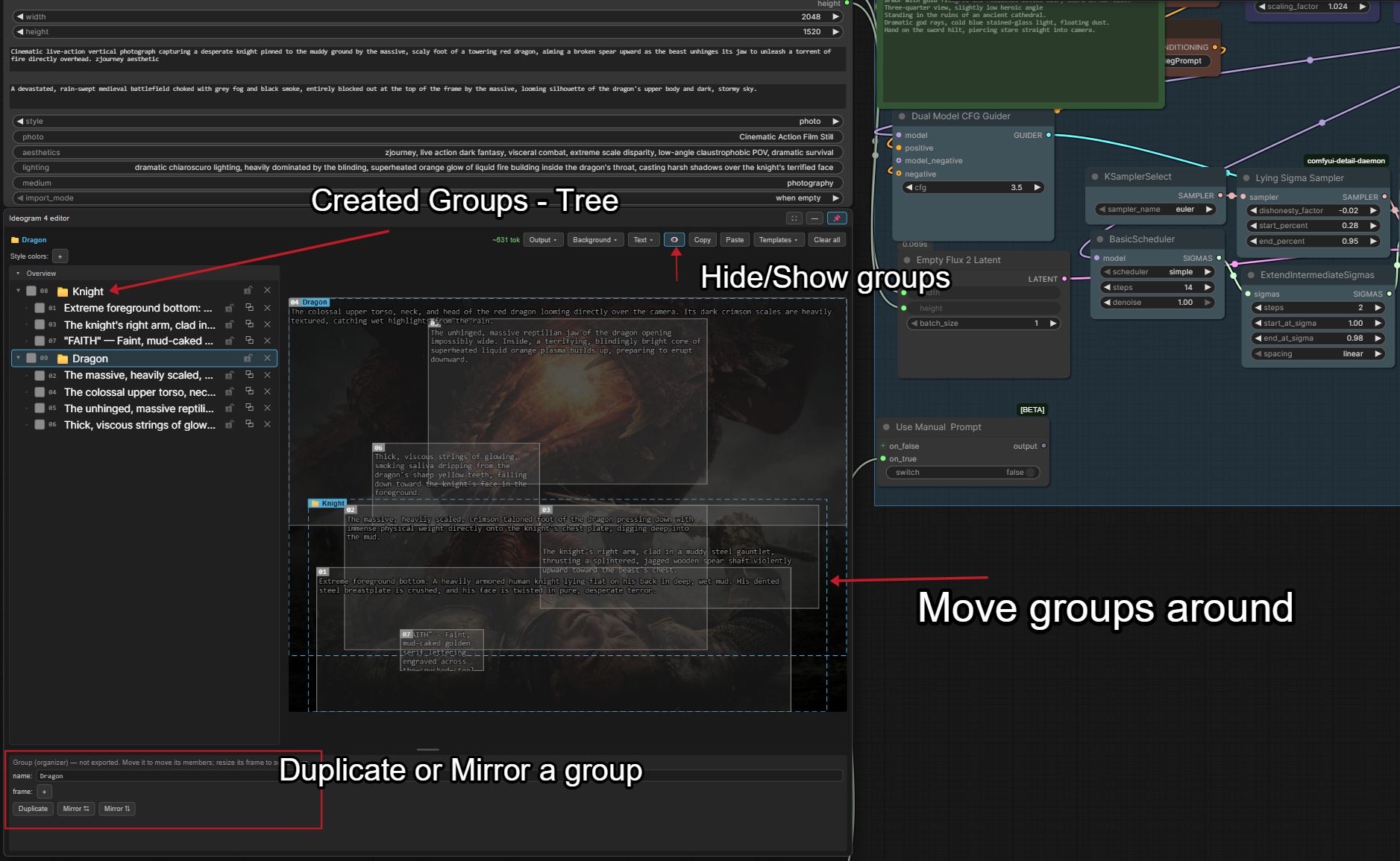
Region editor (canvas)
- Draw by dragging; move and resize with handles; Ctrl-drag to force-draw over an existing box.
- Per-region type (object / text), description, verbatim text, and a color palette; editable bbox fields (pixels + the 0–1000 grid).
- Multi-select — shift-drag marquee, shift-click toggle; Alt-click cycles overlapping boxes; Del / Ctrl+C·V·D to remove / copy / paste / duplicate.
- Lock regions, composition guides (thirds / grid / golden ratio / spiral), snap-to-grid, and adjustable label & box styling.
- Background: a connected reference image, the last generated image ("Grab BG"), or the live sampling preview — with a brightness control.
- Dockable / pinnable / fullscreen panel, a live token estimate, and output settings
(compact/pretty JSON, normalized/absolute coords,
yx/xybbox order).
Overview (scene tree)
- A persistent, collapsible panel listing every region — click a row to select it (synced both ways with the canvas), so you can pick and edit a region without nudging it.
- Ctrl/Cmd-click to multi-select, Shift-click for a range.
- Lock, duplicate, and delete from the list; drag a row — or a whole multi-selection — onto another to nest it; drop on the header to send back to root.
Parenting & groups
- Parent any region under another: move a parent on the canvas and its children follow. Deleting a parent promotes its children to the grandparent (no surprise subtree wipe).
- Groups — right-click the Overview → Create group from selection to wrap regions in a named
container:
- Move the group → everything moves; resize the group → its members scale.
- Duplicate the whole group, or mirror its members horizontally / vertically.
- Deleting a group keeps its children.
- Groups are editor-only organizers — never part of the exported prompt. Toggle their frames on the canvas with 👁️ (hidden by default; always listed in the Overview).
Copy / paste & interop
- Copy / Paste the caption JSON, and save/load named Templates (stored server-side).
Each template can carry an optional preview image — click 📷 in the Templates menu to pick one
(it's center-cropped to a 200×200 webp), or just drop a matching
<template-name>.{webp,png,jpg,jpeg}next to the template file and it's picked up automatically. - Copies carry a small
_itlsidecar that preserves the full layout (groups + hierarchy) for a lossless ITL → ITL round-trip, while staying two-way compatible with ComfyUI-KJNodes: KJNodes ignores the extra data and loads the flat scene, and KJNodes captions load here flat too. The sidecar never reaches the model prompt.
ITL MOSS-Image Prompt Builder
The same bbox editor as the Ideogram 4 Prompt Builder — canvas, Overview, parenting, groups, templates, live preview — producing MOSS-Image's layout JSON instead:
{"summary":{"meta":["poster"],"canvas":"single","caption":"A minimalist travel poster."},
 "items":[{"label":"text","caption":"Large dark-blue uppercase title.","text":"EXPLORE","bbox":[-416,-384,-288,384]},
          {"label":"object","caption":"A flat blue mountain.","tags":["illustration"],"bbox":[-192,-288,384,288]}],
 "bbox_coord_space":"abs_centralized","bbox_format":"yxyx"}
- Scene fields:
caption(the whole scene and style — this is the prompt when no region is placed), optionalmetatags (comma-separated) andcanvas(single/multi_panel/collage), plus a summary palette (the swatch row above the canvas). - Per region: label (object / character / text), caption, verbatim text, optional tags and a color palette. An unplaced region (one without a box) is not exported — MOSS needs a bbox — and the Overview says so.
- bbox = pixels of
width×height, measured from the canvas centre,[ymin, xmin, ymax, xmax]. The prompt carries no canvas size, so generate at exactly the node's width/height (wire itswidth/heightoutputs into the latent, or drive them from the Resolution Selector). An imported MOSS layout is read at the node's current width/height too. The inspector'sout:field shows these centred pixels and is editable. - Outputs:
prompt,preview,bboxes,width,height— the same as the Ideogram node. - Per-region weight — Weak
<<(0.5) · Normal=(1) · Strong>(1.25) · Very strong>>(1.5), set with theweight:buttons under the region type, or from the Overview's right-click menu (applies to the whole selection); the Overview shows the sign on every row. A weight other than Normal sends that region's caption as(caption:weight), which KJNodes' MOSS-Image Prompt Weight turns into attention weighting — wire the builder'spromptinto that node (the editor warns when it isn't connected; without it the brackets reach the model as plain text). The effect is on the region's object, not confined to its area: the rest of the image can shift too. To drop a region entirely, disable it (eye) instead. Emphasis is capped at 1.5: KJ's boost works on the whole image, and above that one long caption — or a couple of emphasized regions — outweighs the layout (objects drift out of their boxes or get duplicated).
Ideogram 4 ⇄ MOSS-Image
Both builders accept either JSON on Paste, on the import_json socket and from Templates, and
convert it to their own format:
- Ideogram → MOSS:
high_level_description,backgroundand the style fields are joined intosummary.captionas<description> <background> Style: <photo|art style>, <aesthetics>, <lighting>, <medium>.(empty fields dropped); the style palette becomes the summary palette;obj→object. - MOSS → Ideogram:
summary.captionbecomesbackground;character→obj;meta,canvasandtagshave no Ideogram field (tags stay on the region in the editor and come back when you paste into a MOSS node). The summary palette lands in the Style colors row — Ideogram only exports a palette insidestyle_description, so pick a style (photo / art style) to send it. - Wire the Ideogram node's
promptinto the MOSS node'simport_jsonwithimport_mode = alwaysand you have a live converter. Leave the Ideogram node's absolute pixels / xy order toggles at their defaults for that: the caption JSON carries no marker for them, so the converter assumes the 0–1000yxgrid.
ITL Ideogram 4 Style Wizard
A "click-together" helper for the style fields of an Ideogram 4 caption — so you don't have to type
aesthetics / lighting / medium / photo / art_style by hand.
- Wire the wizard's
styleoutput into a Prompt Builder'simport_jsoninput (the link just tells the wizard which builder to fill). - Click 🪄 Open Style Wizard to open a two-tab modal. On the Pick styles tab, toggle one or many
chips per category (they're comma-joined) or type your own; a search box filters chips, a live
JSON preview shows the assembled
style_description, and a status line names the builder you're writing to (or warns if nothing's connected). - Photo vs. art_style are both selectable; if you set both, a warning notes that only
photois applied (Ideogram allows only one). - Apply pushes the picks to the connected builder without closing (handy for tweaking); Apply &
close (and Esc / clicking the backdrop) does the same and closes. Either way the picks are
written straight into the builder's style widgets — your bounding boxes, color palette, and
high_level_descriptionare left untouched, and the node emits an empty string at run time so theimport_jsonwire never overwrites the builder's regions.
Editable chip presets. The chip lists live in
ComfyUI/user/default/itl/ideogram4/WizardStylesDefault.json. Edit them right in the wizard on the
Edit presets tab — add, rename, or delete chips per category, then Save to file (or Discard /
Restore defaults). You can also hand-edit the JSON (each entry's key must be one of aesthetics,
lighting, medium, photo, art_style). If the file is missing or malformed, the wizard falls
back to the built-in defaults and shows a warning (with the exact parse error) plus a Restore
defaults button that (re)creates the file.
ITL MOSS-Image Style Wizard
The same chip-picker as the Ideogram 4 Style Wizard — same categories, same chips, same Edit presets
file (WizardStylesDefault.json is shared, so edits show up in both) — aimed at the ITL MOSS-Image Prompt
Builder. MOSS-Image has no style fields, so on close the picks are written into the builder like this:
- Medium + Art Style → the builder's
metatags. In a same-seed test a medium took effect from the tags (as well as from the caption). - Aesthetics + Lighting + Photo → one
Style: …sentence at the end of the caption. Lighting only reliably took effect from the caption text, not from the tags.
The wizard only ever replaces what it wrote itself: your own caption text and meta tags stay, and if you
edit or delete its sentence, closing the wizard without changing the picks leaves your edit alone. What it
last wrote is remembered on the builder node, so it survives saving and copy/paste. Ideogram-style values
such as 3d_render are written as words (3d render). Wire the wizard's style output into the
builder's import_json — like the Ideogram wizard it outputs an empty string at run time, and the
builder doesn't treat it as an import (no needless re-runs).
ITL Prompt Batch
Run a list of prompts one at a time across a queued batch — the text analog of the classic "Load Image Batch + increment index" trick. ComfyUI has no real for-loop, so you queue N runs by hand and this node walks the list, emitting one prompt per run.
Outputs: positive, negative, index (the 0-based index used this run — wire it into a
SaveImage filename so each file records which prompt made it).
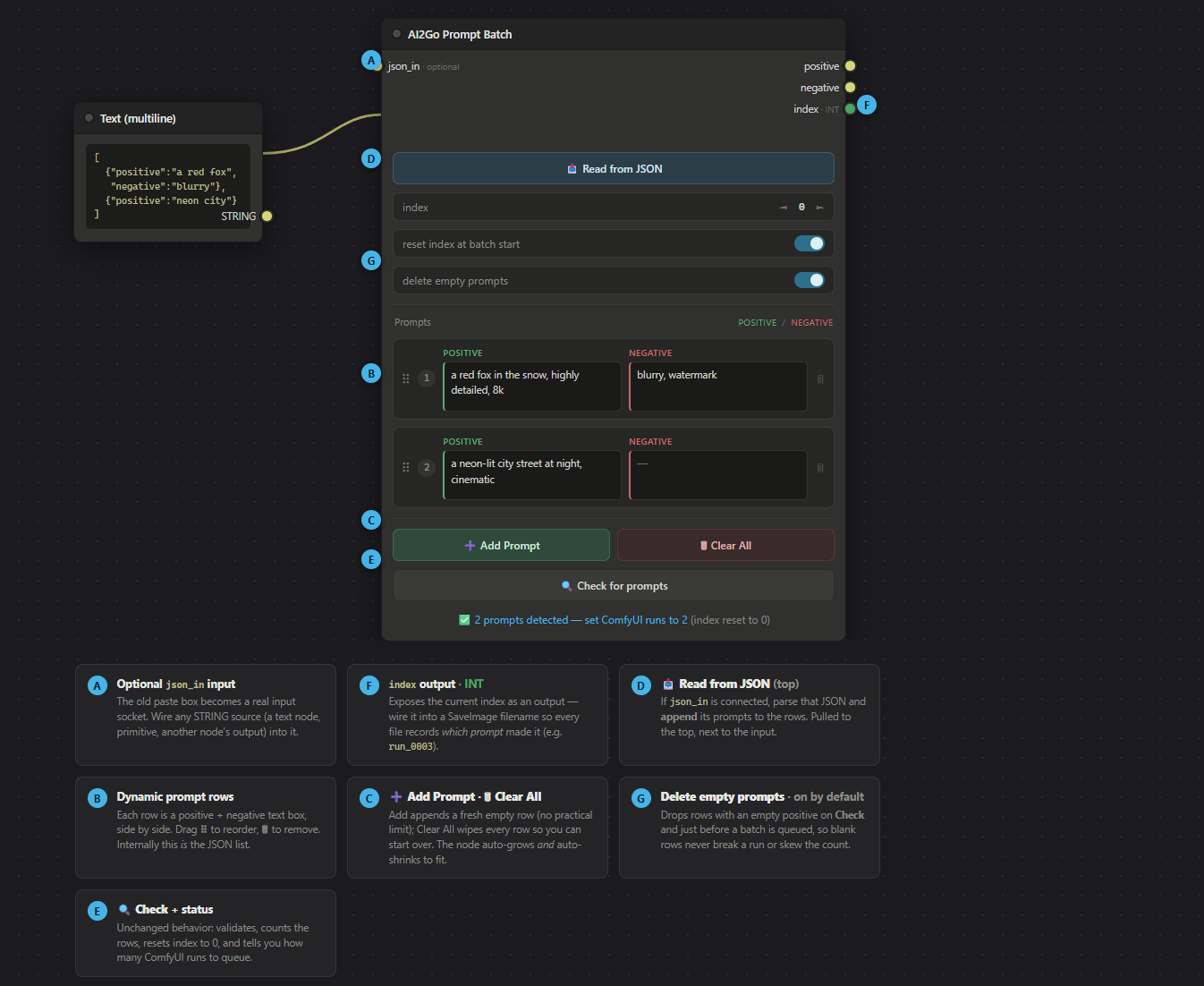
Editing prompts
- A dynamic row editor (in the spirit of rgthree's Power Lora Loader): each row is a positive and negative text box side by side. ➕ Add Prompt appends a row, 🗑 removes one, and the ⠿ handle drag-reorders. The node auto-grows and auto-shrinks to fit; stretch it wider for roomier boxes.
- 📥 Read from JSON — wire a text/primitive node holding a JSON prompt list into the optional
json_insocket, then click to append it to the rows. - 🗑 Clear All (directly under Read from JSON) wipes the list — click once to arm ("⚠ Sure? Click again"), click again within 4 s to confirm; it disarms itself otherwise.
- The rows are the source of truth; internally they serialize to the JSON array
[{"positive": "...", "negative": "..."}, ...](a bare string is treated as positive-only), stored in a hidden field that both saves with the workflow and drives execution.
JSON structure
The prompt list — whether typed into the rows or imported via 📥 Read from JSON — is a JSON array, one entry per queued run:
[
  { "positive": "a red fox in the snow, highly detailed, 8k", "negative": "blurry, watermark" },
  { "positive": "a neon-lit city street at night, cinematic" }
]
positive(required) — the prompt text; must be non-empty.negative(optional) — defaults to""when omitted ornull.
The importer also accepts these convenience forms:
- A bare string entry is treated as positive-only —
["a red fox", "a neon city"]. promptworks as an alias forpositive.- The array may be wrapped in an object —
{ "prompts": [ ... ] }.
Each run emits the entry at index (0-based) and the batch walks 0, 1, 2, …. Entries with an empty
positive are dropped when Delete empty prompts is on; otherwise they raise a "positive is empty"
error at run time.
Running a batch
- Build the list, then click 🔍 Check for prompts — it validates, counts N, resets the index to 0, and tells you how many runs to queue.
- Set ComfyUI's queue/run count to N and run. The node advances
indexby 1 after each run (immune to the "Widget Value Control Mode" setting), walking 0, 1, 2… across the batch.
Toggles.
- Reset index at batch start (default on) — zero the index when a new batch is queued, so every batch starts from the first prompt.
- Delete empty prompts (default on) — drop rows with an empty positive on Check and just before a batch is queued, so blank rows never break a run or skew the count.
If the index ever overshoots the list (more runs than prompts), it clamps to the last prompt instead of erroring.
ITL Multi Loaders (Image, Audio & Video)
Drop multiple files onto one node and every file gets its own output socket — wire each image, clip or video somewhere different in the same run. Six nodes, two flavors each:
| Node | Per file | Always |
|---|---|---|
| Multi Image Loader | image_N | count |
| Multi Image Loader Advanced | image_N + mask_N + filename_N | count |
| Multi Audio Loader | audio_N | count |
| Multi Audio Loader Advanced | audio_N + filename_N | count |
| Multi Video Loader | video_N + audio_N | count |
| Multi Video Loader Advanced | video_N + audio_N + filename_N | count |
- Up to 10 files per node. By default (
output_slots = auto) sockets appear as you add files and disappear as you remove them. Files are uploaded into ComfyUI'sinput/folder (like the stock Load Image), so saved workflows survive restarts. Workflows holding 9 or 10 files need pack version 1.11.0 or newer: an older front-end only knows about 8 and drops the extra files (and their wires) when the workflow loads. output_slots: pin a fixed socket count (1-10) instead ofautoto keep the sockets — and your wires — in place while you swap files around. Extra sockets with no file behind them output nothing, so don't wire more than you actually load; when the pinned count is lower than the number of loaded files, the extra files simply aren't reachable (no socket carries them).- Drop the files onto the field, or click it to browse — same field does both; no separate add button.
- Hover a thumbnail to see the full image (image loaders). Rest the pointer on a row's small thumbnail and a popup opens beside it with the picture scaled to fit your screen, plus its filename and pixel size. It closes as soon as the pointer leaves, or on any click, scroll or key.
- Rows show a thumbnail + pixel size (images) or a duration (audio). Drag the ⠿ grip to reorder, ✕ to remove, Sort by name for folder order. Row order = socket order.
- Removing or reordering files shifts what each socket carries — the node warns you in its status line whenever a change touches a socket that has a wire, so check your connections.
- Per-row on/off toggle, plus a Toggle All control above the list. Switching a row off is
different from removing it: the row keeps its socket position — nothing shifts — and that
socket simply outputs nothing (
None) on the next run;countonly counts the enabled files actually emitted. That's equivalent to leaving an OPTIONAL input unplugged, so it's safe for wires feeding optional inputs downstream. Don't switch off a row whose socket feeds a REQUIRED input — that node will fail onNone. - Downscaling (image nodes): set
downscale_modetokeep aspect ratio(shrink keeping shape),crop to square(centered square) orstretch to square(forced square) and any image whose longest edge exceedsmax_sizeis shrunk on load —off(the default) passes images through untouched.keep aspect ratioandcrop to squarenever upscale;stretch to squaremay enlarge the shorter side (forcing a square does that). Masks are resized with their image; originals ininput/are never modified. - Masks (Advanced): inverted alpha, exactly like stock Load Image — files without an alpha channel yield the stock 64×64 empty mask.
- Audio is never resampled — each
audio_Nkeeps its file's native sample rate. force_rate(video nodes):0(the default) leaves every clip at its own native frame rate, andvideo_Nis handed back lazily without decoding a single frame — the free path. Any other value drops or duplicates frames so every clip runs at that rate while keeping its real running time (a 10s clip stays 10s), the same convention as VideoHelperSuite — but forcing a rate has to decode the clip's frames to do it, so it costs time and memory.- Video clips with no audio track yield nothing on that file's
audio_Nsocket — same as leaving an unplugged OPTIONAL input, so it's safe unless that socket feeds a REQUIRED input downstream.
ITL Resolution Selector
Pick a model-valid width/height by aspect ratio and mode, and (optionally) push it straight into a connected Ideogram 4 Prompt Builder.
- Profiles —
defaultdoes no clamping (it just snaps each side to thesnap_multiplefield, default 8, which is what most diffusion samplers require). Model profiles like Ideogram 4 enforce their own rules (multiples of 16, 256–2048 px) and show a "clamped to keep aspect" warning when a request exceeds the cap.defaultis the default so the node is safe to drop into any workflow. - Modes —
raw(type width/height),auto(pick a ratio; edit one side, the other follows),megapixel(target megapixels + ratio; both computed),input(keep the exact ratio of the width/height inputs and size it to the megapixel target). - Aspect ratios — named presets from 1:1 (Square) to 3:1 (Wide Panorama), including 21:9 (Cinemascope). The list is
square + landscape only; the
⟷flip button transposes to portrait (16:9 → 9:16) and swaps width/height, so there's no duplicated 1:1. - Matching an existing image — connect something like an image's dimensions into
widthandheightand the node switches toinputmode by itself (unplug either and it switches back). The ratio is then taken from those numbers exactly — a 1512×1080 source stays 1.400, it is not rounded to 4:3 — while you pick the size in megapixels and keep the usualsnap_multiplerounding. Theaspect_ratiopicker and flip button step aside; a portrait source simply produces a portrait result. Because the connected values only exist while the graph runs, the readout says "resolves at run time" until the first execution, then reports the real numbers. - The readout shows the resulting W × H, megapixels, and the effective ratio + orientation — in
inputmode the detected ratio and its nearest named preset (auto 1.400 ≈ 4:3 Standard, a label only; the exact ratio is what's used). Wirewidth/heightinto a Prompt Builder; edits push into its canvas live and also apply on execution.
ITL Save Metadata (Civitai)
Two output nodes that save PNG(s) with an A1111-style parameters text chunk — the flat,
human-readable format Civitai actually parses to show the prompt and auto-link the checkpoint and
LoRAs. ComfyUI's stock Save Image embeds the raw workflow/prompt graph instead, which Civitai
can't reliably read back into a prompt — and for a dynamic workflow (our own ITL Prompt Batch
is the worst case: one graph, N prompts, disambiguated only by a run index) it's actively
misleading. These nodes trace the graph at save time to capture the real prompt used on this
specific run.
ITL Save Metadata (Civitai) (Basic) auto-traces everything — positive, negative, steps, CFG,
seed, sampler, scheduler, model, and LoRAs — by walking backward from the KSampler feeding the saved
image (falling back to "the only sampler in the graph" if that walk doesn't land on one). When the
positive/negative text comes from an ITL Prompt Batch node, the trace reads that node's
current index and resolves the exact line that ran for this queue item, not the whole batch list.
ITL Save Metadata (Civitai) Advanced adds optional override sockets — positive, negative,
steps, cfg, seed, sampler_name, scheduler — that win over the trace when wired. Wiring a
Prompt Batch node's positive/negative outputs straight into these sockets is the reliable path
for dynamic/batch prompts: no static-graph guessing, just the string that actually ran. Model and
LoRAs are always auto-traced on both nodes — a variable-length LoRA chain isn't practical to socket,
and it's static graph data regardless of which prompt ran.
The model/LoRA walk recognizes checkpoints and standalone diffusion models (Load Diffusion Model /
GGUF unet loaders), and picks up LoRAs from ComfyUI's stock Load LoRA (LoraLoader /
LoraLoaderModelOnly) as well as rgthree's Power Lora Loader and Lora Loader Stack — including
several LoRAs in one node. Disabled rows and empty (None) / zero-strength slots are skipped, matching
what actually loads.
What gets written
One parameters chunk, A1111 order:
{positive} <lora:name:weight> ...
Negative prompt: {negative}
Steps: …, Sampler: …, CFG scale: …, Seed: …, Size: …, Model hash: …, Model: …, Lora hashes: "...", Version: ComfyUI
Each traced LoRA is appended to the positive line as a <lora:name:weight> tag and listed again in
Lora hashes: — both signals Civitai uses to auto-link the resource. Unknown/unresolved fields are
omitted, never guessed; if something can't be traced (e.g. two KSamplers in the graph, or a dynamic
prompt source the tracer doesn't recognize), a warning names the unresolved field(s) in the ComfyUI
log / node progress text, so you know to wire the Advanced node's sockets.
Test button
Both nodes have a 🔎 Test detection button that runs the same trace against the live editor graph and previews positive/negative, steps/cfg/sampler/seed, model, LoRAs, and any unresolved fields — so you can check exactly what will be saved before queuing a run.
save_workflow
Off by default. Off — the PNG carries only the Civitai parameters chunk. On — it also
embeds the ComfyUI workflow/prompt chunks, the same as the stock Save Image, if you still want
the graph recoverable from the file.
Model & LoRA hashing
Civitai matches a checkpoint/LoRA to its resource page by AutoV2 — the first 10 hex characters
of the file's full SHA-256. Hashing a multi-GB checkpoint is slow, so hashes are cached in
.hash_cache.json (in the pack folder, git-ignored) keyed by path + size + mtime: the first save
of a new checkpoint or LoRA pays the hashing cost once; every save after that is instant.
Verification pending: the AutoV2 hash flavor is the one Civitai's own docs index against, but end-to-end confirmation — uploading a real image and watching Civitai auto-link the checkpoint and LoRA(s) — is still a pending manual check.
Assumption
Both nodes assume one KSampler in the workflow. Multi-sampler graphs (e.g. a hires-fix pass with two KSamplers) aren't disambiguated by the trace; wire the Advanced node's override sockets in that case.
ITL Breeze TTS (Loader, Voice Clone / Design / Direction)
Text-to-speech with Breeze TTS 2 (BreezeBlue, 3B, English + Chinese). Three modes, each as a Normal and an Advanced node:
- Voice Clone —
reference_audio+ its exactreference_text→ speaktextin that voice. - Voice Design — describe the voice in
instruction("a calm, deep male voice"); no reference. - Voice Direction — reference audio + transcript + an
instructionfor tone, pace, emotion.
reference_text must be the clip's exact transcript — ITL Whisper Transcribe (below) produces it
from the reference audio.
Inline vocal events work in the text: (laugh), (sigh), (clears throat); Chinese [笑], [叹气].
Advanced nodes add temperature, top_k, top_p, repetition_penalty, max_new_tokens
(defaults equal the Normal nodes). cfg_scale (Design / Direction only) defaults to 4.0; Voice
Clone has no CFG — its prompt template has no negative branch.
First run downloads the weights (~7.2 GB) from Hugging Face into models/breeze_tts/Breeze-TTS-2/.
Needs an NVIDIA GPU: ~7.7 GiB VRAM, or ~14.4 GiB with the loader's fast_path (CUDA graphs).
Changing Advanced sampling settings with fast_path on re-captures the graphs (a few seconds).
fast_path only works with transformers 4.57.x; on transformers 5 the loader refuses it (leave it off).
Freeing VRAM: the loaded model stays resident between runs so repeated generations are fast, and
ComfyUI's own model manager cannot evict it. If an image or video model runs later in the same
workflow, turn on unload_after on the generate node (or wire the audio through ITL Breeze TTS
Unload); the next Breeze node reloads the weights (~20 s).
The model code ships inside this pack: vendor/breeze-tts is our fork of
breezeblue-ai/breeze-tts (tag comfyui-v1.8, Apache-2.0; provenance and re-sync steps in
vendor/breeze-tts/VENDORED.md), which works with transformers 4.57–5.x. Nothing is installed from
GitHub, so git is not needed and the Comfy registry's scanner accepts the pack (versions 1.8.0–1.9.1
were hidden from ComfyUI Manager because they pulled the fork by URL). Requirements: transformers
= 4.57 (< 6), torch >= 2.7. The install never upgrades or replaces torch: the pack declares no torch dependency at all, so your existing CUDA build stays exactly as it is. pip may still move transformers within 4.57–5.x; if it lands on 5.x,
fast_pathis refused (see above), everything else works. If your torch is older than 2.7 the nodes say so at load time instead of pip swapping it for a CPU-only wheel. If the nodes report that Breeze's dependencies are missing, run ComfyUI Manager's Try fix on this pack.
License: the node code is GPL-3.0 like the rest of this pack; the vendored model code is Apache-2.0; the Breeze weights are research and non-commercial (BreezeBlue Research and Non-Commercial License).
ITL Whisper Transcribe (Loader + Audio to Text)
Speech-to-text with OpenAI Whisper through transformers.
Two nodes:
- ITL Whisper Loader — picks the model (
large-v3-turbodefault,large-v3,medium,small,base,tiny) and the device (auto/cuda/cpu). - ITL Whisper Transcribe —
AUDIOin, transcriptSTRINGout.languageisautoor a fixed code (pick one when detection guesses wrong).unload_afterfrees the model.
Built to feed the Breeze TTS Clone / Direction nodes' reference_text, but it is a general
transcription node: stereo is downmixed, any sample rate is accepted, and clips longer than 30 s
are transcribed with sequential long-form decoding. Whisper's punctuation and casing are
used as-is. For Chinese, Whisper writes simplified or traditional characters depending on the
audio; check the text before using it as a Breeze transcript.
One Whisper model stays resident at a time: two loaders with different models in one workflow reload on every run.
First run downloads the checkpoint from Hugging Face into models/whisper/whisper-<model>/
(only the safetensors + tokenizer files: large-v3-turbo 1.6 GB, large-v3 3.1 GB, medium 3.1 GB,
small 1 GB, base 290 MB, tiny 150 MB). Runs in fp16 on CUDA (large-v3-turbo ≈ 2 GiB VRAM,
large-v3 ≈ 3.5 GiB) or fp32 on CPU. Whisper and Breeze can be resident together (≈ 10 GiB).
No install beyond the pack's requirements.txt: Whisper runs on transformers (>= 4.57, shipped
with ComfyUI) and resamples with librosa (in requirements.txt). Whisper weights are Apache 2.0;
the node code is GPL-3.0 like the rest of this pack.
Credits & License
Licensed under GPL-3.0 — see LICENSE.
Only the Ideogram 4 Prompt Builder node, its canvas editor and the MOSS-Image Prompt Builder built on that same editor are derived from ComfyUI-KJNodes by Kijai (GPL-3.0). Huge thanks to Kijai for that original work — the derived files retain their attribution.
Everything else in this pack — the Ideogram 4 and MOSS-Image Style Wizards, the Resolution Selector, the Prompt Batch node, the Save Metadata (Civitai) nodes, the Multi Loaders, the Breeze TTS nodes and the Whisper nodes — is original development by Into The Latent.
Because the pack includes Kijai's GPL-3.0 code, the whole pack is released under GPL-3.0 as well.