
ComfyUI Text Preset Loader
ComfyUI node to save, organize and reuse text presets with optional preview images.
ComfyUI text preset loader
while using comfyui I found my self switching between group of texts either for my favourite art styles or characters.
Features
- Load text presets from JSON
- Switch between different text presets
- Edit and save new text presets
- optional preview image for each preset
- Tree structure for presets to organize them in categories and subcategories
- search function to quickly find presets by name
- Responsive browser library at
/preset_loader/browse - Category navigation, breadcrumbs, pinned presets, favourite presets and recent presets
- Live synchronization between the browser library and canvas nodes
- Safe atomic JSON updates, rename/move, and save-copy support
- Responsive preset editor with preview upload and draft protection
- Pick presets by ID from a workflow input, with random and range selection
Usage
- load Preset Loader Node from Node library
- in the drop-down menu choose between your text presets
- the text preset will be loaded in the string box and the image will be shown in the image box if it exists
- you can edit the text in the string box and save it as a new preset by clicking the save button and giving it a name.
- the new preset will be added to the drop-down menu and can be loaded like the other presets.
- you can also delete presets by clicking the delete button on the node.
- you can save preview image for the preset by clicking the save image button and selecting an image file.
Browser library
Open http://localhost:8188/preset_loader/browse (replace the host and port if
needed) to manage presets in a full-page interface. The library supports desktop
and mobile layouts, category browsing, search, pinned, favourite and recent
presets, preview images, rename/move, and live updates to open ComfyUI nodes.
Preset names use / as a category separator, for example:
Characters/Heroes/example
Camera/Portrait/close_up
Picking presets by ID
Every preset has a positional ID at each level of the tree, shown next to its
name in the browser. Read them down the tree — the first group is 1, the
first preset inside it is 1, and so on — so 1,2,1 means group 1, subgroup 2,
preset 1.
The node has two optional inputs for this (connect a node to use them; leave them unwired and the node behaves normally):
- preset_id — a string that selects a preset by its numbers.
- seed — drives the random forms below. The same seed always resolves to
the same preset, so a result you like is reproducible. Wire an Int node set to
randomizeto pick a different preset each run.
preset_id overrides the dropdown and the text box when it is connected.
| input | picks |
| --- | --- |
| 1,2,1 | group 1, subgroup 2, preset 1 |
| 1,2 | first preset under group 1, subgroup 2 (unspecified levels take the first) |
| 1,,3 | an empty level also takes the first entry |
| 1,1,[3:8] | a random preset with an ID from 3 to 8 |
| 1,1,[1:-1] | any preset at that level (-1 means the last one) |
| 1,1,[1,4,6] | a random pick from that list |
If a number doesn't exist it falls back to the first entry at that level rather
than failing, and ranges are trimmed to what actually exists, so [3:99] with
7 presets picks between 3 and 7.
Note: IDs are positional. Adding or deleting a preset shifts the numbers of the ones after it in the same group, so a workflow that hardcodes an ID may point at a different preset later. This suits sorting and random picking rather than a permanent address for one specific preset.
Editing behavior
- Update overwrites the currently selected preset and is enabled only when its text has changed.
- Save copy creates a new preset from the current text and preserves the selected preset's preview image.
- Rename/move, pin/unpin, favourite/unfavourite, and delete are available from the node's actions menu.
- Browser edits, pin changes, and favourite changes are propagated to open nodes without reloading.
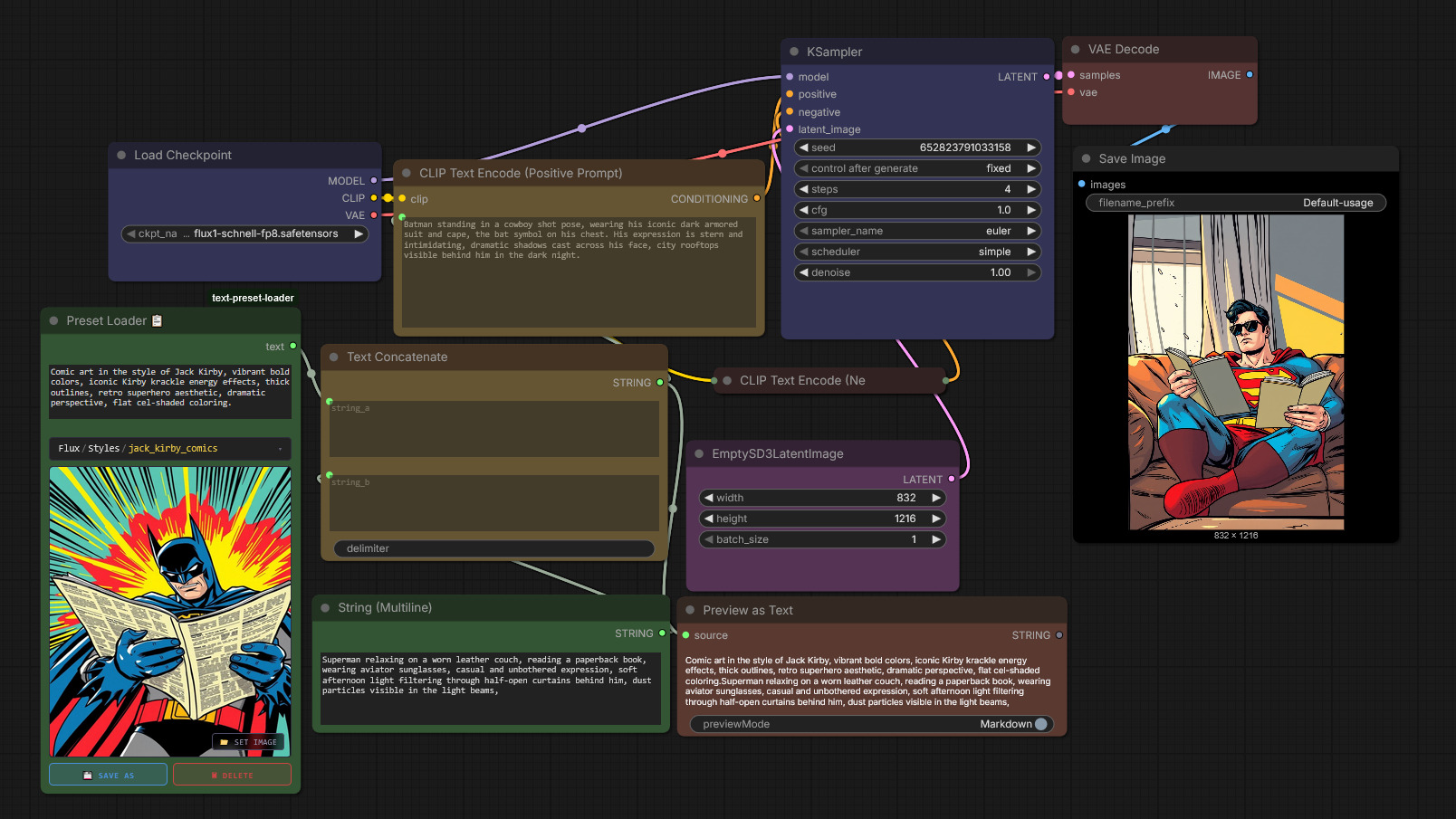
usage in workflow
- connect the output of the Preset Loader Node to the input of a Text concatenate Node.
- use the other input of the Text concatenate Node to add any additional text you want to include in your prompt.
- connect the output of the Text concatenate Node as text for CLIP text encode node.
- use the output of the CLIP text encode node as usual.
examples
default usage with comfy core.
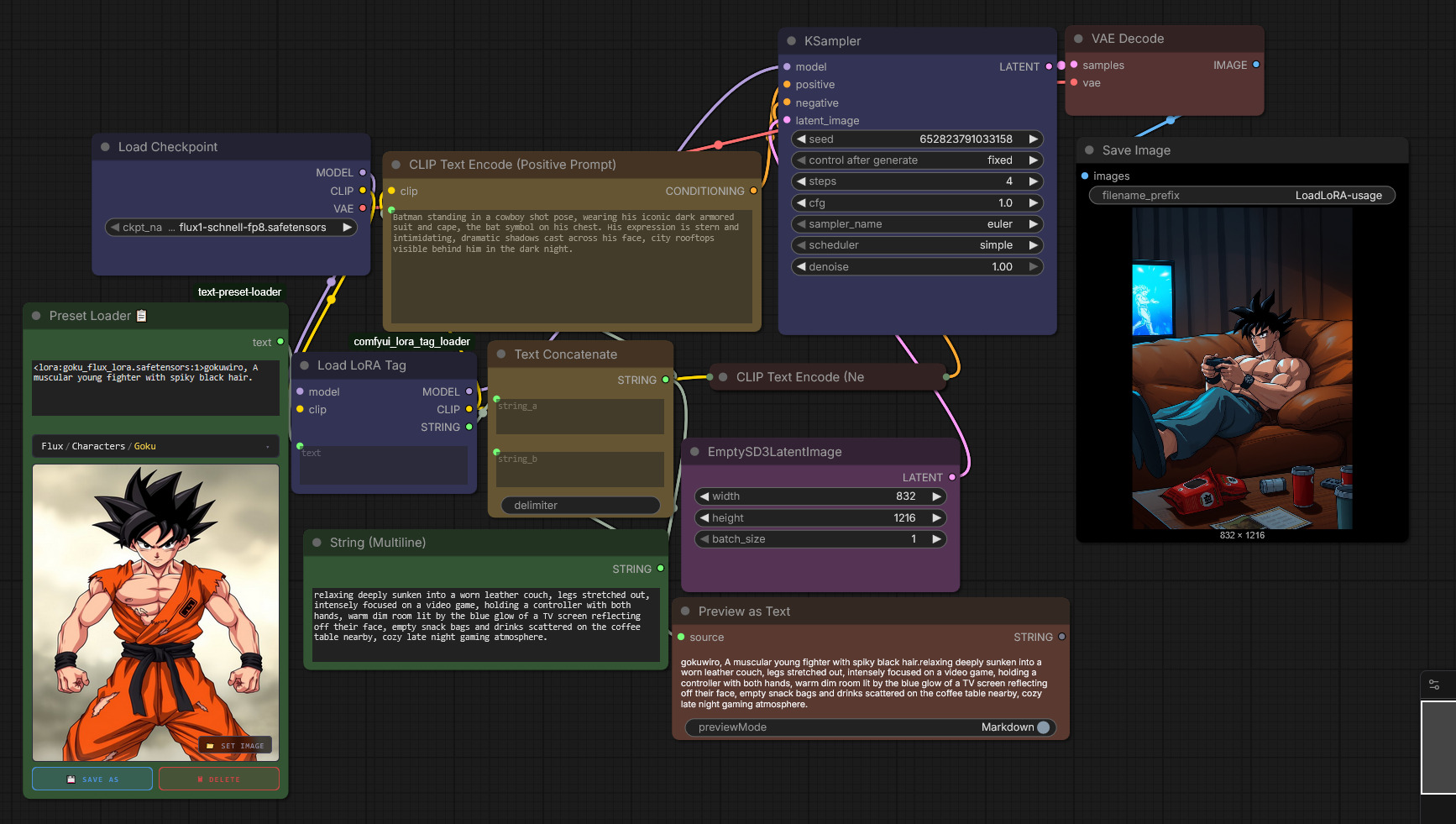
advanced usage to load LoRA using comfyui_lora_tag_loader by badjeff
What's new in 2.1.0
- Favourite presets (♥) — mark your most-used presets per category. Unlike pinning, favouriting doesn't pull a preset out into its own list: it stays right where it is in the tree, just sorted first and marked with a heart, so categories stay meaningful while your go-to presets still rise to the top.
- Pin and favourite are now separate, independent toggles with their own icons — 📌 for pin, ♥ for favourite — available from the node's actions menu and from the browser library (card corner buttons and the editor drawer).
- Favouriting does not change a preset's
preset_idnumber — those stay purely alphabetical, so existing workflows that hardcode an ID are unaffected. - Existing
user_presets.jsonfiles are migrated automatically on first load after updating — no manual edits needed, and nothing gets overwritten.
Notes
- tested it a little bit with nodes 2.0 seems to work. but it was designed for classic.
- I have allergy for JS, so I am sorry if there is something not accounted for.
- To save new preset rather than overwrite just change the name after hitting the save as button.
- remember to use / to create categories and subcategories in the preset name.
- the node comes with 7 presets for testing in flux, you can delete them if you want or edit them as you like.
acknowledgements
- Claude Sonnet 4.6 from Anthropic.
- Huge thanks to @Samseys
for an amazing contribution — the responsive preset browser, the in-node
browser with categories and search, per-node preview controls, multi-frontend
support with the
/preset_loader/browsemanager, live synchronization between the browser and open nodes, and the atomic, lock-protected JSON writes that make it all safe. This release is built on that work.