
ComfyUI-PanelComposer
ComfyUI nodes that turn a panel layout (45+ presets, or hand-drawn) into per-panel generation dimensions, then composite the generated panel images back into one finished comic/manga page - including non-rectangular panel shapes.
Nodes (4)
The tiny node that unblocks ComfyUI's lists
The node that finally stitches your manga page together
Design a manga page in ComfyUI before you generate a single pixel
Turning one (width, height) into two sockets you can wire
ComfyUI-PanelComposer
Custom nodes for generating multi-panel manga/comic pages in ComfyUI: pick (or draw) a panel layout, get per-panel dimensions to feed your generation nodes, then composite the generated panel images back into one finished page.
Nodes
| Node | Does |
|---|---|
| Panel Layout Provider | Outputs a layout's panel geometry (layout_json), a per-panel (width, height) list (panel_dimensions) sized to your target resolution, and a flat-color region map (area_image / area_colors) for regional conditioning. Shows a live preview of the page on the node itself. |
| Panel Compositor | Takes the generated panel images + layout_json and stitches them into one page, with configurable canvas size, fit mode (cover/contain/stretch/fit_to_shape), scaling algorithm, and gutters. |
| List Get Item | Indexes into a list/tuple (e.g. pull one panel's (w, h) out of panel_dimensions). |
| Tuple Unpack | Splits a tuple/list into up to 4 separate outputs (e.g. a panel's (w, h) into separate width/height sockets). |
Parameters
Panel Layout Provider
| Parameter | What it does |
|---|---|
| layout_preset | Which layout to use (grouped by category), or one you saved from the Draw Panels dialog. |
| reading_order | left_to_right / right_to_left — sets each panel's reading order (and the direction shown in the live preview). |
| canvas_rotation | Rotates the panel polygons only (0/90/180/270°) — the page's own shape doesn't rotate, panels just get repositioned within it. |
| aspect_ratio | The page's aspect ratio (e.g. 16:9, 1:1). |
| page_orientation | portrait or landscape — which way aspect_ratio points. |
| canvas_size_mode | fixed_preset (use fixed_preset_size) or fixed_custom (use fixed_custom_megapixels) to size the page. |
| fixed_preset_size | Page size preset (e.g. 1080p, 2K, 4K), used when canvas_size_mode is fixed_preset. |
| fixed_custom_megapixels | Target page megapixels, used when canvas_size_mode is fixed_custom. |
| megapixels | Target megapixels for each individual panel's suggested size in panel_dimensions — separate from the page's own size above. |
| multiple | Rounds every computed width/height to the nearest multiple of this (e.g. 64, for models that require dimensions divisible by 64). |
Panel Compositor
| Parameter | What it does |
|---|---|
| layout_json | The layout from Panel Layout Provider (panel shapes + page size). |
| images | Generated panel images, in the same order as the layout's panels. Extra images are dropped; missing ones render as a numbered placeholder. |
| canvas_mode | How the output page is sized: auto (use layout_json's own size), fixed_preset / fixed_custom (set it independently), or scale_to_input (derive it from one of the actual input images). |
| aspect_ratio, fixed_preset_size, fixed_custom_megapixels | Only used when canvas_mode isn't auto — same meaning as Panel Layout Provider's. |
| page_orientation | auto (follow the layout's own orientation) or force portrait / landscape. |
| scale_to_input_mode | When canvas_mode is scale_to_input: size the canvas off the largest or smallest input image. |
| fit_mode | How each image fills its panel — see below. |
| scale_algo | Resampling filter used whenever an image is resized: nearest, bilinear, bicubic, lanczos. |
| gutter_px | Width, in pixels, of the gap carved between adjacent panels. |
| gutter_color | Hex color used for gutters, and for any padding contain/fit_to_shape leaves behind. |
fit_mode: cover vs. contain vs. stretch vs. fit_to_shape
cover, contain, and stretch all fill the panel's rectangular bounding box first, and whatever doesn't belong to the panel's actual shape gets cropped away afterward. fit_to_shape skips that rectangle step entirely:
- cover — scales the image up/down, keeping its aspect ratio, until it fully covers the bounding box, cropping whatever overflows. No distortion, no padding.
- contain — scales the image down, keeping its aspect ratio, until it fits entirely inside the bounding box, padding the leftover space with
gutter_color. No distortion, no cropping. - stretch — resizes the image to exactly the bounding box's width and height, ignoring its original aspect ratio — so it squashes/stretches to fit. No cropping, no padding.
- fit_to_shape (experimental) — warps the image so its own corners and edges land directly on the panel's actual polygon vertices/edges, instead of filling a rectangle and cropping. On a plain rectangular panel this looks the same as
stretch. The difference only shows on angled/non-rectangular panels (wedges, diagonals, notches):cover/contain/stretchstill fill a rectangle and let the panel's angled edge slice through it, so part of the image gets cut off by that angle —fit_to_shapeinstead bends the whole image to follow the panel's edges, so the full image reads cleanly inside the odd shape with nothing sliced off. Only verified against the built-in presets — check the result if you use it on a custom/drawn shape.
List Get Item
| Parameter | What it does |
|---|---|
| list_or_tuple | Any list/tuple-typed input (e.g. panel_dimensions). |
| index | Which element to return. Out-of-range values clamp to the nearest end instead of erroring. |
Tuple Unpack
| Parameter | What it does |
|---|---|
| tuple_or_list | A list/tuple with up to 4 elements (e.g. one panel's (width, height)). |
Outputs item_0..item_3; positions beyond the input's length output None.
How it works
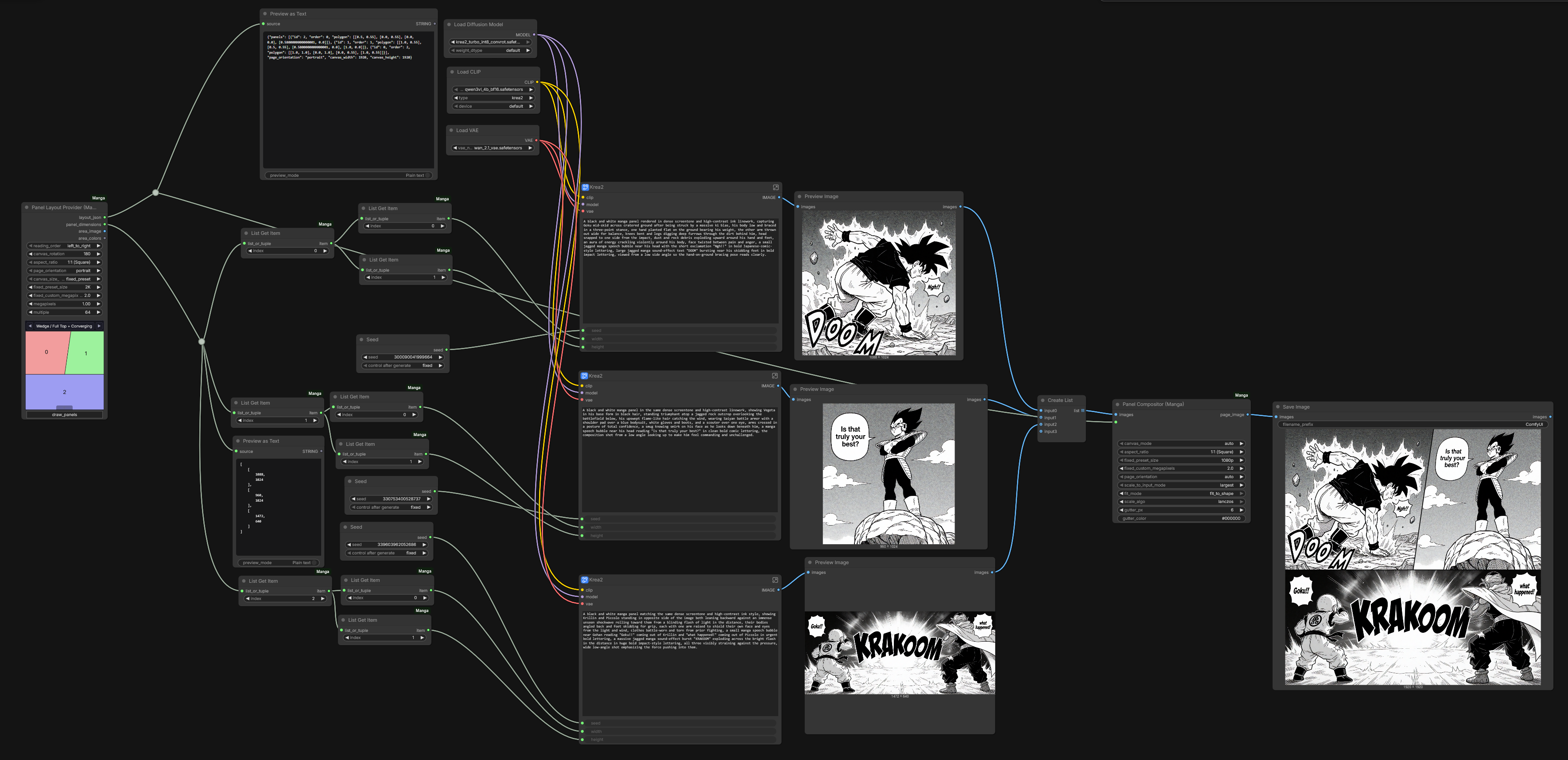
- Panel Layout Provider picks a layout preset (or a custom one you drew — see below) and computes each panel's target size for your chosen aspect ratio/resolution.
- Use List Get Item / Tuple Unpack to route each panel's width/height into your own generation nodes (e.g.
EmptyLatentImage), one generation per panel. - Feed all the generated panel images into Panel Compositor along with
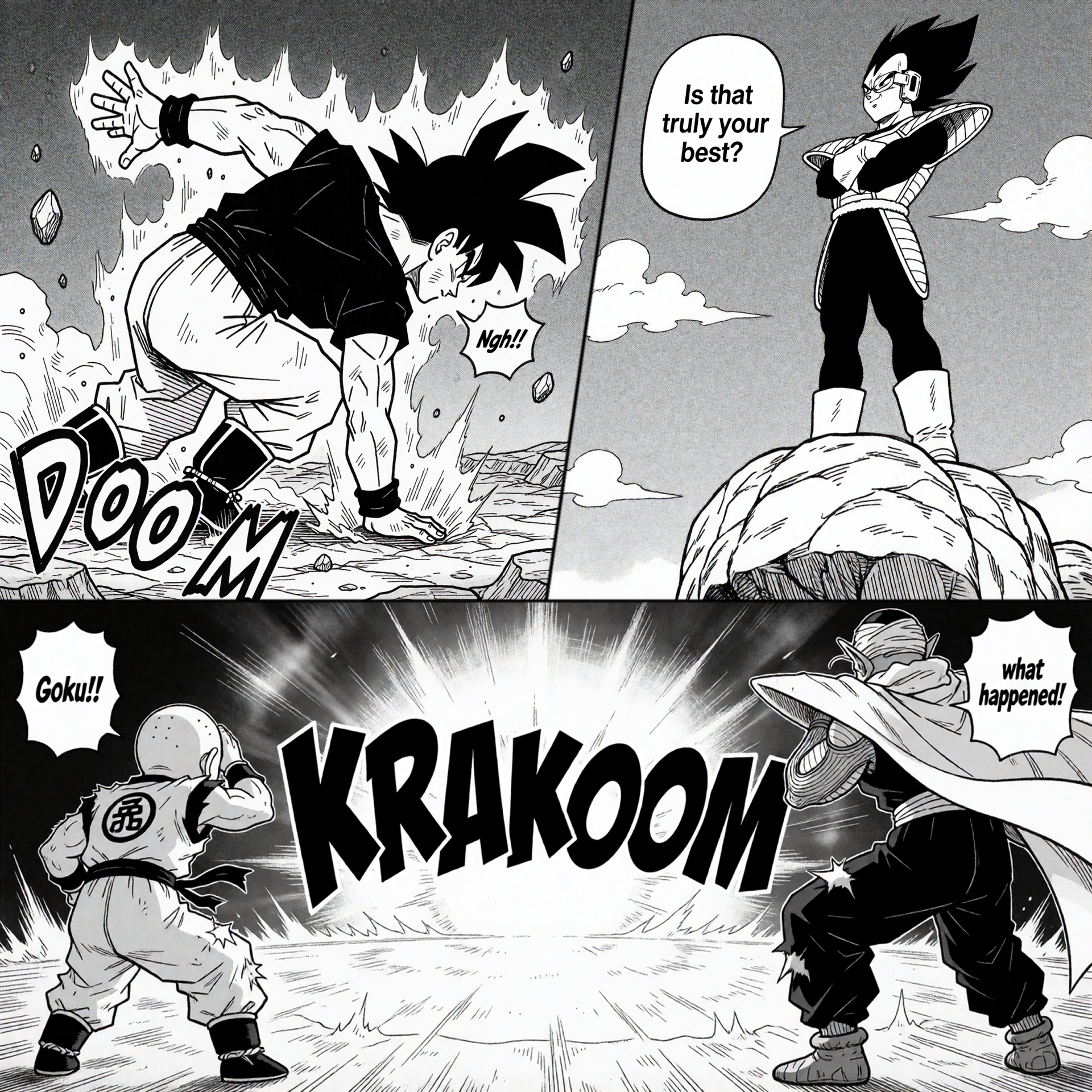
layout_json— it lays each image into its panel's shape and outputs the finished page.
Example
See examples/:
Layout presets & custom layouts
Presets are grouped by category (Single, Splits, Grids, Diagonal, Wedge, Floating, Concave, Cascade, Splash, Strips, ...) and selectable straight from the Panel Layout Provider dropdown. You can also draw your own layout in-node (via the "Draw Panels" dialog) and save it as a reusable user preset — see ADDING_PRESETS.md for details.
See Parameters above for fit_to_shape's caveat on custom/drawn shapes.
Regional conditioning (experimental, theoretical)
area_image/area_colors from Panel Layout Provider exist to support regional conditioning: area_image is a flat-color map with one solid, distinct color per panel, and area_colors gives each panel's exact 0xRRGGBB color in the same order — in theory that lets a mask node (e.g. an exact-color-match node) derive each panel's mask and feed it into a regional-conditioning setup (one prompt per panel region, single shared generation) instead of generating each panel separately.
This has not been gotten working end-to-end — treat it as an unverified starting point, not a supported workflow. In theory the wiring would look like:
Panel Layout Provider --area_image--> [exact-color-match / mask node] --mask--> [regional conditioning node] --+
                      --area_colors-->  (one iteration per panel/color)                                        |
                                                                                                                  v
                          [per-panel positive prompt] ---------------------------------------------> combined conditioning -> KSampler (single pass, full canvas)
Installation
Clone/copy this folder into ComfyUI/custom_nodes/, restart ComfyUI. No extra dependencies beyond what ComfyUI already ships (Pillow).