
ComfyUI Sampling Trace Inspector
Preview-driven execution and sampling trace inspector for ComfyUI
Nodes (10)
The CLIP Snoop That Records What Your Prompt Actually Said
Peek at the Conditioning Tensors, Then Get Out of the Way
Get Your Trace Reports Out — If You're Still on the Old Wiring
A Passthrough That Reads the Image's Mind (Numbers Only)
What's Actually in That Latent? A Number Drop, Not a Guess
Check a Mask's Numbers Without Breaking the Wire
The Engine of Sampling Trace, Now Safely Behind the Curtain
Freeze a Snapshot of Your Model's Patches Mid-Graph
Stamp Observations on a Trace Run, Not a Post-it
See Inside Your KSampler Without Replacing It
ComfyUI Sampling Trace Inspector
English | 한국어
Inspect how a ComfyUI image forms over time: execution flow, sampling steps, latent state, predicted x0, sigma, CFG behavior, ControlNet residuals, model patches, and prompt-word attention in one panel.
Current status: 0.4.0-beta.5 public preview. This bug-fix release adds keyboard step navigation and corrects run-list scrolling and long-title action layout. The previous isolated Quick Start and Registry-ready one-node behavior remain the current release baseline. A clean installation on another machine and a first external user's Quick Start remain unverified. See
docs/LOCAL_VALIDATION.mdanddocs/BUILD_VALIDATION.md.
1. Why this exists
A typical debugging loop looks like this:
Inspect the final image
  → Notice a problem
  → Guess whether CFG, ControlNet, LoRA, or IPAdapter caused it
  → Change a setting and generate again
Sampling Trace Inspector changes the loop:
Inspect step previews
  → Find the step where the result first changes or breaks
  → Check Sigma, CFG delta, Control residuals, and prompt attention
  → Narrow down the settings worth changing
  → Compare two runs with the same seed
This is a sampling debugger for locating turning points in the generation process. It does not claim that one observed signal caused a specific percentage of the final image.
2. How it fits into a workflow
Sampling Trace Inspector does not replace KSampler. Add Sampling Trace · One Node Setup after the final MODEL patch, and feed both the final MODEL and checkpoint CLIP through that one node.
[Checkpoint Loader]
  MODEL → LoRA → IPAdapter / other patches ─┐
  CLIP ─────────────────────────────────────┤
                                           ↓
                         [Sampling Trace · One Node Setup]
                           MODEL → Existing KSampler
                           CLIP  → Positive / Negative Text Encode
Keep ControlNet on the existing CONDITIONING path:
Positive / Negative Conditioning
   ↓
ControlNet Apply
   ↓
KSampler
The node's MODEL output registers observers on a cloned ModelPatcher, while its CLIP output transparently forwards the original tokenizer result and records prompt metadata in the same Run:
OUTER_SAMPLE wrapper
  ├─ sampling begin / end
  └─ step callback around the existing callback

APPLY_MODEL wrapper
  ├─ Control residuals passed to the real model call
  └─ active transformer patch types

Pre-CFG hook
  └─ conditional / unconditional output difference
Samplers that follow the standard CFGGuider → ModelPatcher path can be traced without replacing the sampler node.
3. Inspect installed custom nodes first
Use the static inventory before deciding which adapters are required. The scanner reads source and metadata without importing or executing other custom nodes.
python scripts/scan_custom_nodes.py \
  --comfy-root "<ComfyUI or Windows Portable root>" \
  --output-dir docs
Generated local files:
docs/CUSTOM_NODE_INVENTORY.json
docs/CUSTOM_NODE_INVENTORY.md
docs/TRACE_COMPATIBILITY_MATRIX.md
docs/ADAPTER_PRIORITY.md
docs/LOCAL_ADAPTER_PLAN.md
These files help determine whether installed ControlNet, IPAdapter, LoRA, Detailer, Regional Prompt, Tiled Diffusion, and Qwen-related nodes use standard hooks or need a dedicated adapter. See docs/CUSTOM_NODE_SCAN_GUIDE.md.
4. Installation
- Clone the public repository into
custom_nodes. If you download a ZIP, extract it with the same final folder name.
git clone https://github.com/ILcrowe/ComfyUI-SamplingTrace-Inspector.git ComfyUI/custom_nodes/ComfyUI-SamplingTrace-Inspector
Final location:
ComfyUI/custom_nodes/ComfyUI-SamplingTrace-Inspector/
- Optionally run the static package check with the Python environment used by ComfyUI.
cd ComfyUI/custom_nodes/ComfyUI-SamplingTrace-Inspector
python scripts/static_check.py
-
Restart ComfyUI.
-
Search for the recommended setup node:
Sampling Trace · One Node Setup
- Add
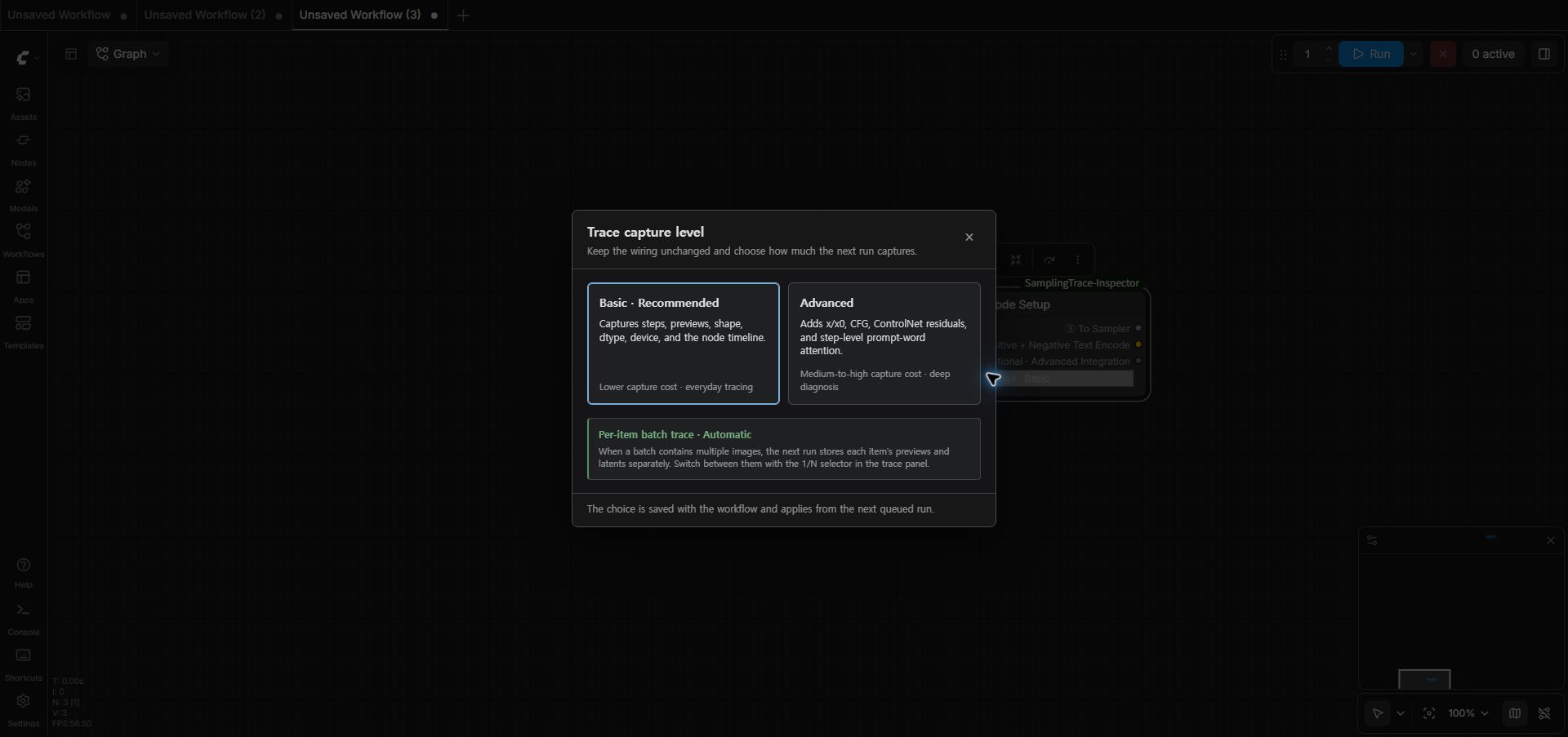
Sampling Trace · One Node Setupafter the final MODEL patch. It intentionally exposes only MODEL and CLIP sockets. Use its compactTrace settingsbutton to open a popup and chooseBasic(default) orAdvanced, then connect MODEL to the first sampler and fan CLIP out to both Text Encode nodes.
- Open the
Sampling Trace Inspectorbottom panel.
5. Recommended wiring
[Checkpoint Loader]
  CLIP ───────────────────────────────────────────┐
       MODEL                                      │
         ↓                                        │
[LoRA Loader]                                             │
         ↓                                               │
[IPAdapter Advanced]                                      │
         ↓                                               │
[Sampling Trace · One Node Setup] ←───────────────────────┘
    MODEL ──→ [KSampler]
    CLIP  ──┬──→ Positive Text Encode
            └──→ Negative Text Encode
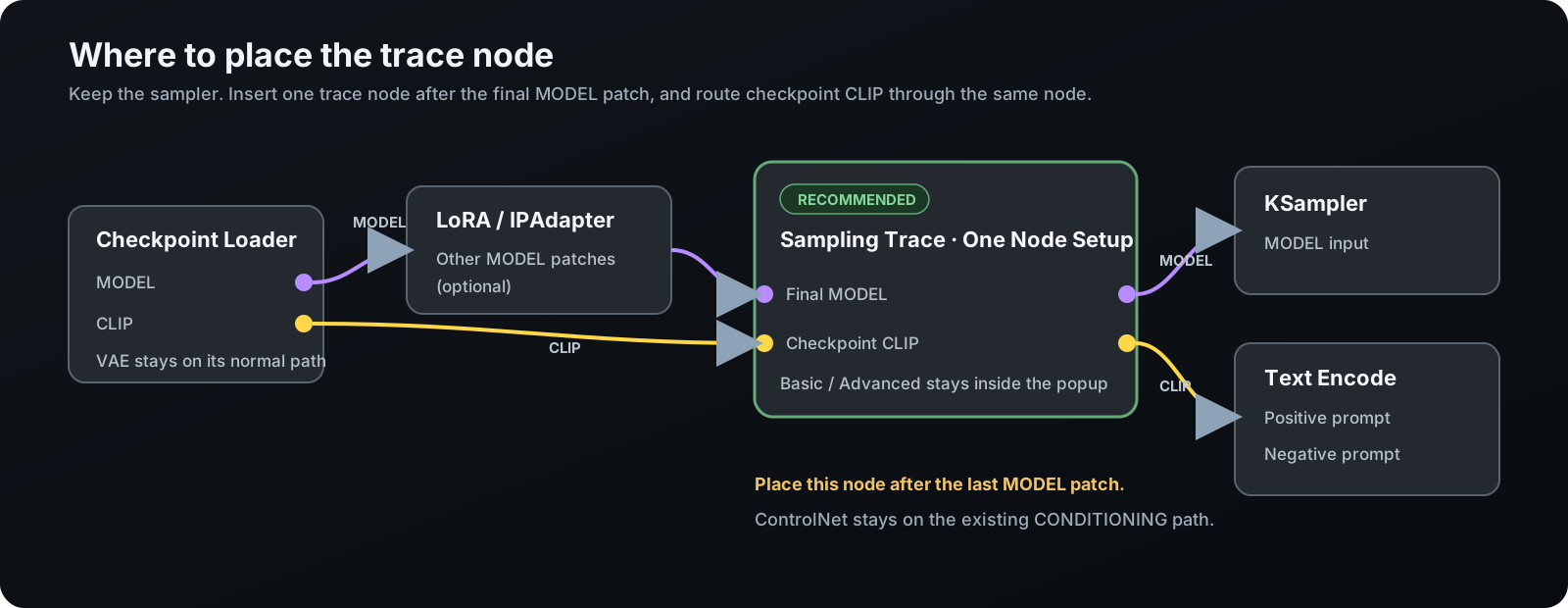
This is the recommended setup: one physical trace node creates one Run for the final MODEL and the actual CLIP tokenize() calls. No prompt_trace wire is needed. Place the node after the last MODEL patch, then connect its CLIP output to both positive and negative Text Encode nodes.
The node starts in Basic mode. Click Trace settings · Basic on the node to open the capture popup; selecting Advanced stores that choice with the workflow and applies it to the next queued run. The popup keeps capture depth out of the wiring surface while making the active level visible on the node.
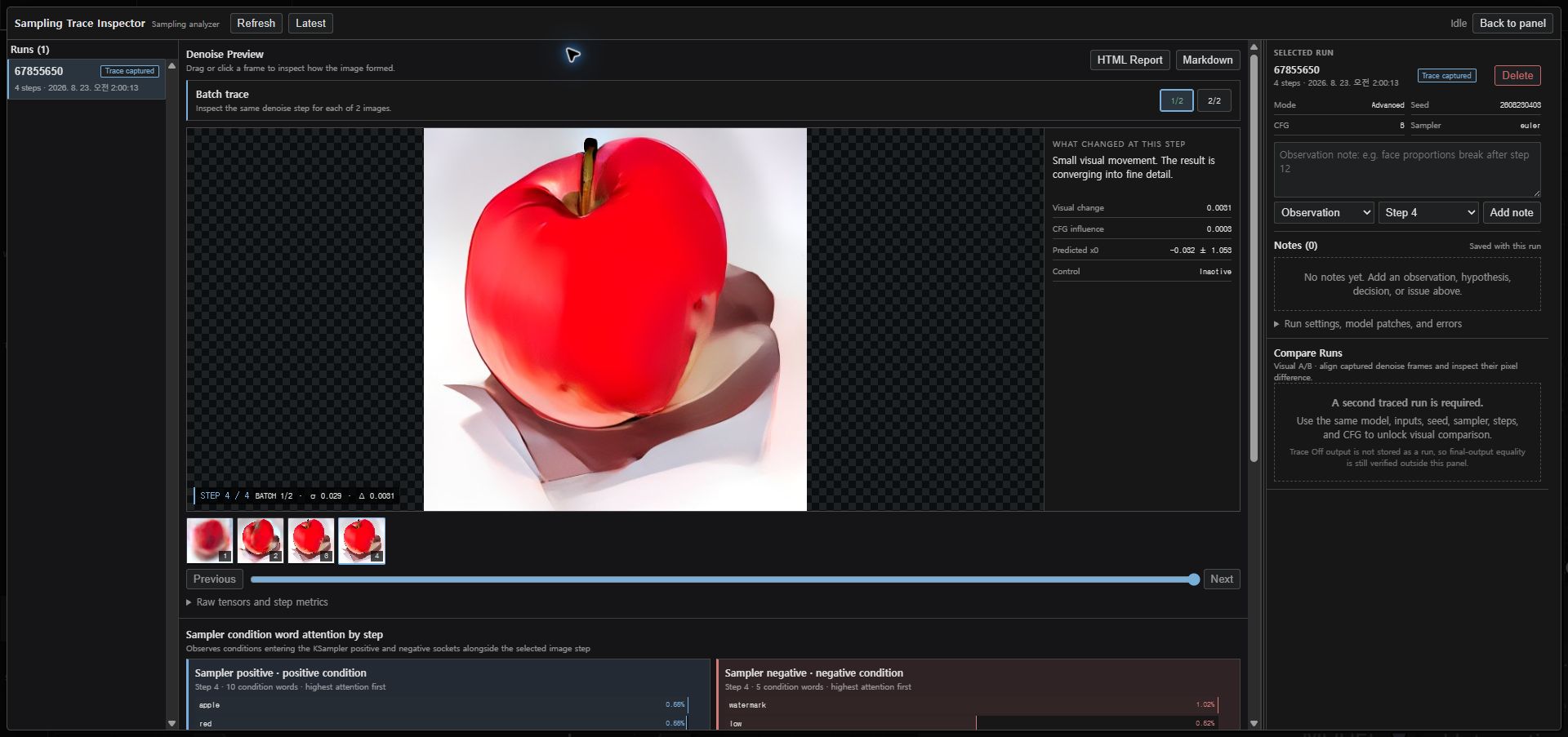
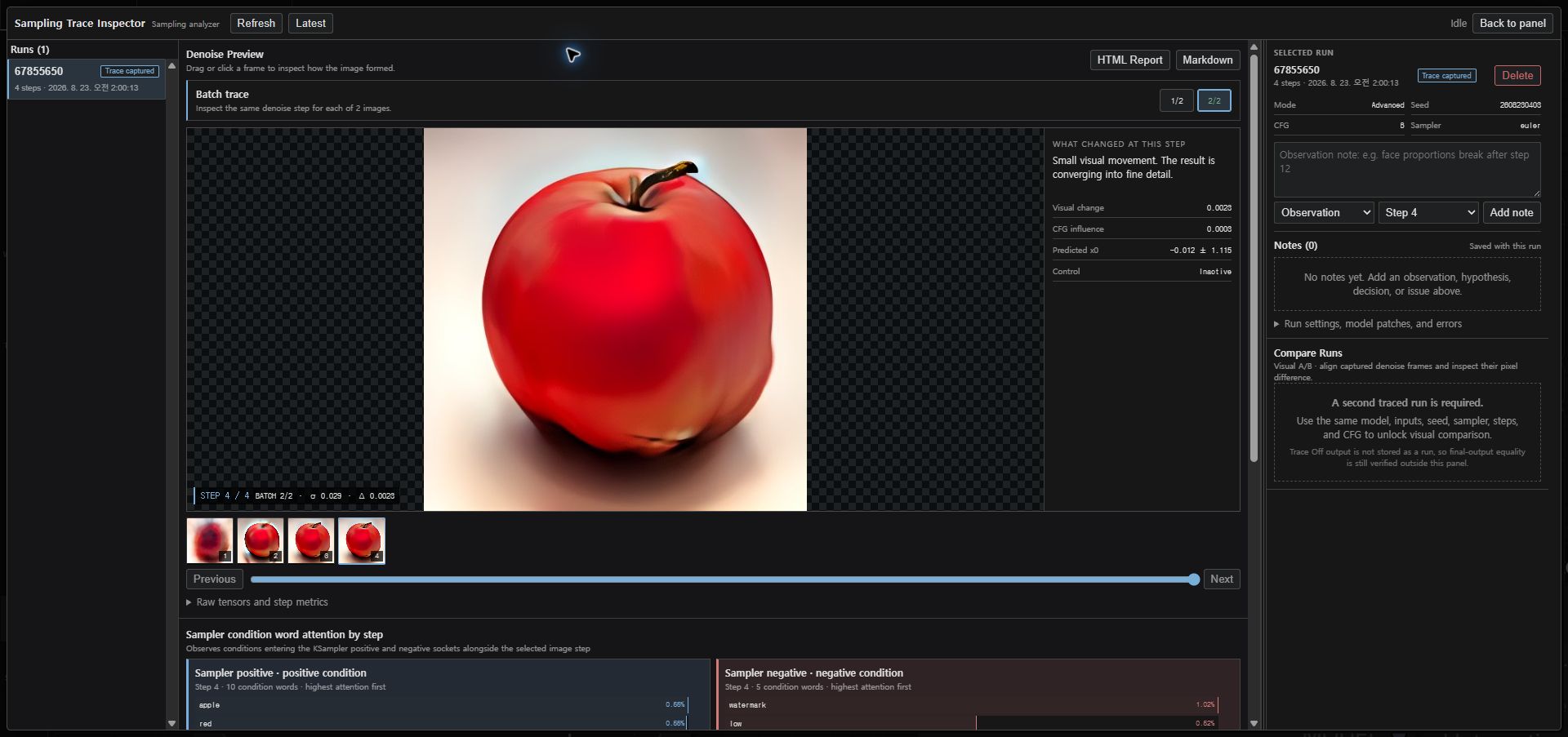
Multi-image batches are captured automatically without adding another node. For example, a batch size of four stores four independent x/x0 summaries and denoise preview histories inside the same sampler segment. Use the 1/4 batch selector above the denoise preview to inspect each image at the same step. Basic keeps lightweight shape/device summaries; Advanced adds per-item tensor statistics. Runs created before per-item batch capture keep their first-image preview and show the other batch buttons disabled until the workflow is run again.
The CLIP proxy forwards the original tokenize() result unchanged and records the calling node, prompt text, CLIP-L/G token IDs, input weights, and readable word groups in the same run. Normal node search exposes only Sampling Trace · One Node Setup. The other nine classes remain registered but deprecated and hidden so saved workflows still load and internal or advanced diagnostics remain possible. Run completion automatically finalizes reports, and Notes are managed in the bottom panel, so separate Export and Note nodes are not part of the public workflow surface.
Why the one-node setup comes after the last MODEL patch
- The snapshot includes LoRA, IPAdapter, and other patches already registered on the final MODEL.
- Runtime patch keys are easier to associate with the actual sampling call.
- Wrappers may survive if the node is placed earlier, but patch interpretation can become incomplete.
6. Trace modes
| Mode | Captured data | Cost | Recommended use |
|---|---|---:|---|
| Basic | Steps, previews, shape/dtype/device, node timeline | Low | Follow the overall generation flow |
| Advanced | Basic plus CFG delta and Control structure. With persist_tensor_stats=true, also captures x/x0 details, Control residuals, and step-level positive/negative prompt-word attention | Medium to high | Tuning and ControlNet, prompt, or custom-node research |
Start with Basic. In the one-node popup, Advanced enables the high-cost tensor statistics needed for the full internal-signal view. Expert split wiring can still use the deprecated Sampling Trace Model node to control persist_tensor_stats separately. Legacy workflow values using Deep are automatically treated as Advanced.
7. Preview settings
preview_every
Controls how often a preview image is stored.
1 = every step
2 = every second step
5 = every fifth step
All numeric step records are still captured. The filmstrip shows only stored preview steps.
preview_max_side
Limits the longest side of a stored preview. The default is 768.
preview_decoder
clear(default): uses the model-family TAESD when available, producing a preview closer to the final image dimensions.fast: uses Latent2RGB. It is faster, but enlargement can reveal the low latent resolution.
If TAESD is unavailable or fails to load, clear falls back to fast. This setting affects only trace previews and does not modify ComfyUI's existing Live Preview setting.
persist_previews
Disable it to save numeric traces without image files.
What a preview means
Current step x0
  ↓
Trace preview decoder
  ├─ clear → model-family TAESD → Latent2RGB fallback
  └─ fast  → Latent2RGB
  ↓
Fast approximate preview
A trace preview helps identify when composition and structure appear or collapse. It is not the final VAE Decode and should not be used as exact evidence for final texture, color, or fine detail.
8. Panel guide
Runs
- Displays the active workflow filename, label, status, and step count.
- Selects the latest stored run.
- Keeps the header fixed while the run list scrolls vertically.
Only the workflow filename is stored in run.json and reports; local absolute paths are removed. Unsaved workflows and API runs fall back to the label or run ID.
Drag the divider between the center workspace and Selected Run / Compare Runs to resize the right panel. The width is saved in the current browser. Double-click the divider to restore its default width.
If generation succeeds without Sampling Trace · One Node Setup in the executed graph, the panel explains the required MODEL path and reminds you to route checkpoint CLIP through the same node before the Text Encode nodes.
Denoise step viewer
- Continuously draggable step slider
- Approximate x0 preview
- Sigma
- Preview change
- x0 mean and standard deviation
- CFG delta
- Control residual summary
Changing the image step also changes the positive and negative prompt-word views. The text section intentionally has no second step selector.
Node timeline
- Node execution start and end
- Cache use
- Progress
- Execution time
- Errors and interruptions
Sampler positive and negative conditions
- Traces the graph role connected to the sampler's
positiveandnegativeinputs. - With
Advanced + persist_tensor_stats=true, observes the average cross-attention for each CONDITIONING word from the actual sampled Q/K values at each step. - Combines partial tokens using the original text and CLIP word boundaries.
- Combines repeated occurrences into one readable word entry.
- Shows positive conditions in a light blue panel and negative conditions in a light red panel.
- Shows a connection guide instead of assigning measurements to the wrong words when only one Text Encode path was connected through
Sampling Trace CLIP.
Prompt token IDs and CONDITIONING inputs remain fixed during a run. Their observed attention changes because the latent state and sigma change at each step. Values are approximate averages over sampled spatial queries, text keys, and cross-attention layers. They are not causal percentages such as “this word produced 30% of the image.”
Raw prompt calls, encoder chunks, token IDs, partial pieces, input weights, special tokens, and padding remain in the stored evidence but are not duplicated in the normal panel.
Visual A/B
- Compares workflow hashes, node counts, settings, and requested versus actual sampler.
- Aligns step previews, x0, CFG, and Control metrics.
- Compares MODEL patch snapshots.
- Builds Markdown and HTML reports.
- Uses the backend
promptIdto associate concurrent executions with the correct run.
The comparison is observational evidence, not an absolute attribution of image quality.
Notes
- Observation
- Hypothesis
- Decision
- Issue
Notes belong to the selected run. They can target the whole run or a specific sampler segment and step, and can be edited, focused, or deleted. The Korean UI localizes the labels while the stored schema retains observation / hypothesis / decision / issue for compatibility. Updating a note also refreshes report.md and report.html.
9. Data storage and privacy
Run data is stored under the ComfyUI user directory by default:
ComfyUI/user/trace_inspector/runs/<run_id>/
├─ run.json
├─ steps.jsonl
├─ probes.jsonl
├─ frontend_events.jsonl
├─ report.md
├─ report.html
└─ artifacts/
   ├─ segment_00_step_0000.jpg
   ├─ segment_00_step_0001.jpg
   └─ ...
run.json.promptTokenization can contain supported prompt text and actual token records. Prompt text, model filenames, workflow snapshots, notes, and preview images may be sensitive. Review a run before sharing it.
If folder_paths.get_user_directory() is unavailable, storage falls back to data/runs/ inside the plugin. Run and note data are not source files. The fallback data/ directory is ignored by Git and is not committed unless someone explicitly bypasses .gitignore.
10. Probe nodes
These typed passthrough probes are hidden from normal node search. They remain registered for saved-workflow compatibility and internal or advanced diagnostics where an arbitrary IMAGE, LATENT, MASK, CONDITIONING, or MODEL branch must be inspected.
| Node | What it records | Passthrough |
|---|---|---|
| Sampling Trace Image | IMAGE shape, range, mean, and standard deviation | IMAGE unchanged |
| Sampling Trace Latent | LATENT keys and samples tensor summary | LATENT unchanged |
| Sampling Trace Mask | MASK shape, range, and statistics | MASK unchanged |
| Sampling Trace Conditioning | CONDITIONING tensors and metadata keys | CONDITIONING unchanged |
| Sampling Trace Model Snapshot | MODEL patch count, transformer patch types, wrappers, and callbacks | MODEL unchanged |
Probe nodes do not start sampling trace by themselves. Existing advanced workflows can connect the deprecated Sampling Trace Model before the sampler to create a traced run.
11. Performance policy
- Never stores complete tensor values.
- Samples at most 65,536 elements for tensor statistics.
- Stores grouped summaries for Control residuals.
- Computes preview change on images reduced to 128×128.
- Isolates observer failures so a trace error does not intentionally fail generation.
- Lets users control disk and decode cost through trace mode and preview interval.
Local WAI Illustrious v17 testing at 512², Euler/normal, 8 steps, CFG 5.0, N=3 found identical decoded output for Off, Basic, and Advanced runs with the same seed. Step-level prompt attention is a higher-cost Advanced option. See docs/LOCAL_VALIDATION.md for measured results and limits.
12. Tests
Package tests:
pytest -q
python scripts/static_check.py
Installed ComfyUI integration smoke test:
python scripts/comfy_integration_smoke.py
Follow docs/TEST_PLAN.md for real generation validation.
13. Support status
Implemented
- Official WebSocket execution-event collection
- Sampling begin, step, and end observation
- Preview persistence
- x, x0, and Sigma records
- CFG delta summary
- Control residual summary
- LoRA, IPAdapter, ControlNet, and KSampler semantic adapters
- Run storage, reports, and A/B comparison
- Bottom panel
- Actual CLIP-call prompt text, CLIP-L/G token evidence, and sampler positive/negative word attention
Verified in the current local installation
- Bottom panel, expanded view, independent vertical scrolling, resizable right panel, and Notes
- Standard KSampler Trace Off/On decoded-pixel identity
- SDXL and Illustrious XL previews
- OpenPose and Depth ControlNet residuals and A/B previews
comfyui_ipadapter_plusattention patch observation and A/Bcomfyui-easy-useandComfyui-EasyIllustriouscustom sampling paths- Impact Pack FaceDetailer sampling path
- A/B Markdown/HTML reports and backend prompt-to-run association
- Off, Basic, and Advanced performance and disk baselines
- Korean/English node and panel localization
Still requires compatibility validation
- Flux and Qwen Image model families using tokenizer APIs other than the validated CLIP path
- More workflows containing multiple KSampler segments
- AnimateDiff, CogVideoX, Wan, and other video-model paths
- A clean install outside the development machine
- First external user's Quick Start
14. Documentation
| Document | Purpose |
|---|---|
| docs/CUSTOM_NODE_SCAN_GUIDE.md | Static inspection of installed custom nodes |
| docs/CUSTOM_NODE_INVENTORY_SCHEMA.md | Inventory JSON contract |
| docs/CODEX_CUSTOM_NODE_INVENTORY_PROMPT.md | Codex prompt for the pre-integration inventory |
| docs/PRODUCT_SPEC.md | Product goals and boundaries |
| docs/ARCHITECTURE.md | Hooks and technical structure |
| docs/PHASES.md | Implementation phases |
| docs/CODEX_HANDOFF.md | Integration handoff criteria |
| docs/CODEX_PROMPT.md | Ready-to-use Codex integration prompt |
| docs/TEST_PLAN.md | Real ComfyUI validation scenarios |
| docs/BUILD_VALIDATION.md | Package checks and unverified boundaries |
| docs/IMPLEMENTATION_STATUS.md | Phase-by-phase implementation status |
| docs/ADAPTER_SDK.md | Custom-node adapter extension guide |
| docs/KNOWN_LIMITATIONS.md | Known limits and risks |
| docs/GLOSSARY_KO.md | English terms with Korean explanations |
| docs/RESEARCH_NOTES_2026-08-12.md | Primary-source research notes |
15. Public preview feedback
Use GitHub Issues for reproducible defects, compatibility problems, and unclear setup steps.
Do not attach model files, private workflow originals, generated images, prompt text, or complete run folders. Share only the minimum reproducible configuration.
16. Sponsorship
The complete source and features remain available under the license below. If this tool helps your work, you can optionally support its public development, documentation, testing, and maintenance through GitHub Sponsors.
License
Copyright (C) 2026 ILcrowe.
Released under the GNU General Public License v3.0 only (GPL-3.0-only). See THIRD_PARTY_NOTICES.md for host and development-time components that are not bundled with this repository.