
ComfyUI Extension
comfyui-grid-cutscene
Interactive grid cutscene system for ComfyUI that creates polygon masks by clicking points on a grid and outputs masks and previews. (Description by CC)
Hyunsigikim/comfyui-grid-cutscene
Nodes1
On cloudLocal install
CategoryLayoutTools
Stars0
Updated8 months ago
Readme
comfyui-grid-cutscene
ComfyUI 커스텀 노드: Grid Cutscene System (Interactive)
격자(grid) 위에서 패널 단위로 4개의 포인트를 찍어 폴리곤 마스크를 만들고, 이를 MASK와 미리보기용 IMAGE로 출력하는 노드입니다.
설치
- 폴더를 아래 경로로 복사
ComfyUI/custom_nodes/comfyui-grid-cutscene
- 의존성 설치 (ComfyUI Portable 루트 기준)
python_embeded\python.exe -m pip install -r ComfyUI\custom_nodes\comfyui-grid-cutscene\requirements.txt
- ComfyUI 실행
노드 정보
- 표시 이름: Grid Cutscene System (Interactive)
- 클래스:
GridCutscenePanel - 카테고리:
LayoutTools
사용 방법
grid_size를 설정 (예:12)panel_index선택 (0..7)- 그리드 위를 클릭해서 포인트를 찍습니다.
- 포인트가 4개가 되면 폴리곤 마스크가 생성됩니다.
all_panels_data는 내부(히든 위젯)에 저장되며, 마스크를 재구성할 때 사용됩니다.
입력/출력
출력
MASKIMAGE(마스크를 3채널 이미지로 변환한 미리보기)
샘플
아래 이미지는 저장소에 포함된 샘플입니다.
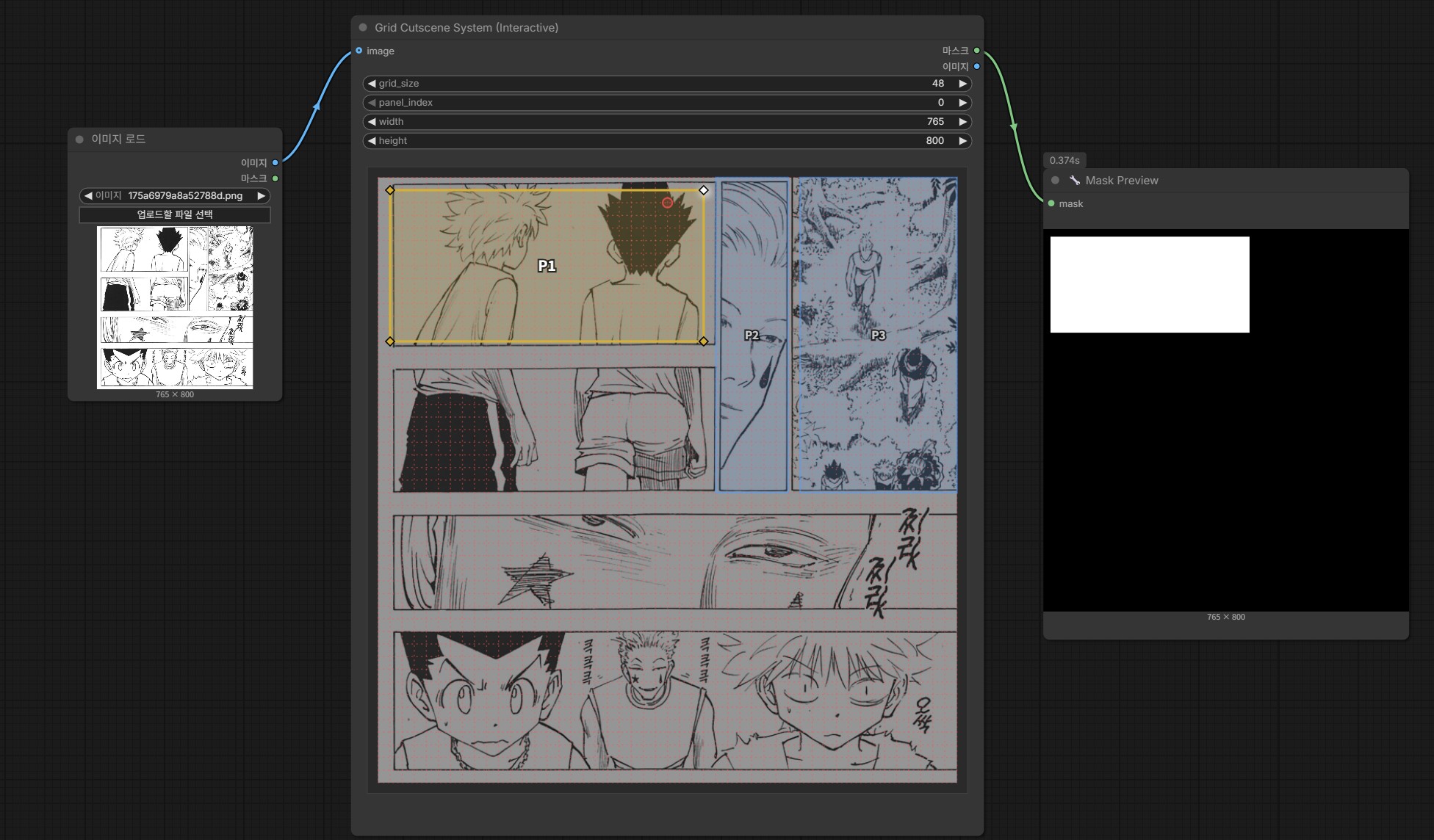
트러블슈팅
- 노드가 목록에 안 보임
- 폴더 경로가
ComfyUI/custom_nodes/comfyui-grid-cutscene인지 확인하세요. - ComfyUI를 재시작하세요.
- 폴더 경로가
- 의존성 설치 오류
requirements.txt설치 명령을 ComfyUI Portable 루트에서 실행했는지 확인하세요.
License
MIT