
ComfyUI-SuperPBR
ComfyUI nodes for turning any picture into a full PBR material.
Nodes (6)
One photo in, albedo and ORM out, no sampler involved
Your depth map isn't flat, and that's why your displacement leans
The drop-down that's empty until you read the README
Three grey maps out of one packed image, plus the Blender advice nobody tells you
How to decompose a 4K texture without feeding it 4K
The node that hides 25 tiles' worth of seams
ComfyUI SuperPBR
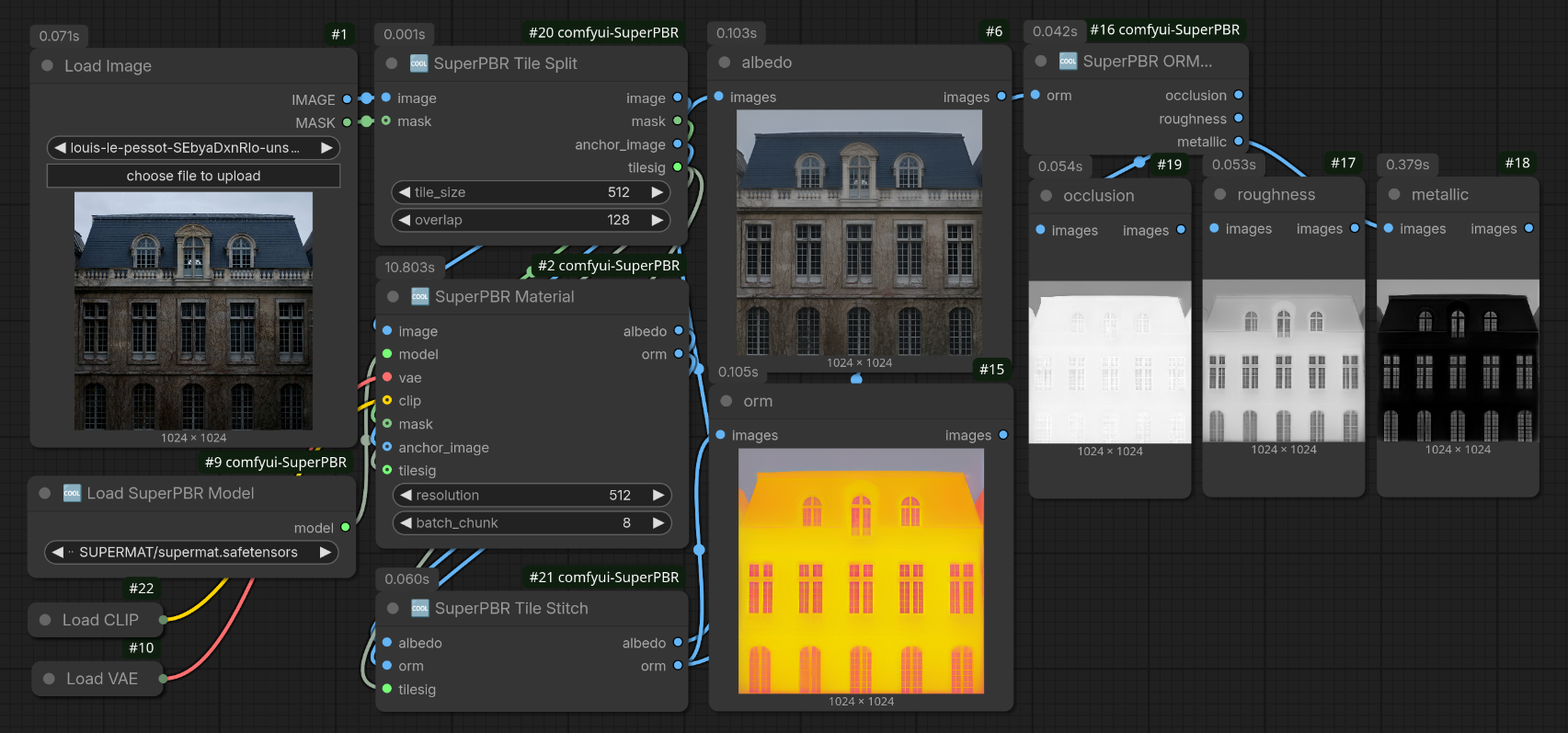 ComfyUI nodes for the Base SuperMat model from
SuperMat: Physically Consistent PBR Material Estimation at Interactive Rates (ICCV 2025).
ComfyUI nodes for the Base SuperMat model from
SuperMat: Physically Consistent PBR Material Estimation at Interactive Rates (ICCV 2025).
SuperMat is a Stable Diffusion 2.1 UNet finetuned to run as a single-step, deterministic feed-forward network. One pass over a rendered object produces its albedo and ORM (occlusion / roughness / metallic) maps, which is what you need to rebuild a PBR texture from a render.
Installation
cd ComfyUI/custom_nodes
git clone https://github.com/Hullabalo/ComfyUI-SuperPBR.git
Model files
Put supermat.pth anywhere under your models/diffusion_models' folder.
Watch below (in SuperPBR Material node description) for advice on VAE and clip.
For generating normal and height maps, I recommend using the native MoGe 3 nodes (as provided with ComfyUI 0.39.0 base install), along with the following model in models/geometry_estimation: MoGe 3 ViTG FP16 and the SuperPBR Detilt node (see below).
Example workflow
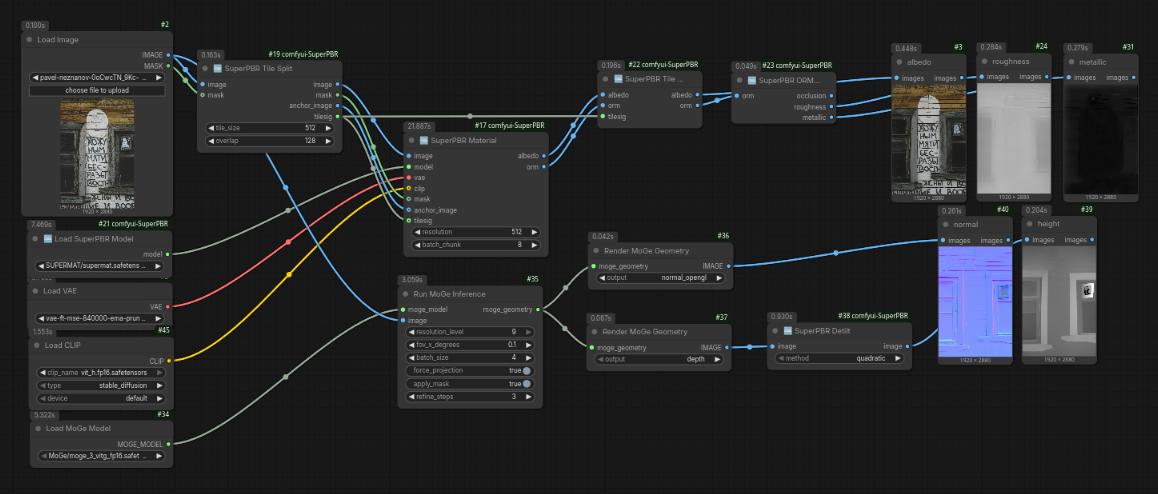 Using SuperMat (albedo, orm) and MoGe3 (height, normal)
Nodes
🆒 Load SuperPBR Model
Selects a Base SuperMat checkpoint ('.pth') and returns a 'SUPERMAT' model.
🆒 SuperPBR Material
Decomposes an image into 'albedo' and 'orm' ('R' = ambient occlusion, 'G = roughness, 'B' = metallic).
| Input | Notes | | --- | --- | | 'image' | The rendered object. The whole batch is decomposed in one pass. | | 'model' | The SuperMat model. get 'supermat.pth' from Hugging Face | | 'vae' | A Stable Diffusion VAE with 4 latent channels, e.g. 'vae-ft-mse-840000-ema-pruned.safetensors'from stabilityai | | 'clip' | Optional (recommended). An SD 2.1 text encoder, e.g. 'text_encoder/model.fp16.safetensors' from sd2-community/stable-diffusion-2-1-base. Only used for the fixed empty-prompt context; when not connected a zero context is used instead (output shift below the maps' noise floor, saves ~675 MB of VRAM and the encoder load). | | 'resolution' | 512 by default, which is what SuperMat was trained for. | | 'mask' | Optional. SuperMat expects the object on a flat '0.5' gray background; connect a mask and the node composites it that way for you. | | 'batch_chunk' | Images decomposed per UNet/VAE pass (1–16, default 8). Larger batches are chunked and concatenated — same output, capped peak VRAM on big tile grids. |
🆒 SuperPBR Tile Split and 🆒 SuperPBR Tile Stitch
For images larger than 512: split into an overlapping tile batch, decompose, then feather-blend the tiles back together. The decomposition node is batch-native, so it needed no changes.
Tile Split inputs: 'image', 'tile_size' (512 default, SuperMat's training resolution — tiles up to 768 also give good results), 'overlap' (default 128 px), and an optional 'mask' which is split on the exact same grid so it stays pixel-aligned with the image tiles. It returns the image and mask tile batches, an 'anchor_image' (the full mask-composited image padded to the tile canvas. See the global anchor below) and a 'tilesig' grid signature.
Tile Stitch takes the 'albedo' and 'orm' tile batches plus the 'tilesig' from Tile Split, and reassembles each with linear feather blending over the overlap. Output size matches the original input exactly.
A fix for tile drift lives in SuperPBR Material Decomposition: connect Tile Split's 'anchor_image' and 'tilesig' outputs into its 'anchor_image' and 'tilesig' inputs. The node then makes one extra global pass over the whole (downscaled) image and blends each tile onto it with a frequency split, in pixel space.
🆒 SuperPBR ORM Split
Splits an ORM map (R = occlusion/AO, G = roughness, B = metallic) straight from SuperPBR Material or reassembled by SuperPBR Tile Stitch, into three separate gray images.
🆒 SuperPBR Detilt
Removes the spurious tilt (and dome/bowl curvature) that depth models often leave on flat areas, so a displacement/height map displaces flat where it should. 'method' selects how the background surface is estimated: 'quadratic' fits a second-order surface on the image's border ring with iterative outlier rejection (also removes the smooth curvature depth models leave on flat inputs), 'bilinear' interpolates between four averaged corner patches, and 'none' passes the map through unchanged.
Credits
Thanks to the following contributors to :
SuperMat Model https://github.com/hyj542682306/SuperMat
MoGe 3 Model https://github.com/microsoft/moge
ComfyUI (of course :-)) https://github.com/Comfy-Org/ComfyUI
Example images Pavel Neznanov Louis Le Pessot
Licenses
All code and models, including this repo is MIT
Images are under Unsplash license