
ComfyUI-Pt-Wrapper
PyTorch extension for ComfyUI featuring extensive PyTorch wrapper nodes for seamless tensor operations and PyTorch model training.
Nodes (212)
One string away from BERT-ready tokens
Absolute value, minus the drama
Arccos, for when your angles need reversing
The node under everything
Where the pack's callables actually get called
Roll your own index and position tensors
The node that turns logits into a prediction
The other arg-extreme, for distances and minima
Arcsin, the half of the trig pair nobody shows off
Arctan, the angle from a ratio
Doing flag math inside ComfyUI
Multiply by powers of two, one bit at a time
The simplest node in the pack, and when it's useful
How you set flags instead of checking them
Floor-division by powers of two, the fast way
Toggling bits and checking parity without Python
The batched matrix multiply behind attention, without the Python
Hand-type a boolean tensor and get on with it
The node the author told you not to use (mostly)
Stitch tensors together without leaving the graph
Cosines for your tensor math, radians included
Hyperbolic cosine, the trig cousin you'll use twice a year
The node that will teach you ComfyUI images aren't what this pack wants
The feeding tube for your no-code training loop
Skip the dataset, feed raw tensors straight to training
Coin-flip probabilities as a real distribution object
A flexible distribution for probabilities and priors
How many successes out of n tries
Pick one outcome out of many
The chi-squared distribution, for stats and variance modeling
Waiting times and decay, as a distribution object
Ptd Gamma — define a Gamma distribution in the node graph, no Python required
Pt Div — element-wise division, the humble node that saves you a step
Ptdm Cdf — ask a distribution 'how likely is anything up to here?'
Ptdm Cdf Tensor — the same CDF, but vectorized across a whole tensor
Ptdm Icdf — the inverse CDF, for going from probability back to value
Ptdm Icdf Tensor — invert a distribution for a whole batch of probabilities
Ptdm Log Prob — the log-probability node that's secretly the useful one
Ptdm Log Prob Tensor — score a whole tensor against a distribution in one shot
Ptdm Pdf — how likely is this exact value? The density node, demystified
Ptdm Pdf Tensor — draw the whole distribution shape at once
Ptdm Pmf — the discrete answer to 'how likely is exactly k?'
Ptdm Pmf Tensor — the whole probability histogram, one tensor at a time
Ptdm Sample — actually draw from the distribution, as a tensor
Ptd Normal — the bell curve as a node, ready to sample and score
Ptd Poisson — a count distribution with the cdf/icdf that PyTorch forgot
Ptd Student T — the fat-tailed distribution the pack had to rescue with scipy
Ptd Uniform — the simplest distribution in the pack, and a handy noise source
Pt Einsum — the one node that replaces half the tensor-math drawer
Pt Eq — element-wise equality, the node behind masks, matches, and one-hots
Pt Evaluate Classification Model — the report card for a model you trained in the graph
Raise any tensor to e^x, one node at a time
The transformer's favorite activation, served as a function
The bridge between conv layers and your classifier head
ReLU's fix for dead neurons, with one knob to turn
Type numbers, get a float32 tensor
Softmax in log space, ready to plug in
Division that rounds down, on purpose
The default activation, as a callable component
The adapter between ComfyUI pixels and PyTorch math
The bridge that makes images usable by PyTorch models
Crack open a latent so the math graph can see it
Hand a numpy array to PyTorch without losing its dtype
Squish scores into a 0-to-1 probability
The smooth ReLU that modern models actually use
Turn raw scores into a proper probability distribution
ReLU's smooth, never-quite-zero cousin
The centered activation that squeezes into -1 to 1
Conjure a constant tensor out of thin air
Pulling specific elements out of a tensor, without losing your mind
Is tensor A at least tensor B, everywhere at once
Strict greater-than, as a node
Pull the exact rows you want out of a tensor
Type some integers, get a tensor back
2x upscale any tensor, not just images
Resize a tensor to an exact resolution
The ≤ comparison that turns numbers into masks
Evenly spaced numbers without typing them all
Pick up where your last training run left off
Natural log, element-wise, with a footgun in the docs
The AND that makes masks composable
Flip a mask so True becomes False
Union of two masks, element-wise
The 'exactly one' operator
The strict less-than comparison
Grab exactly the elements your mask says yes to
The general matrix multiply, batches welcome
The max along a dimension, values only — no argmax
The average along a dimension, for pooling and stats
The middle value, with a torch quirk you should know
The min along a dimension, values only
Matrix multiply, but strictly 2D only
Element-wise multiply — the scaling workhorse
Shrink spatial dimensions the boring, reliable way
The layer that keeps your conv net training sane
Binary cross-entropy for probabilities, not logits
The numerically stable binary classifier loss
The glue node that lets you build your own network
Chaining models that need a mask
The single convolutional layer node
A whole CNN from a few text fields, no coding
The default loss for multiclass classification
The not-equal comparison node
Flip every sign in a tensor at once
Turning token IDs into dense vectors
A text classifier in one node
A Transformer text classifier in one node
A gated recurrent layer for sequence data
The ready-made GRU text classifier
Fine-tune BERT for sentiment analysis in ComfyUI, no Python required
LoRA fine-tuning for HF text classifiers, without touching code
Huber loss as a node — MSE and L1, and you pick the boundary
InstanceNorm2d for image feature maps, as a ComfyUI node
KL divergence as a node — measuring how far one distribution is from another
Mean absolute error as a node — the outlier-proof regression loss
The stabilizer for transformer and image models
The atom of every MLP you'll build
Dim_list in, classifier out
Drop a real LSTM layer into ComfyUI without writing a single tensor
The LSTM + classifier head combo node for text classification
Mean-pool a sequence while ignoring the padding tokens
Max pooling for 2D feature maps, as a string-typed node
Tack a sigmoid or softmax onto the end of any model, as a node
MSE as a node — the default regression loss, squared and averaged
The multi-head attention block for building a transformer encoder
The multi-head attention you can read — the from-scratch version
NLL loss as a node — and why it needs log-probabilities, not logits
Make grayscale images look like 4D tensors before your conv net sees them
Flatten images into vectors before the MLP sees them
Building a residual block without a single line of Python
A residual connection that knows about your attention mask
A real ResNet you can train, built from a few boxes
Ptn RNN is the old-school sequence workhorse
Ptn RNN Linear goes from sequences straight to class scores
Ptn Smooth L1 Loss sits between L1 and L2
Pto Adam wraps Adam for the node graph
Pto AdamW is Adam with weight decay done right
Pto Lr Scheduler Cosine Annealing
Pto Lr Scheduler Reduce On Plateau lowers the rate only when progress stalls
Pto Lr Scheduler Step drops the rate every N epochs
Pt Ones makes the ones() utility a node
Pto SGD does the classic update, momentum and all
Pto Simple does W -= lr * G
Pad an image tensor to a target size, centered, with black borders
Pt Permute is the transpose glue of this pack
Pt Pow raises one tensor to the power of another
Pt Predict Classification Model runs your model on real inputs
Run a trained regressor on new inputs and get a prediction tensor back
Pt Prod is the reduction nobody thinks about
Pt Rand rolls uniform noise in the shape you ask for
Random integer tensors without writing a line of Python
Gaussian noise on demand, straight into your graph
The modulo operator, finally, as a node
Reshape any tensor without touching its data
Save your trained model without ever touching a terminal
Write values into a tensor at exact positions
See the shape of a tensor without printing to the console
Look inside a tensor without leaving the ComfyUI window
For wave math, oscillators, and signal-style data
The math node you'll use exactly when you need it
Extract a tensor's shape as a first-class value
Build a size object from a typed list — no tensor needed
Turn a tensor shape into a NumPy array
A tensor shape as a string you can read, log, or wire onward
Square root, element-wise — the stats workhorse
Drop the pointless size-1 dimensions
Stack two tensors into one with a brand-new dimension
Standard deviation along any dimension, with the correction you actually want
Subtract one tensor from another, element-wise
Add up a tensor along any dimension, or all of them
Tangent of a tensor? It's a node, and here's when you'd actually use it
Tanh as a node — the activation you've been using without knowing it
The half-precision cast that keeps your gradients alive
Half the memory, double the speed — casting tensors to fp16 mid-pipeline
Casting tensors back to full-precision float32
Need 64-bit precision? Pt To Float64 is the honest way to ask for it
The bridge that lets Pt tensors talk to the rest of ComfyUI
For when your tensor refuses to look like an image
The dtype cast for when float32 feels like overkill
The quiet workhorse cast of the Pt-Wrapper dtype family
The cast that fixes every 'expected Long' error
A naive cast to int8 — don't mistake it for quantization
Turn sentences into the token IDs a transformer can eat
Re-badge a tensor as a latent — no VAE involved
Step out of the tensor world without leaving the graph
Split an image into channels you can do real math on
Casting to image bytes — mind the wrapping
The simplest on-ramp to no-code training
Train an image classifier in the graph — with a learning-rate schedule
Train a Transformer for text classification, built node by node
Fine-tune DistilBERT (or friends) for classification — no code, just nodes
The do-anything trainer in Pt-Wrapper's no-code zoo
Predict numbers, not categories — the pack's regression trainer
Train an RNN, GRU, or LSTM for text classification — padding-aware and all
Grow a dimension where you need one
Sample variance, population variance, and the one dial between them
Download a real ML dataset without leaving the graph
A sanity check for your training data
The Pt Wrapper node that turns a public dataset into a training-ready DataLoader
Text classification data, straight from Hugging Face
Skip the transformer, embed text with static GloVe vectors
Feed your own JSONL or CSV into a text classifier
Reshape a tensor without leaving the graph
Train a classifier on your own photos
Sliding windows for sequence models
Make your tiny image dataset last longer
Resize your training images without leaving the graph
The image-to-tensor step every training pipeline needs
The element-wise if/else your tensor math keeps needing
A tensor full of zeros, on demand — more useful than it sounds
Tokenize text in the graph, then hand it off as a callable
Load a SentencePiece tokenizer model — the text-tokenization on-ramp

Update — April 6, 2025
Now You Can Try Building a Transformer Model from Scratch
You can use ComfyUI-Pt-Wrapper to build a Transformer encoder model from scratch for text classification.
Learn how to construct a Transformer encoder using basic components such as multi-head attention, layer normalization, linear layers, embedding layers, and residual connections. This workflow allows you to train the model for IMDB text classification and achieve around 85% accuracy!
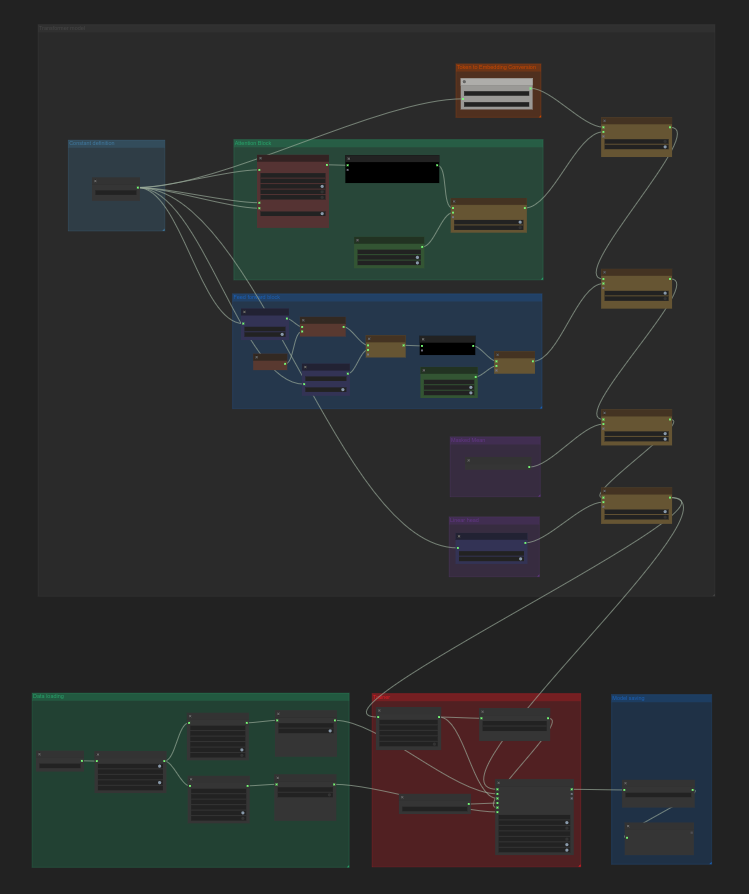
The complete setup of all required nodes is included in the example workflow.
Check out the Building Transformer From Scratch guide.
ComfyUI-Pt-Wrapper
ComfyUI-Pt-Wrapper brings PyTorch model building and training into ComfyUI's node graph environment—no coding required.
It is built for ComfyUI users who want to explore machine learning without writing Python, and for researchers who want to prototype directly in visual workflows. Every operation, from tensor math to full training pipelines, can be configured through nodes.
Originally a focused spin-off of ComfyUI-Data-Analysis, this extension supports a wide range of ML workflows in image and text domains.
What It Offers
- No-code training workflows for image and text classification
- Use pre-built model nodes for major architecture such as ResNet, LSTM, GRU, Transformer, or create your own model from various model nodes.
- Perform tensor operations like
add,gather,scatter,where, etc. - Support for processing text (e.g. tokenization, embedding) to feed to a model
- Featuring 200 nodes as of March 28, 2025.
Example Workflows
Dog vs. Cat Classifier — No Code Needed
Train an image classifier on your own dataset—entirely in ComfyUI nodes.
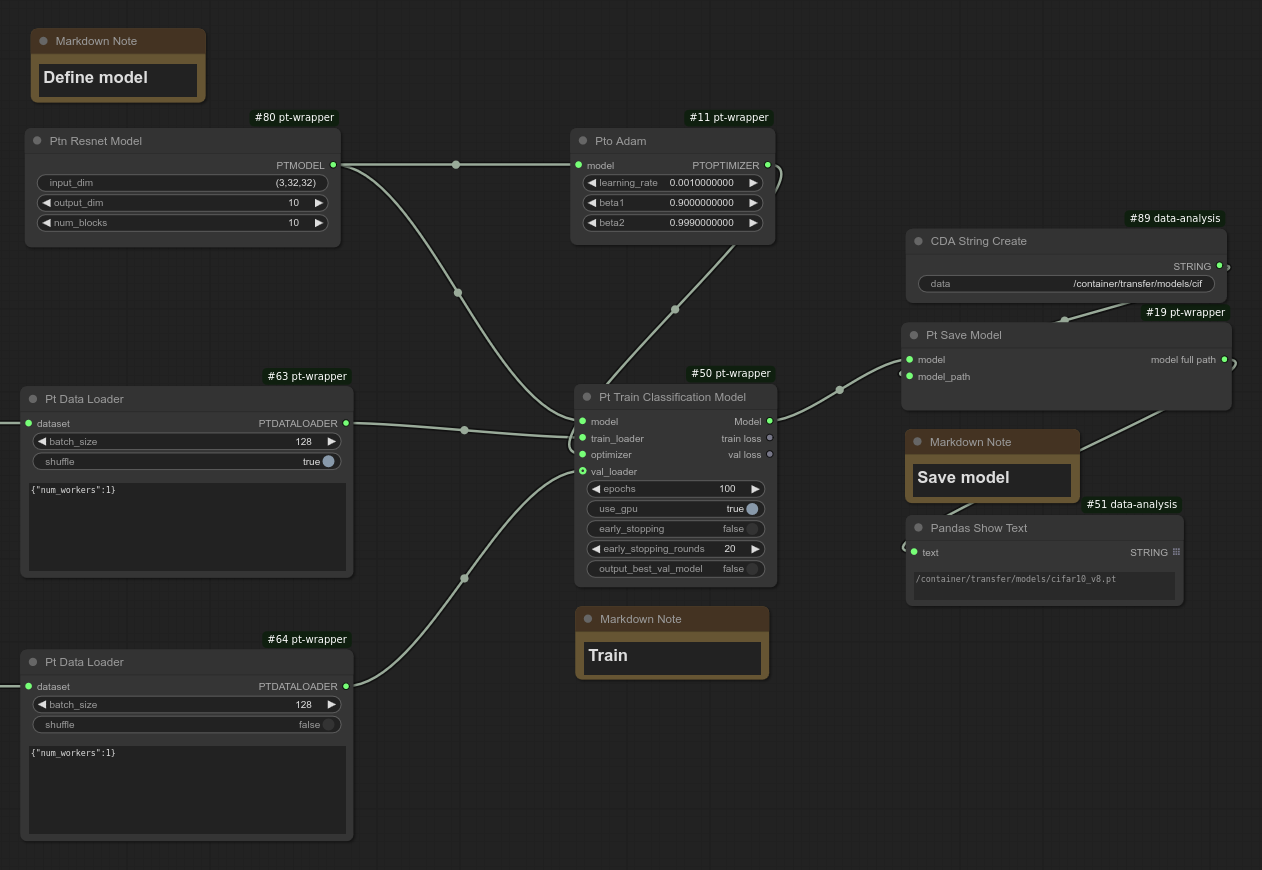
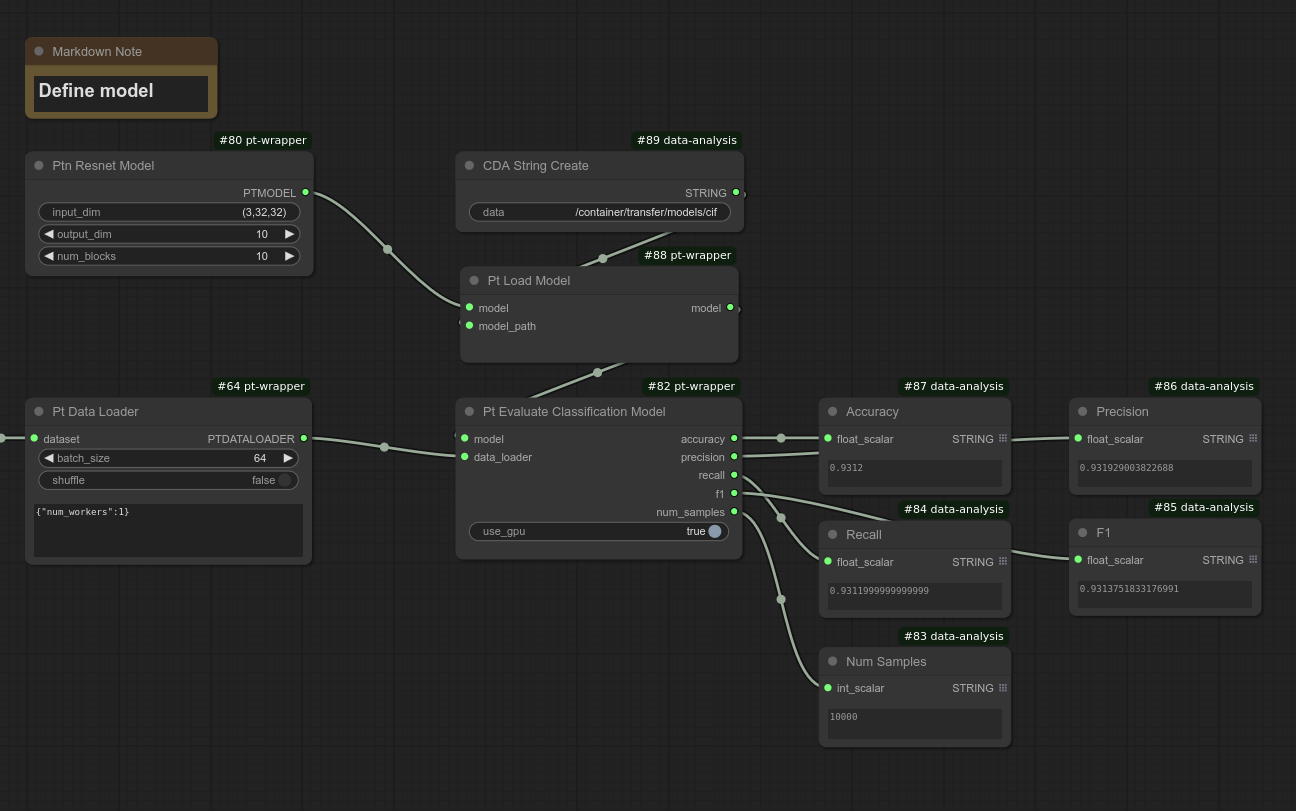
ResNet on CIFAR-10
Train a ResNet achieving 94% validation accuracy. A flexible baseline for your own image classification tasks.
Transformer for Text Classification
Train a text classification model using a configurable Transformer model—all node-based.
embedding_transformer_classification.json
Getting Started
- Node Overview: Node Reference
- Model Training Guide: Model Training Documentation
Contributing
This project does not accept pull requests. Unsolicited PRs will be closed without review.
To suggest a feature or report an issue, open an Issue. All issues are reviewed and prioritized.
Node Reference
Every supported node is documented in detail. Browse the Node Reference to explore tensor operations, models, tokenization, distributions, loss functions, tensor operations and more.
Links in the reference section point directly to individual node docs for quick lookup.