
MiniMax References Manager
Reference management, portable configs and VLM prompt writing for MiniMax H3 Reference-to-Video, with a dedicated object/character replacement mode.
Nodes (1)
MiniMax References Manager
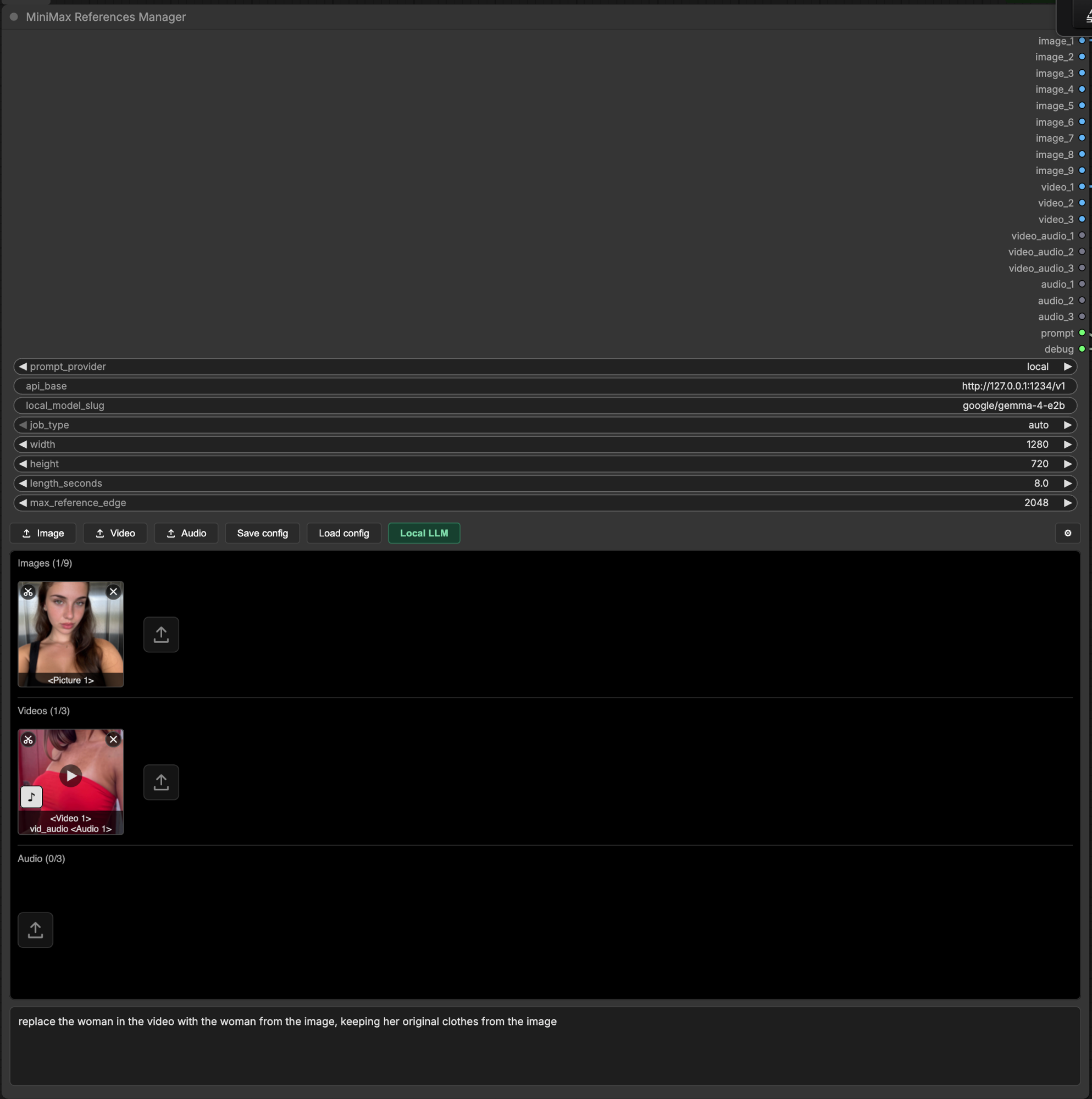
One node that manages every reference for MiniMax H3 Reference to Video, writes the prompt for you, and saves the whole setup to a file you can carry between installs.
Features
- Upload instead of wiring. Drop in images, videos and audio through the node's own UI. Preview them, play them, delete them, reorder nothing. No loader nodes, no links.
- 20 outputs, wired once. Connect the 18 reference sockets plus
promptintoMiniMax H3 Reference to Videoand save the workflow. Change your references as often as you like, the graph never changes. - Auto prompting. A multimodal model looks at your references, reads your direction text, and writes a full MiniMax H3 prompt in the exact six-section format the model expects.
- Run it on your own machine.
prompt_provider: localpoints the prompt writer at any OpenAI-compatible server, so auto prompting needs no account and no key, and your references never leave the machine. Ollama, LM Studio, llama.cpp, vLLM, or anything else that speaks the same API. - It finds your server for you. The Local LLM button sweeps the usual local ports, lists every server that answered and the models it holds, and fills in the URL and the model id in one click, so you never have to go looking for a base URL yourself. The scan is loopback-only and never resolves a hostname, so it cannot be turned into a port scanner.
- Two registers.
standardwrites a scene.replacementswaps one object or character in a reference video for the thing in a reference image.autolets a cheap classifier pick. - Portable configs. Save config downloads a JSON file to your machine. Load config reads it back on any install, on any pod, and restores your direction text, model, reasoning effort and reference list.
- The tags are on the tiles. Every asset shows the label MiniMax will actually give it:
<Picture 2>,<Video 1>,<Audio 1>. What you see is what you address in the prompt. - Video soundtracks come along. A video's audio track is extracted and sent as its own reference by default. Toggle it off per video.
- A
debugoutput that shows the whole request. Where it posted, the model, every setting, your direction, the target format, the reference manifest, and every content part numbered[3/10]with its type and size. It stubs the base64 out as<BASE64_STRING>, so the output stays readable. Wire it into any text preview node. - Honest about what it sent. A local server takes text and images but not video or audio, so a clip goes as sampled frames with no sound. The node says so on the canvas, in the log and in
debug, and it tells the prompt writer not to describe motion or voices it never received. - Prompt passthrough. Set
prompt_providertononeand your direction text goes straight to thepromptoutput with no API call.
Do I need an API key?
No. prompt_provider picks who writes the prompt, and two of its three settings need no account at all.
| prompt_provider | What happens | Key |
| --- | --- | --- |
| openrouter | A hosted multimodal model writes the prompt. Videos go whole, with their sound. | Yes |
| local | Any OpenAI-compatible server on your own machine writes it. Nothing leaves the machine. | No |
| none | No call at all. Your direction text becomes the prompt output, word for word. | No |
Whichever you pick, you keep the whole reference manager: the uploads, the previews, the crop and trim editor, the <Picture 2> / <Video 1> / <Audio 1> tags, the portable configs, all 20 outputs wired once.
Don't like the prompt it writes? Open the node's settings modal and edit system_prompt. It holds the full instructions the model gets. Rewrite it however you like, and it saves with the workflow. Leave it blank to use the packaged default.
Running it locally
Start your server, then click Local LLM on the node. It looks for an OpenAI-compatible server on the machine ComfyUI is running on, lists what it found and which models each one holds, and picking a model sets prompt_provider, api_base and local_model_slug for you in one click.
Ports it looks at: 1234 (LM Studio), 11434 (Ollama), 8080 (llama.cpp), 8000 (vLLM), 1337 (Jan), 5000 (text-generation-webui). The whole sweep takes about a second. A port answering is not enough on its own, so it only reports a server whose reply actually looks like an OpenAI model list.
Nothing found? Start LM Studio's server from its Developer tab, or run ollama serve, then hit Rescan.
If your server runs somewhere else, or on a port not in that list, fill the three fields yourself:
prompt_provider  local
api_base         http://localhost:1234/v1     <- must end in /v1
local_model_slug google/gemma-3-4b
The scan is loopback-only by design. ComfyUI is often reachable by anyone holding its URL, so a scanner that would probe arbitrary hosts on request is not something this node should hand out. A remote server is typed in by hand instead.
Note localhost means the machine ComfyUI runs on, not the machine your browser is on. If ComfyUI is in Docker or on a pod, its localhost is not your laptop, and the scan will tell you so by finding nothing.
Leave openrouter_api_key empty. Local servers ignore it, and the node will not send a key from your environment to an address you typed in yourself. If your server does want one (vLLM started with --api-key), type it into the node and only that key is used.
What you give up. A local server takes text and images, not video or audio. So a reference video is sent as 6 still frames from across the clip, and no audio is sent at all, neither a video's soundtrack nor a standalone clip. The writer is told this and is instructed not to describe motion, cut rhythm or voices it was never given. Expect a weaker prompt than openrouter produces, especially for anything that depends on sound. The node says so on the canvas, in the log, and in the debug output, so you are never guessing which path ran.
Each provider reads its own model field and cannot see the other's: openrouter reads the openrouter_model dropdown, local reads local_model_slug. That is deliberate. A single shared field meant that configuring a local run and switching back to openrouter sent your local model id to OpenRouter, which answered 400: ... is not a valid model ID.
Install
cd ComfyUI/custom_nodes
git clone https://github.com/Hearmeman24/ComfyUI-MiniMaxRefPack
pip install -r ComfyUI-MiniMaxRefPack/requirements.txt
Restart ComfyUI.
Example workflow
A complete Reference-to-Video graph ships with the pack: Workflow → Browse Templates → ComfyUI-MiniMaxRefPack, or drag example_workflows/MiniMax R2V - Auto Prompting + Reference Manager.json onto the canvas.
OpenRouter key
Precedence on prompt_provider: openrouter: the node's openrouter_api_key box, then OPENROUTER_API_KEY, then LLM_KEY.
The openrouter_model dropdown lists only models that accept text, images, audio and video, and defaults to google/gemini-3-flash-preview. A key typed into the node is saved inside the workflow JSON, so use the environment variable if you share workflows.
On prompt_provider: local the environment is never read. Only a key typed into the node is sent, and only to the address in api_base, so a stray OPENROUTER_API_KEY cannot follow a pasted URL to somebody else's server.
Settings
| Setting | What it does |
| --- | --- |
| job_type | standard / replacement / auto. auto only classifies when at least one video and one image are attached, and falls back to standard on any failure. |
| reasoning_effort | none / low / medium / high, default medium. Passed to OpenRouter, dropped for models that don't reason. |
| width / height / length_seconds | Told to the model so it composes for the real frame and keeps its cut timestamps inside the real duration. 0 leaves one unspecified. These do not set the output size, Empty MiniMax H3 AV Latent does. |
| prompt_provider | openrouter / local / none. See above. Replaces the old use_openrouter checkbox; workflows saved before 0.3.2 migrate automatically. |
| api_base | Base URL of your OpenAI-compatible server, used only when prompt_provider is local. Must end in /v1. |
| openrouter_model | The model that writes your prompt on openrouter. Ignored on every other provider. |
| local_model_slug | The model id your own server reports, used only on local. Ignored on every other provider. The Local LLM button fills it in. |
| system_prompt | The full instructions the model is given, editable in the settings modal and saved with the workflow. Blank uses the packaged default. Rewrite it if you want prompts in your own style. |
| max_reference_edge | Downscales a reference image whose long edge is bigger than this, 0 turns it off. Never upscales. Reference videos are already capped by the core node. |
The tag rule
- reference images, in order, become
<Picture 1..n> - then each reference video: if its soundtrack is on, that soundtrack takes the next
<Audio j>first, then the video takes<Video k> - then standalone audio, continuing the
<Audio j>count
So a video's soundtrack is <Audio 1> even if you added a standalone audio clip before it. <Video N> and <Audio N> count independently.
Limits
The model's limits, not the node's: 9 images, 3 videos, 3 soundtracks, 3 audio clips. Reference videos need at least 5 frames, get trimmed to MiniMax's 17k+5 frame grid, then capped to the length of the video you're generating. Clips are resampled to 24fps on the way in.
Known issue
The packaged system prompt asks the model to give every label it defines in subject_definitions exactly one retention_analysis line, while MiniMax's guide says newly invented content gets no retention entry at all. When the model invents something the references didn't supply, it sometimes resolves that by dropping a label or inventing a line for one it never defined. The debug socket shows exactly what it was told.
Licence
MIT. Free, and public on GitHub. Clone it, fork it, rip the prompt writer out and keep the reference manager, ship it inside something you sell. You do not need an account, and the node never calls home.