
Smart Image Crop and Stitch
Mask-driven smart crop and stitch nodes for ComfyUI inpaint and edit workflows.
Nodes (2)
ComfyUI Smart Image Crop and Stitch
A small ComfyUI custom node pack for faster inpaint, detail, resize, and edit workflows.
Inspired by https://github.com/lquesada/ComfyUI-Inpaint-CropAndStitch
This adds new features, (see below) designed for quick and automatic scaling to process small areas on high resolution images.
It takes the active mask area, automatically crops what needs processing, then stitches the result back into the original image. If no mask is present, it can either pass through, resize the full image, or use the full image as the crop.
Nodes
Smart Image Crop
Creates a clean crop from an image and mask.
Main features:
- detects even very light grey masks
- turns detected mask pixels into a solid mask
- optional fast hole filling
- grow or shrink the mask with positive or negative pixels
- automatic or manual output size
- dimensions snap to model-friendly values like
1024,1280, etc. - preview overlay with mask tint and crop border
- no-mask modes:
Bypass,Resize Full Image,Crop Full Image
Outputs:
crop_imagecrop_maskstitcher_infopreview_overlay
Smart Image Stitcher
Places the processed crop back into the original image.
Main features:
- blend modes:
Box Feather,Mask Feather,Hard Paste - optional color match, off by default
- can restore full-image resize results back to original size
- can also keep the resized processed image as the final output
- automatic bypass when the crop node is bypassed
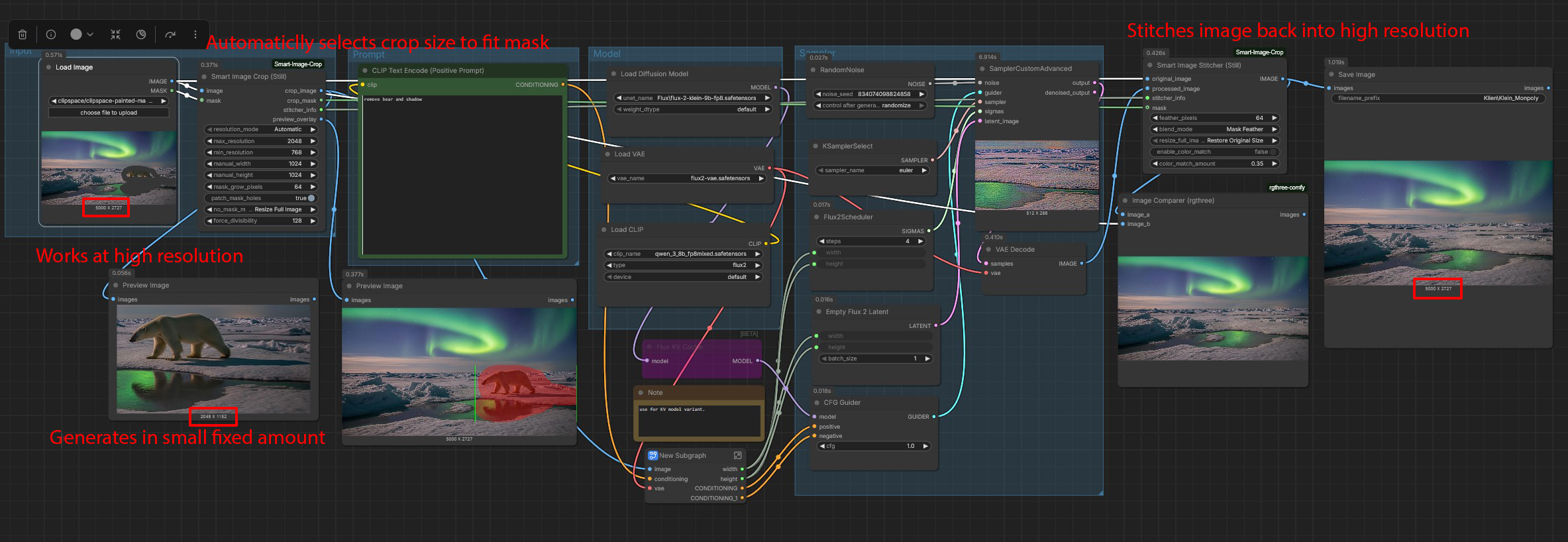
Screenshot
Install
Clone into your ComfyUI custom nodes folder:
cd ComfyUI/custom_nodes
git clone https://github.com/HallettVisual/ComfyUI-Smart-Image-Crop-and-Stitch.git
Restart ComfyUI. The nodes appear under:
Smart Image Tools
The repo also includes ComfyUI Registry metadata for ComfyUI Manager discovery once it is listed by the registry.
ComfyUI Manager
This repo is ready for Comfy Registry publishing. After it is published there, users can find and install it through ComfyUI Manager.
Registry package id:
smart-image-crop-and-stitch
Basic Workflow
- Send your source
IMAGEandMASKintoSmart Image Crop. - Process
crop_imageandcrop_maskwith your inpaint, detail, upscale, or edit workflow. - Send the processed image into
Smart Image Stitcher. - Connect the original image and
stitcher_info. - Use the stitcher output as your final image.
Useful Settings
mask_grow_pixels: positive values grow the mask, negative values shrink it.patch_mask_holes: fills enclosed holes in the mask.force_divisibility: keeps crop sizes friendly for models and VAEs.blend_mode: choose box feather, mask feather, or hard paste.enable_color_match: optional color correction against the original image.no_mask_mode: choose what happens when no mask exists.resize_full_image_output: for no-mask resize workflows, choose original size or resized output.
Notes
- If
feather_pixelsis0, feathered modes behave like a hard paste. Resize Full Imageis useful when one workflow should handle both masked edits and full-image resize/upscale jobs.- Existing workflows may need nodes refreshed or re-added after input changes.
- Example workflows can be placed in the
workflows/folder.
License
Apache License 2.0. See LICENSE.