
Prompt DB
A powerful prompt management system for ComfyUI. Store, categorize, search, and combine prompts with full LoRA integration — all from a beautiful built-in web UI.
Nodes (4)
Stop retyping your LoRA strengths — this node applies a whole saved stack
Four text boxes and a separator, because sometimes that's all you need
Your prompt library finally lives inside the graph
Glue a prefix onto whatever prompt you're currently juggling
📦 ComfyUI Prompt Database
A powerful prompt management system for ComfyUI. Store, categorize, search, and combine prompts with full LoRA integration — all from a beautiful built-in web UI.
✨ Features
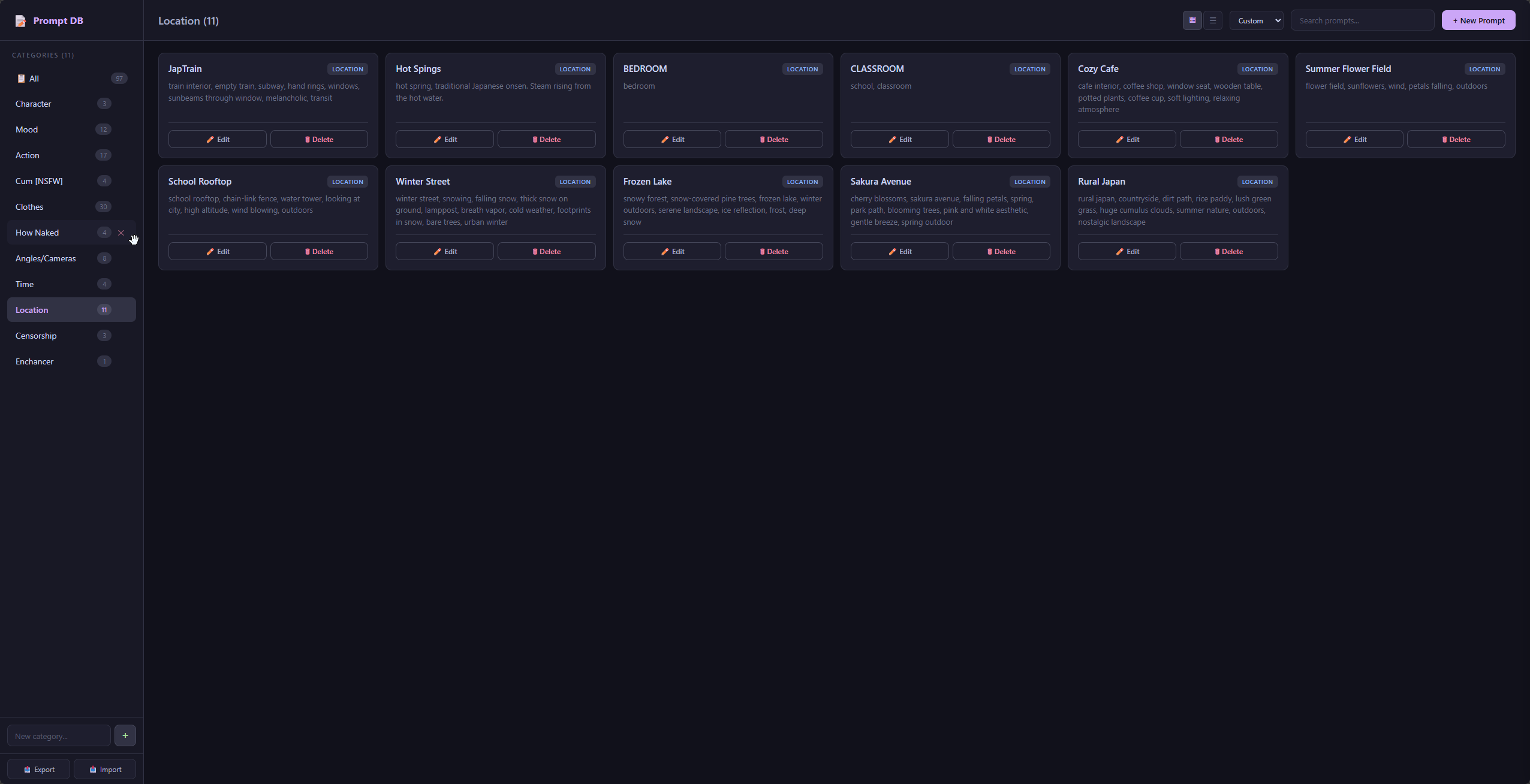
🗂️ Prompt Management (Web UI)
- Categories — organize prompts into named groups
- Create / Edit / Delete prompts with a slide-out drawer
- Search across names, text, and categories
- Drag & Drop — reorder prompts and move them between categories
- Grid & List views — toggle layout with persistent preference
- Sorting — by name (A→Z / Z→A), newest, oldest, category, or custom order
- Export / Import — backup your entire database as JSON; import with Merge (append new, skip duplicates) or Overwrite
- Keyboard shortcuts —
Ctrl+Nnew prompt,/focus search,Escclose
📖 LoRA Integration
- Attach LoRAs to any prompt with custom strength values (supports negative values)
- LoRA auto-discovery — scans your ComfyUI
lorasfolder - Per-LoRA enable/disable toggle in Apply Lora Stack (inline circle ●)
- Strength adjustment — ◀ ▶ arrows or manual input, range -2.0 to 2.0
- Reset to defaults — restore original prompt-defined LoRA strengths
🔗 Node System
Four nodes that work together:
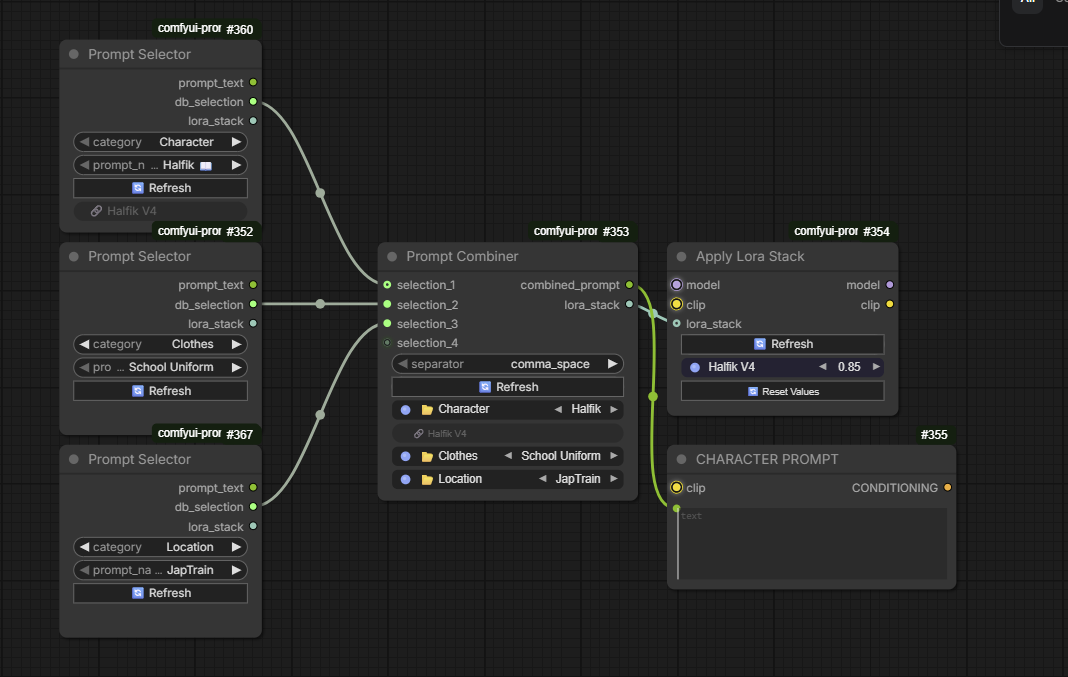
| Node | Purpose | |------|---------| | Prompt DB Manager | Opens the web UI for managing your database | | Prompt Selector | Pick one prompt from a category → outputs text + LoRA stack | | Prompt Combiner | Connect multiple selectors → combines all prompts into one string + merged LoRA stack | | Apply Lora Stack | Takes a LoRA stack and applies it to model + clip |
🚀 Installation
ComfyUI Manager
Search for "Prompt Database" in the ComfyUI Manager and install.
Manual
cd ComfyUI/custom_nodes/
git clone https://github.com/HalfikCode/ComfyUI-Prompt-DB.git
Restart ComfyUI. No additional dependencies required.
📋 Nodes
Prompt DB Manager
Opens the Prompt Database web interface. Add it to your workflow and click the "📂 Open Manager" button.
Outputs: None (management only)
Prompt Selector
Select a single prompt from a category.
Outputs:
| Output | Type | Description |
|--------|------|-------------|
| prompt_text | STRING | The selected prompt's text |
| db_selection | DB_SELECTION | Category name (connect to Combiner) |
| lora_stack | LORA_STACK | LoRAs attached to this prompt |
Prompt Combiner
Accepts multiple DB_SELECTION inputs (from Prompt Selectors). Each connected input shows a dropdown for selecting a prompt within that category. Combines all selected prompts into one string.
Inputs:
separator— how to join prompts:,/ newline / space / noneselection_1..N— DB_SELECTION inputs (dynamic, auto-expands)
Outputs:
| Output | Type | Description |
|--------|------|-------------|
| combined_prompt | STRING | All selected prompts joined by separator |
| lora_stack | LORA_STACK | Merged LoRAs from all selected prompts |
Features:
- Inline mute toggle (● circle) — mute individual categories without disconnecting
- ◀ ▶ arrows — cycle through prompts quickly
- Click prompt name — opens dropdown for full selection
- Prompts are combined in input order (selection_1, selection_2, ...)
Apply Lora Stack
Applies a LORA_STACK to model and clip.
Inputs:
| Input | Type | Description |
|-------|------|-------------|
| model | MODEL | Base model |
| clip | CLIP | CLIP model |
| lora_stack | LORA_STACK | LoRAs to apply |
Outputs: model, clip (with LoRAs applied)
Features:
- Per-LoRA toggle — click the circle (●) to enable/disable individual LoRAs
- Strength control — ◀ ▶ arrows to adjust, supports -2.0 to 2.0 range
- Reset Values button — restores all strengths to prompt defaults
- Missing LoRA files are skipped gracefully with a console warning
🔧 Typical Workflow
[Prompt Selector: Character] ──► selection_1 ─┐
[Prompt Selector: Mood]      ──► selection_2 ─┤
[Prompt Selector: Clothes]   ──► selection_3 ─┼──► [Prompt Combiner] ──► combined_prompt ──► [CLIP Text Encode]
[Prompt Selector: Action]    ──► selection_4 ─┤        │
[Prompt Selector: Location]  ──► selection_5 ─┘        └── lora_stack ──► [Apply Lora Stack] ──► model/clip
- Add a Prompt DB Manager node and create your categories & prompts
- Add Prompt Selector nodes for each category
- Connect them to a Prompt Combiner to merge everything
- Route the
lora_stackoutput to Apply Lora Stack
📁 Data Storage
Prompts are stored in prompts.json in the node pack directory. Back up this file or use the Export feature in the web UI.
⌨️ Keyboard Shortcuts (Web UI)
| Shortcut | Action |
|----------|--------|
| Ctrl + N | Create new prompt |
| / | Focus search bar |
| Esc | Close drawer / modal |
📄 License
MIT